CBJ
Max Output Level: -89 dBFS

- Total Posts : 54
- Joined: 2007/03/12 22:07:23
- Status: offline

Split Monitors
Currently I use a pair of 27" HP monitors to display Sonar 8.53 but want to see how other users implement a dual or quad monitor system? Since my current setup is 50" across it takes up a lot of real estate & all I currently do is stretch Sonar across the entire 50" width which is fantastic, but I want to do more if I can. This setup provides the ability to show the track info on the left screen & the clips on the right screen so it's nearly perfect, I think?
I've been toying with buying 2 additional monitors & placing them above the current ones to provide more real estate to display effects on the left upper monitor & Virtual Instrument plugins on the right upper monitor.
I don't know if Sonar is capable of this approach using Virtual Monitor mode that can provide this type of split or if this is the right procedure / terminology to implement this way of displaying all the info at once?
I've investigated buying a 55 or 65" LG 4K UHD Oled TV & the resolution would be 3840 x 2160 (total) which would bring in each quadrant to display a resolution of 1920 x 1080. This would be fantastic as long as I can display the contents in the way I have described previously. Another scenario would be to utilize a 3 way split with the top 1/4s each utilizing 1920 x 1080 while the bottom would display across the entire TV @ 3840 x 1080. This would allow me to stretch Sonar in the same way I currently stretch it across the 2, 27" HP monitors. Is anyone is utilizing this type of setup I would appreciate any & all feedback on this topic.
Regarding me using Sonar 8.53 I have explained my issues with my eyesight in previous posts & even though I own Sonar X3 I can't see many of the light grey fonts being used on those versions, so I rely on Sonar 8.53 because the color scheme is very vivid & provides the contrast that I need. I work for 12 to 14 hours every day using Sonar 8.53 so I put my eyes through Hell every day. The X1,2,3 all incorporate a lot of greys & pastel shades similar to Pro-Tools & old Commodore (which I ditched back in 1992) so I cannot see the detail control info that I need to make any adjustments.
Thanks to all, & Happy New Year!
|
Brian Walton
Max Output Level: -79 dBFS

- Total Posts : 584
- Joined: 2014/10/24 22:20:18
- Status: offline
Re: Split Monitors
2017/01/04 15:20:35
(permalink)
Have you looked at any of the themes in Plat?
I use the skylight interface across 2 screens and the docking along with the "full screen" mode it great. About 22 inch monitors.
Basically tracking on one side, mixing console / multi doc on the other.
|
karma1959
Max Output Level: -80 dBFS

- Total Posts : 515
- Joined: 2008/10/31 10:56:29
- Location: Brooklyn, NY
- Status: offline
Re: Split Monitors
2017/01/04 15:54:42
(permalink)
I've used two 20" screens forever with Sonar. My default screenset in my project template has the console view on one screen and track view on the other - as that's the setup I use >90% of the time. I do also have other screensets configured in my default project template for special purposes: trackview across both screens, console view across both screens, etc.
Sonar Platinum x64 on Win10 64, Dell T7400 w/ 8 Xeon cores, 8 Gbyte RAM, 3 hard drives, RME Fireface UFX, UAD-1, Mackie Control, Adam A7X
|
jb101
Max Output Level: -46 dBFS

- Total Posts : 2946
- Joined: 2011/12/04 05:26:10
- Status: offline
Re: Split Monitors
2017/01/04 20:23:56
(permalink)
I have two 23" monitors side by side, using Sonar Platinum.
I have Sonar dragged over two screens, and, using screensets have several different set ups.
My main Screenset has the track View over bot screens - I can see so much of a track, I could never go back to one monitor.
Another Screenset has the console view over both screens - ditto.
I can also have track view on one and console on the other.
Shortcut keys like D and shift+D, B, I, C and Full Screen with screensets make it a fantastic way to work.
As for contrast, etc., then I think it is worth trying out Sonar Platinum for the Themes - there have been so many great ones provided by the community - I am sure that you could find one to help. Plus the fact that Sonar Platinum has improved so much since 8.5 and X3 that I would never want to go back.
|
bitflipper
01100010 01101001 01110100 01100110 01101100 01101

- Total Posts : 26036
- Joined: 2006/09/17 11:23:23
- Location: Everett, WA USA
- Status: offline
Re: Split Monitors
2017/01/04 20:27:25
(permalink)
I, too, prefer smaller monitors so that they don't impinge on line-of-sight to speakers and thus affect their frequency response.
Another alternative is to place your two monitors vertically, one above the other. You still get the benefit of tracks on one, plugins/console on the other, but without affecting your audio monitoring. There are a number of monitor stands built for just that purpose, some of which clamp onto the back of your desk, assuming that's an option, and assuming you can find one that'll handle that large a display.
 All else is in doubt, so this is the truth I cling to. My Stuff
|
mudgel
Max Output Level: 0 dBFS

- Total Posts : 12010
- Joined: 2004/08/13 00:56:05
- Location: Linton Victoria (Near Ballarat)
- Status: offline
Re: Split Monitors
2017/01/04 21:37:34
(permalink)
If you use a lot of track view it's interesting to experiment putting you monitors into portrait mode next to each other.
Mike V. (MUDGEL) STUDIO: Win 10 Pro x64, SPlat & CbB x64, PC: ASUS Z370-A, INTEL i7 8700k, 32GIG DDR4 2400, OC 4.7Ghz. Storage: 7 TB SATA III, 750GiG SSD & Samsung 500 Gig 960 EVO NVMe M.2. Monitors: Adam A7X, JBL 10” Sub. Audio I/O & DSP Server: DIGIGRID IOS & IOX. Screen: Raven MTi + 43" HD 4K TV Monitor. Keyboard Controller: Native Instruments Komplete Kontrol S88.
|
Bristol_Jonesey
Max Output Level: 0 dBFS
- Total Posts : 16775
- Joined: 2007/10/08 15:41:17
- Location: Bristol, UK
- Status: offline
Re: Split Monitors
2017/01/05 04:49:08
(permalink)
jb101
I have two 23" monitors side by side, using Sonar Platinum.
I have Sonar dragged over two screens, and, using screensets have several different set ups.
My main Screenset has the track View over bot screens - I can see so much of a track, I could never go back to one monitor.
Another Screenset has the console view over both screens - ditto.
I can also have track view on one and console on the other.
Shortcut keys like D and shift+D, B, I, C and Full Screen with screensets make it a fantastic way to work.
As for contrast, etc., then I think it is worth trying out Sonar Platinum for the Themes - there have been so many great ones provided by the community - I am sure that you could find one to help. Plus the fact that Sonar Platinum has improved so much since 8.5 and X3 that I would never want to go back.
This is EXACTLY how I work. My 2 monitors are attached to 2 Monitor Arms, screwed into the wall behind
CbB, Platinum, 64 bit throughoutCustom built i7 3930, 32Gb RAM, 2 x 1Tb Internal HDD, 1 x 1TB system SSD (Win 7), 1 x 500Gb system SSD (Win 10), 2 x 1Tb External HDD's, Dual boot Win 7 & Win 10 64 Bit, Saffire Pro 26, ISA One, Adam P11A,
|
chuckebaby
Max Output Level: 0 dBFS
- Total Posts : 13146
- Joined: 2011/01/04 14:55:28
- Status: offline
Re: Split Monitors
2017/01/05 06:45:18
(permalink)
I used to have 2 - 24" monitors on swing arms myself but decided to go with a 42 inch Hi def and 1 - 24" to the left.
This gives me just enough room to squeeze in my reference speakers on each side.
I use the 24 for plug ins, other stuff (windows stuff like note pad, explorer, exc).
I choose to trade the stretch / or dock in one monitor for a larger scale view. cant fit as much. Just because it is bigger, doesn't mean you will fit more tracks it simply means your tracks will appear larger. and when automating pin point precision, having a large monitor is the bomb. I see things a lot clearer in sonar than many do. thus the reason I typically avoid threads where people are asking about "I need more room" it wouldn't be fair for me to debate.
But if I may offer you any advise, if you go with a larger Television style set up. choose a high refresh rate and decent specs. don't settle for a turd. a bargain basement open box sale. But something mid grade to good quality. I choose a Sony Bravario.
One thing of importance may be the change (for me anyway) going from a 2 style set up to a 1 style non stretch, or dock in one monitor. You learn to work a little differently. I take advantage of dock shortcuts, screensets and hide revealing the dock a little more than I used to.
Windows 8.1 X64 Sonar Platinum x64 Custom built: Asrock z97 1150 - Intel I7 4790k - 16GB corsair DDR3 1600 - PNY SSD 220GBFocusrite Saffire 18I8 - Mackie Control
|
jfcomposer
Max Output Level: -90 dBFS

- Total Posts : 29
- Joined: 2015/01/27 15:55:04
- Location: Nashville
- Status: offline
Re: Split Monitors
2017/01/05 13:19:00
(permalink)
I use two 23" monitors, plus a 32" TV mounted on the wall above. Left monitor is for the main Sonar window (usually track view), staff view is floated independently to the right monitor, and video view is up on the TV since I'm generally scoring to picture.
|
TranceCanada
Max Output Level: -87 dBFS

- Total Posts : 198
- Joined: 2014/01/29 10:41:44
- Location: Canada
- Status: offline
Re: Split Monitors
2017/01/05 13:34:27
(permalink)
Cakewalk: Sonar Platinum x64 (Lifetime), Producer X3e, Producer X2 Soft Synths: Z3TA+2, Rapture Pro, Xpand2, Serum System 1: HP Envy23, Win10 x64, Core i7-3770 3.1Ghz, 8GB Ram System 2: Microsoft Surface Pro 3, Win10 x64, Core i5-4300U 1.9Ghz/2.5Ghz, 4GB Ram Audio: M-Audio M-Box Mini 2 Controllers: Edirol PCR-M80
|
Kev999
Max Output Level: -36 dBFS

- Total Posts : 3922
- Joined: 2007/05/01 14:22:54
- Location: Victoria, Australia
- Status: offline
Re: Split Monitors
2017/01/05 14:26:13
(permalink)
I have 4 screens in a 2-up 2-down configuration. These are the old type with 5:4 aspect ratio and 1260x1024 pixels. I use each side-by-side pair as if it were a single wide screen and normally have a single window stretched across the width of 2 screens. If I could afford it I would replace each pair with one 21:9 widescreen.
Sonar's Track View is displayed on the top pair. The bottom pair is for PRV, CV or whatever (sometime docked in the undocked Multidock), depending on the Screenset. Whenever I need to have another program open and visible while running Sonar, I just "maximize" the bottom window so that it appears in the lower-left screen only, leaving the lower-right screen free for other uses.
SonarPlatinum∞(22.11.0.111)|Mixbus32C(4.3.19)|DigitalPerformer(9.5.1)|Reaper(5.77)FractalDesign:DefineR5|i7-6850k@4.1GHz|16GB@2666MHz-DDR4|MSI:GamingProCarbonX99a|Matrox:M9148(x2)|UAD2solo(6.5.2)|W7Ult-x64-SP1
Audient:iD22+ASP800|KRK:VXT6|+various-outboard-gear|+guitars&basses, etc.
Having fun at work lately
|
SimpleM
Max Output Level: -86 dBFS

- Total Posts : 203
- Joined: 2007/07/30 22:14:00
- Location: Greensboro, NC
- Status: offline
Re: Split Monitors
2017/01/05 14:46:36
(permalink)
Twin 24" here. I work 90% out of the box for mixing so I rarely use console view except for submixing. I like having a nice big multidock in the second monitor that is always the same size whether doing midi editing or melodyne etc. 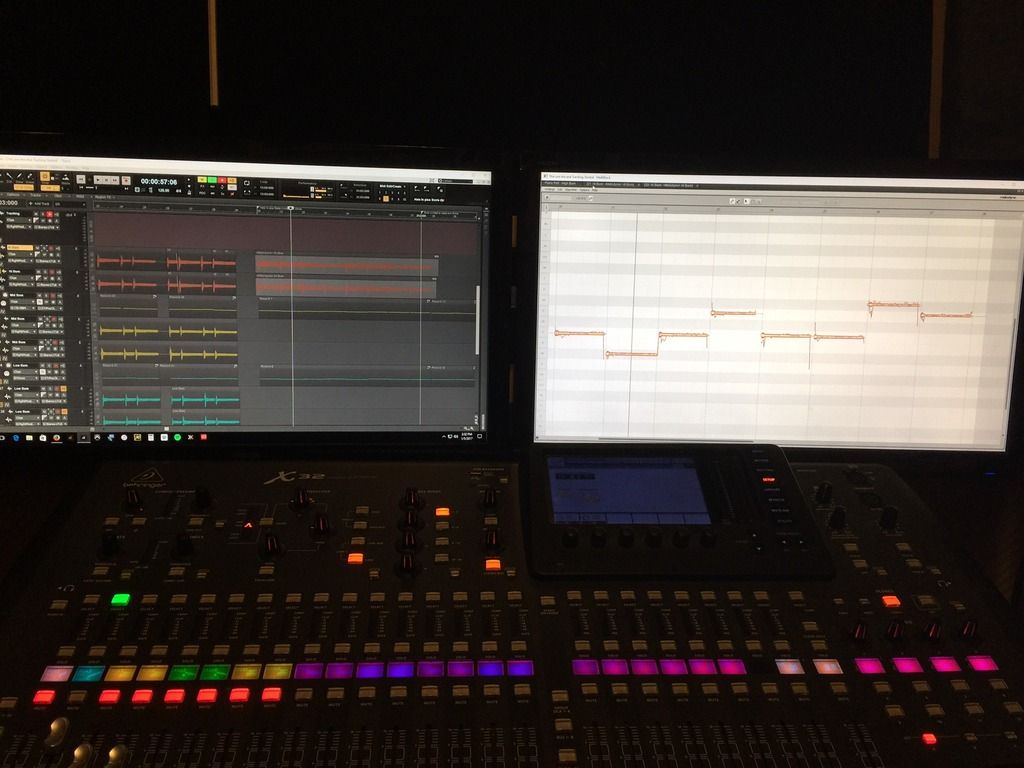
|
Brian Walton
Max Output Level: -79 dBFS
- Total Posts : 584
- Joined: 2014/10/24 22:20:18
- Status: offline
Re: Split Monitors
2017/01/06 10:46:46
(permalink)
CBJ
Currently I use a pair of 27" HP monitors to display Sonar 8.53 but want to see how other users implement a dual or quad monitor system? Since my current setup is 50" across it takes up a lot of real estate & all I currently do is stretch Sonar across the entire 50" width which is fantastic, but I want to do more if I can. This setup provides the ability to show the track info on the left screen & the clips on the right screen so it's nearly perfect, I think?
I've been toying with buying 2 additional monitors & placing them above the current ones to provide more real estate to display effects on the left upper monitor & Virtual Instrument plugins on the right upper monitor.
I don't know if Sonar is capable of this approach using Virtual Monitor mode that can provide this type of split or if this is the right procedure / terminology to implement this way of displaying all the info at once?
I've investigated buying a 55 or 65" LG 4K UHD Oled TV & the resolution would be 3840 x 2160 (total) which would bring in each quadrant to display a resolution of 1920 x 1080. This would be fantastic as long as I can display the contents in the way I have described previously. Another scenario would be to utilize a 3 way split with the top 1/4s each utilizing 1920 x 1080 while the bottom would display across the entire TV @ 3840 x 1080. This would allow me to stretch Sonar in the same way I currently stretch it across the 2, 27" HP monitors. Is anyone is utilizing this type of setup I would appreciate any & all feedback on this topic.
Regarding me using Sonar 8.53 I have explained my issues with my eyesight in previous posts & even though I own Sonar X3 I can't see many of the light grey fonts being used on those versions, so I rely on Sonar 8.53 because the color scheme is very vivid & provides the contrast that I need. I work for 12 to 14 hours every day using Sonar 8.53 so I put my eyes through Hell every day. The X1,2,3 all incorporate a lot of greys & pastel shades similar to Pro-Tools & old Commodore (which I ditched back in 1992) so I cannot see the detail control info that I need to make any adjustments.
Thanks to all, & Happy New Year!
I own a 65 OLED. I would not consider using OLED technology for something that has a static shot until the technology is tested over the long haul. It is known to have burn in (for sure at least temporarily). If you are working 12-14 hours a day, that seems like it would be abusive to this technology. Considering how expensive it is, I'd do research on that as part of your evaluation if the risk is worth it to you. They are awesome for Film appreciation though.
|