Sidroe
Max Output Level: -55.5 dBFS

- Total Posts : 1954
- Joined: 2010/11/10 18:59:43
- Location: Macon,Georgia
- Status: offline
Staff View transposing!
Hi, guys,
Is there any way to get Splat to display the notes in staff view one octave lower with out actually transposing the track? I have been noodling around with Sziedlacsek Ccomplete Orchestra today and that program puts all the strings from the middle C range up! Garritan and Miroslav put the violas and celli and basses in the correct positions on the keyboard! It's pretty hard to read those notes when they don't match up with the staff. I hope this is a clear description of what I am wanting to do. If not, let me know and I will try to be clearer. Anyone? Any help will do.
Sonar Platinum, Sonar X3e, Sonar X2a , Sonar X1 Expanded and 8.5.3 (32 and 64 bit), Windows 10 on a Toshiba P75-A7200 Laptop with i7 @ 2.4 quad and 8 gigs of RAM and secondary WD 1 Tb drive, Windows 10 desktop, Asus i5 @ 3.2 quad, 12 gigs RAM, 1 Tb drive, 1 500 gig drive, MOTU 24io, 2 Roland Studio Captures, Saffire 6 USB for laptop, Soundtracs Topaz Project 8 mixer, Alesis Monitor 2s, Event BAS 20/20s, Roland Micro-Monitor BA-8s, and 45 years worth of collecting FX, Mics, Amps, Guitars, and Keyboards!
|
Bristol_Jonesey
Max Output Level: 0 dBFS

- Total Posts : 16775
- Joined: 2007/10/08 15:41:17
- Location: Bristol, UK
- Status: offline

Re: Staff View transposing!
2015/07/20 16:08:29
(permalink)
Base Octave for Pitches
Preferneces > Customization > Display > Base Octave for Pitches
CbB, Platinum, 64 bit throughoutCustom built i7 3930, 32Gb RAM, 2 x 1Tb Internal HDD, 1 x 1TB system SSD (Win 7), 1 x 500Gb system SSD (Win 10), 2 x 1Tb External HDD's, Dual boot Win 7 & Win 10 64 Bit, Saffire Pro 26, ISA One, Adam P11A,
|
michael diemer
Max Output Level: -68 dBFS

- Total Posts : 1128
- Joined: 2013/05/24 18:54:50
- Location: Maine, USA
- Status: offline
Re: Staff View transposing!
2015/07/20 16:16:59
(permalink)
What I would do Sonar 8.5: Properties: Key Range: set one octave lower. Don't know if same in X Series.
michael diemer Intel Quad Core i7-3770 Ivy Bridge 32 GB ram 1TB Western Digital Black X2 Microsoft Windows 7 Pro 64 UR22 interface Bandlab Cakewalk/Sonar 8.5 Studio GPO-EWQLSO Gold-Vienna SP ED-Cinematic Strings 2
|
Sidroe
Max Output Level: -55.5 dBFS
- Total Posts : 1954
- Joined: 2010/11/10 18:59:43
- Location: Macon,Georgia
- Status: offline
Re: Staff View transposing!
2015/07/20 17:56:00
(permalink)
Bristol, I don't think that is going to work. I just need specific tracks to display in the correct octave. Not the whole project. I will try it and see though.
Sonar Platinum, Sonar X3e, Sonar X2a , Sonar X1 Expanded and 8.5.3 (32 and 64 bit), Windows 10 on a Toshiba P75-A7200 Laptop with i7 @ 2.4 quad and 8 gigs of RAM and secondary WD 1 Tb drive, Windows 10 desktop, Asus i5 @ 3.2 quad, 12 gigs RAM, 1 Tb drive, 1 500 gig drive, MOTU 24io, 2 Roland Studio Captures, Saffire 6 USB for laptop, Soundtracs Topaz Project 8 mixer, Alesis Monitor 2s, Event BAS 20/20s, Roland Micro-Monitor BA-8s, and 45 years worth of collecting FX, Mics, Amps, Guitars, and Keyboards!
|
Sidroe
Max Output Level: -55.5 dBFS
- Total Posts : 1954
- Joined: 2010/11/10 18:59:43
- Location: Macon,Georgia
- Status: offline
Re: Staff View transposing!
2015/07/20 18:09:40
(permalink)
My problem is there are keyswitchs in the octaves below middle C. If I transpose the tracks so as to look right on the staves I am no longer in the correct place to trigger sounds and the note data is pressing the keyswitchs.
Thanks, Michael but I can't even find a properties menu in SPlat at all!
Sonar Platinum, Sonar X3e, Sonar X2a , Sonar X1 Expanded and 8.5.3 (32 and 64 bit), Windows 10 on a Toshiba P75-A7200 Laptop with i7 @ 2.4 quad and 8 gigs of RAM and secondary WD 1 Tb drive, Windows 10 desktop, Asus i5 @ 3.2 quad, 12 gigs RAM, 1 Tb drive, 1 500 gig drive, MOTU 24io, 2 Roland Studio Captures, Saffire 6 USB for laptop, Soundtracs Topaz Project 8 mixer, Alesis Monitor 2s, Event BAS 20/20s, Roland Micro-Monitor BA-8s, and 45 years worth of collecting FX, Mics, Amps, Guitars, and Keyboards!
|
FZ1
Max Output Level: -90 dBFS

- Total Posts : 41
- Joined: 2014/11/13 06:18:25
- Status: offline
Re: Staff View transposing!
2015/07/20 23:05:51
(permalink)
This might not be relevant, but when I am using the staff view for Eb Alto Sax and Bb Tenor Sax I have to transpose the track up or down in the inspector. This gets the score to display properly. Then I use the mfx transpose plug in to get the sounds to play at the right pitch.
|
noynekker
Max Output Level: -66 dBFS

- Total Posts : 1235
- Joined: 2012/01/12 01:09:45
- Location: POCO, by the river, Canada
- Status: offline
Re: Staff View transposing!
2015/07/20 23:20:05
(permalink)
Sidroe, as FZ1 says, you may have to transpose an octave, but then you have to adjust the "Key" slider bar in Inspector's Midi display, up or down an octave, to get the right octave for playback.
post edited by noynekker - 2015/07/20 23:28:39
Cakewalk by Bandlab, Cubase, RME Babyface Pro, Intel i7 3770K @3.5Ghz, Asus P8Z77-VPro/Thunderbolt, 32GB DDR3 RAM, GeForce GTX 660 Ti, 250 GB OS SSD, 2TB HDD samples, Win 10 Pro 64 bit, backed up by Macrium Reflect, Novation Impulse 61 Midi Key Controller, Tannoy Active Near Field Monitors, Guitars by Vantage, Gibson, Yamaki and Ovation.
|
SquireBum
Max Output Level: -84 dBFS

- Total Posts : 347
- Joined: 2013/06/26 13:23:55
- Status: offline
Re: Staff View transposing!
2015/07/20 23:26:18
(permalink)
I think I understand what you want ... the reverse of Octave Treble, but unfortunately there is no such thing. I tried the following and it seemed to get the result you want: 1. Drag the original notes in the track down an octave in the PRV to get your staff view displaying correctly. 2. Then set Key+ to "12" in the inspector to transpose back to the original pitches. This does not affect the display. Edit: looks like noynekker beat me to the punch.  -- Ron
post edited by SquireBum - 2015/07/20 23:35:08
Cakewalk by Bandlab, Sonar Platinum x64 2017.10, X3E, X2a, X1d, 8.5 Windows 10 x64 AMD Phenom II X4 955 3.20 GHz 8 GB Ram Nvidia GeForce 9500 GT Echo Gina 3G
|
noynekker
Max Output Level: -66 dBFS
- Total Posts : 1235
- Joined: 2012/01/12 01:09:45
- Location: POCO, by the river, Canada
- Status: offline
Re: Staff View transposing!
2015/07/20 23:32:03
(permalink)
Ha, funny how we've all said the same thing three totally different ways.
Cakewalk by Bandlab, Cubase, RME Babyface Pro, Intel i7 3770K @3.5Ghz, Asus P8Z77-VPro/Thunderbolt, 32GB DDR3 RAM, GeForce GTX 660 Ti, 250 GB OS SSD, 2TB HDD samples, Win 10 Pro 64 bit, backed up by Macrium Reflect, Novation Impulse 61 Midi Key Controller, Tannoy Active Near Field Monitors, Guitars by Vantage, Gibson, Yamaki and Ovation.
|
TomHelvey
Max Output Level: -80 dBFS

- Total Posts : 537
- Joined: 2013/02/26 20:23:54
- Status: offline
Re: Staff View transposing!
2015/07/21 01:08:03
(permalink)
Sidroe
My problem is there are keyswitchs in the octaves below middle C. If I transpose the tracks so as to look right on the staves I am no longer in the correct place to trigger sounds and the note data is pressing the keyswitchs.
Thanks, Michael but I can't even find a properties menu in SPlat at all!
You might want to create one midi track just for keyswitches 8va bass, an another one for the notes and have them both point to the same instrument/channel.
post edited by TomHelvey - 2015/07/21 01:16:22
System: i7-6900, 64Gb, AMI X99 Carbon Pro Gaming, AMD Radeon HD 7700, Win 10 Pro PCIe: UAD Octo USB: MOTU midi express 128, OB-6 Module, Akai MPK-249, Moog SUB 37, Antelope Orion 32 HD, Softube Console 1, iLok, eLicenser DAW: Cubase Pro, Ableton Live, Sonar Platinum Plugins: Waves, UAD, Xfer, Lennar Digital, u-he, Reveal Sound, Spectrasonics, SoundToys, VPS, Blue Cat, iZotope, NI, Valhalla, Lexicon, etc. https://soundcloud.com/thomas-helvey
|
robert_e_bone
Moderator

- Total Posts : 8968
- Joined: 2007/12/26 22:09:28
- Location: Palatine, IL
- Status: offline
Re: Staff View transposing!
2015/07/21 01:28:45
(permalink)
Whenever any instrument I have loaded has any Key Switches that could lie in the range of notes I might play, I just edit the Key Switches to drop them down however many octaves I need them to go to get them out of the way of playable notes.
i learned this because I was accidentally changing the sound once, whenever I would play octave bass notes with my left hand. I eventually figured out that the existing key switches for that instrument would get triggered by my low bass notes, so that prompted me to edit them to be lower than what I would normally play, and that solved the key switch issue for me. I would save the instrument to a modified name from the original, to show I had edited it, and that would also protect any existing projects that used the original key switch definitions.
Bob Bone
Wisdom is a giant accumulation of "DOH!" Sonar: Platinum (x64), X3 (x64) Audio Interfaces: AudioBox 1818VSL, Steinberg UR-22 Computers: 1) i7-2600 k, 32 GB RAM, Windows 8.1 Pro x64 & 2) AMD A-10 7850 32 GB RAM Windows 10 Pro x64 Soft Synths: NI Komplete 8 Ultimate, Arturia V Collection, many others MIDI Controllers: M-Audio Axiom Pro 61, Keystation 88es Settings: 24-Bit, Sample Rate 48k, ASIO Buffer Size 128, Total Round Trip Latency 9.7 ms
|
FZ1
Max Output Level: -90 dBFS
- Total Posts : 41
- Joined: 2014/11/13 06:18:25
- Status: offline
Re: Staff View transposing!
2015/07/21 03:35:52
(permalink)
I have made drum maps to move keyswitches to different positions and mute notes that I constantly kept futzing up due to my lousy keyboard skills
|
Bristol_Jonesey
Max Output Level: 0 dBFS
- Total Posts : 16775
- Joined: 2007/10/08 15:41:17
- Location: Bristol, UK
- Status: offline
Re: Staff View transposing!
2015/07/21 05:30:07
(permalink)
Ditto for using drum mapped keyswitching.
CbB, Platinum, 64 bit throughoutCustom built i7 3930, 32Gb RAM, 2 x 1Tb Internal HDD, 1 x 1TB system SSD (Win 7), 1 x 500Gb system SSD (Win 10), 2 x 1Tb External HDD's, Dual boot Win 7 & Win 10 64 Bit, Saffire Pro 26, ISA One, Adam P11A,
|
tomixornot
Max Output Level: -58.5 dBFS

- Total Posts : 1674
- Joined: 2011/03/05 11:31:26
- Status: offline
Re: Staff View transposing!
2015/07/21 06:34:44
(permalink)
While adding the soft synth, select Midi Source (instead of Simple Inst. Track) and the First Synth Audio Output (or All Synth Audio, etc.., else there won't be any audio output). Then you'll be able to access the screen below : Plus or minus the keys by 12, 24, etc.. to get your correct sound octave. Extra usage for wind instruments : This is also the place where I will transpose it -2 (Bb) or +3 (Eb), and all of these will in turn respond to the project's master key change. So, I can enter notes in concert pitch and display in the correct transposed score in staff view. 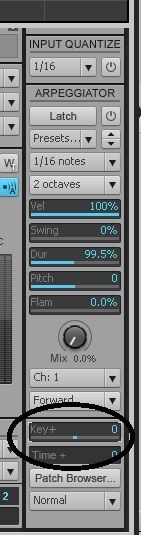
Albert i7 2600K @ 3.40GHz / MB Intel DP67BG / 16GB Ram- ADATA 250GB SSD (Boot)- Samsung Spinpoint F1 1TB HDD (Samples)Audio interface : Motu 828 MK ii i7 6700K @ 4.00GHz / MB Asrock Z170 / 16GB Ram- Samsung EVO 850 120GB / 500 GB SSD
Audio interface : Roland Quad Capture Win 10 Pro / Sonar Platinum
|
Sidroe
Max Output Level: -55.5 dBFS
- Total Posts : 1954
- Joined: 2010/11/10 18:59:43
- Location: Macon,Georgia
- Status: offline
Re: Staff View transposing!
2015/07/21 12:21:33
(permalink)
Thanks! I have never in all my years of sequencing come across this problem and I am once again very thankful for all the knowledge here in this forum. Thanks, fellas!
Sonar Platinum, Sonar X3e, Sonar X2a , Sonar X1 Expanded and 8.5.3 (32 and 64 bit), Windows 10 on a Toshiba P75-A7200 Laptop with i7 @ 2.4 quad and 8 gigs of RAM and secondary WD 1 Tb drive, Windows 10 desktop, Asus i5 @ 3.2 quad, 12 gigs RAM, 1 Tb drive, 1 500 gig drive, MOTU 24io, 2 Roland Studio Captures, Saffire 6 USB for laptop, Soundtracs Topaz Project 8 mixer, Alesis Monitor 2s, Event BAS 20/20s, Roland Micro-Monitor BA-8s, and 45 years worth of collecting FX, Mics, Amps, Guitars, and Keyboards!
|