Beepster
Max Output Level: 0 dBFS

- Total Posts : 18001
- Joined: 2012/05/11 19:11:24
- Status: offline
Steepening hi/low pass slope and/or creating steep bandpass with Sonitus EQ?
I'm so used to the hi/lo pass "slope" feature in the Quad Curve PC eq I figured there would be one available in the Sonitus EQ. Just mucking around with the Sonitus EQ and trying to create a steeper slope on the lo and hi pass options for bands 1 and 6. I'm realizing this IS somehow possible but looks like you gotta know what your doing so looking for some insight on how to manage this. I'll keep playing with it to see what I can get going but I can only imagine others have already sorted out ways to get those sharp slopes happening. Looking to learn. Thanks. PS: Trying to avoid "resonance peaks". Just want to control the slope in a logical way.
post edited by Beepster - 2015/08/07 13:54:21
|
scook
Forum Host

- Total Posts : 24146
- Joined: 2005/07/27 13:43:57
- Location: TX
- Status: offline

Re: Steepening hi/low pass slope and/or creating steep bandpass with Sonitus EQ?
2015/08/07 13:52:01
(permalink)
☄ Helpfulby Beepster 2015/08/07 16:34:33
|
Beepster
Max Output Level: 0 dBFS
- Total Posts : 18001
- Joined: 2012/05/11 19:11:24
- Status: offline
Re: Steepening hi/low pass slope and/or creating steep bandpass with Sonitus EQ?
2015/08/07 13:57:51
(permalink)
scook
Stack the EQ nodes and set them to the appropriate filter type.
scook
Stack the EQ nodes and set them to the appropriate filter type.
By stack you mean at the same frequency setting? Will do. Already getting some nice definition in my chain but slope control will definitely help. I'm wrangling with the Sonitus comp too. Gotta learn these buggers because they're awesome. Stupidity/ignorance is no longer an excuse. Cheers and thanks.
|
Beepster
Max Output Level: 0 dBFS
- Total Posts : 18001
- Joined: 2012/05/11 19:11:24
- Status: offline
Re: Steepening hi/low pass slope and/or creating steep bandpass with Sonitus EQ?
2015/08/07 14:00:22
(permalink)
Ah... and you updated. I've still neglected to add those Melda plugs to my suite but I'm hell bent on learning what I have already.
However it's probably time. This slope thing is exposing a limitation I was not aware of but better I learn how to cope with it.
Cheers.
|
Beepster
Max Output Level: 0 dBFS
- Total Posts : 18001
- Joined: 2012/05/11 19:11:24
- Status: offline
Re: Steepening hi/low pass slope and/or creating steep bandpass with Sonitus EQ?
2015/08/07 14:00:22
(permalink)
dupe
post edited by Beepster - 2015/08/07 14:07:55
|
scook
Forum Host
- Total Posts : 24146
- Joined: 2005/07/27 13:43:57
- Location: TX
- Status: offline
Re: Steepening hi/low pass slope and/or creating steep bandpass with Sonitus EQ?
2015/08/07 14:00:22
(permalink)
☄ Helpfulby Beepster 2015/08/07 16:34:43
Yes, use more than one EQ node at the desired frequency. This will help avoid the resonance bump and steepen the slope. MEqualizer is a lot more flexible though and the price is right.
|
Bristol_Jonesey
Max Output Level: 0 dBFS
- Total Posts : 16775
- Joined: 2007/10/08 15:41:17
- Location: Bristol, UK
- Status: offline
Re: Steepening hi/low pass slope and/or creating steep bandpass with Sonitus EQ?
2015/08/07 14:01:00
(permalink)
☄ Helpfulby Beepster 2015/08/07 16:34:57
Like this: 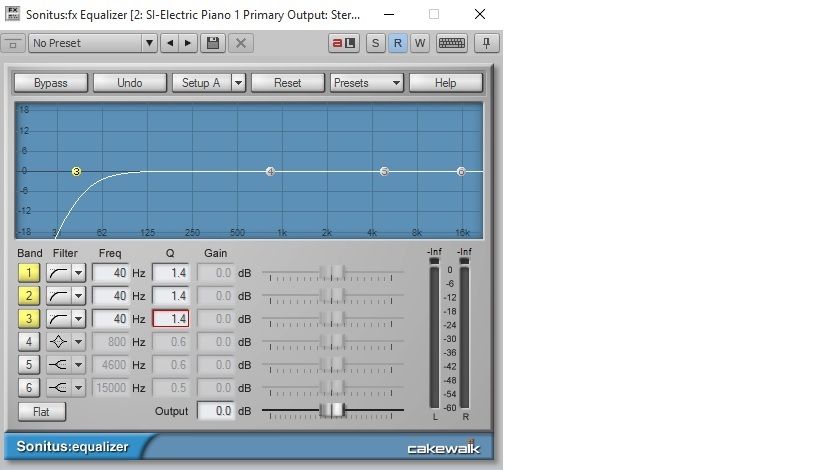
CbB, Platinum, 64 bit throughoutCustom built i7 3930, 32Gb RAM, 2 x 1Tb Internal HDD, 1 x 1TB system SSD (Win 7), 1 x 500Gb system SSD (Win 10), 2 x 1Tb External HDD's, Dual boot Win 7 & Win 10 64 Bit, Saffire Pro 26, ISA One, Adam P11A,
|
Beepster
Max Output Level: 0 dBFS
- Total Posts : 18001
- Joined: 2012/05/11 19:11:24
- Status: offline
Re: Steepening hi/low pass slope and/or creating steep bandpass with Sonitus EQ?
2015/08/07 14:03:44
(permalink)
scook
Yes, use more than one EQ node at the desired frequency. This will help avoid the resonance bump and steepen the slope. MEqualizer is a lot more flexible though and the price is right.
Yeah, and I know I could use some of the other stuff I've got around but I am hurting myself to make myself stronger here. I'm fascinated by the Sonitus suite too. In the past ten minutes they have already proven themselves quite capabable and desirable. I will figure them out. Thanks, dood.
|
Beepster
Max Output Level: 0 dBFS
- Total Posts : 18001
- Joined: 2012/05/11 19:11:24
- Status: offline
Re: Steepening hi/low pass slope and/or creating steep bandpass with Sonitus EQ?
2015/08/07 14:04:19
(permalink)
Bristol_Jonesey
Like this:
Awesome! Thanks.
|
Beepster
Max Output Level: 0 dBFS
- Total Posts : 18001
- Joined: 2012/05/11 19:11:24
- Status: offline
Re: Steepening hi/low pass slope and/or creating steep bandpass with Sonitus EQ?
2015/08/07 15:43:03
(permalink)
Okay... I'm posting this for anyone who searches this topic (and for my own selfish purposes because I am going to want to reference this in the future). Based on the helpful posts by scook and Bristol Jonesey I have figured out something VERY cool and fool proof to make this happen (and a generally cool way to manipulate Sonitus EQ) For low/hi/band pass try the following (this creates a what I was asking for but reveals something very cool about Sonitus EQ). 1) In the fields under the graph set Bands 1, 2 and 3 to "Hiighpass" (using the dropdown). Set notes 4, 5 and 6 to "Lowpass". 2) In the "Freq" box for Bands 1, 2 and 3 set them all to the same number (double click to type in a value or copy paste a value from one box to anther). For each field be sure to press Enter (or the new value will not be accepted and no changes will occur). 3) Repeat this procedure in the "Q" fields using appropriate values for 1, 2 and 3 (just copy/paste one of the values into the the other two boxes pressing Enter each time just to make them equal values). 4) Using a different value (a higher value because this will be your lowpass filter) repeat the same procedure for Bands 4, 5 and 6 (Freq and Q). Now the graph should look like what Bristol Jonesey posted (Nodes 1, 2 and 3 will be on top of each other and Nodes 4, 5 and 6 will be on top of each other creating a "bandpass" on the graph). THIS is the thing I figured out... In the graph section Left Click and drag around one set of the "stacked" nodes. So start with Nodes 1, 2 and three. This is like a "lasso" select. Now all three of those nodes are selected and you can drag all three around the graph. Dragging them left and right will move the high pass throughout he frequency range without screwing up the slope/curve. Of course the same can be done with the other three stacked nodes. It seems the max Q you can set for a set of nodes before a resonance curve happens is 1.4 (edit: after some tests for the low pass the max seems to be 1.6 as shown in the images scook and Jonesey posted... you can go higher but as you bring the Freq down on the lowpass you eventually start getting a curve... just play with it, it's cool). Also screwing with the Q's (mixing and matching) results in different slopes as well as switching out the filter type for each band. Anyway... I'm sure Sonitus EQ masters have a ton of other tricks but just figuring out that you can lasso select those stacked nodes (and they don't even have to be stacked) led to some awesome and useful happiness with this plug. As I said... just posting for my own reference and maybe others exploring the intertubes will discover the losso joy I just have. Thanks doods....
post edited by Beepster - 2015/08/07 16:16:24
|
scook
Forum Host
- Total Posts : 24146
- Joined: 2005/07/27 13:43:57
- Location: TX
- Status: offline
Re: Steepening hi/low pass slope and/or creating steep bandpass with Sonitus EQ?
2015/08/07 15:56:31
(permalink)
☄ Helpfulby Beepster 2015/08/07 16:35:10
|
Beepster
Max Output Level: 0 dBFS
- Total Posts : 18001
- Joined: 2012/05/11 19:11:24
- Status: offline
Re: Steepening hi/low pass slope and/or creating steep bandpass with Sonitus EQ?
2015/08/07 16:03:06
(permalink)
Just to add to that I was able to map out a low and hi pass control to an FX Chain module by mapping Freqs 1, 2 and 3 to one knob and Freqs 4, 5 and 6 to a second knob on the FX Chain module. I now have an adjustable bandpass filter as a PC module which I can now follow up with whatever effect I want which for this experiment is an amp sim... well it will probably be a compressor then an amp sim.
So ya... I can cut out all the low and high shiz I don't want, compress/limit the good stuff to hit the sim (so the sim works more efficiently with less noise) and I still have 4 more knobs to screw with (which I can use for drive in the sim and/or another instance of Sonitus EQ) all with out even touching anything else in the PC. I can also put this at the top of the PC chain so it's like an amp being mic'd, sent through some external processing and then into a nice (virtual) board.
Now THAT is freaking cool.
This is why I'm here and always harassing you guys. lulz
Again... many thanks.
|
Beepster
Max Output Level: 0 dBFS
- Total Posts : 18001
- Joined: 2012/05/11 19:11:24
- Status: offline
Re: Steepening hi/low pass slope and/or creating steep bandpass with Sonitus EQ?
2015/08/07 16:04:31
(permalink)
Hahaha!!! You posted as I was typing my last post. That's pretty much what I did, brother. Thanks, scook. You do not know how much you have contributed to my crazy little universe. Cheers!!! Edit: But I did not include the On/Off swtiches for the bands/filters which is a great idea. I was kind of thinking about that but seeing it in action I think I will. Noice!
post edited by Beepster - 2015/08/07 16:13:33
|
Bristol_Jonesey
Max Output Level: 0 dBFS
- Total Posts : 16775
- Joined: 2007/10/08 15:41:17
- Location: Bristol, UK
- Status: offline
Re: Steepening hi/low pass slope and/or creating steep bandpass with Sonitus EQ?
2015/08/07 16:15:43
(permalink)
☄ Helpfulby Beepster 2015/08/07 16:35:20
Just to add to the options, every control on the Sonitus can be automated via dedicated envelopes.
I've done this before to get a crude-ish sweep filter effect.
Also, double clicking the sliders resets them to zero.
CbB, Platinum, 64 bit throughoutCustom built i7 3930, 32Gb RAM, 2 x 1Tb Internal HDD, 1 x 1TB system SSD (Win 7), 1 x 500Gb system SSD (Win 10), 2 x 1Tb External HDD's, Dual boot Win 7 & Win 10 64 Bit, Saffire Pro 26, ISA One, Adam P11A,
|
AT
Max Output Level: 0 dBFS
- Total Posts : 10654
- Joined: 2004/01/09 10:42:46
- Location: TeXaS
- Status: offline
Re: Steepening hi/low pass slope and/or creating steep bandpass with Sonitus EQ?
2015/08/07 17:05:39
(permalink)
Sonitus was a well-respected 3rd party DXi. Cakewalk bundled them, then bought the company if I remember. Very flexible tools before the vintage emulation craze took off.
And scook, that thinned out look is a lot like the EQ I use on 3rd and 4 guitar parts. ;-)
https://soundcloud.com/a-pleasure-dome
http://www.bnoir-film.com/ there came forth little children out of the city, and mocked him, and said unto him, Go up, thou bald head; go up, thou bald head. 24 And he turned back, and looked on them, and cursed them in the name of the Lord. And there came forth two she bears out of the wood, and tare forty and two children of them.
|
rabeach
Max Output Level: -48 dBFS

- Total Posts : 2703
- Joined: 2004/01/26 14:56:13
- Status: offline
Re: Steepening hi/low pass slope and/or creating steep bandpass with Sonitus EQ?
2015/08/07 17:44:57
(permalink)
scook
Could build an FX Chain for it like this HP-LP Filter.fxc

while adjusting the output gain in the above video it appeared that the frequency response reset
|
clintmartin
Max Output Level: -36.5 dBFS

- Total Posts : 3893
- Joined: 2009/10/11 12:16:43
- Location: Fort Smith, AR
- Status: offline
Re: Steepening hi/low pass slope and/or creating steep bandpass with Sonitus EQ?
2015/08/07 18:08:50
(permalink)
If Cakewalk would update the gui for the Sonitus suite...people would swear they sound better. Top notch plugins!
post edited by clintmartin - 2015/08/07 18:16:14
|
Anderton
Max Output Level: 0 dBFS
- Total Posts : 14070
- Joined: 2003/11/06 14:02:03
- Status: offline
Re: Steepening hi/low pass slope and/or creating steep bandpass with Sonitus EQ?
2015/08/07 18:13:57
(permalink)
A little bit of resonance along with the HP and LP gives a bandpass with mind-bogglingly steep skirts you could never get with a parametric stage bandpass. Oh, and don't forget you can right-click on the band number to copy it to other bands. Sonitus stuff is great. 
|
Anderton
Max Output Level: 0 dBFS
- Total Posts : 14070
- Joined: 2003/11/06 14:02:03
- Status: offline
Re: Steepening hi/low pass slope and/or creating steep bandpass with Sonitus EQ?
2015/08/07 18:14:31
(permalink)
clintmartin
If Cakewalk would update the gui for the Sonitus suite...people would swear they sound better.
Sad but true.
|
scook
Forum Host
- Total Posts : 24146
- Joined: 2005/07/27 13:43:57
- Location: TX
- Status: offline
Re: Steepening hi/low pass slope and/or creating steep bandpass with Sonitus EQ?
2015/08/07 18:18:58
(permalink)
I prefer the Sonitus UIs but would rather use VST2/3 versions of the plug-ins. Unfortunately 64bit VSTs were never created.
|
Keni
Max Output Level: -17.5 dBFS

- Total Posts : 5769
- Joined: 2003/11/04 10:42:15
- Location: Willits, CA USA
- Status: offline
Re: Steepening hi/low pass slope and/or creating steep bandpass with Sonitus EQ?
2015/08/07 19:08:24
(permalink)
I like and use the sonitus plugins too...
But i'm wondering why you didnt simply use th quad?
|
Kev999
Max Output Level: -36 dBFS

- Total Posts : 3922
- Joined: 2007/05/01 14:22:54
- Location: Victoria, Australia
- Status: offline
Re: Steepening hi/low pass slope and/or creating steep bandpass with Sonitus EQ?
2015/08/08 02:22:40
(permalink)
Anderton
A little bit of resonance along with the HP and LP gives a bandpass with mind-bogglingly steep skirts you could never get with a parametric stage bandpass. Oh, and don't forget you can right-click on the band number to copy it to other bands. Sonitus stuff is great.
You can get it even steeper than that if you substitute lo/hi shelf instead of lo/hi pass and set Q to its max value, with all 6 resonance points coinsiding.
SonarPlatinum∞(22.11.0.111)|Mixbus32C(4.3.19)|DigitalPerformer(9.5.1)|Reaper(5.77)FractalDesign:DefineR5|i7-6850k@4.1GHz|16GB@2666MHz-DDR4|MSI:GamingProCarbonX99a|Matrox:M9148(x2)|UAD2solo(6.5.2)|W7Ult-x64-SP1
Audient:iD22+ASP800|KRK:VXT6|+various-outboard-gear|+guitars&basses, etc.
Having fun at work lately
|
Tom Riggs
Max Output Level: -57.5 dBFS

- Total Posts : 1752
- Joined: 2003/11/08 22:47:26
- Location: Displaced Kansan living in Philippines
- Status: offline
Re: Steepening hi/low pass slope and/or creating steep bandpass with Sonitus EQ?
2015/08/08 09:59:15
(permalink)
Sonitus plugs are DX but are not limited to 32 bit. there are 64 bit versions installed when you install Sonar 64 bit. I only mention this because Scook mentioned that there is not a 64 bit vst. that is true however the dx works fine in 64 bit. I like to use the Sonitus eq as well when I need to do something surgical. For instance I have custom condenser mics that I made and mounted inside my acoustic guitars. On one guitar in particular there is a resonance that is pretty extreme and makes things sound strange. I used an analyzer to figure out the fundamental frequency and a sharp q to reduce it and the next 3 overtones. It makes a huge difference and balances the sound of the guitar beautifully. I also use 2 instances of the Sonitus EQ on my monitoring buss to do room correction. I used the Room EQ Wizard analyzer from Home Theater Shack to check my room and build the corrective EQ from the results of the tests. I have not tried stacking the nodes and that is a wonderful idea.
i7-3770k OC at 4.5Ghz, asus p8z77-m, 16g g.skill aries 1600 c9 ram, Noctua d-14 cooler, RME HDSPe Raydat, Motu FastLane, Nvidea GTX 980 ti 6G, windows 7 and 8.1 pro x64. Sonar Platinum and x3e currently installed My Music My YouTube
|
Beepster
Max Output Level: 0 dBFS
- Total Posts : 18001
- Joined: 2012/05/11 19:11:24
- Status: offline
Re: Steepening hi/low pass slope and/or creating steep bandpass with Sonitus EQ?
2015/08/08 12:43:30
(permalink)
Keni
I like and use the sonitus plugins too...
But i'm wondering why you didnt simply use th quad?
Short story is (ZOMG... short story from Beeps, lulz!11eleventy) that I'm bundling it into an FX bin with GR5. It's a DI guitar signal (for this purpose) so I'm yanking out all the uneeded low and high freqs with the Sonitus, then letting it hit an instance of Sonitus Compressor (which I just gave myself a refresher course on this morning) to smooth out the dry signal and THEN it hits the high gain amp sim. That FX Chain goes at the start of the PC and frees up the PC Quad Curve (and everything else) for any extra sweetening/rejection/etc. It's just a test really but one I had planned for a while (and based on previous tests where I used the QC first and the sim in the FX Bin). So far it seems to be working well and simplified a bunch of stuff. BTW... ultra +1 on your tip in the other thread about creating a PC Preset to apply effects across multiple tracks using QuickGroups. This is kind of an extension of that train of though. I wanted my sims consistent, easily loaded and easily manipulated. By using the sim in an FX Chain PC Module I can load it instantly across many tracks at once. If I do this on TOO many tracks it chokes the system like a dirty chicken for a few moments but all and all it's much quicker AND I get much more control over the chain of effects (and get to add my wacky experiments like this Sonitus EQ thingamabobber). aaaand that wasn't short at all. lol Anyhoo... seems to be working as I intended. This is particularly encouraging because I made a rather complex plan (to me), saw it through and it produced the intended results. Much better than just smacking things around willy nilly hoping something happens to make the loud things sound gooderer which was more or less my mixing style only a short while ago. Thanks (everyone).
post edited by Beepster - 2015/08/08 12:52:27
|
Bristol_Jonesey
Max Output Level: 0 dBFS
- Total Posts : 16775
- Joined: 2007/10/08 15:41:17
- Location: Bristol, UK
- Status: offline
Re: Steepening hi/low pass slope and/or creating steep bandpass with Sonitus EQ?
2015/08/08 15:26:44
(permalink)
Beepster
Keni
I like and use the sonitus plugins too...
But i'm wondering why you didnt simply use th quad?
BTW... ultra +1 on your tip in the other thread about creating a PC Preset to apply effects across multiple tracks using QuickGroups. This is kind of an extension of that train of though. I wanted my sims consistent, easily loaded and easily manipulated.
I haven't seen the other thread, but a definite +1 for naming & saving your own pc presets I always name them starting with an underscore so that when you want to load one, yours are always at the top of the list.
CbB, Platinum, 64 bit throughoutCustom built i7 3930, 32Gb RAM, 2 x 1Tb Internal HDD, 1 x 1TB system SSD (Win 7), 1 x 500Gb system SSD (Win 10), 2 x 1Tb External HDD's, Dual boot Win 7 & Win 10 64 Bit, Saffire Pro 26, ISA One, Adam P11A,
|
Kev999
Max Output Level: -36 dBFS
- Total Posts : 3922
- Joined: 2007/05/01 14:22:54
- Location: Victoria, Australia
- Status: offline
Re: Steepening hi/low pass slope and/or creating steep bandpass with Sonitus EQ?
2015/08/08 21:18:12
(permalink)
Keni
...i'm wondering why you didnt simply use th quad?
The Quad has only one of each of hp, lp, hi-shelf and lo-shelf, wheareas Sonitus has potentially 6 of the same type of EQ filter and therefore allows some extreme (and crazy) stacking possibilities.
SonarPlatinum∞(22.11.0.111)|Mixbus32C(4.3.19)|DigitalPerformer(9.5.1)|Reaper(5.77)FractalDesign:DefineR5|i7-6850k@4.1GHz|16GB@2666MHz-DDR4|MSI:GamingProCarbonX99a|Matrox:M9148(x2)|UAD2solo(6.5.2)|W7Ult-x64-SP1
Audient:iD22+ASP800|KRK:VXT6|+various-outboard-gear|+guitars&basses, etc.
Having fun at work lately
|