jimusic
Max Output Level: -64 dBFS

- Total Posts : 1325
- Joined: 2008/05/21 18:59:52
- Location: Near Vancouver, British Columbia, Canada
- Status: offline
Taking Computer Screen Shots
Hey Buds,
Is there a way to take a photo or screen shot of my computer screen without taking out my Digital Camera and trying to hold it still?
I'm using Windows 7.
I'd like to be able to post or email them for various reasons.
Is there something in Win 7 that I just haven't found yet, or maybe a free download app?
Thanks,
James
|
Rain
Max Output Level: 0 dBFS

- Total Posts : 9736
- Joined: 2003/11/07 05:10:12
- Location: Las Vegas
- Status: offline

Re: Taking Computer Screen Shots
2014/03/27 03:09:57
(permalink)
I haven't used a PC in ages but there used to be a Print Screen key which you could use - it saved a screen capture to the clipboard, which could be pasted in a program which supported pic - like MS paint... 
TCB - Tea, Cats, Books...
|
craigb
Max Output Level: 0 dBFS
- Total Posts : 41704
- Joined: 2009/01/28 23:13:04
- Location: The Pacific Northwestshire
- Status: offline
Re: Taking Computer Screen Shots
2014/03/27 05:06:16
(permalink)
Time for all of you to head over to Beyond My DAW!
|
Glyn Barnes
Max Output Level: -0.3 dBFS

- Total Posts : 7564
- Joined: 2009/06/10 05:12:31
- Location: A Stone's Throw from the Line
- Status: offline
Re: Taking Computer Screen Shots
2014/03/27 06:20:36
(permalink)
What they said. But some people swear by snaggit. It does give more options. Me, i just print screen and crop it MS office photo editor (or Paint).
|
Shambler
Max Output Level: -75 dBFS

- Total Posts : 783
- Joined: 2010/07/06 05:20:19
- Status: offline
Re: Taking Computer Screen Shots
2014/03/27 07:06:19
(permalink)
You can also use windows built in 'snipping' tool to copy the whole screen or just a part of it.
SONAR Platypus on Win10 64bit. Studio One Pro / Cubase Pro 9.5...just in case. 8GB i7-2600 3.4GHz Gigabyte Z68XP-UD3P Geforce GTX970 Focusrite Scarlett 18i20 2nd Gen Prophet 12/Rev 2/Virus Snow Zebra2/DIVA/NI Komplete 10
|
Guitarhacker
Max Output Level: 0 dBFS
- Total Posts : 24398
- Joined: 2007/12/07 12:51:18
- Location: NC
- Status: offline
Re: Taking Computer Screen Shots
2014/03/27 09:06:24
(permalink)
hit SHIFT and hold... press PRT SCR one time.... release.
Programs> Accessories>Paint> paste
Waaa Laaa!
My website & music: www.herbhartley.com MC4/5/6/X1e.c, on a Custom DAW Focusrite Firewire Saffire Interface BMI/NSAI "Just as the blade chooses the warrior, so too, the song chooses the writer "
|
Mesh
Max Output Level: 0 dBFS
- Total Posts : 27360
- Joined: 2009/11/27 14:08:08
- Location: Online right here!
- Status: offline
Re: Taking Computer Screen Shots
2014/03/27 09:36:33
(permalink)
Guitarhacker
hit SHIFT and hold... press PRT SCR one time.... release.
Programs> Accessories>Paint> paste
Waaa Laaa!
To go with this...... Pressing the ALT + PRT SCRN keys will capture the active window (right click the mouse to Paste). If you want a really cool "High Contrast" effect, press SHIFT + ALT + PRNT SCRN.
Platinum Gaming DAW: AsRock Z77 Overclock FormulaI7 3770k @ 4.5GHz : 16GB RAM G.Skill Ripjaws X 250GB OS SSD : 3TB HDD : 1TB Sample HDDWin 10 Pro x 64 : NH-D14 CPU Cooler HIS IceQ 2GB HD 7870Focusrite Scarlett 2i4The_Forum_Monkeys
|
sharke
Max Output Level: 0 dBFS
- Total Posts : 13933
- Joined: 2012/08/03 00:13:00
- Location: NYC
- Status: offline
Re: Taking Computer Screen Shots
2014/03/27 09:54:40
(permalink)
The Windows snipping tool is the best because it allows you to crop the part you need before saving it. The PrtScn key works too but you have to open a paint program to crop it. It's in Vista, Windows 7 & 8. You just go to Accessories->Snipping Tool, or search for "Snipping Tool" in Windows 8.
JamesWindows 10, Sonar SPlat (64-bit), Intel i7-4930K, 32GB RAM, RME Babyface, AKAI MPK Mini, Roland A-800 Pro, Focusrite VRM Box, Komplete 10 Ultimate, 2012 American Telecaster!
|
craigb
Max Output Level: 0 dBFS
- Total Posts : 41704
- Joined: 2009/01/28 23:13:04
- Location: The Pacific Northwestshire
- Status: offline
Re: Taking Computer Screen Shots
2014/03/27 13:54:20
(permalink)
☄ Helpfulby Rain 2014/03/27 17:06:37
Beagle doesn't like the snipping tool.  (Just sayin'...) (Just sayin'...)
Time for all of you to head over to Beyond My DAW!
|
jimusic
Max Output Level: -64 dBFS
- Total Posts : 1325
- Joined: 2008/05/21 18:59:52
- Location: Near Vancouver, British Columbia, Canada
- Status: offline
Re: Taking Computer Screen Shots
2014/03/28 01:32:14
(permalink)
Awesome! Thanks for all the replies Buds!
|
Moshkiae
Max Output Level: -14 dBFS

- Total Posts : 6111
- Joined: 2009/04/27 10:26:25
- Status: offline
Re: Taking Computer Screen Shots
2014/03/28 10:54:19
(permalink)
Glyn Barnes
What they said.
But some people swear by snaggit. It does give more options. Me, i just print screen and crop it MS office photo editor (or Paint).
W7 has the "Snipping Tool" I think ... and it is excellent and probably the one thing I use the most these days!
As a wise Guy once stated from his holy chapala ... none of the hits, none of the time ... prevents you from becoming just another turkey in the middle of all the other turkeys!
|
spacealf
Max Output Level: -54 dBFS

- Total Posts : 2133
- Joined: 2010/11/18 17:44:34
- Status: offline
Re: Taking Computer Screen Shots
2014/03/29 18:56:44
(permalink)
Most of the time I just hit "Print Screen" and probably shut down the program while the picture is on the clipboard, then get up Paint and Paste from the Clipboard or just Paste.
Except in Sonar, if you close down the program after hitting the Print Screen key on the keyboard, you will get nothing to Paste from the clipboard. The only way I found to take a picture in Sonar is to hit the Print Screen key and minimize Sonar to the Taskbar and open up Paint and Paste the image in there and save it first, and then if not doing anything else in Sonar, exit out of the program.
|
craigb
Max Output Level: 0 dBFS
- Total Posts : 41704
- Joined: 2009/01/28 23:13:04
- Location: The Pacific Northwestshire
- Status: offline
Re: Taking Computer Screen Shots
2014/03/29 19:03:14
(permalink)
I just bring up PhotoShop, Alt-Tab back to the page I want, hit "Print Screen" then Alt-Tab back to PhotoShop, hit Ctrl-N (to create a new document of the same size as whatever is in my clipboard, in this case a screen shot), then hit Ctrl-V to paste it in the new document. Crop and do whatever, save as a .jpg and I'm done.
Time for all of you to head over to Beyond My DAW!
|
spacealf
Max Output Level: -54 dBFS
- Total Posts : 2133
- Joined: 2010/11/18 17:44:34
- Status: offline
Re: Taking Computer Screen Shots
2014/03/29 19:07:17
(permalink)
Sonar takes up the entire screen (full screen). Otherwise Print Screen is the entire desktop in Windows.  Sonar Exclusive!
|
craigb
Max Output Level: 0 dBFS
- Total Posts : 41704
- Joined: 2009/01/28 23:13:04
- Location: The Pacific Northwestshire
- Status: offline
Re: Taking Computer Screen Shots
2014/03/29 19:10:59
(permalink)
spacealf
Sonar takes up the entire screen (full screen). Otherwise Print Screen is the entire desktop in Windows.
Sonar Exclusive!
Many programs go full screen. By hitting F11 in Chrome (and the same or similar in other browsers) you can make the Coffee House go full screen too. The proof is right HERE!
Time for all of you to head over to Beyond My DAW!
|
Rain
Max Output Level: 0 dBFS
- Total Posts : 9736
- Joined: 2003/11/07 05:10:12
- Location: Las Vegas
- Status: offline
Re: Taking Computer Screen Shots
2014/03/29 20:18:30
(permalink)
craigb
I just bring up PhotoShop, Alt-Tab back to the page I want, hit "Print Screen" then Alt-Tab back to PhotoShop, hit Ctrl-N (to create a new document of the same size as whatever is in my clipboard, in this case a screen shot), then hit Ctrl-V to paste it in the new document. Crop and do whatever, save as a .jpg and I'm done.
I click the "Grab" icon in the dock, pick an option (Selection, Window, Screen, Timed Screen) in the capture menu and I'm done. 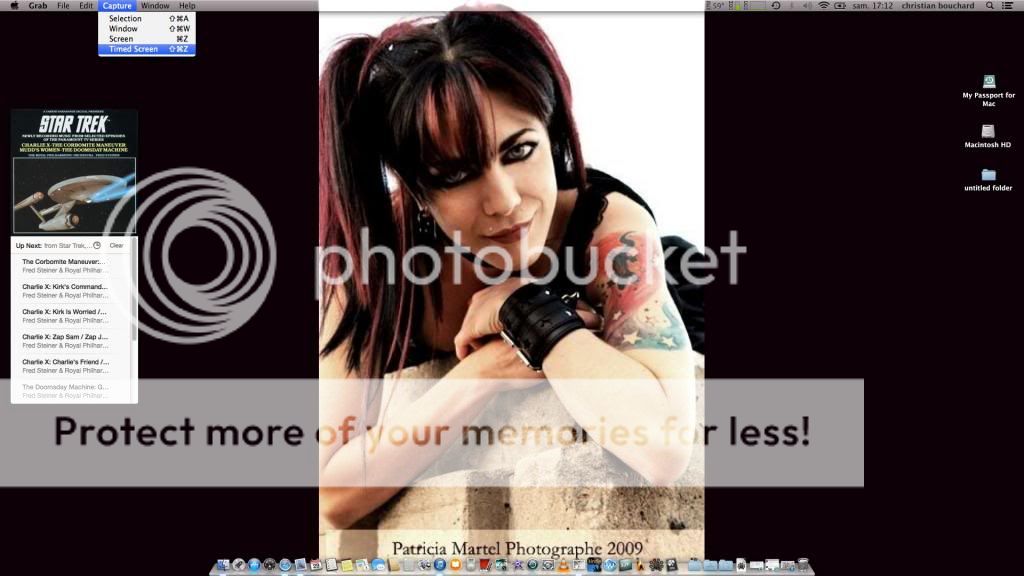 I love my Mac. ;)
TCB - Tea, Cats, Books...
|
SteveStrummerUK
Max Output Level: 0 dBFS
- Total Posts : 31112
- Joined: 2006/10/28 10:53:48
- Location: Worcester, England.
- Status: offline
Re: Taking Computer Screen Shots
2014/03/29 20:39:28
(permalink)
craigb
I just bring up PhotoShop, Alt-Tab back to the page I want, hit "Print Screen" then Alt-Tab back to PhotoShop, hit Ctrl-N (to create a new document of the same size as whatever is in my clipboard, in this case a screen shot), then hit Ctrl-V to paste it in the new document. Crop and do whatever, save as a .jpg and I'm done.
Craig, in Photoshop Elements, there is a real neat option to create a new file from whatever image you have on the clipboard: 
|
craigb
Max Output Level: 0 dBFS
- Total Posts : 41704
- Joined: 2009/01/28 23:13:04
- Location: The Pacific Northwestshire
- Status: offline
Re: Taking Computer Screen Shots
2014/03/29 21:09:48
(permalink)
@Steve - Yep, PS doesn't have that option (the New dialog goes to a FAR more involved creation window), but just hitting Ctrl-N, Ctrl-V only takes a second anyway - probably faster too! @Rain - Nice "Grab" you've got there! LOL! 
Time for all of you to head over to Beyond My DAW!
|
sharke
Max Output Level: 0 dBFS
- Total Posts : 13933
- Joined: 2012/08/03 00:13:00
- Location: NYC
- Status: offline
Re: Taking Computer Screen Shots
2014/03/31 01:12:41
(permalink)
An annoying thing is when PrtScn doesn't work because of something else you're doing when you press it. For example, I wanted to harvest a screen shot of the graphical bug which occurs when you drag a clip from one project to another, but I couldn't do it because the thing only occurs before you release the mouse button and PrtScn doesn't register then. I wish it had a timer you could set 
JamesWindows 10, Sonar SPlat (64-bit), Intel i7-4930K, 32GB RAM, RME Babyface, AKAI MPK Mini, Roland A-800 Pro, Focusrite VRM Box, Komplete 10 Ultimate, 2012 American Telecaster!
|
Glyn Barnes
Max Output Level: -0.3 dBFS
- Total Posts : 7564
- Joined: 2009/06/10 05:12:31
- Location: A Stone's Throw from the Line
- Status: offline
Re: Taking Computer Screen Shots
2014/03/31 01:25:34
(permalink)
You live and learn - I never knew about the the snip tool. Just pin the icon to the taskbar and its every bit as easy as Rain's discription of the Mac grab tool.
|