johnnyV
Max Output Level: -48.5 dBFS

- Total Posts : 2677
- Joined: 2010/02/22 11:46:33
- Location: Here, in my chair
- Status: offline

Testing RTL - looking for feedback Tascam US1641 users
OK I started a thread down in the basement under Hardware and it's been 24 hours so I'm coming back up here where obviously you get more coverage. I still say there are to many sub threads. Anyhow In another thread I asked how you test for RTL and Jim R handed over a link to a simple testing tool http://centrance.com/down...ent_instructions.shtml So I've been trying it out on my interfaces. It looks real bad or maybe not. I have not experianced any timing issues so might be because Sonar makes up the diffeance and you never hear it. Tascam us1641 = 15.5 ms RTL in the lowest setting which I cannot use or audio engine stops. I have to use the Normal setting and that gives a 28.8 ms RTL !!! is that terrible or what? So I tried the little tool with my home system M Audio Fast track pro- At 256 samples 16.8 ms RTL. It won't let me lower the setting. It just jumps back. Any how my question is I know there are other Sonar users with these same interfaces, could you please test yours and report back here your findings. Just curious and want to know if these cards are actually crap. As I say they seem to work just fine but!!!
post edited by johnnyV - 2010/09/16 11:28:47
Sonar X3e Studio - Waiting for Professional Scarlett 6i6Yamaha Gear= 01v - NSM 10 - DTX 400 - MG82cx Roland Gear= A 49- GR 50 - TR 505 - Boss pedalsTascam Gear= DR 40 - US1641 -Mackie Gear= Mix 8 - SRM 350's i5 Z97 3.2GHZ quad 16 Gig RAM W 8.1 home buildTaylor mini GS - G& L Tribute Tele - 72 Fender Princeton - TC BH 250 - Mooer and Outlaw Pedals Korg 05/RW
|
Jim Roseberry
Max Output Level: 0 dBFS

- Total Posts : 9871
- Joined: 2004/03/23 11:34:51
- Location: Ohio
- Status: offline
Re:Real Time Latency Testing
2010/09/15 16:28:33
(permalink)
As I say they seem to work just fine but!!!
Hi Johnny, At the risk of being repetitive...  If you're monitoring via hardware (onboard DSP based near zero latency monitoring), then you're not experiencing the round-trip latency. Let me elaborate... There are buffers/latency on both the input and output sides. Playing back audio (tracks or VSTi): You experience one-way (playback) latency. This situation doesn't involve the input side. Recording audio tracks: Upon playback, Sonar automatically compensates for the input side's latency. This ensures newly recorded audio tracks are in sync with existing tracks. As has been discussed, this compensation is not always 100% perfect. You can playback and re-record a short transient 'spike'... determine the offset... and manually compensate via the Options Menu>Audio>Advanced. Playing/Monitoring in realtime thru software EFX/processing: In this scenario, you're dealing with both the input and output sides. This is where you encounter round-trip latency. ie: DI electric guitar being played/monitored in realtime thru your favorite AmpSim plugin - You feed the guitar to your audio interface's input (here you've got latency from the ASIO input buffer, A/D converter, and the driver's hidden safety buffer)
- The guitar's signal is processed by Sonar (your favorite AmpSim plugin) and is fed to the audio interface's outputs. (here you've got the latency of the ASIO output buffer, D/A converter, and the driver's hidden safety buffer)
In this example, audio is being input/processed/output in realtime. There's no means of compensating for latency on-the-fly... unless you can alter the laws of time/space. (You can't compensate for latency on audio that has yet to be input.) Thus, you get the full 'brunt' of your audio interface's round-trip latency. Note that the latency on both the input and output sides is always present. DAW applications and audio interfaces (via their hardware based near zero latency monitoring) provide a means of working around the latency. Effectively making it a non issue for most purposes... However, when you play/monitor in realtime thru software based EFX/processing (like the DI guitar example above), there's no means of compensating/hiding the latency on either the input or output sides. Thus, you encounter round-trip latency. Hope that clears up the subject...
post edited by Jim Roseberry - 2010/09/15 16:29:49
|
brundlefly
Max Output Level: 0 dBFS
- Total Posts : 14250
- Joined: 2007/09/14 14:57:59
- Location: Manitou Spgs, Colorado
- Status: offline
Re:Real Time Latency Testing
2010/09/15 16:50:27
(permalink)
You can playback and re-record a short transient 'spike'... determine the offset... and manually compensate via the Options Menu>Audio>Advanced. In any version of SONAR that reports the Total Round Trip value (8.3.1 and later?), you can just subtract the Total Round Trip reported by SONAR from the CEntrance reported latency (in samples), and this is the offset needed for perfect latency compensation. In earlier SONAR versions that do not report Round Trip, the offset can be calculated as: Offset = CEntrance Round-trip – ASIO Reported Latency – Buffer Size The above is only relevant to ASIO drivers that CEntrance can access. If you're using WDM drivers, you have to do the loopback recording, and measure the offset.
|
brundlefly
Max Output Level: 0 dBFS
- Total Posts : 14250
- Joined: 2007/09/14 14:57:59
- Location: Manitou Spgs, Colorado
- Status: offline
Re:Real Time Latency Testing
2010/09/15 16:54:06
(permalink)
M Audio Fast track pro- At 256 samples 16.8 ms RTL. It won't let me lower the setting. It just jumps back. It may be that you have to set the lower limit of the buffer size in the M-Audio's control panel before you can go lower.
|
Jim Roseberry
Max Output Level: 0 dBFS
- Total Posts : 9871
- Joined: 2004/03/23 11:34:51
- Location: Ohio
- Status: offline
Re:Real Time Latency Testing
2010/09/15 17:47:04
(permalink)
If you're using WDM drivers, you have to do the loopback recording, and measure the offset. FWIW, I believe the Cycling '74 loopback test can measure ASIO or WDM.
|
johnnyV
Max Output Level: -48.5 dBFS
- Total Posts : 2677
- Joined: 2010/02/22 11:46:33
- Location: Here, in my chair
- Status: offline
Re:Real Time Latency Testing
2010/09/15 18:51:36
(permalink)
Thanks for the most excellent explanation. This would be the exact case when I toggle the input echo I get a very noticeable slap back delay. I also have had delays when playing MIDI controller - soft synths but somehow that has stopped happening and I forget what I did now. I do not plan on using any amp sims so I guess I'll be OK for now. Like I say I've not experienced a problem. But I will also follow through and perform the loop back test just to make sure. The Tascam control panel gave me 5 settings you could try. None of them have numbers just cute names. The new drivers are suppose to show more options but I can't seem to install them. I'm stuck with the original 1.00 drivers for now, I'm working on it. Might be because of XP. It just stalls and gives error message. I will try imaging it on a CD. The M-Audio is stuck on 256 samples and there does not seem to be a way to change it in the control panel. But like I say, It works fine ( we won't mention the sh---y pre amps) The main reason for this foray is I'm hoping to have the cash to purchase a up to date computer with W7 64 bit very soon now, and I am hoping one of these interfaces will be part of a well oiled machine.
post edited by johnnyV - 2010/09/15 18:53:29
Sonar X3e Studio - Waiting for Professional Scarlett 6i6Yamaha Gear= 01v - NSM 10 - DTX 400 - MG82cx Roland Gear= A 49- GR 50 - TR 505 - Boss pedalsTascam Gear= DR 40 - US1641 -Mackie Gear= Mix 8 - SRM 350's i5 Z97 3.2GHZ quad 16 Gig RAM W 8.1 home buildTaylor mini GS - G& L Tribute Tele - 72 Fender Princeton - TC BH 250 - Mooer and Outlaw Pedals Korg 05/RW
|
johnnyV
Max Output Level: -48.5 dBFS
- Total Posts : 2677
- Joined: 2010/02/22 11:46:33
- Location: Here, in my chair
- Status: offline
Re:Real Time Latency Testing
2010/09/15 20:01:50
(permalink)
Hey here's a good one.
Pay attention you Sound Blaster Bashers!
Just ran the CEntrance test on my old Audigy II PCI card.
It came in better than my others 2 at 11.5 ms. So that brings us full circle to where this topic started with someone using an old delta PCI card and looking at new interfaces.
The other interesting thing is it's control panel gives me a whole lot of options for sample size, and clock.
One step forward 2 steps back.
I made some most excellent recording with that old POS. To bad new computers don't have PCI support anymore. I'd be mighty tempted..
Sonar X3e Studio - Waiting for Professional Scarlett 6i6Yamaha Gear= 01v - NSM 10 - DTX 400 - MG82cx Roland Gear= A 49- GR 50 - TR 505 - Boss pedalsTascam Gear= DR 40 - US1641 -Mackie Gear= Mix 8 - SRM 350's i5 Z97 3.2GHZ quad 16 Gig RAM W 8.1 home buildTaylor mini GS - G& L Tribute Tele - 72 Fender Princeton - TC BH 250 - Mooer and Outlaw Pedals Korg 05/RW
|
Jim Roseberry
Max Output Level: 0 dBFS
- Total Posts : 9871
- Joined: 2004/03/23 11:34:51
- Location: Ohio
- Status: offline
Re:Real Time Latency Testing
2010/09/15 21:20:56
(permalink)
To bad new computers don't have PCI support anymore. I'd be mighty tempted.. Yeah, the Audiophile 192 yields 5ms RTL at a 64-sample ASIO buffer size/44.1k. Not bad for an audio interface that's $179. BTW, You can get i7 mobos with a PCI slot. Probably not a good long-term plan... but it would certainly work in the near-term.
|
johnnyV
Max Output Level: -48.5 dBFS
- Total Posts : 2677
- Joined: 2010/02/22 11:46:33
- Location: Here, in my chair
- Status: offline
Re:Real Time Latency Testing
2010/09/15 21:52:00
(permalink)
That's OK Jim is was kinda joking,,, but I'm going to have to seriously look into the over all system now, right down to a better chair!
Sonar X3e Studio - Waiting for Professional Scarlett 6i6Yamaha Gear= 01v - NSM 10 - DTX 400 - MG82cx Roland Gear= A 49- GR 50 - TR 505 - Boss pedalsTascam Gear= DR 40 - US1641 -Mackie Gear= Mix 8 - SRM 350's i5 Z97 3.2GHZ quad 16 Gig RAM W 8.1 home buildTaylor mini GS - G& L Tribute Tele - 72 Fender Princeton - TC BH 250 - Mooer and Outlaw Pedals Korg 05/RW
|
johnnyV
Max Output Level: -48.5 dBFS
- Total Posts : 2677
- Joined: 2010/02/22 11:46:33
- Location: Here, in my chair
- Status: offline
Re:Real Time Latency Testing
2010/09/16 11:26:27
(permalink)
So one thing the RTL test utility does not do is test the digital in / out ! Now that takes the converters out of the equation right? I guess I could test it by patching in my 01V. I used to always use the SPDIF and the 01V with the Audigy. Also if I have a better computer I would be able to access lower RTL buy lowering the sample settings. Right now that will result in dropouts. I'm stuck at the midrange level. I have always let Sonar decide what is best and have never managed to change the defaults that show up. Here's the best possible scenario the Audigy has to offer. This is on a crappy old P4 with 750MB RAM. 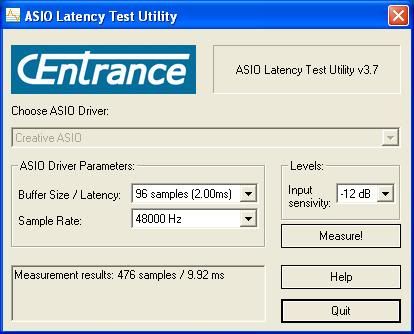 http://i777.photobucket.c...uckel/SBscreenshot.jpg http://i777.photobucket.c...uckel/SBscreenshot.jpg
Sonar X3e Studio - Waiting for Professional Scarlett 6i6Yamaha Gear= 01v - NSM 10 - DTX 400 - MG82cx Roland Gear= A 49- GR 50 - TR 505 - Boss pedalsTascam Gear= DR 40 - US1641 -Mackie Gear= Mix 8 - SRM 350's i5 Z97 3.2GHZ quad 16 Gig RAM W 8.1 home buildTaylor mini GS - G& L Tribute Tele - 72 Fender Princeton - TC BH 250 - Mooer and Outlaw Pedals Korg 05/RW
|
Jim Roseberry
Max Output Level: 0 dBFS
- Total Posts : 9871
- Joined: 2004/03/23 11:34:51
- Location: Ohio
- Status: offline
Re:Real Time Latency Testing
2010/09/16 16:21:16
(permalink)
So one thing the RTL test utility does not do is test the digital in / out ! Now that takes the converters out of the equation right? I guess I could test it by patching in my 01V. Yes, that would take the A/D and D/A out of the equation... But... you'd still have latency from the O1V's converters (or whatever converters you use). No way to avoid it... That said, the A/D D/A at most contribute 2ms to RTL... so they're not the biggest factor. The problem with typical audio interfaces is the large/hidden safety buffer (of which you have no control). BTW, Even if the audio interface provides low RTL, the design/drivers need to be up to the task. Otherwise, the setting will be useless (glitches/garbled audio).
|
brundlefly
Max Output Level: 0 dBFS
- Total Posts : 14250
- Joined: 2007/09/14 14:57:59
- Location: Manitou Spgs, Colorado
- Status: offline
Re:Real Time Latency Testing
2010/09/16 17:14:17
(permalink)
So one thing the RTL test utility does not do is test the digital in / out It will if you can create the data loopback. My E-MU 1820m will do it via the Patchmix interface, and it lops 88 samples off the RTL. Just about 2ms like Jim said. All that's left are the buffers and another 8 samples for PCI bus I/O.
|
johnnyV
Max Output Level: -48.5 dBFS
- Total Posts : 2677
- Joined: 2010/02/22 11:46:33
- Location: Here, in my chair
- Status: offline
Re:Real Time Latency Testing
2010/09/16 21:55:57
(permalink)
My idea of using the 01v was stupid once I gave it a little more thought! Whats wrong with this picture kind of thing. I'm afraid the solution is as always $$$$$$$$$$$
COme on you Tascam and M Audio users , still no feedback from you and I'm offering free beer downstairs!
Sonar X3e Studio - Waiting for Professional Scarlett 6i6Yamaha Gear= 01v - NSM 10 - DTX 400 - MG82cx Roland Gear= A 49- GR 50 - TR 505 - Boss pedalsTascam Gear= DR 40 - US1641 -Mackie Gear= Mix 8 - SRM 350's i5 Z97 3.2GHZ quad 16 Gig RAM W 8.1 home buildTaylor mini GS - G& L Tribute Tele - 72 Fender Princeton - TC BH 250 - Mooer and Outlaw Pedals Korg 05/RW
|
myconsumerclub
Max Output Level: -82 dBFS

- Total Posts : 410
- Joined: 2007/07/09 23:39:46
- Status: offline
Re:Real Time Latency Testing
2015/02/09 11:14:23
(permalink)
dawbench.com tests interfaces for RTL
Samsung I7 8 mb ram windows 8 64 bit on everything x2 & X1 producer line 6 podfarm gold interface event monitors Ibanez rg 350 guitar and GA6CE classical edirol pcr 500 keystation 88 plugins out the wazoo
|
brundlefly
Max Output Level: 0 dBFS
- Total Posts : 14250
- Joined: 2007/09/14 14:57:59
- Location: Manitou Spgs, Colorado
- Status: offline
Re:Real Time Latency Testing
2015/02/09 11:59:42
(permalink)
Warning: Ancient thread that probably does not need any more responses.
SONAR Platinum x64, 2x MOTU 2408/PCIe-424 (24-bit, 48kHz) Win10, I7-6700K @ 4.0GHz, 24GB DDR4, 2TB HDD, 32GB SSD Cache, GeForce GTX 750Ti, 2x 24" 16:10 IPS Monitors
|