ElRoc0 Tha Gr81
Max Output Level: -84 dBFS

- Total Posts : 309
- Joined: 2004/05/09 21:13:40
- Location: South Chi
- Status: offline

Re: Tweaking your system??
2013/12/14 21:33:32
(permalink)
http://twitter.com/RocHardEntGrp http://www.SoundCloud.com/RocHardEntGrp i7 3.5 quadcore, TridentX 32gb, Sonar x2 & X3e, Project 5, RME Fireface 800, FW-1884,, Tranzport, Presonus, Aphex, Alesis, 2 Panasonic Ramsa DA-7's, Waves Diamond, Komplete 9, MV88, MPC2K, Fantom X7, Liquidmix, Tama, Ibanez, Line 6, Hartke, Boss, RME, Behringer ADA8K, washburn, TD8, AKG, Shure, Neuman, Sennheiser
|
robert_e_bone
Moderator

- Total Posts : 8968
- Joined: 2007/12/26 22:09:28
- Location: Palatine, IL
- Status: offline
Re: Tweaking your system??
2013/12/14 22:29:43
(permalink)
☄ Helpfulby Five0SixBand 2013/12/14 23:00:47
I see little tiny picture placeholders, but no images. Not sure why that is.
So, please list the following:
1. Driver Mode (from Preferences>Audio>Playback and Recording)
2. Record Bit-Depth (from Preferences>File>Audio Data)
3. Playback Timing Master (from Preferences>Audio>Driver Settings)
4. Record Timing Master (from Preferences>Audio>Driver Settings)
5. Sampling Rate in Sonar (from Preferences>Audio>Driver Settings)
6. ASIO Reported Latencies (from Preferences>Audio>Driver Settings)
7. Input Drivers - the selected ones (Preferences>Audio>Devices)
8. Output Drivers - the selected ones (Preferences>Audio>Devices)
9. Sample Rate as it is currently set on your audio interface
10. ASIO Buffer Size as it is currently set on your audio interface
11. The exact model of your audio interface
12. The version of your audio interface drivers
You say you are able to listen to other songs - are those played through the same single audio interface? I just want to make sure that the interface itself is able to play songs outside of Sonar.
Also, when you did your testing, did you have your other interfaces completely disconnected?
I really do not understand why this interface does not work in X3.
By chance, did you perform the same test with the same single interface and same settings, in X2? I would like to try to isolate the issues to a Sonar X3 thing, and if the same settings and interface hardware hookup works with X2, than that would be helpful to know.
Thanks for your patience - I am hoping someone else can jump in with some ideas on how to figure this out, as well.
I tried to send you a private message with my email address, so you could send me the screen shots you posted that I cannot seem to see, but the system said you either cannot or will not accept private messages, so I guess that option's out.
Anyways, I will try to help you figure this out.
What happens if you use one of the other audio interfaces instead - just for testing in the same manner.
Bob Bone
Wisdom is a giant accumulation of "DOH!" Sonar: Platinum (x64), X3 (x64) Audio Interfaces: AudioBox 1818VSL, Steinberg UR-22 Computers: 1) i7-2600 k, 32 GB RAM, Windows 8.1 Pro x64 & 2) AMD A-10 7850 32 GB RAM Windows 10 Pro x64 Soft Synths: NI Komplete 8 Ultimate, Arturia V Collection, many others MIDI Controllers: M-Audio Axiom Pro 61, Keystation 88es Settings: 24-Bit, Sample Rate 48k, ASIO Buffer Size 128, Total Round Trip Latency 9.7 ms
|
ElRoc0 Tha Gr81
Max Output Level: -84 dBFS
- Total Posts : 309
- Joined: 2004/05/09 21:13:40
- Location: South Chi
- Status: offline
Re: Tweaking your system??
2013/12/14 22:35:30
(permalink)
That's weird they're huge pics on my screen so huge I was thinking of re-sizing. I will email them to you
http://twitter.com/RocHardEntGrp http://www.SoundCloud.com/RocHardEntGrp i7 3.5 quadcore, TridentX 32gb, Sonar x2 & X3e, Project 5, RME Fireface 800, FW-1884,, Tranzport, Presonus, Aphex, Alesis, 2 Panasonic Ramsa DA-7's, Waves Diamond, Komplete 9, MV88, MPC2K, Fantom X7, Liquidmix, Tama, Ibanez, Line 6, Hartke, Boss, RME, Behringer ADA8K, washburn, TD8, AKG, Shure, Neuman, Sennheiser
|
ElRoc0 Tha Gr81
Max Output Level: -84 dBFS
- Total Posts : 309
- Joined: 2004/05/09 21:13:40
- Location: South Chi
- Status: offline
Re: Tweaking your system??
2013/12/15 00:35:28
(permalink)
robert_e_bone
So, please list the following:
1. Driver Mode (from Preferences>Audio>Playback and Recording)
ASIO
2. Record Bit-Depth (from Preferences>File>Audio Data)
32
3. Playback Timing Master (from Preferences>Audio>Driver Settings)
1. ASIO Fireface Analog 1 (1)
4. Record Timing Master (from Preferences>Audio>Driver Settings)
1. ASIO Fireface Analog 1 (1)
5. Sampling Rate in Sonar (from Preferences>Audio>Driver Settings)
44100
6. ASIO Reported Latencies (from Preferences>Audio>Driver Settings)
Input 6.8 msec, 301 samples
Output 8.0 msec, 352 samples
Total Roundtrip: 14.8 msec, 653 samples
7. Input Drivers - the selected ones (Preferences>Audio>Devices)
ASIO Fireface Analog, Spdif & ADAT only the left & odd numbers tho??
8. Output Drivers - the selected ones (Preferences>Audio>Devices)
ASIO Fireface Analog, Spdif & ADAT only the left & odd numbers
9. Sample Rate as it is currently set on your audio interface
44.1
10. ASIO Buffer Size as it is currently set on your audio interface
256
11. The exact model of your audio interface
RME Fireface 800
12. The version of your audio interface drivers
Driver version 3.080
Driver date: 10-09-13
Harware Revision: 2.77
Enable MMCSS for ASIO?
You say you are able to listen to other songs - are those played through the same single audio interface?
Yes
I just want to make sure that the interface itself is able to play songs outside of Sonar.
Yes
Also, when you did your testing, did you have your other interfaces completely disconnected?
No
I really do not understand why this interface does not work in X3.
Nor do I. It should
By chance, did you perform the same test with the same single interface and same settings, in X2?
No, Everything works in X2 so I had no need to change any thing. When things are working well I'm extremely hesitant to change anything fror fear of messing something up.
I would like to try to isolate the issues to a Sonar X3 thing, and if the same settings and interface hardware hookup works with X2, than that would be helpful to know.
Thanks for your patience - I am hoping someone else can jump in with some ideas on how to figure this out, as well.
The more helpful input the better.
I tried to send you a private message with my email address, so you could send me the screen shots you posted that I cannot seem to see, but the system said you either cannot or will not accept private messages, so I guess that option's out.
Changed.
Anyways, I will try to help you figure this out.
Thank you sincerely!
What happens if you use one of the other audio interfaces instead - just for testing in the same manner.
Trying to change my interface to the FW-1884 now. Didn't save.
Bob Bone
http://twitter.com/RocHardEntGrp http://www.SoundCloud.com/RocHardEntGrp i7 3.5 quadcore, TridentX 32gb, Sonar x2 & X3e, Project 5, RME Fireface 800, FW-1884,, Tranzport, Presonus, Aphex, Alesis, 2 Panasonic Ramsa DA-7's, Waves Diamond, Komplete 9, MV88, MPC2K, Fantom X7, Liquidmix, Tama, Ibanez, Line 6, Hartke, Boss, RME, Behringer ADA8K, washburn, TD8, AKG, Shure, Neuman, Sennheiser
|
robert_e_bone
Moderator
- Total Posts : 8968
- Joined: 2007/12/26 22:09:28
- Location: Palatine, IL
- Status: offline
Re: Tweaking your system??
2013/12/15 04:27:42
(permalink)
I really do not understand why you are not getting sound playback through Sonar using the 1 interface. I do not know if there is an issue with there being the other interfaces present because you did not temporarily disconnect them (I was wishing you would, just to get it TRULY down to 1 interface connected to your computer). If you for the moment discard the testing I was trying to get you to do, and go back to your 3-interface setup with WDM drivers, perhaps there is a way to get it to work better on the dropouts. I did notice your Playback I/O and Record I/O Buffers were set to 256 each. I believe this has been reported as being too small - it apparently used to be larger and at some point was dropped back to 256 for some reason. (I think this to be the case, but my brain is quite fuzzy on this point). I suggest you go to Preferences>Audio>Sync and Caching, and adjust the Playback I/O Buffer Size and the Record I/O Buffer Size to both be 512. Here is the relevant text from the Sonar documentation on these 2 parameters: I/O Buffer Size. This value determines the buffer characteristics for transfers to and from the disk. Changing this value does not affect audio latency, but will affect the disk throughput for audio tracks. The default setting is 128. A higher value causes more audio to be buffered from the disk ahead of the playback cursor. If you are hearing consistent dropouts/clicks in your audio and if your project contains high bit depth (32/64 bit) or high sample rate audio (88.2K or higher), it may be indicative of a too small I/O buffer size. If so, try a higher I/O buffer size like 256 or 512. If audio problems persist, reset to 128 and try a different remedy.Also, if you are playing a large file, and using maximum latency, a too-small I/O buffer size may cause dropouts or crashes. Try increasing the buffer size by blocks of 128. Here is the link where I got the above text snippet from: http://www.cakewalk.com/Documentation/default.aspx?Doc=SONAR%20X2&Lang=EN&Req=Dialogs2.056.html Here is a link to a forum thread that talks about making the switch to 512 for these buffers: http://forum.cakewalk.com/Cakewalk-buffer-size-is-512-good-m1264520.aspx Also, please detail the exact FireWire card you have installed for this interface. I am primarily interested in the chip set that it uses. Lots of folks have had lots of troubles over the years due to FireWire being quite sensitive to the chip sets on the cards. I believe Texas Instruments chip sets seem to be the preferred ones that I keep seeing posted in forum threads. I would suggest you record with 24-bit record bit-depth, at a sample rate of either 44.1 k or 48 k, and try to adjust things so that your total roundtrip latency is at or less than 10 milliseconds. (As a separate note, regarding your settings when you tested using ASIO, you had additionally reported using an ASIO Buffer Size of 256 - I found when using ASIO that I could go as low as 64, but that ran a bit too close and some dropouts would sometimes occur, so I raised to 128. I think if the ASIO Buffer Size is too high, that this too can cause dropouts to occur) By the way - I checked your driver download version against the latest released version on the RME web site, and your drivers are NOT the latest ones. You reported using driver version 3.080, and there was a newer one released on 11/23/2013, which is version 3.081. PLEASE NOTE that this also requires you to be on the latest firmware version. I do not know if you not having the latest drivers affected your ability to hear sound through Sonar in the testing I had you do. IF I have the right interface located on the RME site, here is the link to the driver downloads page for the RME FireFace 800: http://www.rme-audio.de/en_downloads.php?page=content/downloads/en_downloads_driver&subpage=content/downloads/en_downloads_driver_fireface It MIGHT be worth updating to the newer driver, and repeating the tests I had asked you to do (and this time if you do it, please temporarily remove the other interfaces completely - meaning physically disconnect them). Bob Bone
Wisdom is a giant accumulation of "DOH!" Sonar: Platinum (x64), X3 (x64) Audio Interfaces: AudioBox 1818VSL, Steinberg UR-22 Computers: 1) i7-2600 k, 32 GB RAM, Windows 8.1 Pro x64 & 2) AMD A-10 7850 32 GB RAM Windows 10 Pro x64 Soft Synths: NI Komplete 8 Ultimate, Arturia V Collection, many others MIDI Controllers: M-Audio Axiom Pro 61, Keystation 88es Settings: 24-Bit, Sample Rate 48k, ASIO Buffer Size 128, Total Round Trip Latency 9.7 ms
|
Blades
Max Output Level: -43 dBFS

- Total Posts : 3246
- Joined: 2003/11/06 08:22:52
- Location: Georgia
- Status: offline
Re: Tweaking your system??
2013/12/15 08:34:29
(permalink)
☄ Helpfulby Five0SixBand 2013/12/15 19:12:57
Jumping into the fray a bit late...
So if you are hearing sound through that same interface while outside of Sonar from places like Youtube, that means you must have it set as the default sound card to use for Windows sounds. Correct?
How about you change that to either point Windows to the onboard sound or None while you try to figure this out. Sounds like Windows might be hogging the driver up and preventing Sonar from using it.
|
Sir Les
Max Output Level: -67 dBFS

- Total Posts : 1182
- Joined: 2012/07/09 04:56:19
- Location: MONTREAL, QUEBEC, CANADA,
- Status: offline
Re: Tweaking your system??
2013/12/15 09:08:55
(permalink)
Hi...in the mixer control pannel view, on the "master output", what device output is selected?...as I have noted here at times, that sometimes it is not set correctly and needs to be done there as well sometimes...
Just trying to be helpful...
1. Intel 5960x 3.5mhz , ASUS x99 deluxe u3.1, Asus Thunderbolt ex II, G skills f4 3000 Memory 32GB , ADATA ssd 250GB Main Drive, Lots of WD Red 7200 Mechanical Drives with Black Drives, 14x multi optical Drive, LG Multi Blu Drive, 2X Extern WD Mybooks usb 3.0, AMD r7 270 video card, Motu 828x TB , Motu Midi XT. 2. USING MAC PRO, as win 10 has damaged 2 x99 systems 8.1 is also to blame for the final burnout trying to roll back! 3. Something Wonderful: https://1drv.ms/f/s!AlHkRy9cXBbYpQNvVBCt8r7fQ5PS
|
robert_e_bone
Moderator
- Total Posts : 8968
- Joined: 2007/12/26 22:09:28
- Location: Palatine, IL
- Status: offline
Re: Tweaking your system??
2013/12/15 09:41:20
(permalink)
Thank you folks for jumping in to help on this.
I have to believe this is most likely from some kind of local environmental cause, and hopefully as such, it can be reasoned/tested through to a positive resolution.
I have never dealt with multiple audio interfaces running WDM, although as I am typing this I just realized that anyone who has left their on-board sound chips enabled while running WDM drivers in Sonar is pretty much doing something quite similar, and there have been other posts where folks have run with 2 interfaces and WDM.
I just do not for the life of me understand why a single interface running ASIO would not produce sound in Sonar, but would do so playing song files outside of Sonar.
At the same time, however, the test did NOT involve a single audio interface, as the other 2 were also left connected, so we thus far have not had a pristine test of the single interface running ASIO approach.
(I would like to see that test run with the other 2 interfaces physically disconnected from the computer, because quite frankly all kinds of folks have posted over the years how switching from WDM to ASIO magically made dropouts go away, and sine he is having dropouts while using WDM, testing under ASIO seems logical to me).
I had thought of the Windows default audio device question, but as it was around 4 AM, my brain and I were not on speaking terms, and I forgot to inquire. :)
And Sir Les, that was a good idea to ask about the selected output for Master in the console.
Bob Bone
Wisdom is a giant accumulation of "DOH!" Sonar: Platinum (x64), X3 (x64) Audio Interfaces: AudioBox 1818VSL, Steinberg UR-22 Computers: 1) i7-2600 k, 32 GB RAM, Windows 8.1 Pro x64 & 2) AMD A-10 7850 32 GB RAM Windows 10 Pro x64 Soft Synths: NI Komplete 8 Ultimate, Arturia V Collection, many others MIDI Controllers: M-Audio Axiom Pro 61, Keystation 88es Settings: 24-Bit, Sample Rate 48k, ASIO Buffer Size 128, Total Round Trip Latency 9.7 ms
|
ElRoc0 Tha Gr81
Max Output Level: -84 dBFS
- Total Posts : 309
- Joined: 2004/05/09 21:13:40
- Location: South Chi
- Status: offline
Re: Tweaking your system??
2013/12/17 22:27:25
(permalink)
Blades
Jumping into the fray a bit late...
So if you are hearing sound through that same interface while outside of Sonar from places like Youtube, that means you must have it set as the default sound card to use for Windows sounds. Correct?
Yes
How about you change that to either point Windows to the onboard sound or None while you try to figure this out. Sounds like Windows might be hogging the driver up and preventing Sonar from using it.
I changed it to one of the other interfaces (Motu). So back to trying to figure out why I'm getting no sound from the RME.
http://twitter.com/RocHardEntGrp http://www.SoundCloud.com/RocHardEntGrp i7 3.5 quadcore, TridentX 32gb, Sonar x2 & X3e, Project 5, RME Fireface 800, FW-1884,, Tranzport, Presonus, Aphex, Alesis, 2 Panasonic Ramsa DA-7's, Waves Diamond, Komplete 9, MV88, MPC2K, Fantom X7, Liquidmix, Tama, Ibanez, Line 6, Hartke, Boss, RME, Behringer ADA8K, washburn, TD8, AKG, Shure, Neuman, Sennheiser
|
ElRoc0 Tha Gr81
Max Output Level: -84 dBFS
- Total Posts : 309
- Joined: 2004/05/09 21:13:40
- Location: South Chi
- Status: offline
Re: Tweaking your system??
2013/12/17 22:34:56
(permalink)
Sir Les
Hi...in the mixer control pannel view, on the "master output", what device output is selected?...as I have noted here at times, that sometimes it is not set correctly and needs to be done there as well sometimes...
It is set to the RME Fireface Analog 1 (1)
Just trying to be helpful...
Please continue to chime in! Never know when something may click.
http://twitter.com/RocHardEntGrp http://www.SoundCloud.com/RocHardEntGrp i7 3.5 quadcore, TridentX 32gb, Sonar x2 & X3e, Project 5, RME Fireface 800, FW-1884,, Tranzport, Presonus, Aphex, Alesis, 2 Panasonic Ramsa DA-7's, Waves Diamond, Komplete 9, MV88, MPC2K, Fantom X7, Liquidmix, Tama, Ibanez, Line 6, Hartke, Boss, RME, Behringer ADA8K, washburn, TD8, AKG, Shure, Neuman, Sennheiser
|
ElRoc0 Tha Gr81
Max Output Level: -84 dBFS
- Total Posts : 309
- Joined: 2004/05/09 21:13:40
- Location: South Chi
- Status: offline
Re: Tweaking your system??
2013/12/17 23:01:41
(permalink)
I shut down, disconnected both other interfaces but that changed nothing as of yet. Going to try the RME forums also. I updated the drivers and just updated Sonar to X3d BTW... Firewire card is a Texas Instruments Chipset. Forgot to answer that.
post edited by Five0SixBand - 2013/12/18 23:25:05
http://twitter.com/RocHardEntGrp http://www.SoundCloud.com/RocHardEntGrp i7 3.5 quadcore, TridentX 32gb, Sonar x2 & X3e, Project 5, RME Fireface 800, FW-1884,, Tranzport, Presonus, Aphex, Alesis, 2 Panasonic Ramsa DA-7's, Waves Diamond, Komplete 9, MV88, MPC2K, Fantom X7, Liquidmix, Tama, Ibanez, Line 6, Hartke, Boss, RME, Behringer ADA8K, washburn, TD8, AKG, Shure, Neuman, Sennheiser
|
ElRoc0 Tha Gr81
Max Output Level: -84 dBFS
- Total Posts : 309
- Joined: 2004/05/09 21:13:40
- Location: South Chi
- Status: offline
Re: Tweaking your system??
2013/12/22 22:15:26
(permalink)
So this AM I booted up the PC forgot to turn on the RME & Motu first then powered up the RME and wallahhh there was sound? So played a few project, played with my soft synths all worked wjile in ASIO btw. So now I guess to figure out how to incorporate the Motu 828 into the mix. Seeing as tho all my hardware synths & drums are running into it.
http://twitter.com/RocHardEntGrp http://www.SoundCloud.com/RocHardEntGrp i7 3.5 quadcore, TridentX 32gb, Sonar x2 & X3e, Project 5, RME Fireface 800, FW-1884,, Tranzport, Presonus, Aphex, Alesis, 2 Panasonic Ramsa DA-7's, Waves Diamond, Komplete 9, MV88, MPC2K, Fantom X7, Liquidmix, Tama, Ibanez, Line 6, Hartke, Boss, RME, Behringer ADA8K, washburn, TD8, AKG, Shure, Neuman, Sennheiser
|
mudgel
Max Output Level: 0 dBFS

- Total Posts : 12010
- Joined: 2004/08/13 00:56:05
- Location: Linton Victoria (Near Ballarat)
- Status: offline
Re: Tweaking your system??
2013/12/23 04:41:12
(permalink)
☄ Helpfulby Five0SixBand 2013/12/23 18:47:25
Windows sounds run 16 bit at most and 44.1khz sample rate and CANT use ASIO drivers. If you have windows set to use a particular sound card then it no longer becomes available to Sonar if it's set to use ASIO.
WDM drivers will allow several devices to run concurrently. But it does create the problem of synchronisation between the various hardware devices. A chain of SP/DIF I/O can send and receive the necessary clock settings but can be problematic. Bad synchronisation will result in jitter, drop outs and and a slew of issues not worth the trouble of going through.
This is just some info I hadn't seen in the previous threads, though I could have missed it.
Mike V. (MUDGEL) STUDIO: Win 10 Pro x64, SPlat & CbB x64, PC: ASUS Z370-A, INTEL i7 8700k, 32GIG DDR4 2400, OC 4.7Ghz. Storage: 7 TB SATA III, 750GiG SSD & Samsung 500 Gig 960 EVO NVMe M.2. Monitors: Adam A7X, JBL 10” Sub. Audio I/O & DSP Server: DIGIGRID IOS & IOX. Screen: Raven MTi + 43" HD 4K TV Monitor. Keyboard Controller: Native Instruments Komplete Kontrol S88.
|
ElRoc0 Tha Gr81
Max Output Level: -84 dBFS
- Total Posts : 309
- Joined: 2004/05/09 21:13:40
- Location: South Chi
- Status: offline
Re: Tweaking your system??
2013/12/23 21:06:53
(permalink)
mudgel
Windows sounds run 16 bit at most and 44.1khz sample rate and CANT use ASIO drivers. If you have windows set to use a particular sound card then it no longer becomes available to Sonar if it's set to use ASIO.
Thanks did not know this. I only had it ASIO Bob Boone wanted to make sure of functionality while helping solve my issues. Now that we know it works fine I need to get it back to WDM drivers and get all 3 functioning.
WDM drivers will allow several devices to run concurrently. But it does create the problem of synchronisation between the various hardware devices. A chain of SP/DIF I/O can send and receive the necessary clock settings but can be problematic. Bad synchronisation will result in jitter, drop outs and and a slew of issues not worth the trouble of going through.
If I get the sync issues I have BNC 75ohm to lock it all to either my console or the RME if need be. But I am using them all in Sonar but for separate uses. The 828mk2 is for my hardware synths & drum machines etc.. The RME is for all my Vocals and live instrumentation and the FW-1884 is if I add any more out board gear. But for now I need the RME & Motu functioning properly.
This is just some info I hadn't seen in the previous threads, though I could have missed it.
Great info! Please contribute as possible I have much to learn and fast as possible.
Thanks!
http://twitter.com/RocHardEntGrp http://www.SoundCloud.com/RocHardEntGrp i7 3.5 quadcore, TridentX 32gb, Sonar x2 & X3e, Project 5, RME Fireface 800, FW-1884,, Tranzport, Presonus, Aphex, Alesis, 2 Panasonic Ramsa DA-7's, Waves Diamond, Komplete 9, MV88, MPC2K, Fantom X7, Liquidmix, Tama, Ibanez, Line 6, Hartke, Boss, RME, Behringer ADA8K, washburn, TD8, AKG, Shure, Neuman, Sennheiser
|
mudgel
Max Output Level: 0 dBFS
- Total Posts : 12010
- Joined: 2004/08/13 00:56:05
- Location: Linton Victoria (Near Ballarat)
- Status: offline
Re: Tweaking your system??
2013/12/24 19:34:13
(permalink)
You don't play all those instruments simultaneously do you? It seems more like you want everything permanently connected in which case you'd be better off with using your best interface together with some AD converters. I have an RME FF800 and can connect 28 audio channels simultaneously just by using 2 ADAT devices for additional input. Only. 1 driver and 1 device as far as my DAW is concerned
You will need to connect all your clock I/O so that all devices are synchronised. There is still no guarantee that each device's drivers will let them cooperate fully. All drivers are not created equal. Sometimes the WDM/KS drivers are OK, however, in most cases, ASIO drivers are the most stable and generally preferred for providing lower latency.
Mike V. (MUDGEL) STUDIO: Win 10 Pro x64, SPlat & CbB x64, PC: ASUS Z370-A, INTEL i7 8700k, 32GIG DDR4 2400, OC 4.7Ghz. Storage: 7 TB SATA III, 750GiG SSD & Samsung 500 Gig 960 EVO NVMe M.2. Monitors: Adam A7X, JBL 10” Sub. Audio I/O & DSP Server: DIGIGRID IOS & IOX. Screen: Raven MTi + 43" HD 4K TV Monitor. Keyboard Controller: Native Instruments Komplete Kontrol S88.
|
ElRoc0 Tha Gr81
Max Output Level: -84 dBFS
- Total Posts : 309
- Joined: 2004/05/09 21:13:40
- Location: South Chi
- Status: offline
Re: Tweaking your system??
2013/12/24 21:26:01
(permalink)
I understand your point. I just do not understand why this set up worked so well in X2 but not X3.
http://twitter.com/RocHardEntGrp http://www.SoundCloud.com/RocHardEntGrp i7 3.5 quadcore, TridentX 32gb, Sonar x2 & X3e, Project 5, RME Fireface 800, FW-1884,, Tranzport, Presonus, Aphex, Alesis, 2 Panasonic Ramsa DA-7's, Waves Diamond, Komplete 9, MV88, MPC2K, Fantom X7, Liquidmix, Tama, Ibanez, Line 6, Hartke, Boss, RME, Behringer ADA8K, washburn, TD8, AKG, Shure, Neuman, Sennheiser
|
kellerpj
Max Output Level: -85 dBFS

- Total Posts : 287
- Joined: 2003/12/05 00:25:05
- Status: offline
Re: Tweaking your system??
2013/12/27 13:41:33
(permalink)
Bob:
The "Minimum Processor State tweak" made a BIG difference in my setup. I am able to reliably bring down the reported total round trip latency to a ridiculously low 6.2 ms. I can finally do real time audio tracking with effects with input echo enabled.
Thanks so much for this information,
Paul
|
Splat 
Max Output Level: 0 dBFS
- Total Posts : 8672
- Joined: 2010/12/29 15:28:29
- Location: Mars.
- Status: offline
Re: Tweaking your system??
2013/12/27 14:41:18
(permalink)
robert_e_bone
That setting is under the advanced settings for Power Management. One person has reported that they do not have that option, but I have always found it in the above settings.
Control Panel\System and Security\Power Options\Edit Plan Settings - then click on Change Advanced Power Settings, then under the High Performance Power Plan, expand the 'Processor Power Management' group, and you will see the Minimum Processor State option - set that to 100%.
Hope that helps,
Bob Bone
In Windows 7 it's called Processor Performance Core park Min Core. It's in the same area as specified by Bob. If you can't see it Run Windows update several times, including the optional fixes. The person who can't see it probably needs to do this... If you still can't see it there is a registry hack (google it). You don't need to worry about core parking being turned off in the BIOS if this setting is applied. Cheers.. Alex
Sell by date at 9000 posts. Do not feed. @48/24 & 128 buffers latency is 367 with offset of 38. Sonar Platinum(64 bit),Win 8.1(64 bit),Saffire Pro 40(Firewire),Mix Control = 3.4,Firewire=VIA,Dell Studio XPS 8100(Intel Core i7 CPU 2.93 Ghz/16 Gb),4 x Seagate ST31500341AS (mirrored),GeForce GTX 460,Yamaha DGX-505 keyboard,Roland A-300PRO,Roland SPD-30 V2,FD-8,Triggera Krigg,Shure SM7B,Yamaha HS5.Maschine Studio+Komplete 9 Ultimate+Kontrol Z1.Addictive Keys,Izotope Nectar elements,Overloud Bundle,Geist.Acronis True Image 2014.
|
robert_e_bone
Moderator
- Total Posts : 8968
- Joined: 2007/12/26 22:09:28
- Location: Palatine, IL
- Status: offline
Re: Tweaking your system??
2013/12/27 22:25:04
(permalink)
kellerpj
Bob:
The "Minimum Processor State tweak" made a BIG difference in my setup. I am able to reliably bring down the reported total round trip latency to a ridiculously low 6.2 ms. I can finally do real time audio tracking with effects with input echo enabled.
Thanks so much for this information,
Paul
FANTASTIC news! @Alex, after Sir Les had reported from a prior thread that he did not have the Processor Power Management (where the Minimum Processor State and Maximum Processor State are found), I went to a Windows 7 machine I used to use as my primary DAW, and it was also labelled the same as it is for me in Windows 8. I am wondering if that naming difference is something in one of the multiple flavors of Windows 7 (Home, Premium, Professional, Ultimate, Super Duper, New and Improved, Wowzer Dowzer). - I don't recall what the flavors were called - please forgive me for substituting drivel. The point is that perhaps its name varies among Windows 7 versions, and that is why Sir Les did not have it under the name I gave him, and perhaps why it is under the name Alex has supplied. Bob Bone
Wisdom is a giant accumulation of "DOH!" Sonar: Platinum (x64), X3 (x64) Audio Interfaces: AudioBox 1818VSL, Steinberg UR-22 Computers: 1) i7-2600 k, 32 GB RAM, Windows 8.1 Pro x64 & 2) AMD A-10 7850 32 GB RAM Windows 10 Pro x64 Soft Synths: NI Komplete 8 Ultimate, Arturia V Collection, many others MIDI Controllers: M-Audio Axiom Pro 61, Keystation 88es Settings: 24-Bit, Sample Rate 48k, ASIO Buffer Size 128, Total Round Trip Latency 9.7 ms
|
Splat
Max Output Level: 0 dBFS
- Total Posts : 8672
- Joined: 2010/12/29 15:28:29
- Location: Mars.
- Status: offline
Re: Tweaking your system??
2013/12/27 22:30:24
(permalink)
Well I had to do a registry hack as originally it wasn't available to me (at the time), so I'm thinking later down the line Windows update introduced the functionality to the masses (when it became fully baked). So maybe there's a difference between reghackers and those who had it laid out in front of them..?
Sell by date at 9000 posts. Do not feed. @48/24 & 128 buffers latency is 367 with offset of 38. Sonar Platinum(64 bit),Win 8.1(64 bit),Saffire Pro 40(Firewire),Mix Control = 3.4,Firewire=VIA,Dell Studio XPS 8100(Intel Core i7 CPU 2.93 Ghz/16 Gb),4 x Seagate ST31500341AS (mirrored),GeForce GTX 460,Yamaha DGX-505 keyboard,Roland A-300PRO,Roland SPD-30 V2,FD-8,Triggera Krigg,Shure SM7B,Yamaha HS5.Maschine Studio+Komplete 9 Ultimate+Kontrol Z1.Addictive Keys,Izotope Nectar elements,Overloud Bundle,Geist.Acronis True Image 2014.
|
robert_e_bone
Moderator
- Total Posts : 8968
- Joined: 2007/12/26 22:09:28
- Location: Palatine, IL
- Status: offline
Re: Tweaking your system??
2013/12/27 23:12:03
(permalink)
A fine question - I have always found those parameters - for several different desktops I have built - I thought I had them in XP Pro, as well, but my brain is a bit fuzzy on that.
When I also had found a web site with literally screen shots that matched what I had on both my Windows 8 machine and my Windows 7 machine, I felt confident in stating that those parameters should be present - but for Sir Les, they seem to have NOT been there. I have NO explanation for that.
Bob Bone
Wisdom is a giant accumulation of "DOH!" Sonar: Platinum (x64), X3 (x64) Audio Interfaces: AudioBox 1818VSL, Steinberg UR-22 Computers: 1) i7-2600 k, 32 GB RAM, Windows 8.1 Pro x64 & 2) AMD A-10 7850 32 GB RAM Windows 10 Pro x64 Soft Synths: NI Komplete 8 Ultimate, Arturia V Collection, many others MIDI Controllers: M-Audio Axiom Pro 61, Keystation 88es Settings: 24-Bit, Sample Rate 48k, ASIO Buffer Size 128, Total Round Trip Latency 9.7 ms
|
Splat
Max Output Level: 0 dBFS
- Total Posts : 8672
- Joined: 2010/12/29 15:28:29
- Location: Mars.
- Status: offline
Re: Tweaking your system??
2013/12/27 23:24:27
(permalink)
, I felt confident in stating that those parameters should be present - but for Sir Les, they seem to have NOT been there. I have NO explanation for that.
10 to 1 he didn't run Windows Update fully, maybe he missed the optional updates as well....
Anyway there's the reg hack for the rest of us...
Sell by date at 9000 posts. Do not feed. @48/24 & 128 buffers latency is 367 with offset of 38. Sonar Platinum(64 bit),Win 8.1(64 bit),Saffire Pro 40(Firewire),Mix Control = 3.4,Firewire=VIA,Dell Studio XPS 8100(Intel Core i7 CPU 2.93 Ghz/16 Gb),4 x Seagate ST31500341AS (mirrored),GeForce GTX 460,Yamaha DGX-505 keyboard,Roland A-300PRO,Roland SPD-30 V2,FD-8,Triggera Krigg,Shure SM7B,Yamaha HS5.Maschine Studio+Komplete 9 Ultimate+Kontrol Z1.Addictive Keys,Izotope Nectar elements,Overloud Bundle,Geist.Acronis True Image 2014.
|
dubdisciple
Max Output Level: -17 dBFS

- Total Posts : 5849
- Joined: 2008/01/29 00:31:46
- Location: Seattle, Wa
- Status: offline
Re: Tweaking your system??
2013/12/27 23:40:05
(permalink)
I think his screen shots may give us a few answers. I tried right clicking on the images he attempted to post and they take me to a google error page. By any chance are the images hosted in your personal google account?
|
robert_e_bone
Moderator
- Total Posts : 8968
- Joined: 2007/12/26 22:09:28
- Location: Palatine, IL
- Status: offline
Re: Tweaking your system??
2013/12/28 01:56:25
(permalink)
Well, he is the second person to not have those parameters, so I would like to figure out where, when, and how they show up, so that I can better guide the next individual needing this particular assistance.
Bob Bone
Wisdom is a giant accumulation of "DOH!" Sonar: Platinum (x64), X3 (x64) Audio Interfaces: AudioBox 1818VSL, Steinberg UR-22 Computers: 1) i7-2600 k, 32 GB RAM, Windows 8.1 Pro x64 & 2) AMD A-10 7850 32 GB RAM Windows 10 Pro x64 Soft Synths: NI Komplete 8 Ultimate, Arturia V Collection, many others MIDI Controllers: M-Audio Axiom Pro 61, Keystation 88es Settings: 24-Bit, Sample Rate 48k, ASIO Buffer Size 128, Total Round Trip Latency 9.7 ms
|
Sir Les
Max Output Level: -67 dBFS
- Total Posts : 1182
- Joined: 2012/07/09 04:56:19
- Location: MONTREAL, QUEBEC, CANADA,
- Status: offline
Re: Tweaking your system??
2013/12/28 07:49:26
(permalink)
CakeAlexS
robert_e_bone
That setting is under the advanced settings for Power Management. One person has reported that they do not have that option, but I have always found it in the above settings.
Control Panel\System and Security\Power Options\Edit Plan Settings - then click on Change Advanced Power Settings, then under the High Performance Power Plan, expand the 'Processor Power Management' group, and you will see the Minimum Processor State option - set that to 100%.
Hope that helps,
Bob Bone
In Windows 7 it's called Processor Performance Core park Min Core. It's in the same area as specified by Bob.
If you can't see it Run Windows update several times, including the optional fixes. The person who can't see it probably needs to do this...
If you still can't see it there is a registry hack (google it).
You don't need to worry about core parking being turned off in the BIOS if this setting is applied.
Cheers..
Alex
I did update window 7 Professional to the tilt...and all drivers to the most recent...and when asked to do the Processor Performance Tweak in power management...The item specified by Bob to turn to 100%....Was not there...I posted the pic in that post Because you did not believe me...And still to this day, you continue to say something contray?...I will check into that registry ...But that goes beyond some peoples skill levels, and goes to show that Sonar X does not work out of the box with no tweaking....Just saying tweaking is being asked to do at a very high level of skill required if one has to edit registry entries...I was not asked to do any fixes...so..?..the system in my post and spec, is being refitted with new mb, cpu, mem, and thunderbolt ..and is tied up in RMA with Corsair....But thanks for chiming in, and remembering me...and a possible course of action for the new build outlook...
post edited by Sir Les - 2013/12/28 08:31:54
1. Intel 5960x 3.5mhz , ASUS x99 deluxe u3.1, Asus Thunderbolt ex II, G skills f4 3000 Memory 32GB , ADATA ssd 250GB Main Drive, Lots of WD Red 7200 Mechanical Drives with Black Drives, 14x multi optical Drive, LG Multi Blu Drive, 2X Extern WD Mybooks usb 3.0, AMD r7 270 video card, Motu 828x TB , Motu Midi XT. 2. USING MAC PRO, as win 10 has damaged 2 x99 systems 8.1 is also to blame for the final burnout trying to roll back! 3. Something Wonderful: https://1drv.ms/f/s!AlHkRy9cXBbYpQNvVBCt8r7fQ5PS
|
Sir Les
Max Output Level: -67 dBFS
- Total Posts : 1182
- Joined: 2012/07/09 04:56:19
- Location: MONTREAL, QUEBEC, CANADA,
- Status: offline
Re: Tweaking your system??
2013/12/28 08:46:54
(permalink)
Oh as for optional updates?, I did not do the "windows essential security package", ..cause I do not like those apps running in background for internet and security..so why install what one does not need.....As I do not use them features nor need to on that system..don't use internet,...unless asked to post info and such on forums..
I do not recall seeing other downloads...and win update stated all updated and no other ones necessary were posted, other than internet 11, which I did install and remove...and the Microsoft essentails...
If the picture I posted does not show up?...I tried...I cannot post it now cause the system is in pieces waiting for the new ... using photobucket I seem to have more success posting pictures/screen shots ...It seemed to work well on these forums, as apposed to Microsofts skydrive, which I may have used to post that instance, and not showing up as pictures, So I left links, and some other shots....sorry if that is the case....But the truth is there, or here, and can be reposted with much effort to rebuild...just to post a screen shot.
1. Intel 5960x 3.5mhz , ASUS x99 deluxe u3.1, Asus Thunderbolt ex II, G skills f4 3000 Memory 32GB , ADATA ssd 250GB Main Drive, Lots of WD Red 7200 Mechanical Drives with Black Drives, 14x multi optical Drive, LG Multi Blu Drive, 2X Extern WD Mybooks usb 3.0, AMD r7 270 video card, Motu 828x TB , Motu Midi XT. 2. USING MAC PRO, as win 10 has damaged 2 x99 systems 8.1 is also to blame for the final burnout trying to roll back! 3. Something Wonderful: https://1drv.ms/f/s!AlHkRy9cXBbYpQNvVBCt8r7fQ5PS
|
Sir Les
Max Output Level: -67 dBFS
- Total Posts : 1182
- Joined: 2012/07/09 04:56:19
- Location: MONTREAL, QUEBEC, CANADA,
- Status: offline
Re: Tweaking your system??
2013/12/28 09:15:35
(permalink)
What optional fixes are you referring to in win update?...when I click check for updates, it says "windows is up to date"...and I click check for updates, and the same message occurs...is there a different route to these fixes or optional downloads I am unaware of?
1. Intel 5960x 3.5mhz , ASUS x99 deluxe u3.1, Asus Thunderbolt ex II, G skills f4 3000 Memory 32GB , ADATA ssd 250GB Main Drive, Lots of WD Red 7200 Mechanical Drives with Black Drives, 14x multi optical Drive, LG Multi Blu Drive, 2X Extern WD Mybooks usb 3.0, AMD r7 270 video card, Motu 828x TB , Motu Midi XT. 2. USING MAC PRO, as win 10 has damaged 2 x99 systems 8.1 is also to blame for the final burnout trying to roll back! 3. Something Wonderful: https://1drv.ms/f/s!AlHkRy9cXBbYpQNvVBCt8r7fQ5PS
|
Sir Les
Max Output Level: -67 dBFS
- Total Posts : 1182
- Joined: 2012/07/09 04:56:19
- Location: MONTREAL, QUEBEC, CANADA,
- Status: offline
Re: Tweaking your system??
2013/12/28 09:25:27
(permalink)
 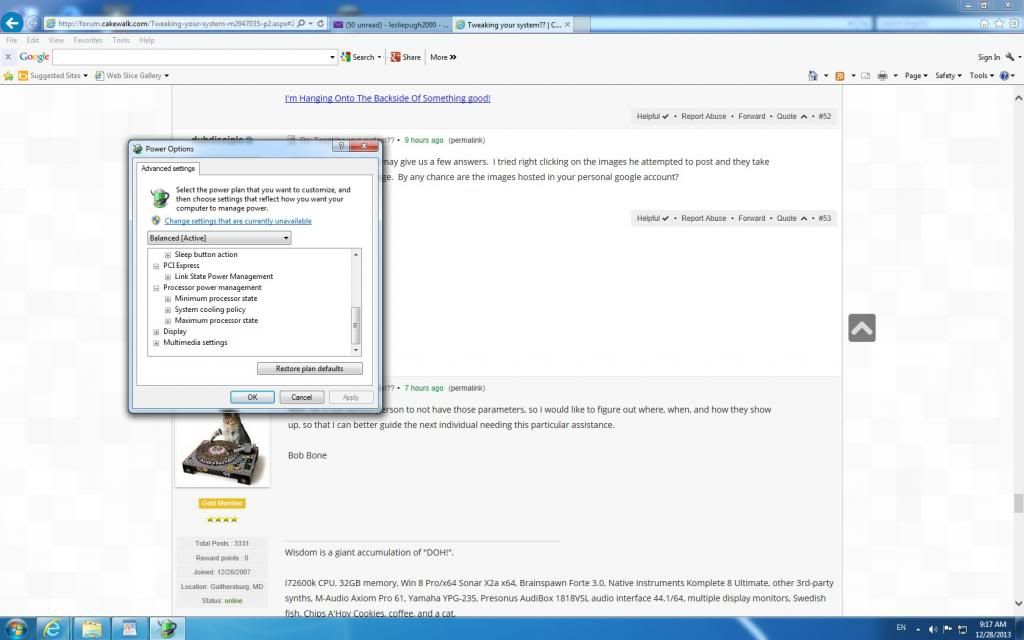 " /> This is my internet system power management...the item Alex is referencing is not there..about cores...But the Bob reference to turn up cpu to 100% is present, on this system.
1. Intel 5960x 3.5mhz , ASUS x99 deluxe u3.1, Asus Thunderbolt ex II, G skills f4 3000 Memory 32GB , ADATA ssd 250GB Main Drive, Lots of WD Red 7200 Mechanical Drives with Black Drives, 14x multi optical Drive, LG Multi Blu Drive, 2X Extern WD Mybooks usb 3.0, AMD r7 270 video card, Motu 828x TB , Motu Midi XT. 2. USING MAC PRO, as win 10 has damaged 2 x99 systems 8.1 is also to blame for the final burnout trying to roll back! 3. Something Wonderful: https://1drv.ms/f/s!AlHkRy9cXBbYpQNvVBCt8r7fQ5PS
|
Sir Les
Max Output Level: -67 dBFS
- Total Posts : 1182
- Joined: 2012/07/09 04:56:19
- Location: MONTREAL, QUEBEC, CANADA,
- Status: offline
Re: Tweaking your system??
2013/12/28 09:32:16
(permalink)
 " /> <iframe src="https://skydrive.live.com/embed?cid=D8165C5C2F47E451&resid=D8165C5C2F47E451%21111&authkey=AF7wI-yKprp54nU" width="320" height="200" frameborder="0" scrolling="no"></iframe> This is the link to the photo of the sabertooth system showing non of Bob's Nor Alex's references...I can not get the photo to work yet from sky drive...But this link should take you there to the photo without log in.
1. Intel 5960x 3.5mhz , ASUS x99 deluxe u3.1, Asus Thunderbolt ex II, G skills f4 3000 Memory 32GB , ADATA ssd 250GB Main Drive, Lots of WD Red 7200 Mechanical Drives with Black Drives, 14x multi optical Drive, LG Multi Blu Drive, 2X Extern WD Mybooks usb 3.0, AMD r7 270 video card, Motu 828x TB , Motu Midi XT. 2. USING MAC PRO, as win 10 has damaged 2 x99 systems 8.1 is also to blame for the final burnout trying to roll back! 3. Something Wonderful: https://1drv.ms/f/s!AlHkRy9cXBbYpQNvVBCt8r7fQ5PS
|
Splat
Max Output Level: 0 dBFS
- Total Posts : 8672
- Joined: 2010/12/29 15:28:29
- Location: Mars.
- Status: offline
Re: Tweaking your system??
2013/12/28 10:01:48
(permalink)
After you check for updates in Windows update you will see an optional update section.
Note what Bob and I are referring (the setting under power management) to is the same thing, just written differently in Windows. If you are seeing neither you need to google up the registry hack, it's up to you if you want to install it or not, but for me it was a difference between a workable system and not (wasn't a "nice to have").
When it comes to security I have a virus scanning running at all times, I just exclude certain folders. I will say if you don't have proper antivirus one day this will probably bite you (and you might never know about it), even if you have disabled your internet connection. If you are compromising security (and switching off features windows provides for this) because you are perceiving it will give you are performance increase, well good luck with that philosophy, may have worked in the last decade :) The malicious software removal tools Microsoft supplies with windows update are excellent BTW.
Sell by date at 9000 posts. Do not feed. @48/24 & 128 buffers latency is 367 with offset of 38. Sonar Platinum(64 bit),Win 8.1(64 bit),Saffire Pro 40(Firewire),Mix Control = 3.4,Firewire=VIA,Dell Studio XPS 8100(Intel Core i7 CPU 2.93 Ghz/16 Gb),4 x Seagate ST31500341AS (mirrored),GeForce GTX 460,Yamaha DGX-505 keyboard,Roland A-300PRO,Roland SPD-30 V2,FD-8,Triggera Krigg,Shure SM7B,Yamaha HS5.Maschine Studio+Komplete 9 Ultimate+Kontrol Z1.Addictive Keys,Izotope Nectar elements,Overloud Bundle,Geist.Acronis True Image 2014.
|