Cabbitt
Max Output Level: -88 dBFS

- Total Posts : 130
- Joined: 2009/06/23 12:29:52
- Status: offline
Upgrade
Hello all. I'm about to upgrade from 8.5.3 to X3 Producer, and wanted to make sure my PC can handle it. My specs seem to be OK, but I'm no computer guy, and wanted to draw on your expertise. Will this box run X3 smoothly? Thanks in advance. Regards, Bob 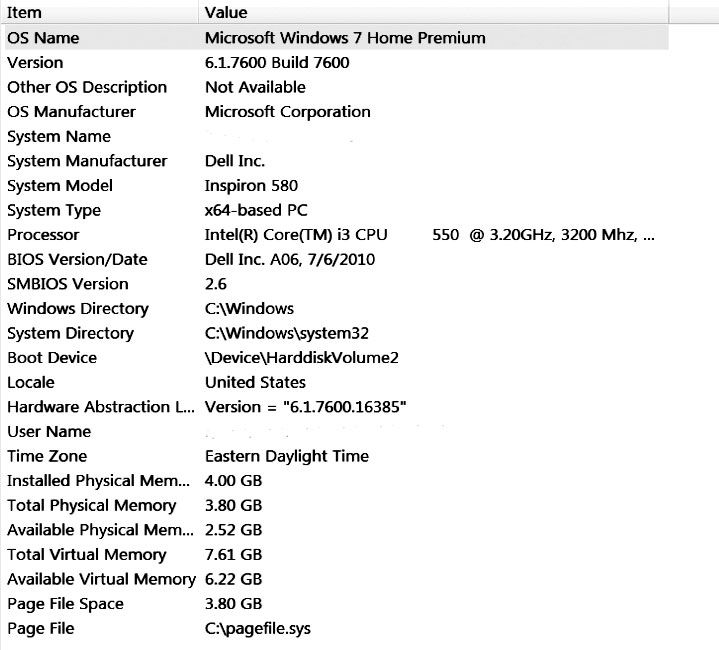 [/URL]
|
Sanderxpander
Max Output Level: -36.5 dBFS

- Total Posts : 3873
- Joined: 2013/09/30 10:08:24
- Status: offline
As with everything, it depends completely on what you'll be doing. Can you boot X3? Sure. Can you record audio and midi, and use a few fx and plugins, sure. Your RAM and CPU are limited for a modern DAW but you could definitely make music with it.
|
Cabbitt
Max Output Level: -88 dBFS
- Total Posts : 130
- Joined: 2009/06/23 12:29:52
- Status: offline
I'm not doing anything elaborate, but I do use samples and effects - so this computer isn't really up to it?
|
Cabbitt
Max Output Level: -88 dBFS
- Total Posts : 130
- Joined: 2009/06/23 12:29:52
- Status: offline
So, I guess I will just have to stick with 8.5.3. Can't see buying a new computer just to run one program. Bummer.
|
dlion16
Max Output Level: -83 dBFS

- Total Posts : 391
- Joined: 2007/03/08 15:21:55
- Location: East Quogue, NY
- Status: offline
if u can add another 4gb ram it will make a big difference...
SONAR Platinum Lifetime 64-bit; Focusrite Scarlett 6i6 2nd Gen.; KRK Rokit 5; ASUS P9X79; INTEL I7-3820 3.6 GHZ;850 WATT POWER SUPPLY; EVGA NVIDIA GTX560 TI 1GB;Windows 10 Home 64-bit; 32GB RAM;2 Internal SSD Drives, 3 External USB drives.
|
Sanderxpander
Max Output Level: -36.5 dBFS
- Total Posts : 3873
- Joined: 2013/09/30 10:08:24
- Status: offline
If 8.5.3 is running fine and you don't run into limits very often, going to X3 should be fine and give you somewhat similar performance.
|
FastBikerBoy
Forum Host

- Total Posts : 11326
- Joined: 2008/01/25 16:15:36
- Location: Watton, Norfolk, UK
- Status: offline
I'm with Sanderxpander. If you are running 8.5.3 okay going to X3 should be okay, although more horsepower never hurts of course.
|
bent4life
Max Output Level: -87 dBFS

- Total Posts : 176
- Joined: 2009/08/30 10:12:07
- Location: Japan
- Status: offline
I ran X1 and X2 on a system with similar specs with no problems. Used samples and effects (fairly modestly) and other programs as well. Like dlion16 says, I eventually added 4GB of RAM and things got faster. I agree with Sanderxpander that it should be OK.
Win 7 Pro x64; i7 3770k; 16GB RAM; Sonar Platinum; Moto Ultralite-mk4
|
Cabbitt
Max Output Level: -88 dBFS
- Total Posts : 130
- Joined: 2009/06/23 12:29:52
- Status: offline
Excellent. I will go ahead then. Will also shop for more RAM. Thanks everyone.
Regards,
Bob
|
Marcus Curtis
Max Output Level: -72 dBFS

- Total Posts : 945
- Joined: 2007/09/04 22:50:09
- Location: Tulsa
- Status: offline
It should work fine. Like everyone here has said more ram will speed things up. There are other things you can do to improve your performance. You can configure your computer to squeeze even more system resources from it.
Things like turning off apps that run in the background and turning off programs that start up that you don't need for recording help. Turning off the User Control Settings, power saving options and unplugging from the internet and turning off internet apps that run in the background will help you get more performance.
I did these types of things with with a computer with similar system specs and got better performance from X1 and X2.
This really helps when using CPU intensive programs as it frees up system resources.
http://www.marcuscurtismusic.com/ Windows 10 ultimate, Sonar Platinum, AMD Phenom 2 x6 1075T processor 3.00 GHz, (6 cores) 8 gigs of Ram, Audio interfaces=VS-100, Pod X3 live pro, Boss GT-100, Boss GP10 Midi Controllers=Edirol PCR 800, roland GR-55. Ozone 7, Podfarm, Th2 Full Version, Melda, True Pianos Full Version, and a whole bunch of free VST plugins which can be found through my site.
|
Cabbitt
Max Output Level: -88 dBFS
- Total Posts : 130
- Joined: 2009/06/23 12:29:52
- Status: offline
Thanks Marcus. I've already turned off all of that junk, and this computer has never been connected to the net. I will double check though in case I've missed anything.
You guys have been a great help.
Regards,
Bob
|
stevec
Max Output Level: 0 dBFS

- Total Posts : 11546
- Joined: 2003/11/04 15:05:54
- Location: Parkesburg, PA
- Status: offline
With that additional 4GB of RAM you should be just fine. I'm running X3 on a Q9300 2.5 GHz with 8GB RAM, under Win7 x64, and SONAR runs well with multiple softsynths, FX, audio tracks, etc. So with an i3 I'd imagine you'd be at or just above the performance I'm getting.
Just be prepared for the UI and workflow changes, because that's where you're likely to see the most difference when compared to 8.5. Just give it some time and use any and all learning materials available. It's certainly different, but for many (most?) of us it surpasses the "classic" editions by a long shot in most areas.
SteveC https://soundcloud.com/steve-cocchi http://www.soundclick.com/bands/pagemusic.cfm?bandID=39163 SONAR Platinum x64, Intel Q9300 (2.5Ghz), Asus P5N-D, Win7 x64 SP1, 8GB RAM, 1TB internal + ESATA + USB Backup HDDs, ATI Radeon HD5450 1GB RAM + dual ViewSonic VA2431wm Monitors; Focusrite 18i6 (ASIO); Komplete 9, Melodyne Studio 4, Ozone 7 Advanced, Rapture Pro, GPO5, Valhalla Plate, MJUC comp, MDynamic EQ, lots of other freebie VST plugins, synths and Kontakt libraries
|
Sanderxpander
Max Output Level: -36.5 dBFS
- Total Posts : 3873
- Joined: 2013/09/30 10:08:24
- Status: offline
Just to explain my initial comment; most modern DAWs in a pro studio are more near the top end of the spectrum. At least 8GB of RAM and usually 16+, running i7 quad cores or higher. So, your system is modest compared to serious modern DAW PCs. But then, you may not often need 150 audio tracks or 200 simultaneous plugs. Your Sonar 8.5 performance is probably the best thing to judge how X3 will do. It shouldn't be much different in itself, as it depends more on the plugins and instruments you use.
|
Cabbitt
Max Output Level: -88 dBFS
- Total Posts : 130
- Joined: 2009/06/23 12:29:52
- Status: offline
Just d/L'd last night, and started playing around with X3 this morning. WOW! This thing is incredible. True, the UI is quite different and will take some time, but at first glance, I'm loving X3.
I always had latency problems with 8.5.3 and my Saffire USB, but it's performing flawlessly now. I know this computer isn't pro quality, but I rarely use more than 8-10 tracks. Just doing song demos, nothing for release.
I really appreciate all the help.
Regards,
Bob
|