rcrees
Max Output Level: -83 dBFS

- Total Posts : 392
- Joined: 2005/04/28 10:36:01
- Location: New York City
- Status: offline
Using an ESata external drive as my "Audio" drive
I know I'm supposed to have a separate drive for my Audio drive. I never really thought this was necessary for me since 95% of my work is using soft synths and I wasn't sure if the Audio drive was needed unless I did a lot of bouncing to audio or freezing these synths, which I don't most of the time. But now I'm recording my electric guitar and vocals a bit more and I should probably set up my system to make X2 as happy as possible.
It would be a hassle to install another hard drive in my store bought Dell (I already installed one in the easily accessible bay for my sample libraries). I do have a couple USB 3 and one Esata port free. Any thoughts on using an external Esata drive as my audio drive?
Thanks for any and all advice
Best,
Rob
http://www.rcreesmusic.com Dell XPS 8300, Intel Core i7, 8gigs ram, AMD Radeon 6670, Two SATA II 500gig hard drives, one 250gig external USB drive, Focusrite Scarlett 2i2, M-Audio Keystation 61es, Windows 7 Home Premium, SONAR X3 Producer, many sample libraries including EastWest PLAYx64 Gold Complete, RA, Stormdrum and Choirs
|
Beepster
Max Output Level: 0 dBFS

- Total Posts : 18001
- Joined: 2012/05/11 19:11:24
- Status: offline

Re:Using an ESata external drive as my "Audio" drive
2012/10/04 17:33:37
(permalink)
You should probably turn the extra internal drive into your audio drive and put your sample libraries on the external one. It's a bit of work but shouldn't be too hard. Cheers.
|
Beepster
Max Output Level: 0 dBFS
- Total Posts : 18001
- Joined: 2012/05/11 19:11:24
- Status: offline
Re:Using an ESata external drive as my "Audio" drive
2012/10/04 17:38:02
(permalink)
Oh and if there is an open HDD bay it's not that hard to install a new drive. You just pop off the case panel, put the new drive in (this varies from case to case), hook up the cable to the MOBO (you can usual find the manual for you motherboard online IF you can find the model number) then format the drive. There are many videos on this. I suggest the Newegg TV videos on youtube. They are quite helpful. Cheers.
|
Silicon Audio
Max Output Level: -84 dBFS

- Total Posts : 346
- Joined: 2012/03/06 04:33:19
- Location: Northland, New Zealand
- Status: offline
Re:Using an ESata external drive as my "Audio" drive
2012/10/04 17:42:37
(permalink)
Esata is a good option as the drive should perform as well as an internal drive. A lot of people (including myself) have been disappointed at the poor performance of USB3.
"One of the great and beautiful things about music and recordings in general is that legacies live on" - Billy Arnell - April 15 2012
|
Beepster
Max Output Level: 0 dBFS
- Total Posts : 18001
- Joined: 2012/05/11 19:11:24
- Status: offline
Re:Using an ESata external drive as my "Audio" drive
2012/10/04 17:48:42
(permalink)
I used to be curious about when USB 3.0 interfaces were gonna start hitting the market... now I'm more interested in whether there is a way to make interfaces that use SATA. I'm prabobaly missing some kind of techno mumbo jumbo but I've got all these extra SATA and ESATA ports on the back of my system begging to be used. They just look so lonely.
|
arachnaut
Max Output Level: -67 dBFS

- Total Posts : 1168
- Joined: 2007/05/05 17:24:33
- Location: Sunnyvale, CA USA
- Status: offline
Re:Using an ESata external drive as my "Audio" drive
2012/10/04 21:58:54
(permalink)
- Jim Hurley - SONAR Platinum - x64 - Windows 10 Pro ASUS P8P67 PRO Rev 3.0; Core i7-2600K@4.4GHz; 16 GB G.SKILL Ripjaws X; GeForce GT 740; Saffire Pro14 MixControl 3.7; Axiom 61 64-Bit audio, SR: 48kHz, ASIO 256 samples latency, Rec/Play I/O Buffers 512k, Total Round Trip Latency 13 ms, Pow-r 3 dither
|
Blogman
Max Output Level: -81 dBFS

- Total Posts : 481
- Joined: 2011/02/08 02:32:48
- Status: offline
Re:Using an ESata external drive as my "Audio" drive
2012/10/05 02:45:55
(permalink)
I currently use eSATA port for my audio drive and have had great results. Heads up because Angelbird is about to be releasing SSD2GO drives 550GB of SSD external drives with eSATA/USB3 running at 10X the speed of a normal hard drive. I know because I'm getting the first 1 in the US before they come out and will report back on the amazing results. 7 different colors to choose from. :) Lighting fast, no moving parts, portable! Using with Vienna PRO Instruments 2 provides the ability to load 10x as many samples into RAM (Hard drives are SO fast you can lower the pre-cache) 10X as fast. The same benefits come with Streaming audio tracks as well. Check 'em out!!! http://www.angelbird.com/
|
robert_e_bone
Moderator

- Total Posts : 8968
- Joined: 2007/12/26 22:09:28
- Location: Palatine, IL
- Status: offline
Re:Using an ESata external drive as my "Audio" drive
2012/10/05 09:30:04
(permalink)
Let's back up a second.
While you can add all the drives you want - it's really only needed for performance reasons.
If you do choose to split things up, just think for a second on what kinds of things will be accessed concurrently. Normally, there are 4 kinds of usual accesses potentially:
1. Operating System access
2. Program access - loading synths and such and Sonar itself
3. Sample content - Pianos, strings, sounds in general that are sample-based - can be quite large
4. Audio Content - playback and recording likely at same time for audio - also quite large
I usually keep all my programs on the same drive as my operating system.
Sample content would go on a different drive
Audio content could be placed on a third drive - I happen to keep mine at the moment on the same drive as my sample content, but as I am writing this I think I will move to put this onto a 3rd drive. Please note that on my system I am having NO issues whatsoever with concurrent disc access, I just happen to have an extra solid-state drive so I might as well use it.
Unless you are having issues, there is actually no requirement whatsoever to split things across multiple drives, but as you get more complex projects going there exists the potential for problems.
Bob Bone
Wisdom is a giant accumulation of "DOH!" Sonar: Platinum (x64), X3 (x64) Audio Interfaces: AudioBox 1818VSL, Steinberg UR-22 Computers: 1) i7-2600 k, 32 GB RAM, Windows 8.1 Pro x64 & 2) AMD A-10 7850 32 GB RAM Windows 10 Pro x64 Soft Synths: NI Komplete 8 Ultimate, Arturia V Collection, many others MIDI Controllers: M-Audio Axiom Pro 61, Keystation 88es Settings: 24-Bit, Sample Rate 48k, ASIO Buffer Size 128, Total Round Trip Latency 9.7 ms
|
arachnaut
Max Output Level: -67 dBFS
- Total Posts : 1168
- Joined: 2007/05/05 17:24:33
- Location: Sunnyvale, CA USA
- Status: offline
Re:Using an ESata external drive as my "Audio" drive
2012/10/05 13:37:49
(permalink)
I've given a lot of thought to the way I set up my Windows 7 system and it is based on some ideas that evolved through the years. I built my system based on several themes: I wanted to have a lot of SATA ports and two PCIe ports. One PCIe for graphics, the other for an SSD (eventually when they come down in price). I wanted to use as many drives as possible to allow for parallelism in drive access - most of the time the computer is waiting for the drive head to move to a spot, so if you can use more drives, they can seek in parallel. Then again, you want to move as much write activity from your SSD as possible to avoid it's write cycle lifespan problems. But I don't have an SSD yet. Here is the way I have set things up:  Each of these disks are 2TB drives, Disk 2 and 5 are Sata 600, the others are Sata 300. Disk 0 and 1 are external, the rest are internal. Disk 6 is a USB thumb drive which is formatted in NTFS because I use encryption and compression on it. Disk 0 is solely used by Retrospect for nightly incremental file backup. It is an external drive, but I keep it attached all the time. Disk 1 is solely used by Acronis for full image backups. It is also an external drive, but I keep it attached all the time. I only make image backups when I have made some major changes. Disk 2 is a high-speed SATA 600 drive with the System partition and program files. It also has a G: partition that I use to save private stuff. Disk 3 has the TMP partition which has the swap file, TEMP folder location, internet cache files and stuff like that. The second partition on it is called 'Big Boy 1' and it has all my software installations and various large files. It is my 'garage' or 'attic' - a repository for stuff and a lot of junk. I don't back it up because it's too big. Disk 4 has a Big Boy 2 partition that is a copy of Big Boy 1 - copied because I don't back this up. I use ROBOCOPY scripts to keep them in sync. The TMP2 folder is used for Windows Search and some other scratch stuff. Disk 5 is a high-speed SATA 600 drive with two partitions: 'Jim' contains my desktop, email, document, etc. - the various user folders. 'Komplete' has all my audio projects and samples and libraries. Disk 6 is a mini-usb drive that is only about 1/4 inch long on the outside - it plugs into an external USB 2 slot on the front panel. It is encrypted and compressed. It holds my security info, KeePass stuff, scripts, BOOT Prom images, a few ISO boot images, and miscellaneous disaster recovery files. This, I suppose is rather elaborate, and I tend to monitor file system things in detail, while I imagine most don't want to think too much about files and directory locations.
- Jim Hurley - SONAR Platinum - x64 - Windows 10 Pro ASUS P8P67 PRO Rev 3.0; Core i7-2600K@4.4GHz; 16 GB G.SKILL Ripjaws X; GeForce GT 740; Saffire Pro14 MixControl 3.7; Axiom 61 64-Bit audio, SR: 48kHz, ASIO 256 samples latency, Rec/Play I/O Buffers 512k, Total Round Trip Latency 13 ms, Pow-r 3 dither
|
Blogman
Max Output Level: -81 dBFS
- Total Posts : 481
- Joined: 2011/02/08 02:32:48
- Status: offline
Re:Using an ESata external drive as my "Audio" drive
2012/10/05 14:58:28
(permalink)
btw- When the Angelbird SSD2GO come out (soon) you can get 480G portable SSD with eSATA/USB3 for around $600. YAAY!!! 7 different colors. 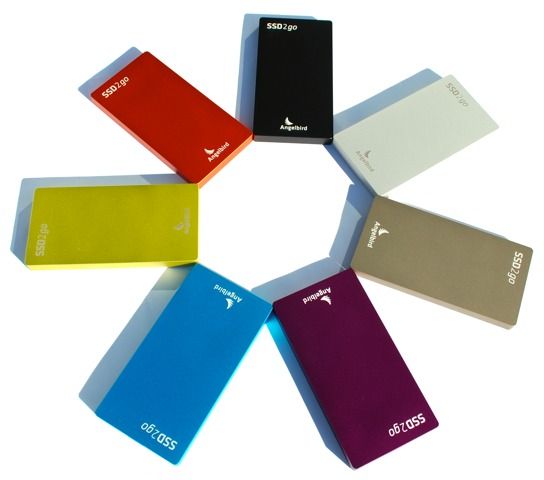
|
rcrees
Max Output Level: -83 dBFS
- Total Posts : 392
- Joined: 2005/04/28 10:36:01
- Location: New York City
- Status: offline
Re:Using an ESata external drive as my "Audio" drive
2012/10/05 17:19:21
(permalink)
Thanks everybody for continued interest and information. I LOVE this forum.
Rob
http://www.rcreesmusic.com Dell XPS 8300, Intel Core i7, 8gigs ram, AMD Radeon 6670, Two SATA II 500gig hard drives, one 250gig external USB drive, Focusrite Scarlett 2i2, M-Audio Keystation 61es, Windows 7 Home Premium, SONAR X3 Producer, many sample libraries including EastWest PLAYx64 Gold Complete, RA, Stormdrum and Choirs
|
jm24
Max Output Level: -54 dBFS

- Total Posts : 2127
- Joined: 2003/11/12 10:41:12
- Status: offline
Re:Using an ESata external drive as my "Audio" drive
2012/10/05 18:51:57
(permalink)
Most synths (DP) load samples to ram, so, unless space is an issue, only streaming samples need a separate disk.
Esata should be little different than sata, with respect to speed. But, this depends upon the electronics used in the external drive.
And: some external USB drives actually use 5k rpm IDE disks.
Good to know, that when you discover the fire, you can grab just one small box to preserve you posterior.
But, I recommend an internal disk just for convenience. Not having another external connection is good. Then use the Esata for backups, and offsite storage.
|
robert_e_bone
Moderator
- Total Posts : 8968
- Joined: 2007/12/26 22:09:28
- Location: Palatine, IL
- Status: offline
Re:Using an ESata external drive as my "Audio" drive
2012/10/07 10:45:59
(permalink)
To all, I DID have a solid state drive, a 512GB screamer 6.0 gbs transfer.
It died! That's the 2nd time one of those has bit the dust on me.
So, this time when it screwed the pooch for me, rahter than replace it with another one, I just got a 2 TB SATA 6.0 gbs regular drive, and took the $800 in savings and bought myself a 46" HDTV to use as my main PC display.
I don't have ANY issues with speed using the regular drive, and at this point would NOT spend the money to go out and get any more of them. Maybe someday, but for now regular drives are plenty fast enough.
Bob Bone
Wisdom is a giant accumulation of "DOH!" Sonar: Platinum (x64), X3 (x64) Audio Interfaces: AudioBox 1818VSL, Steinberg UR-22 Computers: 1) i7-2600 k, 32 GB RAM, Windows 8.1 Pro x64 & 2) AMD A-10 7850 32 GB RAM Windows 10 Pro x64 Soft Synths: NI Komplete 8 Ultimate, Arturia V Collection, many others MIDI Controllers: M-Audio Axiom Pro 61, Keystation 88es Settings: 24-Bit, Sample Rate 48k, ASIO Buffer Size 128, Total Round Trip Latency 9.7 ms
|
Blogman
Max Output Level: -81 dBFS
- Total Posts : 481
- Joined: 2011/02/08 02:32:48
- Status: offline
Re:Using an ESata external drive as my "Audio" drive
2012/10/07 11:27:53
(permalink)
Well in terms of using the future of sampling NOW, Just the violins alone from Dimension strings can throw down 32 Voices per key, so throw in Velocity crossfading and cell crossfading, release notes, legato portamento samples, the 'Spinning Junk' drives just can't keep up. Besides with the SSD drives you can load 10x as many samples into your RAM 10x as fast (using less pre-cache or pre-load). Certainly a necessity for me right now. I put the ENTIRE orchestra on stage/stages/studios in VEP/MIR and position them in any direction 360o, then place the mics (conductor is my fav). The violas, cellos, bass's will be out next year totaling over 1,000,000 samples just for the string section. Complete individual control over each musician. even breathing, coughing and multi-velocities of browsing thei music and positioning and un-positioning their instruments. Amazing! :) For me, 'spinning Junk' TOO SLOW! The Blogopherianman moves fast.
|