whattarush
Max Output Level: -76 dBFS

- Total Posts : 713
- Joined: 2004/04/03 09:48:08
- Location: The ATL
- Status: offline
VU Meter???
I recently purchased Studio One 3 and it comes with a VU meter as an add-on. I downloaded and installed it in Studio One and I tried using it in SONAR Platinum with no luck. I even copied it from the Studio One folder to Cakewalk's Shared plug-in folder and rescanned the folder and I still can't get it to come up in the Plug-In Manager. Has anyone has any luck getting this VU meter plug-in to work in SONAR? Thanks in advance for your help!!!
|
Maarkr
Max Output Level: -81 dBFS

- Total Posts : 488
- Joined: 2011/12/10 09:35:33
- Location: Maine
- Status: offline

Re: VU Meter???
2017/01/19 10:15:24
(permalink)
i don't have studio one but many vsts are proprietary to the DAW... same as Sonar has many that are not usable in other DAWs.
Maarkr Studio: SPALT Lifetime/BL Cakewalk, Studio One 3.5, UAD, Z3ta+2, IKM, NI, Waves, iZotope, Melda, Reaper i7 3770/Giga Z77 mobo, Win10 Pro-64 w16Gb, MOTU Ultralite MK4, Yamaha HS80M wSub, Live: PX-5S, FA-06, Roland Lucina, Epi Les Paul, Ibanez Bass, Amps, e-drums, Zoom R-16... Latest album release, NEW! Counry Classic at http://genemaarkr.bandcamp.com/
|
jude77
Max Output Level: -68 dBFS

- Total Posts : 1146
- Joined: 2013/08/27 21:31:34
- Location: South Saturn Delta
- Status: offline
Re: VU Meter???
2017/01/19 11:06:07
(permalink)
☄ Helpfulby tlw 2017/01/20 07:15:55
You haven't lived until you've taken the Rorschach. Windows 10 Home Edition 64-bit /6th Generation Intel(R) Core(TM) i7-6700 Processor (8M Cache, up to 4.0 GHz)/16GB (1x16GB) DDR4 2133MHz SDRAM Memory/ NVIDIA(R) GeForce(R) GT 730 with 2GB DDR3 Graphics Memory/ Dell KB216 Wired Multi-Media Keyboard English Black/ 802.11ac + Bluetooth 4.0/Integrated 7.1 with WAVE MAXXAudio Pro/Wireless 3165 driver
|
bitflipper
01100010 01101001 01110100 01100110 01101100 01101

- Total Posts : 26036
- Joined: 2006/09/17 11:23:23
- Location: Everett, WA USA
- Status: offline
Re: VU Meter???
2017/01/19 11:48:51
(permalink)
☄ Helpfulby Bflat5 2017/01/20 04:28:52
There's always a good chance that any plugin you obtain through your DAW vendor is going to be a proprietary version that only works within that DAW. Makes sense, as they're not giving you something out of kindness, but rather to enhance the value of their paid products. Fortunately, there are plenty of free and cheap VU meters around, with VUMT suggested by jude77 being one of the better ones. A nice freebie that I've used is the one from LSR.
 All else is in doubt, so this is the truth I cling to. My Stuff
|
pwalpwal
Max Output Level: -43 dBFS

- Total Posts : 3249
- Joined: 2015/01/17 03:52:50
- Status: offline
Re: VU Meter???
2017/01/19 11:54:43
(permalink)
yeah the s1 is proprietary, and +1 for VUMT
|
tnipe
Max Output Level: -89 dBFS

- Total Posts : 91
- Joined: 2015/02/14 06:13:42
- Status: offline
Re: VU Meter???
2017/01/19 12:00:57
(permalink)
We need some prochannel VU-meters!
|
Jesse G
Max Output Level: -32.5 dBFS

- Total Posts : 4282
- Joined: 2004/04/14 01:43:43
- Status: offline
Re: VU Meter???
2017/01/19 17:22:34
(permalink)
☄ Helpfulby whattarush 2017/01/25 09:29:50
Peace,Jesse G.  A fisher of men <>< ==============================Cakewalk and I are going places together! A fisher of men <>< ==============================Cakewalk and I are going places together!
Cakewalk By Bandlab, Windows 10 Pro- 64 bit, Gigabyte GA-Z97X-SLI, Intel Core i5-4460 Haswell Processor, Crucial Ballistix 32 GB Ram, PNY GeForce GTX 750, Roland Octa-Capture, Mackie Big Knob, Mackie Universal Controller (MCU), KRK V4's, KRK Rockit 6, Korg TR-61 Workstation, M-Audio Code 49 MIDI keyboard controller.[/
|
Bassman002
Max Output Level: -84 dBFS

- Total Posts : 321
- Joined: 2014/12/19 05:51:16
- Status: offline
Re: VU Meter???
2017/01/20 03:44:55
(permalink)
☄ Helpfulby FCCfirstclass 2017/01/23 12:07:54
@Jesse G
That's what I need:)
thanks for that tip
Bassman.
|
mudgel
Max Output Level: 0 dBFS

- Total Posts : 12010
- Joined: 2004/08/13 00:56:05
- Location: Linton Victoria (Near Ballarat)
- Status: offline
Re: VU Meter???
2017/01/20 04:26:07
(permalink)
In any case the Cakewalk Shared plugin folder would not be the right folder.
only VST plugins can be copied into different folders (generally) without going through special installation procedures, but then Sonar has to be told which pathways to search for VST plugins.
Mike V. (MUDGEL) STUDIO: Win 10 Pro x64, SPlat & CbB x64, PC: ASUS Z370-A, INTEL i7 8700k, 32GIG DDR4 2400, OC 4.7Ghz. Storage: 7 TB SATA III, 750GiG SSD & Samsung 500 Gig 960 EVO NVMe M.2. Monitors: Adam A7X, JBL 10” Sub. Audio I/O & DSP Server: DIGIGRID IOS & IOX. Screen: Raven MTi + 43" HD 4K TV Monitor. Keyboard Controller: Native Instruments Komplete Kontrol S88.
|
chuckebaby
Max Output Level: 0 dBFS
- Total Posts : 13146
- Joined: 2011/01/04 14:55:28
- Status: offline
Re: VU Meter???
2017/01/20 07:12:19
(permalink)
another vote for PSP TripleMeter. Great VU meter.
You can even use the screw to calibrate the needles floating point (db)
Windows 8.1 X64 Sonar Platinum x64 Custom built: Asrock z97 1150 - Intel I7 4790k - 16GB corsair DDR3 1600 - PNY SSD 220GBFocusrite Saffire 18I8 - Mackie Control
|
Jeff Evans
Max Output Level: -24 dBFS

- Total Posts : 5139
- Joined: 2009/04/13 18:20:16
- Location: Ballarat, Australia
- Status: offline
Re: VU Meter???
2017/01/21 19:30:29
(permalink)
bitflipper
There's always a good chance that any plugin you obtain through your DAW vendor is going to be a proprietary version that only works within that DAW. Makes sense, as they're not giving you something out of kindness, but rather to enhance the value of their paid products.
Fortunately, there are plenty of free and cheap VU meters around, with VUMT suggested by jude77 being one of the better ones. A nice freebie that I've used is the one from LSR. Be aware that this meter calibrates with a square wave not a sine wave. For example -14 dB sinewave reads 0 dB VU on most VU meters (that are set for -14 calibration) but -3dB on this LSR meter. (when also set for -14 calibration) No big deal but worth noting. Music reads normally though and reads about the same as my real VU's do. The ballisitic is not too bad either for a freebie.
Specs i5-2500K 3.5 Ghz - 8 Gb RAM - Win 7 64 bit - ATI Radeon HD6900 Series - RME PCI HDSP9632 - Steinberg Midex 8 Midi interface - Faderport 8- Studio One V4 - iMac 2.5Ghz Core i5 - Sierra 10.12.6 - Focusrite Clarett thunderbolt interface Poor minds talk about people, average minds talk about events, great minds talk about ideas -Eleanor Roosevelt
|
BobbyT
Max Output Level: -88 dBFS

- Total Posts : 107
- Joined: 2011/03/29 21:35:46
- Location: Texas
- Status: offline
Re: VU Meter???
2017/01/21 21:16:48
(permalink)
tnipe
We need some prochannel VU-meters!
+1 on that.Great idea...
|
Michayl Asaph
Max Output Level: -89 dBFS
- Total Posts : 84
- Joined: 2006/01/27 11:38:28
- Status: offline
Re: VU Meter???
2017/01/21 22:41:25
(permalink)
|
The Grim 
Max Output Level: -76 dBFS
- Total Posts : 724
- Joined: 2016/04/19 02:31:06
- Location: hades
- Status: offline
Re: VU Meter???
2017/01/21 22:56:53
(permalink)
the tbproaudio vu meter has copped quite a bit off flac because it is ' apparently' inaccurate etc, whether that is true or not is not for me to say, just putting it out there http://www.kvraudio.com/f...c.php?f=6&t=476712 i use the klanghelm vu meters and they seem to be pretty good. also a fan of the studio one vu meters, and like the fact that you can have the ' mini' version expanded and visible for each track or bus. probably not as good as the klanghelm, but very useful none the less ( of course not for sonar) psp triple looks ok, and for $29 most likely worth a look seeing how a couple of knowledgeable people above recommend it. would like to hear jeff evans's view on it ( nudge, nudge) 
|
Jeff Evans
Max Output Level: -24 dBFS
- Total Posts : 5139
- Joined: 2009/04/13 18:20:16
- Location: Ballarat, Australia
- Status: offline
Re: VU Meter???
2017/01/21 23:47:30
(permalink)
I have the PSP Triple meter and it is very nice too. The VU has a nice look and it is accurate and the ballistic is pretty decent. The other two meters are very useful as well.
I also have the Klanghelm meters too (V2) and like them a lot. Always have and now they are even better.
The TBProAudio VU looks pretty nice too so not sure what the trouble might be with those. I checked out the reports on it and yes there may be issues. The main one being ballistics. Especially if you have very nice real VU's like I do. The real deal is still the best but the Klanghelm is very good ballistics wise.
Specs i5-2500K 3.5 Ghz - 8 Gb RAM - Win 7 64 bit - ATI Radeon HD6900 Series - RME PCI HDSP9632 - Steinberg Midex 8 Midi interface - Faderport 8- Studio One V4 - iMac 2.5Ghz Core i5 - Sierra 10.12.6 - Focusrite Clarett thunderbolt interface Poor minds talk about people, average minds talk about events, great minds talk about ideas -Eleanor Roosevelt
|
Jesse G
Max Output Level: -32.5 dBFS
- Total Posts : 4282
- Joined: 2004/04/14 01:43:43
- Status: offline
Re: VU Meter???
2017/01/22 14:32:50
(permalink)
The original PSP Vintage Meter is located in the link below. This is the free version that originally worked with Windows XP, Windows 7 and with Windows 8 PSP Original Vintage Meter 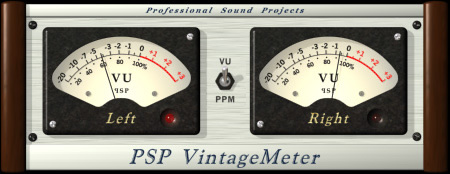
Peace,Jesse G. A fisher of men <>< ==============================Cakewalk and I are going places together!
Cakewalk By Bandlab, Windows 10 Pro- 64 bit, Gigabyte GA-Z97X-SLI, Intel Core i5-4460 Haswell Processor, Crucial Ballistix 32 GB Ram, PNY GeForce GTX 750, Roland Octa-Capture, Mackie Big Knob, Mackie Universal Controller (MCU), KRK V4's, KRK Rockit 6, Korg TR-61 Workstation, M-Audio Code 49 MIDI keyboard controller.[/
|
Jeff Evans
Max Output Level: -24 dBFS
- Total Posts : 5139
- Joined: 2009/04/13 18:20:16
- Location: Ballarat, Australia
- Status: offline
Re: VU Meter???
2017/01/22 16:29:40
(permalink)
It is 32 bit and on the site it does not say anything about Win 7 or Win 8 either. Just up to XP although I am sure it could work. But the 32 bit thing could be an issue.
Specs i5-2500K 3.5 Ghz - 8 Gb RAM - Win 7 64 bit - ATI Radeon HD6900 Series - RME PCI HDSP9632 - Steinberg Midex 8 Midi interface - Faderport 8- Studio One V4 - iMac 2.5Ghz Core i5 - Sierra 10.12.6 - Focusrite Clarett thunderbolt interface Poor minds talk about people, average minds talk about events, great minds talk about ideas -Eleanor Roosevelt
|
RSMCGUITAR
Max Output Level: -64 dBFS

- Total Posts : 1318
- Joined: 2014/12/27 02:33:15
- Location: Toronto
- Status: offline
Re: VU Meter???
2017/01/22 17:21:07
(permalink)
Just curious, why would you need this?
|
Jeff Evans
Max Output Level: -24 dBFS
- Total Posts : 5139
- Joined: 2009/04/13 18:20:16
- Location: Ballarat, Australia
- Status: offline
Re: VU Meter???
2017/01/22 18:08:52
(permalink)
☄ Helpfulby tnipe 2017/01/22 18:11:45
It is one way of maintaining correct rms gain staging right throughout the production process. The VU meter is setup so 0 dB VU aligns itself to a digital reference below 0 DBFS such as -14, -18 or -20. Then you can track onto your tracks with the VU just hitting 0 dB VU on the way in. It ensures all your tracks are recorded at the same rms level. It also helps you set the recording level which is something many have problems with. It makes it all easy.
VU's can be put over buses and the main mix as well to ensure the same ref level is maintained in both of those places. With the headroom built in you dont have to sweat peaks so much. They won’t move the VU much anyway and the headroom will ensure they are not clipped pretty well anywhere.
It is a handy tool for checking rms levels in and out of plug-ins and plug-in chains as well.
VU's should be used in conjunction with peak metering because the very fast transient sounds will slip past the VU meter and you need your peak meters to keep an eye on those types of sounds. eg drum sounds. But apart from drums nearly all other types of signals can be monitored very nicely rms wise.
It is older concept that was all we had years ago and it seemed to work. Modern DAW's made the mistake of cutting them out but now they have made a comeback.
Although DAW's such as Sonar and many others do offer rms indicators they are way too low on the scale to be very useful. The VU is making use of the full scale deflection making it much easier to see.
Real VU meters offer more information in the ballistics of the meter. eg how it dances to the music. When a real VU swings wildly it means something is out of control and often you can track it down and sort it out. The virtual meters are not quite as good as an expensive quality VU movement ballistics wise yet but some of them are getting better all the time such as the Klanghelm meter for example.
Maintaining the same peak levels on your tracks mean the rms levels are all over the place that live under the peak values. Keeping rms levels the same and letting the peak levels vary make it much easier to mix. Because all your tracks will be at the same volume level. Something that does NOT happen when you maintain incoming peak levels to the same value. Ever had a track that is too soft to be heard in a mix? Reason is that the rms level is too low.
They are just nice to look at too!
Specs i5-2500K 3.5 Ghz - 8 Gb RAM - Win 7 64 bit - ATI Radeon HD6900 Series - RME PCI HDSP9632 - Steinberg Midex 8 Midi interface - Faderport 8- Studio One V4 - iMac 2.5Ghz Core i5 - Sierra 10.12.6 - Focusrite Clarett thunderbolt interface Poor minds talk about people, average minds talk about events, great minds talk about ideas -Eleanor Roosevelt
|
tnipe
Max Output Level: -89 dBFS
- Total Posts : 91
- Joined: 2015/02/14 06:13:42
- Status: offline
Re: VU Meter???
2017/01/22 18:12:46
(permalink)
|
RSMCGUITAR
Max Output Level: -64 dBFS
- Total Posts : 1318
- Joined: 2014/12/27 02:33:15
- Location: Toronto
- Status: offline
Re: VU Meter???
2017/01/22 18:15:16
(permalink)
Thanks for the reply Jeff. Very interesting. So since Sonar can have peak and RMS meters this is more for moving either BEFORE all your inserts or between them?
|
Jeff Evans
Max Output Level: -24 dBFS
- Total Posts : 5139
- Joined: 2009/04/13 18:20:16
- Location: Ballarat, Australia
- Status: offline
Re: VU Meter???
2017/01/22 18:40:21
(permalink)
Yes definitely. For example Studio One allows you to insert a plugin before the signal even reaches the track. Way back in the signal chain. So you can put one of their meters there or a third party VU. You can still use an insert though it is just that you will have to enable input monitoring in order to see it working which is also fine too. And yes to between them as well. Good idea if you have a plugin chain. Some plug-ins will just add gain for example to a signal and it is good to be aware of it. Back it off after the plugin and get it back to the ref level. A lot of plug-ins have output level controls too making this easy. But even if not you can always insert a plugin to subtract or add gain straight after a plug-in.
Everyone knows I am pretty well a big fan of VU's! You can certainly produce without them it is just with them I feel it is all a bit easier and more straight forward.
If you premaster say a whole group of songs so all the mixes are at the same rms level then mastering is a snap because all your tracks are going to be the same volume before you even master and that is a nice place to be. You are now not chasing some tracks to be louder and pull others down. You can almost use the same mastering chain for all of them.
Specs i5-2500K 3.5 Ghz - 8 Gb RAM - Win 7 64 bit - ATI Radeon HD6900 Series - RME PCI HDSP9632 - Steinberg Midex 8 Midi interface - Faderport 8- Studio One V4 - iMac 2.5Ghz Core i5 - Sierra 10.12.6 - Focusrite Clarett thunderbolt interface Poor minds talk about people, average minds talk about events, great minds talk about ideas -Eleanor Roosevelt
|
RSMCGUITAR
Max Output Level: -64 dBFS
- Total Posts : 1318
- Joined: 2014/12/27 02:33:15
- Location: Toronto
- Status: offline
Re: VU Meter???
2017/01/22 19:25:09
(permalink)
☄ Helpfulby tnipe 2017/01/24 16:43:16
Thanks for all the info Jeff. Gave tnipe's idea a vote over in the bakery. Though I suspect I'd need a tutorial to figure it out if Cake decides to add it ever!
|
The Maillard Reaction
Max Output Level: 0 dBFS
- Total Posts : 31918
- Joined: 2004/07/09 20:02:20
- Status: offline

post edited by Caa2 - 2017/01/27 20:29:25
|
Jeff Evans
Max Output Level: -24 dBFS
- Total Posts : 5139
- Joined: 2009/04/13 18:20:16
- Location: Ballarat, Australia
- Status: offline
Re: VU Meter???
2017/01/24 15:32:09
(permalink)
Caa2
Fun fact: An actual VU meter only displays RMS at 1kHz. In other words, VU meters do not display the RMS of musical or spoken word content.
Furthermore, VU meters are only appropriate in an analog domain as they are intended to describe actual real life voltage so that one may infer actual real life amperage. They just sort of play make believe as a proxy in the digital domain.
A great upgrade for SONAR will be the provision of LUFS meters.
this message will probably self destruct. This post has already self destructed and is total rubbish. First. Frequency response of my VU (hardware) meter is like from DC to well above hearing. 30Khz or more. Flat as a tack as they say. So it shows correct rms values over a super wide range of frequencies. It was originally designed for voice and voice is actually the perfect program material for a VU. It is one area where it excels. Music wise it does an excellent job of showing rms values of music. I agree it is not exact but very very close. It is super useful in a modern digital recording medium. Use it and you will find your tracking and mixing will improve out of sight. It is an excellent modern day tool. The LUFS meter is also an excellent tool. It shows you volume over the whole course of a piece of audio which is also good to know. For a track that is consistent a great VU reading will give you a very similar LUFS reading. (LUFS is about 2 down from VU rms. eg a K-14 track that is consistent is about -16 LUFS. For consistent level tracks they are very related to each other.)
Specs i5-2500K 3.5 Ghz - 8 Gb RAM - Win 7 64 bit - ATI Radeon HD6900 Series - RME PCI HDSP9632 - Steinberg Midex 8 Midi interface - Faderport 8- Studio One V4 - iMac 2.5Ghz Core i5 - Sierra 10.12.6 - Focusrite Clarett thunderbolt interface Poor minds talk about people, average minds talk about events, great minds talk about ideas -Eleanor Roosevelt
|
whattarush
Max Output Level: -76 dBFS
- Total Posts : 713
- Joined: 2004/04/03 09:48:08
- Location: The ATL
- Status: offline
Re: VU Meter???
2017/01/25 09:32:29
(permalink)
Thanks guys for your responses. I'm going to check some of these out this evening when I get home!!!
I need to dig around because I think I may have the PSP VintageMeter that Jesse G mentioned somewhere in my "archives". Thanks again!!!
|
abacab
Max Output Level: -30.5 dBFS

- Total Posts : 4464
- Joined: 2014/12/31 19:34:07
- Status: offline
Re: VU Meter???
2017/01/25 15:59:45
(permalink)
The Grim
the tbproaudio vu meter has copped quite a bit off flac because it is 'apparently' inaccurate etc, whether that is true or not is not for me to say, just putting it out there http://www.kvraudio.com/f...c.php?f=6&t=476712
i use the klanghelm vu meters and they seem to be pretty good. also a fan of the studio one vu meters, and like the fact that you can have the 'mini' version expanded and visible for each track or bus. probably not as good as the klanghelm, but very useful none the less (of course not for sonar)
psp triple looks ok, and for $29 most likely worth a look seeing how a couple of knowledgeable people above recommend it. would like to hear jeff evans's view on it (nudge, nudge)
I read that TBProAudio mvMeter thread over at KVR (caution: long, with some name calling). The developer has already patched it twice this month in response to the test reports from the KVR metering "expert", citing apparent inaccuracies. It seems that the current version 1.0.2 is now usable, if you are willing to overlook the alleged "blatant ripoff" of Klanghelm's design. http://www.tb-software.com/TBProAudio/mvmeter.html
DAW: CbB; Sonar Platinum, and others ...
|
The Maillard Reaction
Max Output Level: 0 dBFS
- Total Posts : 31918
- Joined: 2004/07/09 20:02:20
- Status: offline
Re: VU Meter???
2017/01/25 18:36:01
(permalink)
post edited by Caa2 - 2017/01/27 20:29:37
|
Jeff Evans
Max Output Level: -24 dBFS
- Total Posts : 5139
- Joined: 2009/04/13 18:20:16
- Location: Ballarat, Australia
- Status: offline
Re: VU Meter???
2017/01/25 20:10:49
(permalink)
☄ Helpfulby abacab 2017/01/25 20:19:19
Please refer to the where you got the quote from. At first you said they were only accurate at one frequency which is obviously completely wrong. The VU meter is designed to read voltage in the analog world, not current. (Let me clarify here. Yes a very long time ago it was showing power transfer over a 600 ohm telephone line but since then the impedances that exist in audio signals being transferred from point A to point B are much higher now hence the fact that it reads voltage these days not current) In the digital world it shows very well what the average or rms level of the signal is making it a fabulous and seriously tool. Please click on this link, unzip and read the following attached article. You might learn something about them and even change your mind. https://drive.google.com/file/d/0B_2Jb7O_b5BkeVB3dFVsUm8zelE/view?usp=sharing
post edited by Jeff Evans - 2017/01/25 20:32:01
Specs i5-2500K 3.5 Ghz - 8 Gb RAM - Win 7 64 bit - ATI Radeon HD6900 Series - RME PCI HDSP9632 - Steinberg Midex 8 Midi interface - Faderport 8- Studio One V4 - iMac 2.5Ghz Core i5 - Sierra 10.12.6 - Focusrite Clarett thunderbolt interface Poor minds talk about people, average minds talk about events, great minds talk about ideas -Eleanor Roosevelt
|