guitartrek
Max Output Level: -47 dBFS

- Total Posts : 2842
- Joined: 2006/02/26 12:37:57
- Status: offline
What is the best way to clean up Midi Event Channel numbers?
I'm re-orchestrating some old tracks with new controllers for VSL. And I noticed that the controller events have different midi channels attached to them, creating a bunch of extra controller lanes. Not sure how they got there. The tracks themselves have distinct channel numbers, so it doesn't matter what channel number the midi event has - I believe they can all have a channel of 1, like the notes. I want to consolidate each controller type to one channel number so they all show up in the same lane. Is there a CAL routine for this? What is the easiest way to change? 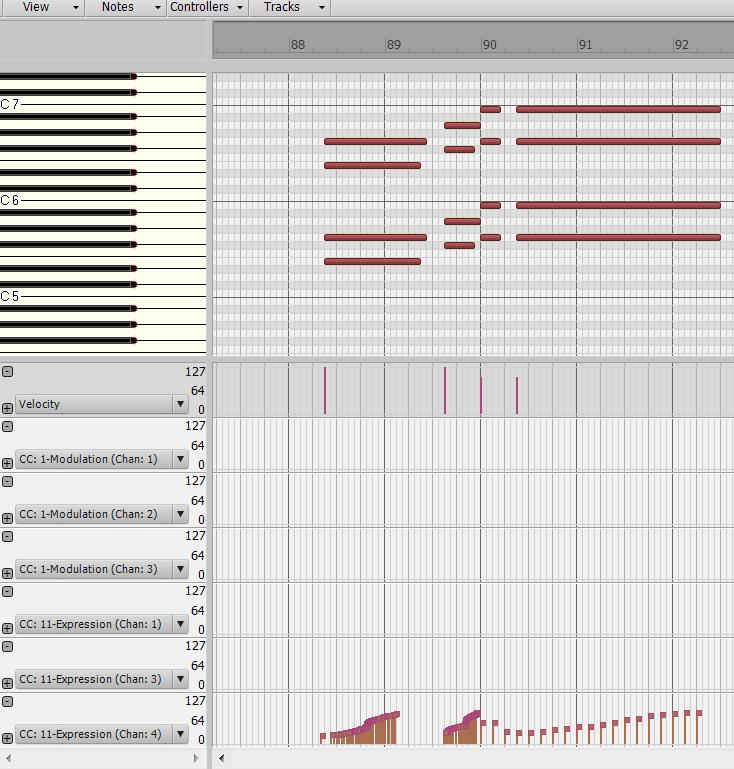
post edited by guitartrek - 2014/01/01 17:34:01
|
guitartrek
Max Output Level: -47 dBFS
- Total Posts : 2842
- Joined: 2006/02/26 12:37:57
- Status: offline

Re: [Solved] What is the best way to clean up Midi Event Channel numbers?
2014/01/01 12:21:42
(permalink)
I used the Find/Change which was very fast.
|
brundlefly
Max Output Level: 0 dBFS

- Total Posts : 14250
- Joined: 2007/09/14 14:57:59
- Location: Manitou Spgs, Colorado
- Status: offline
Re: [Solved] What is the best way to clean up Midi Event Channel numbers?
2014/01/01 12:28:41
(permalink)
I would select the clip(s) and use Process > Find/Change. Then deselect Notes (or select Noneand then re-select Controllers), give it the channel range you want to modify, click OK, and enter the target channel in the second dialog. Many users seem put off by the "business" and non-graphical nature of this process, but it's quick, powerful and flexible for this kind of thing. For notes, the Event Inspector suffices, but IIRC the Event Inspector does not operate on controllers.
one caveat, if a track is showing the same controller type with two different channels, that would suggest to me that there are events in that track that belong with another instrument/part, and I would recommend you sort that out before changing anything.
EDIT: Ha! Got interrupted in writing my post, and you got there already I see.
SONAR Platinum x64, 2x MOTU 2408/PCIe-424 (24-bit, 48kHz) Win10, I7-6700K @ 4.0GHz, 24GB DDR4, 2TB HDD, 32GB SSD Cache, GeForce GTX 750Ti, 2x 24" 16:10 IPS Monitors
|
guitartrek
Max Output Level: -47 dBFS
- Total Posts : 2842
- Joined: 2006/02/26 12:37:57
- Status: offline
Re: [Solved] What is the best way to clean up Midi Event Channel numbers?
2014/01/01 17:33:28
(permalink)
BrundleFly - I'm not certain about this - I am assuming if I have midi events on a track where the track is set to send out info on a certain channel, that the track channel overrides whatever channel the midi event is. Is this correct? I'm changing all events to channel 1 just to keep it easy. But maybe I'm mistaken?
|
John
Forum Host

- Total Posts : 30467
- Joined: 2003/11/06 11:53:17
- Status: offline
Re: [Solved] What is the best way to clean up Midi Event Channel numbers?
2014/01/01 17:40:57
(permalink)
No the event channel overrides the track channel.
|
guitartrek
Max Output Level: -47 dBFS
- Total Posts : 2842
- Joined: 2006/02/26 12:37:57
- Status: offline
Re: [Solved] What is the best way to clean up Midi Event Channel numbers?
2014/01/01 18:42:50
(permalink)
Thanks John. Are you sure about that? I've got note events with channel 1 in a track that is routed to channel 3, and these notes are going correctly to the instrument in Vienna Ensemble that is receiving on channel 3. And when I draw a note in this track and check the note in the event list, it has channel 1. Is it different between note events and controller events?
|
brundlefly
Max Output Level: 0 dBFS
- Total Posts : 14250
- Joined: 2007/09/14 14:57:59
- Location: Manitou Spgs, Colorado
- Status: offline
Re: [Solved] What is the best way to clean up Midi Event Channel numbers?
2014/01/01 18:50:35
(permalink)
No, you're right; forced output channel override event channels. I just wasn't sure that the multiple Modulation controller lanes (for example) were from different tracks or if you somehow had events with different channels on one track that shouldn't be re-channeled either by forced output or Find/Change, but needed to be moved to another track.
SONAR Platinum x64, 2x MOTU 2408/PCIe-424 (24-bit, 48kHz) Win10, I7-6700K @ 4.0GHz, 24GB DDR4, 2TB HDD, 32GB SSD Cache, GeForce GTX 750Ti, 2x 24" 16:10 IPS Monitors
|
John
Forum Host
- Total Posts : 30467
- Joined: 2003/11/06 11:53:17
- Status: offline
Re: [Solved] What is the best way to clean up Midi Event Channel numbers?
2014/01/01 18:52:37
(permalink)
If it didn't work a type 0 file wouldn't work either.
|
brundlefly
Max Output Level: 0 dBFS
- Total Posts : 14250
- Joined: 2007/09/14 14:57:59
- Location: Manitou Spgs, Colorado
- Status: offline
Re: [Solved] What is the best way to clean up Midi Event Channel numbers?
2014/01/01 18:58:10
(permalink)
The track Output channel has to be set to None to preserve individual event channels.
SONAR Platinum x64, 2x MOTU 2408/PCIe-424 (24-bit, 48kHz) Win10, I7-6700K @ 4.0GHz, 24GB DDR4, 2TB HDD, 32GB SSD Cache, GeForce GTX 750Ti, 2x 24" 16:10 IPS Monitors
|
SuperG
Max Output Level: -63 dBFS

- Total Posts : 1371
- Joined: 2012/10/19 16:09:18
- Location: Edgewood, NM
- Status: offline
Re: [Solved] What is the best way to clean up Midi Event Channel numbers?
2014/01/01 22:07:37
(permalink)
Having wrestled many a midi file, I see this kind of thing all the time. It's basically that type 1 midi files can have multiple tracks, but channel numbers are hard-coded within midi data (Which is why type 0 midi files can work multichannel). You can have controllers for channel 10 in track one, or vice-versa, it's all legal. I find that most of these come from keyboard workstations - Composition there appears to be important, but not necessarily an elegant data stream.
It's a pain to sort out. Many times I just convert the embedded midi controls to automation lanes (to the appropriate track), so I can further modify it.
BTW, automation and embedded midi controls are not mutually exclusive; they are both active simultaneously and you can easily trip over your own feet if not careful. That's probably the number one reason to convert them to automation.
|
guitartrek
Max Output Level: -47 dBFS
- Total Posts : 2842
- Joined: 2006/02/26 12:37:57
- Status: offline
Re: [Solved] What is the best way to clean up Midi Event Channel numbers?
2014/01/02 19:20:23
(permalink)
SuperG - Thats interesting. I've never converted midi controller events to automation. But I was thinking my existing Sonar automation prevents me from porting a project from Sonar to for example Logic, because Sonar's automation is totally different from another DAW's automation. But now I'm wondering if you can convert Sonar's automation to MIDI events so that you could port a project over to another DAW?
|
b rock
Max Output Level: 0 dBFS
- Total Posts : 8717
- Joined: 2003/12/07 20:31:48
- Location: Anytown (South of Miami), U.S.A.
- Status: offline
Re: [Solved] What is the best way to clean up Midi Event Channel numbers?
2014/01/02 19:47:16
(permalink)
But now I'm wondering if you can convert Sonar's automation to MIDI events so that you could port a project over to another DAW? I've always used a virtual MIDI cable for that (Maple MIDI for 32-bit; LoopBe1 is 64-bit). Two MIDI tracks; the first plays back the automation curve, the second records it as MIDI. The drawing tool variations really come in handy here with this kind of conversion technique. Automation (MIDI) Track: Input N/A. Output set to virtual MIDI cable. MIDI Record (MIDI) Track: Input set to virtual MIDI cable. Output N/A. Arm for recording. As for your original question, Bounce To Clip(s) - with a forced / redirected MIDI Channel dialed in - will convert all of your various MIDI Channel-ized tracks to the forced channel. If I recall this correctly, it will also force all MIDI notes to that specific MIDI channel. Selections are ignored. None / Omni preserves channelization on the Bounce (see brundlefly).
|
guitartrek
Max Output Level: -47 dBFS
- Total Posts : 2842
- Joined: 2006/02/26 12:37:57
- Status: offline
Re: [Solved] What is the best way to clean up Midi Event Channel numbers?
2014/01/03 08:06:53
(permalink)
Thanks b rock. I'll have to look into the virtual midi cables. I just remembered, I use automation on a fair amount of busses, which may be a problem because they can't contain midi events, correct?
I don't suppose there are any conversion programs or formats that handle automation well for porting to different DAW's?
|
SuperG
Max Output Level: -63 dBFS
- Total Posts : 1371
- Joined: 2012/10/19 16:09:18
- Location: Edgewood, NM
- Status: offline
Re: [Solved] What is the best way to clean up Midi Event Channel numbers?
2014/01/03 11:53:07
(permalink)
guitartrek
SuperG - Thats interesting. I've never converted midi controller events to automation. But I was thinking my existing Sonar automation prevents me from porting a project from Sonar to for example Logic, because Sonar's automation is totally different from another DAW's automation. But now I'm wondering if you can convert Sonar's automation to MIDI events so that you could port a project over to another DAW?
The one sure-fire way to get lane automation over to another Daw is to save the project as a midi file. The automation lanes will be saved as midi-control messages. Obviously, this won't help with the audio tracks, but you can easily import those manually into another Daw - just be sure to bounce them out with any effects you need first.
|
konradh
Max Output Level: -42 dBFS

- Total Posts : 3325
- Joined: 2006/01/16 16:07:06
- Status: offline
Re: [Solved] What is the best way to clean up Midi Event Channel numbers?
2014/01/03 13:50:27
(permalink)
I have always kept Sonar set to force the channel number in the Track Out regardless of what is in the Event List, and that is fine for external synths; however, for some soft synths, or to fix the lane problem described above, I agree that Find/Change is a simple fix.
Konrad Current album and more: http://www.themightykonrad.com/ Sonar X1d Producer. V-Studio 700. PC: Intel i7 CPU 3.07GHz, 12 GB RAM. Win 7 64-bit. RealGuitar, RealStrat, RealLPC, Ivory II, Vienna Symphonic, Hollywood Strings, Electr6ity, Acoustic Legends, FabFour, Scarbee Rick/J-Bass/P-Bass, Kontakt 5. NI Session Guitar. Boldersounds, Noisefirm. EZ Drummer 2. EZ Mix. Melodyne Assist. Guitar Rig 4. Tyros 2, JV-1080, Kurzweil PC2R, TC Helicon VoiceWorks+. Rode NT2a, EV RE20. Presonus Eureka. Rokit 6s.
|