paul jenkins
Max Output Level: -84 dBFS

- Total Posts : 346
- Joined: 2015/02/17 19:53:32
- Status: offline
Why cant i fade in or out a midi clip
Yeah, please someone tell me how to fade in or out a midi clip.......i noticed i have no options in process effect, and as the sonar documentation tells me to just use the edit tool and click on the corner.......but it wont click on the corner...........and i went to cross fade a addictive drums loop with a loop from the loops browser....seems that wont work.....it just turns the browser loop into an addictive drum
|
Cactus Music
Max Output Level: 0 dBFS

- Total Posts : 8424
- Joined: 2004/02/09 21:34:04
- Status: offline

Re: Why cant i fade in or out a midi clip
2016/12/02 13:57:13
(permalink)
Far as I know that option only works with audio. I just tried it in Home Studio.
But as all things Sonar there's lots of ways to achieve a task.
1. freeze the midi track and apply the fade out to the audio track. If your already using a simple instrument track I think it should already be available.
2. Draw a CC 10 event in piano view.
3. Automate the track ( W) and use the fader to make your move.
|
Jesse G
Max Output Level: -32.5 dBFS

- Total Posts : 4282
- Joined: 2004/04/14 01:43:43
- Status: offline
Re: Why cant i fade in or out a midi clip
2016/12/02 14:23:50
(permalink)
Peace,Jesse G.  A fisher of men <>< ==============================Cakewalk and I are going places together! A fisher of men <>< ==============================Cakewalk and I are going places together!
Cakewalk By Bandlab, Windows 10 Pro- 64 bit, Gigabyte GA-Z97X-SLI, Intel Core i5-4460 Haswell Processor, Crucial Ballistix 32 GB Ram, PNY GeForce GTX 750, Roland Octa-Capture, Mackie Big Knob, Mackie Universal Controller (MCU), KRK V4's, KRK Rockit 6, Korg TR-61 Workstation, M-Audio Code 49 MIDI keyboard controller.[/
|
chuckebaby
Max Output Level: 0 dBFS
- Total Posts : 13146
- Joined: 2011/01/04 14:55:28
- Status: offline
Re: Why cant i fade in or out a midi clip
2016/12/02 16:01:29
(permalink)
Watched that video and I almost feel a sleep listening to 15 minutes explaining how to do a fade with control Automation.  I personally use Volume Automation Its a lot easier and it is the exact same thing as a fade. If your familiar with Automation then you know what to do. I use a lane myself but you can do it right on the clip.
Windows 8.1 X64 Sonar Platinum x64 Custom built: Asrock z97 1150 - Intel I7 4790k - 16GB corsair DDR3 1600 - PNY SSD 220GBFocusrite Saffire 18I8 - Mackie Control
|
paul jenkins
Max Output Level: -84 dBFS
- Total Posts : 346
- Joined: 2015/02/17 19:53:32
- Status: offline
Re: Why cant i fade in or out a midi clip
2016/12/02 20:49:43
(permalink)
Thanx everyone for your input, yeah i think a volume automation is easiest.......Question what is a "cc ten event to be drawn in piano roll"?....and thanx chuck for ye helpful drum video...yeah you were the geazer that had the focusrite and mackie control surface i think from my earlier post, setting up hardware for my software.......Yeah i ended up buying the Zoom R24, i thought it was pretty craphouse, but i did like some loops, which i ripped off it(Good for camping away from home etc), so my studio i bought a presonus 1818 8 input soundcard and also a beringer UFX 1604 16 channel mixer/interface/transport...........So yeah, thanx to the sonar online forum im learning heaps really fast, cheers
|
chuckebaby
Max Output Level: 0 dBFS
- Total Posts : 13146
- Joined: 2011/01/04 14:55:28
- Status: offline
Re: Why cant i fade in or out a midi clip
2016/12/02 22:06:31
(permalink)
☄ Helpfulby Dream Logic Audio 2016/12/02 22:29:16
paul jenkins
Question what is a "cc ten event to be drawn in piano roll
CC: continuous controllers Its a controller event. If its a simple fade you need, use Volume "automation. If its a crescendos and decrescendos, its going to be a bit more technical then just popping in a node and bending a line. Use the Process > Scale Velocity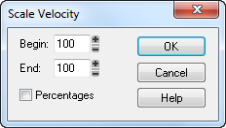 1-Select the events whose velocity data you want to change. 2-Choose Process > Scale Velocity to display the Scale Velocity dialog box 3-Enter the starting and ending velocity values. 4-Check the Percentages box if the values are percentages. 5-Click OK when you are done. Scale velocity changes the actual timbre of the instrument. When you scale down, velocity's change. when mellowing out on that bass line a little bit, come down on the velocity. the scale velocity will allow you to make gradual changes rather than guessing where the note begins to soften.
Windows 8.1 X64 Sonar Platinum x64 Custom built: Asrock z97 1150 - Intel I7 4790k - 16GB corsair DDR3 1600 - PNY SSD 220GBFocusrite Saffire 18I8 - Mackie Control
|
promidi
Max Output Level: -66 dBFS

- Total Posts : 1220
- Joined: 2014/11/21 18:46:39
- Location: South Australia
- Status: offline
Re: Why cant i fade in or out a midi clip
2016/12/02 22:38:31
(permalink)
Or if you wish to use controller 11 events to do the fade out, you can do do in PRV. Start drawing your volume curve and before releasing the mouse button, hold down shift. That way you will produce a linear reduction of volume from start to finish.
Windows 10 64bit fully patched, 16 gig ram . PCR-800 Controller. (Working in Win 10 1809 64bit)CPU: i5 4670. Video: Nvidia GTX560ti (latest drivers). Audio IF: Focusrite 2i2 2nd Gen
Internet always on.
Software: Cakewalk by Bandlab (2018.09 B29)
ASIO mode. 24bit 48khz 256 samples Rapture Pro, AAS GS2, VS-3, EP-4, VA-2, Chromophone 2, Z3TA+ 2, Addictive drums 2, Addictive Keys, Mpowersynth (latest), Iris 2, GPO5, Sampletank 3,
|
BRainbow
Max Output Level: -83 dBFS

- Total Posts : 399
- Joined: 2004/03/14 01:39:12
- Location: Honolulu, Hawai'i
- Status: offline
Re: Why cant i fade in or out a midi clip
2016/12/03 03:30:05
(permalink)
I think it's easiest to:
1. Easiest of all, in track view create a descending volume envelope below the MIDI track in an automation lane, or
2. Draw a straight line Controller 7 (volume) fade in the bottom (controller) pane of the MIDI piano roll view; or
3. In track view create a descending volume envelope in an automation lane, below the AUDIO track that is fed by the MIDI track (either pre-bounced/frozen or in a separate soft synth audio track).
Cakewalk (forever), Two WIN10 64-bit DAWs: home-brew ASRock x299 Taichi / i7 7820x w/ 64GB RAM and ASUS X99A-II / i7-5820K w/ 32GB RAM, ZOOM UAC 8, Mackie ONYX 1640i FW Mixer/Interface, Mackie ONYX 1200F, Avalon U5 PreAmp, NI Komplete 11 Ultimate, EastWest Composer CloudX, Yamaha MOTIF XS8, Ensoniq SD-1 and ESQ-1, Korg M1rEX, Yamaha TX-81Z, Roland D110, Line6 HELIX Rack and Native, POD HD-Pro, POD Farm 2.5, Yamaha NS-10 and Presonus Eris E8 monitors, Yamaha Disklavier Upright Piano, mics, guitars, basses, and the cutest little tambourine.
|
paul jenkins
Max Output Level: -84 dBFS
- Total Posts : 346
- Joined: 2015/02/17 19:53:32
- Status: offline
Re: Why cant i fade in or out a midi clip
2016/12/03 03:37:07
(permalink)
Ok so thanx all, excuse my newness, Using automation, i know how to manually, move the knobs in read/write mode,where everything lights up red that your automation......how do you set it to manually, for example go between point a and point b....say for example using the smooth pluggin, you want it on 3 position at the start but then 5 at bar 10 and then 8 at bar 15 etc?
|
Bristol_Jonesey
Max Output Level: 0 dBFS
- Total Posts : 16775
- Joined: 2007/10/08 15:41:17
- Location: Bristol, UK
- Status: offline
Re: Why cant i fade in or out a midi clip
2016/12/03 06:30:22
(permalink)
☄ Helpfulby Zargg 2016/12/03 14:52:37
Easiest way - in your audio track either open up an automation lane (the first lane ALWAYS defaults to volume) or change the Edit Filter from Clips to Automation > Volume.
Next, select the range you want the changes made by clicking & dragging in the timeline
Next, position your cursor just below the track header so that the cursor changes to what looks like a capital I on it's side with 2 up/down arrows
Now you can click and drag that segment of the envelope up/down, creating 4 nodes in the process
Just right click any node to delete or reset that node or left click it to move it somewhere else
This sounds a lot more complicated than it is but it's about 5 seconds in practice.
CbB, Platinum, 64 bit throughoutCustom built i7 3930, 32Gb RAM, 2 x 1Tb Internal HDD, 1 x 1TB system SSD (Win 7), 1 x 500Gb system SSD (Win 10), 2 x 1Tb External HDD's, Dual boot Win 7 & Win 10 64 Bit, Saffire Pro 26, ISA One, Adam P11A,
|
bvideo
Max Output Level: -58 dBFS

- Total Posts : 1707
- Joined: 2006/09/02 22:20:02
- Status: offline
Re: Why cant i fade in or out a midi clip
2016/12/03 14:13:38
(permalink)
The descriptions above showing how to create fades for MIDI give a clue about why the corner-grip fade is not offered on MIDI clips.
MIDI fades require using one of the publicly defined parameters, volume or expression. A person might think these ought to be controlled by CC (continuous controller), leading to a solution whereby Sonar just scales the parameter down to zero or up from zero for fade-out or -in based on the user's desired set value. Unfortunately it is not always possible for Sonar to know the user's set value. It could be hidden in a synth preset or a sysex message, instead of being set in a MIDI CC or envelope that Sonar can follow. Therefore it is left to the user to decide how to use the CCs.
Audio fades do not require using any publicly defined parameter. Sonar can just scale audio samples between 0% and 100% to compute fades, and offer a choice of curves as well.
W10 pro, Sonar Platinum, Alesis Multimix 16 FW, MOTU Express 128, Gigabyte Z370 HD3P, i7 8700K, 16 Gigs, ssd + 2 X 2T disks, D50-MEX, JV80, A90EX, M1REX
|