twaddle
Max Output Level: -55.5 dBFS

- Total Posts : 1967
- Joined: 2004/07/28 15:46:48
- Location: Bristol UK
- Status: offline
X1 Expanded can not locate required version
Title says it all really.
I have sonar x1 expanded so I down load the expanded patch and the installer can't locate the required version. We're there any other patches for X1 expanded that I might have needed to install beforehand?
I don't see any in the downloads section.
Steve
soundcloud SoundClick Myspace Gigabyte GA-X58A-UD3R, Intel i7 930, 3.40Ghz, 12GB Corsair DDR3 1TB WD SATA 6Gb X 2 Emu- 0404 PCIe Sonar X1d Expanded BFD3 + BFD2 + BFD Eco Dual boot windows 7, 32 & 64bit
|
cliffr
Max Output Level: -80 dBFS

- Total Posts : 539
- Joined: 2010/02/19 21:44:43
- Location: Wellington, New Zealand
- Status: offline

Re:X1 Expanded can not locate required version
2012/03/05 13:19:22
(permalink)
You probably have a hotfix installed that must be rolled back (removed) before updating.
Read the instructions - it gives the required versions and hotfix rollback.
Cheers - Cliff
i7-950 24 GB, GTX 580, W7/64 Ultimate, Sonar Platinum, Alesis MasterControl, KRK Rokit RP8g2s Some Real piano, basses, and guitars, Komplete 8Ultimate, Ibanez guitars, MusicLab RG/Strat/LPC, Trilian, Omnisphere, RMX, EWQL SO Platinum, Pianos, Choirs, VOP, Gypsy, Goliath, SD2, MOR, Ra, HS, HB, too many plugs, Midi controllers, and all kinds of weird gadgets My Soundclick Page
|
Alegria
Max Output Level: -54.5 dBFS

- Total Posts : 2075
- Joined: 2008/11/07 12:57:49
- Status: offline
Re:X1 Expanded can not locate required version
2012/03/05 13:20:28
(permalink)
What is your current Sonar version number?
|
twaddle
Max Output Level: -55.5 dBFS
- Total Posts : 1967
- Joined: 2004/07/28 15:46:48
- Location: Bristol UK
- Status: offline
Re:X1 Expanded can not locate required version
2012/03/05 13:28:50
(permalink)
If you mean build it's 434
Steve
soundcloud SoundClick Myspace Gigabyte GA-X58A-UD3R, Intel i7 930, 3.40Ghz, 12GB Corsair DDR3 1TB WD SATA 6Gb X 2 Emu- 0404 PCIe Sonar X1d Expanded BFD3 + BFD2 + BFD Eco Dual boot windows 7, 32 & 64bit
|
bapu
Max Output Level: 0 dBFS

- Total Posts : 86000
- Joined: 2006/11/25 21:23:28
- Location: Thousand Oaks, CA
- Status: offline
Re:X1 Expanded can not locate required version
2012/03/05 13:30:30
(permalink)
twaddle
Title says it all really.
Steve
Install instructions really says it all. 
|
dubdisciple
Max Output Level: -17 dBFS

- Total Posts : 5849
- Joined: 2008/01/29 00:31:46
- Location: Seattle, Wa
- Status: offline
Re:X1 Expanded can not locate required version
2012/03/05 13:31:13
(permalink)
twaddle..in the instructions it gives specific details on how to rollback to 425 in order to do the install.
|
Alegria
Max Output Level: -54.5 dBFS
- Total Posts : 2075
- Joined: 2008/11/07 12:57:49
- Status: offline
Re:X1 Expanded can not locate required version
2012/03/05 13:32:02
(permalink)
You need to rollback the quickfix and you'll find exactly how to do this by reading the instructions located here: Installation Instructions
|
californiamusic
Max Output Level: -86 dBFS

- Total Posts : 223
- Joined: 2005/08/07 10:06:46
- Location: Chicago, IL
- Status: offline
Re:X1 Expanded can not locate required version
2012/03/05 14:06:05
(permalink)
I had the same question.. thanks for the info. Got it all installed ; )
Intel i7-4770 - 3.9GHZ DDR3 - 32GB RAM Sonar PlatinumPresonus Studio 192 Motu 2408 MK3 Waves v9 Spectrasonics Omnisphere, Stylus RMX, Trilion Novation V-Station, Gladiator, ReFX Nexus, Lounge Lizard, Alchemy www.soundcloud.com/glenntolliver
|
dappa1
Max Output Level: -46 dBFS

- Total Posts : 2949
- Joined: 2007/02/26 04:18:57
- Status: offline
Re:X1 Expanded can not locate required version
2012/03/05 14:13:21
(permalink)
I know this is going to sound dumb but my version number is 319 and x1d cannot locate so instructions say to ctrl + c to clip board. Where is the clipboard??? I guess if someone can walk me through this. i'm lost isnt there an option just to get rid of the quickfix? then be done with it no??? Oh well I can't open up Sonar now. I followed the instructions and nothing! Guess there has to be one sad story!
post edited by Dappa1 - 2012/03/05 14:25:43
|
Re:X1 Expanded can not locate required version
2012/03/05 14:20:55
(permalink)
Dappa1
I know this is going to sound dumb but my version number is 319 and x1d cannot locate so instructions say to ctrl + c to clip board. Where is the clipboard???
I guess if someone can walk me through this. i'm lost isnt there an option just to get rid of the quickfix? then be done with it no???
The "clipboard" doesn't have an interface (at least by default). Any time you copy something, it saves it in memory to the "clipboard". When you paste, it pastes the data store in the clipboard. You could also just drag and drop the file, or right-click and select "Copy", but the shortcuts were just one way of explaining how to move the files. Unfortunately, rolling back a QuickFix requires you manually replacing the files. Just try going through the instructions one step at a time, it should hopefully not be overwhelming. Best regards,
|
Alegria
Max Output Level: -54.5 dBFS
- Total Posts : 2075
- Joined: 2008/11/07 12:57:49
- Status: offline
Re:X1 Expanded can not locate required version
2012/03/05 14:26:34
(permalink)
Build 319 indicates that you have not installed a quickfix. So in your case, there's no need to rollback anything and can install X1d directly on top of your current installation.
Note: The Windows "clipboard" is a temporary storage area for objects you have either copied or cut (an object being a snippet of text, a file, a folder etc.), enabling you to paste this object elsewhere as need be. But if I did not misunderstand your issue, there is no need for you to copy anything.
|
timidi
Max Output Level: -21 dBFS

- Total Posts : 5449
- Joined: 2006/04/11 12:55:15
- Location: SE Florida
- Status: offline
Re:X1 Expanded can not locate required version
2012/03/05 14:26:36
(permalink)
Where is the clipboard??? It is an imaginary placeholder that floats invisibly right above your monitor. Some can actually see it with the use of the correct drug. When you cntrl/c, what ever it is that you cntrl/cee'd will fly up into the clipboard awaiting your command. At the same time you cntrl/c, the majic is continued as this action also places your copied data into an invisible sock underneath your "V" key. So, when you hit cntrl/V, whatever is under your "V" key and above your monitor in the clipboard gets placed where you cntrl/V from. hope that helps.
|
Alegria
Max Output Level: -54.5 dBFS
- Total Posts : 2075
- Joined: 2008/11/07 12:57:49
- Status: offline
Re:X1 Expanded can not locate required version
2012/03/05 14:28:54
(permalink)
|
dappa1
Max Output Level: -46 dBFS
- Total Posts : 2949
- Joined: 2007/02/26 04:18:57
- Status: offline
Re:X1 Expanded can not locate required version
2012/03/05 14:36:58
(permalink)
nope build 326 is the quick fix help about sonar shows you that. It asked me to copy and replace and I did just that and nothing cant use it. :( I was looking forward to this...oh well Holds head down in shame and kicks dust and lands in my eye try to rub eyes and pokes myself in the right eye. What do I do now?
|
siordanescu
Max Output Level: -87 dBFS

- Total Posts : 194
- Joined: 2010/08/02 13:34:14
- Location: Timisoara/Romania
- Status: offline
Re:X1 Expanded can not locate required version
2012/03/05 14:42:09
(permalink)
Crtl+P is a bad shortcut in the tutorial for paste....Ctrl+V is the good one.....or...right click on item and...copy....and paste....to roll on the good version.
HP EliteBook 8460p Intel core i7-2620M, 2,7 ghz, 8G RAM, Win 10 x64, CAKEWALK by BANDLAB, SONAR PLATINUM, M-AUDIO PROJECTMIX, ALESIS IO 26, TASCAM US 16x08, TC ELECTRONIC KONNEKT 24 D, ROLAND V SYNTH, ROLAND XP 50, M AUDIO PROKEYS 88.
|
dappa1
Max Output Level: -46 dBFS
- Total Posts : 2949
- Joined: 2007/02/26 04:18:57
- Status: offline
Re:X1 Expanded can not locate required version
2012/03/05 14:42:59
(permalink)
Nope it says it cant do the action because ttslame was not found
|
Re:X1 Expanded can not locate required version
2012/03/05 14:50:16
(permalink)
Dappa1
Nope it says it cant do the action because ttslame was not found
This is typically the result of double-clicking on a SONAR.exe that is not in the correct directory. It cannot locate TTSLame.dll because it's not in the same directory as the .exe file. Are you sure you're placing the files properly?
|
siordanescu
Max Output Level: -87 dBFS
- Total Posts : 194
- Joined: 2010/08/02 13:34:14
- Location: Timisoara/Romania
- Status: offline
Re:X1 Expanded can not locate required version
2012/03/05 14:56:21
(permalink)
do you have x1 expanded...or producer?...did you download the good version?...x1D expanded or producer?...did you applied the latest quickfix(424)?...
HP EliteBook 8460p Intel core i7-2620M, 2,7 ghz, 8G RAM, Win 10 x64, CAKEWALK by BANDLAB, SONAR PLATINUM, M-AUDIO PROJECTMIX, ALESIS IO 26, TASCAM US 16x08, TC ELECTRONIC KONNEKT 24 D, ROLAND V SYNTH, ROLAND XP 50, M AUDIO PROKEYS 88.
|
TCfromBN
Max Output Level: -90 dBFS

- Total Posts : 36
- Joined: 2008/12/11 17:04:33
- Status: offline
Re:X1 Expanded can not locate required version
2012/03/05 15:00:27
(permalink)
Hello,
I went to rollback my hotfix and found that the backup was of version 434? Is there an easy way for me to extract 425 from an update or something? I apparently don't have the 425 exe on my computer anymore.
I'm stuck.
|
dappa1
Max Output Level: -46 dBFS
- Total Posts : 2949
- Joined: 2007/02/26 04:18:57
- Status: offline
Re:X1 Expanded can not locate required version
2012/03/05 15:05:17
(permalink)
oh well maybe it was never for me!
I have to re install sonar then put in the patches x1c then x1d
oh well
|
dappa1
Max Output Level: -46 dBFS
- Total Posts : 2949
- Joined: 2007/02/26 04:18:57
- Status: offline
Re:X1 Expanded can not locate required version
2012/03/05 15:06:54
(permalink)
It may be in another folder you maybe right but it looks like I am starting all over again.
I will be careful in future. I am hoping that X1 Studio will re install without the patches and or quick fixes
|
Jason Gray
Max Output Level: -86 dBFS
- Total Posts : 243
- Joined: 2010/11/16 09:58:23
- Location: Manchester Uk
- Status: offline
Re:X1 Expanded can not locate required version
2012/03/05 15:13:31
(permalink)
I installed every Update patch and the Expanded Fix, i now have build 434 showing,and i can not install x1d expanded and i have no idea what to do now, surley i dont have to uninstall all and reinstall it all again less ??? what
Whats the score,
|
Jason Gray
Max Output Level: -86 dBFS
- Total Posts : 243
- Joined: 2010/11/16 09:58:23
- Location: Manchester Uk
- Status: offline
Re:X1 Expanded can not locate required version
2012/03/05 15:23:29
(permalink)
Sorted it now, up and running, as Fix removal instructions state .
|
dappa1
Max Output Level: -46 dBFS
- Total Posts : 2949
- Joined: 2007/02/26 04:18:57
- Status: offline
Re:X1 Expanded can not locate required version
2012/03/05 15:58:00
(permalink)
re installed X1 Studio no joy I need some assistance, with all the joy around here I am having alot of sorrow
|
twaddle
Max Output Level: -55.5 dBFS
- Total Posts : 1967
- Joined: 2004/07/28 15:46:48
- Location: Bristol UK
- Status: offline
Re:X1 Expanded can not locate required version
2012/03/05 19:21:44
(permalink)
Thank you all Don't think I've ever had any problem updating and may never thus have felt the need to read the installation guide. Bound to get me one day I guess Steve
post edited by twaddle - 2012/03/05 19:32:36
soundcloud SoundClick Myspace Gigabyte GA-X58A-UD3R, Intel i7 930, 3.40Ghz, 12GB Corsair DDR3 1TB WD SATA 6Gb X 2 Emu- 0404 PCIe Sonar X1d Expanded BFD3 + BFD2 + BFD Eco Dual boot windows 7, 32 & 64bit
|
nazaru
Max Output Level: -88 dBFS

- Total Posts : 123
- Joined: 2004/01/09 19:59:17
- Status: offline

Re:X1 Expanded can not locate required version
2012/03/05 20:49:53
(permalink)
Man I am so screwed up now that I cannot even reinstall Sonar Producer XI using the registration code and serical number saved in my online account. I got screwed up by using shift C instead of Ctrl C and it got progressively worse until I decided to start all over by installing X1. I cant even do that now! What the hell? Im going to control panel now and unistalling Sonar X1 and trying again. I hope I dont lose my work. This update should have been made more dummy proof. This roll back process sucks and has the potential to screw you.
Dean (Nazaru) McCray www.thelegionofboomINC.com Sonar Platinum, Reason 8.2, Reactor 5, Pro Tools 12, Intel Q6600 @2.9 GHz, 8 Gig Ram, Windows 10 64 Dual 23 " Acer monitors MCU with 3 XT, Mackie C4 Rode K2, NT1000, Envoice Mindprint, Focusrite ISA One, UAD-2 Octo, Antelope Audio Orion Studio Maudio B8 Monitors
|
simonknight
Max Output Level: -89 dBFS

- Total Posts : 81
- Joined: 2005/02/17 20:42:29
- Status: offline
Re:X1 Expanded can not locate required version
2012/03/05 22:07:52
(permalink)
I didn't have any problems with the rollback, but I don't understand why it's necessary. The X1d installer appears to install a new SONARPDR.EXE.
Windows 7 64 bit, Cakewalk UA-101, X1 expanded 64 and 32 bit. Dell XPS 9000 i7 12GB RAM
|
T9CStudio
Max Output Level: -89 dBFS
- Total Posts : 61
- Joined: 2004/06/08 21:07:27
- Location: Houston
- Status: offline
Re:X1 Expanded can not locate required version
2012/03/05 22:22:40
(permalink)
Hmmm, I read the installation guide before trying to install and I'm not getting thru the "cannot find correct version" either.
Can anyone help me find what's wrong based on the folders shown below? 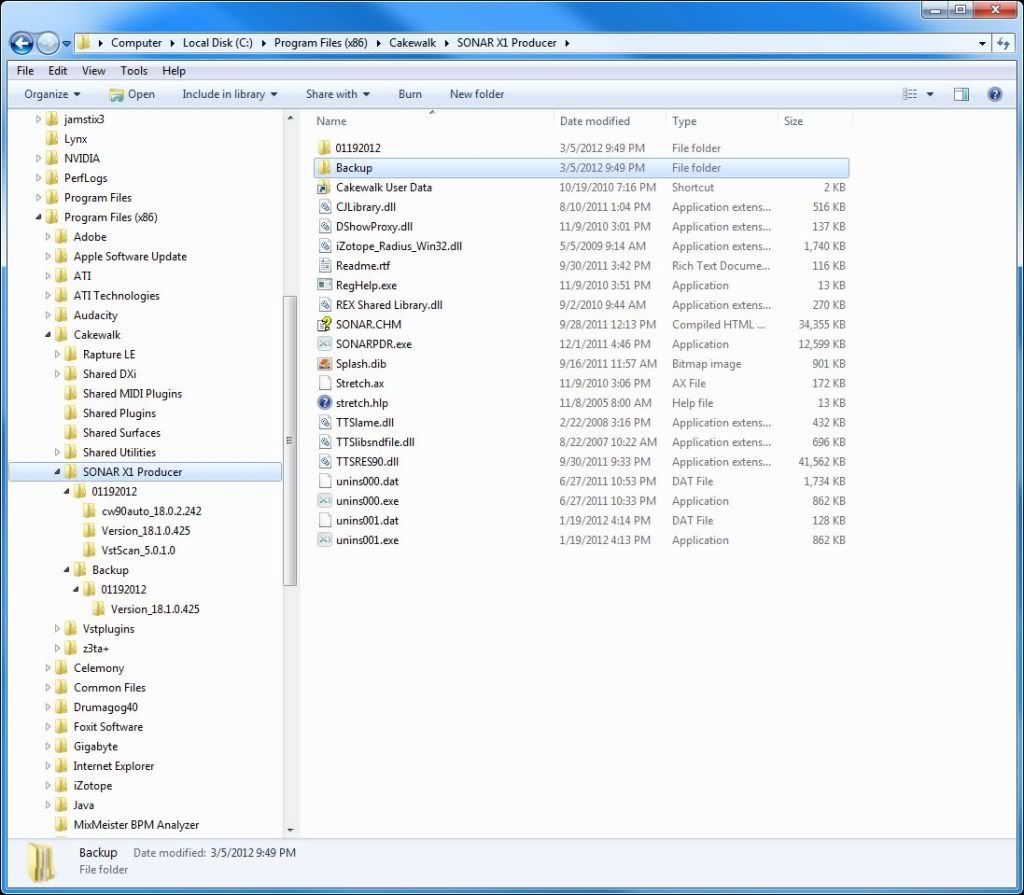 " border="0" /> post edited by T9CStudio - 2012/03/05 23:22:05
Platinum, Win7/64bit, 16gb, LynxTwoA, Mytek Stereo 96 AD/DA, DigiMaxD8
|
gray36
Max Output Level: -83 dBFS

- Total Posts : 372
- Joined: 2010/03/12 10:22:18
- Status: offline
Re:X1 Expanded can not locate required version
2012/03/06 09:47:23
(permalink)
Click on backup(3//5/2012) 3 or 4 times until you get to icon that looks like your SONARPDR.exe(12/01/2011) on your machine, right-click, copy. Then move down to SONARPDR.exe(12/01/2011), highlight, right-click, paste! See what happens!
HP Pavilion dv6 Intel Duo Core 2 2.20GHz T6600, Windows 7 x 64, Guitar tracks Pro 4, SonarX1dEXP,SonarX2Prod. 8.5.3, Focusrite Saffire 6 USB, JBL monitors, Alesis SR-16, Guitar Rig 4 Pro, PRS SE, Epiphone Les Paul Custom, Cort SJ-10 ,Steven Slate 3.5, Akai MPK25, Glyph GT 050Q (500GB)RP1000 http://soundcloud.com/mar...ayin-around-mix1
|
jimmitch
Max Output Level: -90 dBFS
- Total Posts : 44
- Joined: 2010/02/22 09:27:09
- Status: offline
Re:X1 Expanded can not locate required version
2012/03/06 10:28:16
(permalink)
I have X1c Producer build 326 .I get the update can't find the right verson .What do I have to do to upgrade? Thanks Jim
|