metal190
Max Output Level: -90 dBFS

- Total Posts : 11
- Joined: 2008/10/16 14:29:38
- Status: offline
X3 - Constant Crashes - Please Help
Hi all - got a project file that crashes Sonar 9 out of 10 ten times we try to open it. it has made it through multiple versions of Sonar, probably starting with Sonar 8.5...? (yes, I've been working on the song that long  ) It makes it through all the typical start up windows of loading soft synths, mismatched plugins, silent buses, etc and then at the last second it crashes with a fatal error. 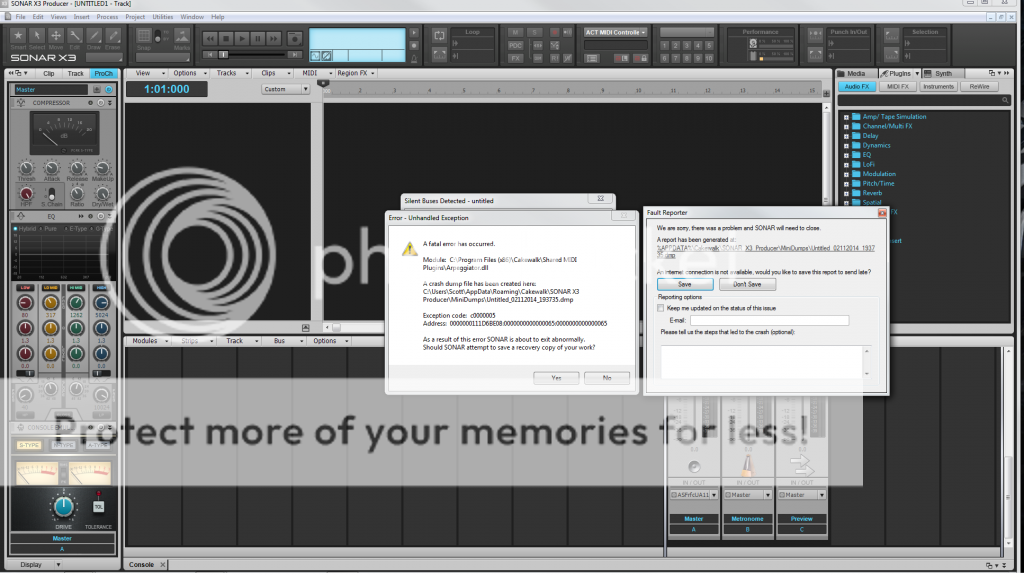 " /> System info: Fireface UFX connected via USB, Sonar X3, Creation Station PC with Windows 7 64 bit, more info in the following photo: 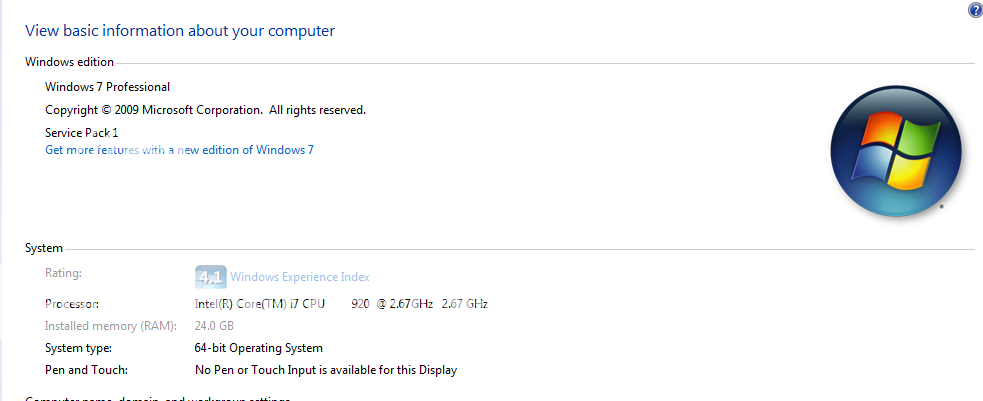 " />
|
scook
Forum Host

- Total Posts : 24146
- Joined: 2005/07/27 13:43:57
- Location: TX
- Status: offline

Re: X3 - Constant Crashes - Please Help
2014/02/12 00:14:02
(permalink)
Does it load in safe mode skipping the Arp MFX?
|
metal190
Max Output Level: -90 dBFS
- Total Posts : 11
- Joined: 2008/10/16 14:29:38
- Status: offline
Re: X3 - Constant Crashes - Please Help
2014/02/12 00:16:23
(permalink)
How do I try that (cause it always crashes with the message re: the arpeggiator every time)? Thanks btw!
|
SuperG
Max Output Level: -63 dBFS

- Total Posts : 1371
- Joined: 2012/10/19 16:09:18
- Location: Edgewood, NM
- Status: offline
Re: X3 - Constant Crashes - Please Help
2014/02/12 00:20:05
(permalink)
To use Safe Mode, open a file while holding down the Shift key.
|
robert_e_bone
Moderator

- Total Posts : 8968
- Joined: 2007/12/26 22:09:28
- Location: Palatine, IL
- Status: offline
Re: X3 - Constant Crashes - Please Help
2014/02/12 02:40:08
(permalink)
1. Do you recall if you did the download and install of Sonar with your antivirus temporarily suspended?
2. Do you recall if you did the install of Sonar with the explicit option of Run As Administrator? (not enough just to install with user account that has admin privileges)
3. Is your Windows Update maintenance up to date? If not, please run Windows Update over and over until all the outstanding maintenance is applied.
4. Are you running X3d, which is the current release?
5. That error looks like it might be an access violation. Does this occur if you launch Sonar with Run As Administrator option set?
6. Is your antivirus software running when you are launching Sonar?
7. Have you double-checked the integrity of the downloaded installation files? There are MD5 Hash values published on the Sonar install web page, and there are freeware utilities you can use to generate those MD5 hash values on the downloaded install files, which you can then compare to what Cakewalk has.
Here are the published values for the various download files for X3 Producer:
File Name:Description:File Size:MD5 Hash:01_Read_This_First_SONAR_X3.exeInstalls the Read Me and Setup Guides.Approx.
5 MB717027ce66f323706344420ee66f0e9c02_SONAR_X3_Producer.part1.exePart 1 of the SONAR X3 Producer installer. Launches the SONAR X3 Setup Wizard at the end.Approx. 1.20
GBfe5d24de89c0d2bf7c8ef0fff85e0abd02_SONAR_X3_Producer.part2.exePart 2 of the SONAR X3 Producer installer. Auto-launches. Can be manually run if Part 1 has finished.Approx. 1.65
GB5128ef47dada335c196e179c596f32f002_SONAR_X3_Producer.part3.exePart 3 of the SONAR X3 Producer installer. Auto-launches. Can be manually run if Part 2 has finished.Approx. 1.65
GB5c27dbeb9fcf17151e1ccb6ae9f1f54202_SONAR_X3_Producer.part4.exePart 4 of the SONAR X3 Producer installer. Auto-launches. Can be manually run if Part 3 has finished.Approx. 920.37
MBd822bc697796d90c5606193e027f89dd03_Loops_And_One_Shots.part1.exePart 1 of the Additional Loops Installer.Approx. 1.29 GB672aa6ad6d43cb9312d0a1924bb7c92503_Loops_And_One_Shots.part2.exePart 2 of the Additional Loops Installer. Auto-launches. Can be manually run if Part 1 has finished.Approx. 1.92 GB0f997f0cc5aee114dfb7cc5dc4a6e2f203_Loops_And_One_Shots.part3.exePart 3 of the Additional Loops Installer. Auto-launches. Can be manually run if Part 2 has finished.Approx. 1.07 GBce19d4f34447b9051f6b27dd12df30a904_Dimension_Pro_1_5_Setup.exeDimension Pro 1.5 full installer. Installs plug-in and content.
Requires serial number in "CWDM-1.50-XXXXXX-XXXXXX" format.Approx. 2.93 GB86701254801a9889e12545adb279fdba04_Dimension_Pro_1.5_Expansion_Packs.zipAdditional Expansion Packs for Dimension Pro.Approx. 196 MB806121d5a559b432e80254fe701fd82805_XLN_Audio_Addictive_Drums_Download_Instructions.rtfInstructions for downloading XLN Audio Addictive DrumsApprox. 35 KB5f1b549e95a5063672c87ef8f8a5ac49
Please review and respond to the above.
In addition, if you follow the procedures for submitting a support ticket, I believe one of the options allows you to send one of those mini-dumps to Cakewalk.
If you then call tech support, they may be able to assist you with a quick resolution to the issue, if one of the above items does not end up being the problem.
I hope there is a speedy resolution. On the plus side, you do not have a commonly reported issue, so it is likely to be something specific to your system/environment - which is good, because it can then most likely be resolved.
Bob Bone
Wisdom is a giant accumulation of "DOH!" Sonar: Platinum (x64), X3 (x64) Audio Interfaces: AudioBox 1818VSL, Steinberg UR-22 Computers: 1) i7-2600 k, 32 GB RAM, Windows 8.1 Pro x64 & 2) AMD A-10 7850 32 GB RAM Windows 10 Pro x64 Soft Synths: NI Komplete 8 Ultimate, Arturia V Collection, many others MIDI Controllers: M-Audio Axiom Pro 61, Keystation 88es Settings: 24-Bit, Sample Rate 48k, ASIO Buffer Size 128, Total Round Trip Latency 9.7 ms
|
metal190
Max Output Level: -90 dBFS
- Total Posts : 11
- Joined: 2008/10/16 14:29:38
- Status: offline
Re: X3 - Constant Crashes - Please Help
2014/02/12 19:04:19
(permalink)
You guys are awesome.
So... I just opened in safe mode and left the arpeggiator disabled, and it opened fine. Problem is, I have no idea where the arpeggiator is in my project - I suspect it's in a clip FX bin. I know, this is a little embarassing - the song has 56 tracks and is currently about 12:30 long. Is there an easy way to find where that plug in is hiding so I can remove it from this project?
Now posting answers to Robert's questions...
|
metal190
Max Output Level: -90 dBFS
- Total Posts : 11
- Joined: 2008/10/16 14:29:38
- Status: offline
Re: X3 - Constant Crashes - Please Help
2014/02/12 19:11:09
(permalink)
Please see inline responses below. And thanks for the help! robert_e_bone
1. Do you recall if you did the download and install of Sonar with your antivirus temporarily suspended? Yes.
2. Do you recall if you did the install of Sonar with the explicit option of Run As Administrator? (not enough just to install with user account that has admin privileges). No, but I only have one account on my DAW computer, which is the administrator account. Is there a place to confirm administrator privileges, and is it possible the administrator account would not have administrator privileges?
3. Is your Windows Update maintenance up to date? If not, please run Windows Update over and over until all the outstanding maintenance is applied. I'll try that now and will let you know if this fixes it!
4. Are you running X3d, which is the current release? Yes - by the time I bought X3, X3d was included.
5. That error looks like it might be an access violation. Does this occur if you launch Sonar with Run As Administrator option set? I never get the error when I launch Sonar, only when I launch that one project file. How do I launch Sonar with the Run As Administrator option?
6. Is your antivirus software running when you are launching Sonar? It's always disabled, as I leave my DAW computer disconnected from the internet. (It's at a studio with no internet access).
7. Have you double-checked the integrity of the downloaded installation files? There are MD5 Hash values published on the Sonar install web page, and there are freeware utilities you can use to generate those MD5 hash values on the downloaded install files, which you can then compare to what Cakewalk has. I'll download one of those utilities and check it out. Thanks for making life easy by posting the hash values here.
Here are the published values for the various download files for X3 Producer:
File Name:Description:File Size:MD5 Hash:01_Read_This_First_SONAR_X3.exeInstalls the Read Me and Setup Guides.Approx.
5 MB717027ce66f323706344420ee66f0e9c02_SONAR_X3_Producer.part1.exePart 1 of the SONAR X3 Producer installer. Launches the SONAR X3 Setup Wizard at the end.Approx. 1.20
GBfe5d24de89c0d2bf7c8ef0fff85e0abd02_SONAR_X3_Producer.part2.exePart 2 of the SONAR X3 Producer installer. Auto-launches. Can be manually run if Part 1 has finished.Approx. 1.65
GB5128ef47dada335c196e179c596f32f002_SONAR_X3_Producer.part3.exePart 3 of the SONAR X3 Producer installer. Auto-launches. Can be manually run if Part 2 has finished.Approx. 1.65
GB5c27dbeb9fcf17151e1ccb6ae9f1f54202_SONAR_X3_Producer.part4.exePart 4 of the SONAR X3 Producer installer. Auto-launches. Can be manually run if Part 3 has finished.Approx. 920.37
MBd822bc697796d90c5606193e027f89dd03_Loops_And_One_Shots.part1.exePart 1 of the Additional Loops Installer.Approx. 1.29 GB672aa6ad6d43cb9312d0a1924bb7c92503_Loops_And_One_Shots.part2.exePart 2 of the Additional Loops Installer. Auto-launches. Can be manually run if Part 1 has finished.Approx. 1.92 GB0f997f0cc5aee114dfb7cc5dc4a6e2f203_Loops_And_One_Shots.part3.exePart 3 of the Additional Loops Installer. Auto-launches. Can be manually run if Part 2 has finished.Approx. 1.07 GBce19d4f34447b9051f6b27dd12df30a904_Dimension_Pro_1_5_Setup.exeDimension Pro 1.5 full installer. Installs plug-in and content.
Requires serial number in "CWDM-1.50-XXXXXX-XXXXXX" format.Approx. 2.93 GB86701254801a9889e12545adb279fdba04_Dimension_Pro_1.5_Expansion_Packs.zipAdditional Expansion Packs for Dimension Pro.Approx. 196 MB806121d5a559b432e80254fe701fd82805_XLN_Audio_Addictive_Drums_Download_Instructions.rtfInstructions for downloading XLN Audio Addictive DrumsApprox. 35 KB5f1b549e95a5063672c87ef8f8a5ac49
Please review and respond to the above.
In addition, if you follow the procedures for submitting a support ticket, I believe one of the options allows you to send one of those mini-dumps to Cakewalk. I didn't see this option, but when I submitted my support ticket I made the offer. Submitted the ticket last night but haven't heard back from cakewalk support yet.
If you then call tech support, they may be able to assist you with a quick resolution to the issue, if one of the above items does not end up being the problem. I wish I could do it over the phone, but I'm never near my DAW during the work day.
I hope there is a speedy resolution. On the plus side, you do not have a commonly reported issue, so it is likely to be something specific to your system/environment - which is good, because it can then most likely be resolved. Many many thanks!
Bob Bone
|
robert_e_bone
Moderator
- Total Posts : 8968
- Joined: 2007/12/26 22:09:28
- Location: Palatine, IL
- Status: offline
Re: X3 - Constant Crashes - Please Help
2014/02/12 19:29:38
(permalink)
With regard to install with Run As Administrator, versus using an account with Admin privileges:
These are 2 different things. Installing with Run as Administrator grants additional privileges, above and beyond what you get with simply using an account that has administrator privileges.
It is possible that your install didn't get everything it needed to do done, due to having less than the full Run As Administrator privileges.
To launch the Sonar installer, or any program, with Run As Administrator, you would right-click on the launch icon, and either click on the Run As Administrator, or click on Properties, then on Advanced, and then check Run As Administrator. Doing it the first way runs only that time with Run As Administrator. Doing it the 2nd way sets that option for any time you run that program.
I always install programs with Run As Administrator, and I also always set the Sonar launch icon to permanently use Run As Administrator.
Do things work better if you launch Sonar with Run As Administrator?
If not, and if figuring out where this arpeggiator is and getting rid of it doesn't work, you might consider a re-install of Sonar, this time using Run As Administrator explicitly, using either of the above 2 methods for setting that option.
Bob Bone
Wisdom is a giant accumulation of "DOH!" Sonar: Platinum (x64), X3 (x64) Audio Interfaces: AudioBox 1818VSL, Steinberg UR-22 Computers: 1) i7-2600 k, 32 GB RAM, Windows 8.1 Pro x64 & 2) AMD A-10 7850 32 GB RAM Windows 10 Pro x64 Soft Synths: NI Komplete 8 Ultimate, Arturia V Collection, many others MIDI Controllers: M-Audio Axiom Pro 61, Keystation 88es Settings: 24-Bit, Sample Rate 48k, ASIO Buffer Size 128, Total Round Trip Latency 9.7 ms
|
Splat 
Max Output Level: 0 dBFS

- Total Posts : 8672
- Joined: 2010/12/29 15:28:29
- Location: Mars.
- Status: offline
Re: X3 - Constant Crashes - Please Help
2014/02/12 19:29:39
(permalink)
Are you running 32 bit Sonar on 64 bit windows? Looking at your screenshot the DLL is in:
C:\Program Files (X86) \Cakewalk\Shared MIDI Plugins\arpeggiator.dll
If you can running 64 bit it is in:
C:\Program Files\Cakewalk\Shared MIDI Plugins\arpeggiator.dll
Maybe worth checking the windows event viewer for more info...
Sell by date at 9000 posts. Do not feed. @48/24 & 128 buffers latency is 367 with offset of 38. Sonar Platinum(64 bit),Win 8.1(64 bit),Saffire Pro 40(Firewire),Mix Control = 3.4,Firewire=VIA,Dell Studio XPS 8100(Intel Core i7 CPU 2.93 Ghz/16 Gb),4 x Seagate ST31500341AS (mirrored),GeForce GTX 460,Yamaha DGX-505 keyboard,Roland A-300PRO,Roland SPD-30 V2,FD-8,Triggera Krigg,Shure SM7B,Yamaha HS5.Maschine Studio+Komplete 9 Ultimate+Kontrol Z1.Addictive Keys,Izotope Nectar elements,Overloud Bundle,Geist.Acronis True Image 2014.
|
metal190
Max Output Level: -90 dBFS
- Total Posts : 11
- Joined: 2008/10/16 14:29:38
- Status: offline
Re: X3 - Constant Crashes - Please Help
2014/03/07 02:52:31
(permalink)
So, I got the original problem somewhat fixed, in that I got the file open in safe mode and deleted the arpeggiator instances. Then the file worked for about 4 weeks. Then the $h!t hit the fan.
Not sure what has happened, but now upon trying to open almost all of my files, Sonar crashes and generates a mini dump. (Exception code c0000005, Address 00000001401A6FEF:0000000000000065:0000000000000065)
I've tried redownloading X3, ensuring antivirus is off, then installing with antivirus off and as administrator. I even tried the "clean install", renaming the old cakewalk folders and deleting the keys out of the registry.
Not sure what to do now. A few files work, but mostly just random ones with a track or two and no plugins from laying down guitar ideas. Most files with any level of complexity or intensity crash the program.
Any ideas are MUCH MUCH MUCH appreciated!
|
metal190
Max Output Level: -90 dBFS
- Total Posts : 11
- Joined: 2008/10/16 14:29:38
- Status: offline
Re: X3 - Constant Crashes - Please Help
2014/03/07 03:46:29
(permalink)
Oh. And if I get a file open that has many tracks and or plug ins, I get lots of audio drop outs. Shouldn't be happening based on the specs of my machine, and based on this being a sudden and new development.
|
mettelus
Max Output Level: -22 dBFS

- Total Posts : 5321
- Joined: 2005/08/05 03:19:25
- Location: Maryland, USA
- Status: offline
Re: X3 - Constant Crashes - Please Help
2014/03/07 08:17:45
(permalink)
If this is "sudden" have you tried to do a system restore to a day when you last knew it worked? That exception code is most often thrown by Windows over a driver error. Is that giving you a blue screen or just crashing SONAR?
Another place to check is Windows Event Viewer and look for more detail on each of these (Windows should have them all logged).
ASUS ROG Maximus X Hero (Wi-Fi AC), i7-8700k, 16GB RAM, GTX-1070Ti, Win 10 Pro, Saffire PRO 24 DSP, A-300 PRO, plus numerous gadgets and gizmos that make or manipulate sound in some way.
|