jonnewyork
Max Output Level: -85 dBFS

- Total Posts : 263
- Joined: 2007/02/07 19:38:38
- Status: offline
X3 driver settings not being saved
On a project I'm working on, between plugins and automation a buffer size of 256 samples isn't cutting it.
So I go to preferences/ driver settings/ ASIO Panel to change it to 512 samples. Then I hit "ok" which closes the window.
So I'm back to the driver settings window with a choice of "ok" or "apply".
Regardless of which I click, I save the program.
No matter what I do to save the buffer setting at 512 samples, the next time I open the program, it is set to 256 samples.
Why is that?
Cheers, Jon Win 7 Pro Intel Core i7-3770 @ 3.40 GHz, 3.40 GHz 16 GB RAM 64 bit op sys Lynx Aurora 16 ADC w/ AES16e card
|
robert_e_bone
Moderator

- Total Posts : 8968
- Joined: 2007/12/26 22:09:28
- Location: Palatine, IL
- Status: offline

Re: X3 driver settings not being saved
2016/08/06 21:58:05
(permalink)
Is there any other application that also accesses the audio interface? Perhaps that other application is setting it back to whatever it is set to?
Just guessing really, sorry it's all I have at the moment for you. I have not seen that myself before.
Bob Bone
Wisdom is a giant accumulation of "DOH!" Sonar: Platinum (x64), X3 (x64) Audio Interfaces: AudioBox 1818VSL, Steinberg UR-22 Computers: 1) i7-2600 k, 32 GB RAM, Windows 8.1 Pro x64 & 2) AMD A-10 7850 32 GB RAM Windows 10 Pro x64 Soft Synths: NI Komplete 8 Ultimate, Arturia V Collection, many others MIDI Controllers: M-Audio Axiom Pro 61, Keystation 88es Settings: 24-Bit, Sample Rate 48k, ASIO Buffer Size 128, Total Round Trip Latency 9.7 ms
|
jonnewyork
Max Output Level: -85 dBFS
- Total Posts : 263
- Joined: 2007/02/07 19:38:38
- Status: offline
Re: X3 driver settings not being saved
2016/08/07 01:34:01
(permalink)
I don't think I can even run Sonar with another audio application.
This is the only project I've needed to set the buffer to 512 samples for and I think that's because I'm using vocal rider and little microshift along with some automation. So this is the first time this has cropped up.
Another thing that happens automatically that I can't seem to control is default bus assignments. If I insert a new audio track it defaults to the 'guitar' bus even though I didn't assign it myself and I'm recording vocals. If a new track is going to default to the same bus assignment every time, I'd be okay with it going to the 'master' bus.
Cheers, Jon Win 7 Pro Intel Core i7-3770 @ 3.40 GHz, 3.40 GHz 16 GB RAM 64 bit op sys Lynx Aurora 16 ADC w/ AES16e card
|
Zargg
Max Output Level: 0 dBFS

- Total Posts : 10666
- Joined: 2014/09/28 04:20:14
- Location: Norway
- Status: offline
Re: X3 driver settings not being saved
2016/08/07 06:50:40
(permalink)
☄ Helpfulby Bristol_Jonesey 2016/08/08 04:03:47
jonnewyork
Another thing that happens automatically that I can't seem to control is default bus assignments. If I insert a new audio track it defaults to the 'guitar' bus even though I didn't assign it myself and I'm recording vocals. If a new track is going to default to the same bus assignment every time, I'd be okay with it going to the 'master' bus.
Hi. To change default bus, right click on (as an example) Master bus, and choose set as default.  All the best.
Ken Nilsen ZarggBBZWin 10 Pro X64, Cakewalk by Bandlab, SPlat X64, AMD AM3+ fx-8320, 16Gb RAM, RME Ucx (+ ARC), Tascam FW 1884, M-Audio Keystation 61es, *AKAI MPK Pro 25, *Softube Console1, Alesis DM6 USB, Maschine MkII Laptop setup: Win 10 X64, i5 2.4ghz, 8gb RAM, 320gb 7200 RPM HD, Focusrite Solo, + *
|
jonnewyork
Max Output Level: -85 dBFS
- Total Posts : 263
- Joined: 2007/02/07 19:38:38
- Status: offline
Re: X3 driver settings not being saved
2016/08/07 21:53:11
(permalink)
Zargg71
jonnewyork
Another thing that happens automatically that I can't seem to control is default bus assignments. If I insert a new audio track it defaults to the 'guitar' bus even though I didn't assign it myself and I'm recording vocals. If a new track is going to default to the same bus assignment every time, I'd be okay with it going to the 'master' bus.
Hi. To change default bus, right click on (as an example) Master bus, and choose set as default.
All the best.
Thanks, Zargg71
Cheers, Jon Win 7 Pro Intel Core i7-3770 @ 3.40 GHz, 3.40 GHz 16 GB RAM 64 bit op sys Lynx Aurora 16 ADC w/ AES16e card
|
jonnewyork
Max Output Level: -85 dBFS
- Total Posts : 263
- Joined: 2007/02/07 19:38:38
- Status: offline
Re: X3 driver settings not being saved
2016/09/02 09:05:31
(permalink)
Is everyone still stumped?
I'm having the problem on other projects also. If I change the buffer size and save it, every time I open a project that requires a value other than 256, it has automatically defaulted to 256 regardless of whether I saved it at 512 or 1024. Kind of annoying to have to reset it every time I open the project.
I was hoping it was an error on my part, but if nobody knows why this is happening, I guess it's a bug that hasn't been fixed.
Cheers, Jon Win 7 Pro Intel Core i7-3770 @ 3.40 GHz, 3.40 GHz 16 GB RAM 64 bit op sys Lynx Aurora 16 ADC w/ AES16e card
|
brundlefly
Max Output Level: 0 dBFS
- Total Posts : 14250
- Joined: 2007/09/14 14:57:59
- Location: Manitou Spgs, Colorado
- Status: offline
Re: X3 driver settings not being saved
2016/09/02 14:19:58
(permalink)
It's highly unlikely this is due to a SONAR bug. If it is, then it's an interoperability problem with your specific system and the interface driver or its 'console' app.
First, the ASIO buffer is not project-specific; it's set in the interface driver, using the interface's console app, and will affect all projects and all programs that use the ASIO driver. Second, SONAR does not reset the ASIO buffer size when it starts; it reads the stored value from the driver. If the value it reads isn't what was last set using the interface's console (whether launched outside of SONAR or from within SONAR via the button in Preferences), then either some other app requested the driver to use a different buffer size or the driver is changing spontaneously (probably on boot/wake when it first gets loaded).
SONAR Platinum x64, 2x MOTU 2408/PCIe-424 (24-bit, 48kHz) Win10, I7-6700K @ 4.0GHz, 24GB DDR4, 2TB HDD, 32GB SSD Cache, GeForce GTX 750Ti, 2x 24" 16:10 IPS Monitors
|
Cactus Music
Max Output Level: 0 dBFS
- Total Posts : 8424
- Joined: 2004/02/09 21:34:04
- Status: offline
Re: X3 driver settings not being saved
2016/09/02 14:34:03
(permalink)
As said above, the interfaces control panel is where you set the buffer, The Sonar numbers are just reporting what those are set to and changing them I believe does nothing. On the Sonar preference driver tab, Look for the ASIO button.
That's one way to open your audio interface control panel. Some apps like Focusrite create a desktop icon. And all will show in your Windows Control Panel.
some interfaces, like Focusrite and Tascam use a different number system. My Scarlett uses ms. So 7ms is in the middle and I think is = to 256
The Tascam just uses named settings = Lowest - Normal- and Highest latency.
|
robert_e_bone
Moderator
- Total Posts : 8968
- Joined: 2007/12/26 22:09:28
- Location: Palatine, IL
- Status: offline
Re: X3 driver settings not being saved
2016/09/02 19:00:44
(permalink)
I took a quick look in the manual for the Lynx Aurora, and saw a note in there about having to put it into standby mode after settings changes, to save the changes, prior to power being removed.
I am wondering if after you make that buffer size change, if putting the audio interface into standby mode and saving its state (and then restarting Sonar), would maybe resolve its jumping back to the 512 settings. Is that remotely possible? It seems easy enough to try it.
OR, do I need more coffee? :)
I will continue to read and learn about working with settings for the interface, to see if maybe I can figure out something.
Bob Bone
Wisdom is a giant accumulation of "DOH!" Sonar: Platinum (x64), X3 (x64) Audio Interfaces: AudioBox 1818VSL, Steinberg UR-22 Computers: 1) i7-2600 k, 32 GB RAM, Windows 8.1 Pro x64 & 2) AMD A-10 7850 32 GB RAM Windows 10 Pro x64 Soft Synths: NI Komplete 8 Ultimate, Arturia V Collection, many others MIDI Controllers: M-Audio Axiom Pro 61, Keystation 88es Settings: 24-Bit, Sample Rate 48k, ASIO Buffer Size 128, Total Round Trip Latency 9.7 ms
|
jonnewyork
Max Output Level: -85 dBFS
- Total Posts : 263
- Joined: 2007/02/07 19:38:38
- Status: offline
Re: X3 driver settings not being saved
2016/09/03 10:08:01
(permalink)
Cactus Music
As said above, the interfaces control panel is where you set the buffer, The Sonar numbers are just reporting what those are set to and changing them I believe does nothing. On the Sonar preference driver tab, Look for the ASIO button.
That's one way to open your audio interface control panel. Some apps like Focusrite create a desktop icon. And all will show in your Windows Control Panel.
some interfaces, like Focusrite and Tascam use a different number system. My Scarlett uses ms. So 7ms is in the middle and I think is = to 256
The Tascam just uses named settings = Lowest - Normal- and Highest latency.
The ASIO button is the only way I can set/ change the buffer size AFAIK. The "Buffers in playback queue +-" button and the Buffer Size Fast/ Slow slider are both inoperable. Maybe this is a clue? 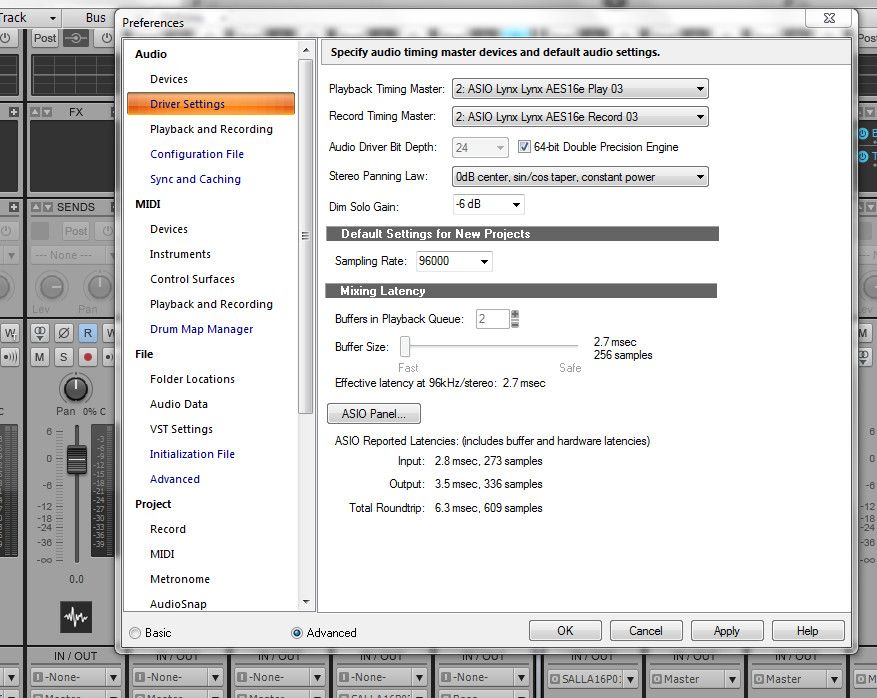
Cheers, Jon Win 7 Pro Intel Core i7-3770 @ 3.40 GHz, 3.40 GHz 16 GB RAM 64 bit op sys Lynx Aurora 16 ADC w/ AES16e card
|
jonnewyork
Max Output Level: -85 dBFS
- Total Posts : 263
- Joined: 2007/02/07 19:38:38
- Status: offline
Re: X3 driver settings not being saved
2016/09/03 10:28:13
(permalink)
robert_e_bone
I took a quick look in the manual for the Lynx Aurora, and saw a note in there about having to put it into standby mode after settings changes, to save the changes, prior to power being removed.
I am wondering if after you make that buffer size change, if putting the audio interface into standby mode and saving its state (and then restarting Sonar), would maybe resolve its jumping back to the 512 settings. Is that remotely possible? It seems easy enough to try it. The thing is, I like to use the minimum amount of latency req'd for a project, which is typically 256. I had to use 512 on a project where a couple of plugins (waves vocal rider and soundtoys little microshift, specifically) combined with automation were too much for the 256 setting, and melodyne requires 1024. So it would be nice if Sonar could save the settings specific to each individual project. OR, do I need more coffee? :) I'm putting on a fresh pot ;)
I will continue to read and learn about working with settings for the interface, to see if maybe I can figure out something.
Bob Bone
I appreciate your efforts, Bob.
Cheers, Jon Win 7 Pro Intel Core i7-3770 @ 3.40 GHz, 3.40 GHz 16 GB RAM 64 bit op sys Lynx Aurora 16 ADC w/ AES16e card
|
scook
Forum Host

- Total Posts : 24146
- Joined: 2005/07/27 13:43:57
- Location: TX
- Status: offline
Re: X3 driver settings not being saved
2016/09/03 10:30:40
(permalink)
The ASIO Panel button launches the control software bundled with the audio interface. As mentioned above SONAR has no control over buffer size when running in ASIO mode.
The Buffers in Playback Queue and Buffer Size slider are NOT used when running in ASIO mode. This is why the controls are not available.
|
jonnewyork
Max Output Level: -85 dBFS
- Total Posts : 263
- Joined: 2007/02/07 19:38:38
- Status: offline
Re: X3 driver settings not being saved
2016/09/03 18:31:40
(permalink)
Thanks for explaining why the controls aren't available, Scook. There is no way to set the latency from the Aurora 16 or the AES16e card other than a single global setting, set it and forget it. I need to go through Sonar to change the buffer sizes for each project. 
Cheers, Jon Win 7 Pro Intel Core i7-3770 @ 3.40 GHz, 3.40 GHz 16 GB RAM 64 bit op sys Lynx Aurora 16 ADC w/ AES16e card
|
robert_e_bone
Moderator
- Total Posts : 8968
- Joined: 2007/12/26 22:09:28
- Location: Palatine, IL
- Status: offline
Re: X3 driver settings not being saved
2016/09/03 18:37:25
(permalink)
jonnewyork - it seems to me that running with a buffer size of 256 when recording would drive me nuts with noticeable lag.
I use an ASIO Buffer Size of 128 when recording, and then change it to either 1024 or 2048 when mixing. The smaller size when recording gives me a Total Round Trip Latency in Sonar of just under 10 milliseconds. When mixing, the much larger buffer size gives the more robust plugins room enough to do what they need to - such as Perfect Space or LP-64, etc.
Generally, for the rest of time, I expect to switch back and forth between a small buffer for recording, and a giant buffer when mixing.
Bob Bone
Wisdom is a giant accumulation of "DOH!" Sonar: Platinum (x64), X3 (x64) Audio Interfaces: AudioBox 1818VSL, Steinberg UR-22 Computers: 1) i7-2600 k, 32 GB RAM, Windows 8.1 Pro x64 & 2) AMD A-10 7850 32 GB RAM Windows 10 Pro x64 Soft Synths: NI Komplete 8 Ultimate, Arturia V Collection, many others MIDI Controllers: M-Audio Axiom Pro 61, Keystation 88es Settings: 24-Bit, Sample Rate 48k, ASIO Buffer Size 128, Total Round Trip Latency 9.7 ms
|
jonnewyork
Max Output Level: -85 dBFS
- Total Posts : 263
- Joined: 2007/02/07 19:38:38
- Status: offline
Re: X3 driver settings not being saved
2016/09/03 21:44:38
(permalink)
That's a great tip for recording.
It would be nice if Sonar would remember the buffer size for each project since I do a lot more mixing than recording, though. Somehow it always defaults to 256 when I open a project.
Cheers, Jon Win 7 Pro Intel Core i7-3770 @ 3.40 GHz, 3.40 GHz 16 GB RAM 64 bit op sys Lynx Aurora 16 ADC w/ AES16e card
|