g_randybrown
Max Output Level: -40 dBFS

- Total Posts : 3522
- Joined: 2003/12/24 11:30:04
- Location: Las Cruces, NM, USA
- Status: offline
can't see controls in PRV controller pane
Probably user error but with show controller pane selected I can't seem to be able to add a CC by right clicking in the far left pane. When I do right click I get 2 options...to copy or move selected items to this lane.
Any idea what I'm missing here?
Thanks,
Randy
G. Randy Brown Windows 10, 64 bit, PlatinumIntel Core i7-3770S Asus P8Z77-V LK mobo 4X8GB Corsair XMS3 memory 500 GB Crucial BX100 SSD (OS)two WD Black 1 TB HDDSAPPHIRE DUAL-X 100314-4L Radeon HD 6970 2GB 256-Bit GDDR5 Presonus AudioBox 22VSLyoutube.com/crystalclearnm
|
scook
Forum Host

- Total Posts : 24146
- Joined: 2005/07/27 13:43:57
- Location: TX
- Status: offline

Re: can't see controls in PRV controller pane
2016/03/10 16:13:42
(permalink)
Is the PRV using the default color scheme?
|
g_randybrown
Max Output Level: -40 dBFS
- Total Posts : 3522
- Joined: 2003/12/24 11:30:04
- Location: Las Cruces, NM, USA
- Status: offline
Re: can't see controls in PRV controller pane
2016/03/10 16:24:00
(permalink)
Yes sir Steve, under prefs/customization/colors the "normal" preset is selected.
Not that this is relevant but just yesterday I went from Win 7 to Win 10.
Thanks,
Randy
G. Randy Brown Windows 10, 64 bit, PlatinumIntel Core i7-3770S Asus P8Z77-V LK mobo 4X8GB Corsair XMS3 memory 500 GB Crucial BX100 SSD (OS)two WD Black 1 TB HDDSAPPHIRE DUAL-X 100314-4L Radeon HD 6970 2GB 256-Bit GDDR5 Presonus AudioBox 22VSLyoutube.com/crystalclearnm
|
Paul P
Max Output Level: -48.5 dBFS

- Total Posts : 2685
- Joined: 2012/12/08 17:15:47
- Location: Montreal
- Status: offline
Re: can't see controls in PRV controller pane
2016/03/10 16:30:11
(permalink)
g_randybrown
When I do right click I get 2 options...to copy or move selected items to this lane.
I also get this when right-clicking in the left pane. Do you not already have one controller (velocity) showing at the bottom? If you do, you can change it to the controller you want (clicking the down arrow) or click the "+" to add a new one. If you don't, I couldn't say why.
Sonar Platinum [2017.10], Win7U x64 sp1, Xeon E5-1620 3.6 GHz, Asus P9X79WS, 16 GB ECC, 128gb SSD, HD7950, Mackie Blackjack
|
scook
Forum Host
- Total Posts : 24146
- Joined: 2005/07/27 13:43:57
- Location: TX
- Status: offline
Re: can't see controls in PRV controller pane
2016/03/10 16:49:52
(permalink)
Right-click does not have an add controller option. Paul describes the two methods to add controllers. The only time I have manged to hide the + is using custom colors.
|
g_randybrown
Max Output Level: -40 dBFS
- Total Posts : 3522
- Joined: 2003/12/24 11:30:04
- Location: Las Cruces, NM, USA
- Status: offline
Re: can't see controls in PRV controller pane
2016/03/10 18:11:17
(permalink)
That's just it, there is not one already added and no plus sign. It looks like this: 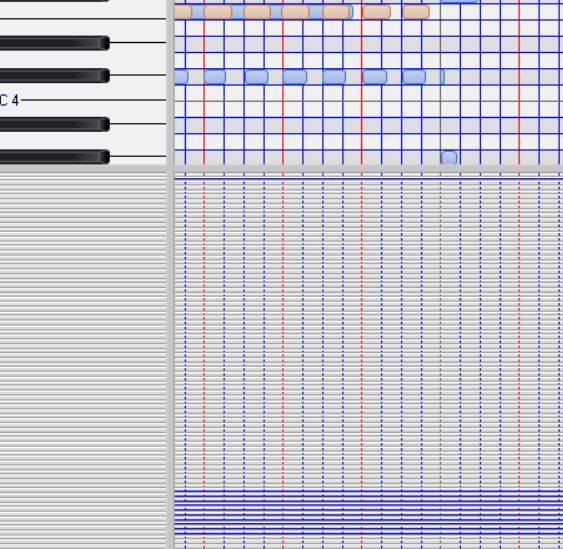
G. Randy Brown Windows 10, 64 bit, PlatinumIntel Core i7-3770S Asus P8Z77-V LK mobo 4X8GB Corsair XMS3 memory 500 GB Crucial BX100 SSD (OS)two WD Black 1 TB HDDSAPPHIRE DUAL-X 100314-4L Radeon HD 6970 2GB 256-Bit GDDR5 Presonus AudioBox 22VSLyoutube.com/crystalclearnm
|
scook
Forum Host
- Total Posts : 24146
- Joined: 2005/07/27 13:43:57
- Location: TX
- Status: offline
Re: can't see controls in PRV controller pane
2016/03/10 18:38:19
(permalink)
Check the Event list. It looks like there are quite a few CC lanes already set up. Too many to fit in the space provided.
|
g_randybrown
Max Output Level: -40 dBFS
- Total Posts : 3522
- Joined: 2003/12/24 11:30:04
- Location: Las Cruces, NM, USA
- Status: offline
Re: can't see controls in PRV controller pane
2016/03/10 18:59:19
(permalink)
Good eye Steve, you're right as usual ...this was a midi file sent to me and it had a gazillion controllers.
Thanks very much,
Randy
G. Randy Brown Windows 10, 64 bit, PlatinumIntel Core i7-3770S Asus P8Z77-V LK mobo 4X8GB Corsair XMS3 memory 500 GB Crucial BX100 SSD (OS)two WD Black 1 TB HDDSAPPHIRE DUAL-X 100314-4L Radeon HD 6970 2GB 256-Bit GDDR5 Presonus AudioBox 22VSLyoutube.com/crystalclearnm
|