Lilbitz
Max Output Level: -90 dBFS

- Total Posts : 1
- Joined: 2009/11/07 21:08:43
- Status: offline

Composing on Music Creator
I have some complaints and one question. The question is at the bottom if you'd like to skip the complaints.
I've been looking for a program that will enable me to compose music. I played violin in a county ensemble a decade ago, but I honestly can't say I play any instrument well enough to record. My interest is in composing. I don't know if Music Creator 5 is the best program for composing with software instruments, but the music composition software options at the store were limited (two programs) and this looked like the better one.
Here's my problem: everything in Music Creator 5 is geared toward people who want to record their own performances. When I enter a search in the help, I get a hundred results that deal with recording and nothing that deals with just composing. I've tried using the staff view for tracks (because that's what I learned in music theory) but the notes don't go where I want them to. The program keeps inserting rests and pushing my notes forward. I've made myself learn how to use the piano roll view instead, and that's worked pretty well, but I've spent countless hours trying out different things and learning by trial-and-error because I can't use the help files.
I'm starting to get a composition together, but I've encountered yet another problem. I want an acoustic guitar and none of the "acoustic guitars" in the sound center sound anything like the classic six-stringed acoustic guitar. Is there any way to download more instruments to my program?
|
57Gregy
Max Output Level: 0 dBFS

- Total Posts : 14404
- Joined: 2004/05/31 17:04:17
- Location: Raleigh, North Carolina
- Status: offline
Re:Composing on Music Creator
2009/11/07 23:40:39
(permalink)
When using the staff view, there are a couple things that determine where the notes are placed, The note duration and the resolution. So if you want to put a 1/4 note in the second beat position and the resolution is set at Whole or Measure, it will place it on the first beat. If the resolution is set to 1/2, the note will go to either the first beat or the third, depending on which one is closer to where you clicked the note in. So if you want a string of 1/4 notes, you should set the resolution to 1/4, and the notes will go on the proper beats. Same with 1/8 or any other note. To set the resolution to the desired interval, click the drop-down arrow next to the snap-to grid button. It's a button with a little grid on it. Or you can click the snap-to grid button to turn it off, and the notes can be placed anywhere without regard to the note durations. 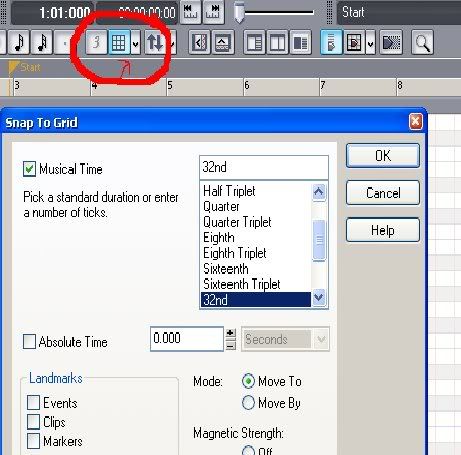 You can try the TTS-1 soft synth instead, but it's kinda hard to get a MIDI guitar to sound like a real one. You can't install other sounds in either TTS-1 or Sound Center, but you can download other soft synths and use them with MC, as long as they are DXi or VSTi. Since I play guitar, and have several, I haven't encountered that problem. 
|
DaveElson
Max Output Level: -84 dBFS

- Total Posts : 350
- Joined: 2004/01/16 12:42:38
- Location: Bothell, WA
- Status: offline
Re:Composing on Music Creator
2009/11/08 12:24:10
(permalink)
Lilbitz As Greg has said, there are other instruments you can purchase or download for free, but I would agree that many (especially guitar) don't sound great. There are a few that get good reviews but are not necessarily cheap. Considering cost, and the fact that you're main interest is composition, I would ask - does it really matter if the guitar doesn't sound authentic IF you're not going to use it in a production of some sort? If you want to compose something original, have an idea of what it sounds like but then play yourself from the printed score, the lack of authentic sounds won't stop you doing that. Either way, you'll get help here if you need it. There are other programs more geared towards notation too. I have Guitar Pro 5, which despite having Guitar in the title will, as a notation program accommodate all kinds of instruments and has it's own sounds. Not trying to steer you away from here but I have started to import notation from that into MC5. Edit - just reread the original post and saw that the interest is composing with software instruments, so perhaps sound quality is a little more important than I thought.
post edited by DaveElson - 2009/11/08 12:28:10
|
BluesMatt
Max Output Level: -90 dBFS
- Total Posts : 37
- Joined: 2007/12/26 12:36:39
- Status: offline
Re:Composing on Music Creator
2009/11/08 16:48:47
(permalink)
Lilbitz,
Not to discourage you from exploring and playing with Music Creator 5 but......I think Music Creator (MC) is primarily an audio and MIDI recording application with tools to edit (audio and MIDI) and mix multiple tracks down to .wav and MP3 files. In my relatively limited experience with MC4, composing from a blank staff (or piano roll) with this tool is not particularily easy. However, editing already recorded music in either staff or piano roll view is pretty easy.
As Dave mentioned, there are other applications that are optimized for composing. Many of these programs also have soft synths so you can hear what you've written. Take a look at PrintMusic from Finale. It is not too expensive and may have more of the composing features you are looking for.
No matter what you finally decide to do, please visit here again and let everyone known how your projects and coming along.
Matt
|
BluesMatt
Max Output Level: -90 dBFS
- Total Posts : 37
- Joined: 2007/12/26 12:36:39
- Status: offline
Re:Composing on Music Creator
2009/11/08 17:47:53
(permalink)
Lilbitz, After a little exploring right on the Cakewalk site, I stumbled upon "[font="verdana, arial, helvetica, sans-serif; line-height: normal; "]
http://www.cakewalk.com/P...RealGuitar/default.asp
I'm not sure this will give you what you need. Let us know.
thanks...........matt
|
57Gregy
Max Output Level: 0 dBFS
- Total Posts : 14404
- Joined: 2004/05/31 17:04:17
- Location: Raleigh, North Carolina
- Status: offline
Re:Composing on Music Creator
2009/11/09 00:00:50
(permalink)
Composing in the staff isn't easy. I can barely read music, and very slowly, too. I don't know anything about key or time signature, never had any real music lessons.
But I did compose a classical piece for my dad mostly clicking notes in the staff view, with piano, strings, horns, lots of instruments I can't play in real life.
Give a listen, if you like. It's 6 minutes long, called "Suite For Piano And Orchestra, For Dad". Click the My Noises link below to get to my soundclick page. It's literally the hardest thing I've ever done musically, and If I can do it, anyone can.
There are also many collaborations going on here, and at other sites on the web. Take a look at Cakewalk's 'Songs' forum. Lots of those folks send mp3 or wave files to each other and add parts to them. Many collaborative efforts. You can probably find someone to play your guitar parts for you; many of them read music or can play by ear from a MIDI track you send them, so you can get a 'real-sounding' guitar in your songs.
|
Wood67
Max Output Level: -64 dBFS

- Total Posts : 1348
- Joined: 2008/10/27 08:57:36
- Location: Brighton, UK
- Status: offline
Re:Composing on Music Creator
2009/11/09 04:07:55
(permalink)
Try the Yellow Tools Independence Free VST. This is a free version of their (much dearer) rompler, but includes some reasonably good acoustic guitar patches, particularly for picking. Strumming is not so good though.
Wood Studio One 3 Pro, (Sonar Platinum), Intel i7, Win10 Pro, 32Gb ram, RME Babyface Pro, Behringer X-Touch, Presonus Faderport, Akai MPK49, Arturia KeyLab25, KRK Rokit 5 monitors, and other sonic surprises.
|
Guitarhacker
Max Output Level: 0 dBFS
- Total Posts : 24398
- Joined: 2007/12/07 12:51:18
- Location: NC
- Status: offline
Re:Composing on Music Creator
2009/11/09 08:46:52
(permalink)
LIL..... try Band in a Box.... it's a rather costly program but I think it does what you want..... the guitars in the real tracks sound very good. you can get a free working demo version at http://www.pgmusic.com/ and play with it..the demo version doesn't have real instruments, they are midi, but you can see it it works for you for composing. Listen to a few of the top of the list songs on my soundclick site. steel guitar, sax, dobro, and some of the acoustic guitar was done on BB/RT.
post edited by Guitarhacker - 2009/11/09 08:50:31
My website & music: www.herbhartley.com MC4/5/6/X1e.c, on a Custom DAW Focusrite Firewire Saffire Interface BMI/NSAI "Just as the blade chooses the warrior, so too, the song chooses the writer "
|
Mamabear
Max Output Level: 0 dBFS
- Total Posts : 8954
- Joined: 2006/12/01 18:03:09
- Location: Missouri
- Status: offline
Re:Composing on Music Creator
2009/11/09 09:43:57
(permalink)
Welcome to the forum. I'm a piano player (only) but have composed several pieces with MC3 (and have upgraded to Studio 8 in the meantime, but that's neither here nor there. It can all be done with MC5.) I did have to invest in more software to get better-sounding instruments. I wish I would have in the beginning. It really wasn't that much of an outlay of money and it would have saved tons of time trying to get good sounds out of less-than-great samples. Specifically Dim Pro (I've used a couple of their guitar sounds (picking) that aren't bad (see my 'Silent Night' I believe it is.) For all the other sounds (violins, etc.), I use GPO (Garritan Personal Orchestra). I wouldn't be surprised if they have another sale around Christmas time (see northernsounds.com) and you can pick up some great sounds for $99.00. There are several people around here and the other forums that can help you get the best sounds out of those programs. For the piano sound I use Ivory Grand, which is only about $169.00. Anyway, yes, it's definitely possible. You don't have record any audio to get great sounds. Check out rolifer@verizon.net on the songs forum if you want to see how good these samples can sound. Unfortunately, if you thought you could do it all for $39.00, well, it's just not true. It IS hard to get your head around at first. But, it IS possible and it IS fun. :-)
|