Help Needed with Music Creator 5

Author
kkarrington
Max Output Level: -90 dBFS
  • Total Posts : 2
  • Joined: 2009/11/08 04:02:32
  • Status: offline
2009/11/08 04:12:52 (permalink)

Help Needed with Music Creator 5

I recently went to Best Buy and ask for a music mixing program and the salesman suggested music creator for me. I am having trouble learning the ropes. I have a couple of questions:
 
1. I am mainly needing this software to mix my own music as I am a professional entertainer, can this software be used for that purpose?
 
2. I need info on how to fade in and out, blending tracks together, how to add sound effects ect.
 
3. I only want to use this program to customize my own mixes, can this be done?
 
Any info would be helpful. I feel I have wasted money on this product when clearly it is not easy to use.
#1

6 Replies Related Threads

    Peter Rabbit
    Max Output Level: -64 dBFS
    • Total Posts : 1305
    • Joined: 2005/03/15 18:42:26
    • Status: offline
    Re:Help Needed with Music Creator 5 2009/11/08 15:33:13 (permalink)
     
    MC will do everthing you need it to do.
     
    The software is very user friendly once you've learned it. "Learning" it can be quite a chore but well worth the time and effort.
     
    My suggestion is to work through all the tutorials starting from the first to the last and this should give you the answers to most of your questions.
     
    Pete

    "Creating a bad song takes just as much time and energy as creating a good one. The problem is that you don't know it's a bad song until someone tells you, and by then it's too late."
    P. Rabbit
    #2
    BluesMatt
    Max Output Level: -90 dBFS
    • Total Posts : 37
    • Joined: 2007/12/26 12:36:39
    • Status: offline
    Re:Help Needed with Music Creator 5 2009/11/08 16:33:14 (permalink)
    K,

    I agree with Pete.  Once you get the software installed and playing audio then you can start exploring the mixing tools.  Music Creator 5 should have everything you need.

    Have fun and visit the forum often as you starting learning about MC5.  The veterans here are very knowledgeable and generous with their experience.

    Matt


    #3
    57Gregy
    Max Output Level: 0 dBFS
    • Total Posts : 14404
    • Joined: 2004/05/31 17:04:17
    • Location: Raleigh, North Carolina
    • Status: offline
    Re:Help Needed with Music Creator 5 2009/11/08 23:46:13 (permalink)
    1. I am mainly needing this software to mix my own music as I am a professional entertainer, can this software be used for that purpose?

     
    Yes. Everyone here uses it for that purpose, as well as recording.
     
    2. I need info on how to fade in and out, blending tracks together, how to add sound effects ect.
     
    Blending tracks together? Once you record something on another track, if it's in time, it should be blended. Maybe I misunderstood...
    But to easily fade a track in or out, you hover your cursor over the top left or right corner of an audio clip. When the cursor becomes a triangle, grab it and move the triangle to the left or right, depending on whether it's a fade in or out.
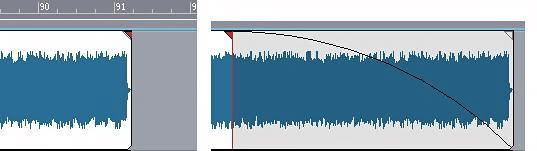


    The gray area is the fade out.
    What kind of sound effects? In the track pane or the console view, you should see a box labeled FX. That's the effects bin. Right-click in there to bring up a list of available effects. Select the one you want, and most have control panels to choose presets or adjust to your liking. If you don't like that effect, you can right-click it to delete it and try another.
    Oh, and welcome to the forum!
    Some info on your system would be helpful; what's your operating system? How much RAM does the computer have? Which version of Music Creator did you buy? Do you know what sound card you have?

    Greg 
    I am selling my MIM Fender Stratocaster HSS, red and black. PM for more details.

    Music Creator 2003, MC Pro 24, SONAR Home Studio 6 XL, SONAR  X3e, CbB, Focusrite Saffire, not enough space.
    Everything is better with pie. 

    http://www.soundclick.com/bands/default.cfm?bandID=609446
    http://www.reverbnation.com/#!/gregfields 
    #4
    Guitarhacker
    Max Output Level: 0 dBFS
    • Total Posts : 24398
    • Joined: 2007/12/07 12:51:18
    • Location: NC
    • Status: offline
    Re:Help Needed with Music Creator 5 2009/11/09 18:40:28 (permalink)
    I would recommend a decent audio interface other than your internal soundcard. It will allow you to do things better, however, if you are working in the audio realm only...no midi.... you will probably be OK as long as you just run a handful of tracks and don't get too fancy.

    Yes...MC5 will do all that and more.

    Just import your mix into an open audio track in a new project and tweek away.

    My website & music: www.herbhartley.com

    MC4/5/6/X1e.c, on a Custom DAW   
    Focusrite Firewire Saffire Interface


    BMI/NSAI

    "Just as the blade chooses the warrior, so too, the song chooses the writer 
    #5
    kkarrington
    Max Output Level: -90 dBFS
    • Total Posts : 2
    • Joined: 2009/11/08 04:02:32
    • Status: offline
    Re:Help Needed with Music Creator 5 2009/11/11 20:39:12 (permalink)
    Thanks Guys! I am going to start the tutorials and hopefully I will be able to learn what I need to know. Thanks again!
    #6
    Robomusic
    Max Output Level: 0 dBFS
    • Total Posts : 8943
    • Joined: 2004/05/30 00:54:24
    • Status: offline
    Re:Help Needed with Music Creator 5 2009/11/12 11:33:12 (permalink)
    By mix your own music do you mean, make a playlist of songs and use it as a backing band?  Or do you mean actually mix songs from scratch?

    What process you need will tell us how to guide you. For instance, if the songs are premade tunes and all you want to do is place them in order and add fades and effects, that is fairly easy.

    Tell us a little more details are nice.

    I'd Seize the day but i can't quite reach it!

    http://www.acidplanet.com/artist.asp?AID=33477&T=1260
    Music Town
    #7
    Jump to:
    © 2026 APG vNext Commercial Version 5.1