Hakkyou1403
Max Output Level: -90 dBFS

- Total Posts : 3
- Joined: 2009/03/25 14:30:08
- Status: offline
Skipping
Hello,
I've been using Music Creator 4 for a while now and I recently bought a new laptop with Windows Vista on it. Up until now I've been using Windows XP, which worked fine for me. Now when I go to record my music, it works fine the first time, but when I play it back or record something along with the first track, it skips horribly so that what I record doesn't match up to what I did earlier, it makes mixing the songs a real pain. Is there anything I can do? I truly appreciate any help given to me. Thank you.
|
Guitarhacker
Max Output Level: 0 dBFS

- Total Posts : 24398
- Joined: 2007/12/07 12:51:18
- Location: NC
- Status: offline
Sounds like the soundcard in the new lappy. You'll need to mess with the latency settings or...better yet, get a recording interface that will handle the data from MC5 in an expedient manner.
My website & music: www.herbhartley.com MC4/5/6/X1e.c, on a Custom DAW Focusrite Firewire Saffire Interface BMI/NSAI "Just as the blade chooses the warrior, so too, the song chooses the writer "
|
57Gregy
Max Output Level: 0 dBFS
- Total Posts : 14404
- Joined: 2004/05/31 17:04:17
- Location: Raleigh, North Carolina
- Status: offline
... and check that both the sampling rate and bit depth are the same for MC and your sound card.
|
Beagle
Max Output Level: 0 dBFS
- Total Posts : 50621
- Joined: 2006/03/29 11:03:12
- Location: Fort Worth, TX
- Status: offline
what soundcard are you using? what is your driver mode and your reported latency?
|
Hakkyou1403
Max Output Level: -90 dBFS
- Total Posts : 3
- Joined: 2009/03/25 14:30:08
- Status: offline
To be completely honest, I don't know how to find any of these things out. Can you tell me how to find them?
|
57Gregy
Max Output Level: 0 dBFS
- Total Posts : 14404
- Joined: 2004/05/31 17:04:17
- Location: Raleigh, North Carolina
- Status: offline
In Music Creator, at the top, click the Options button, then select Audio. You should have these options, and they should tell you what you need to know: 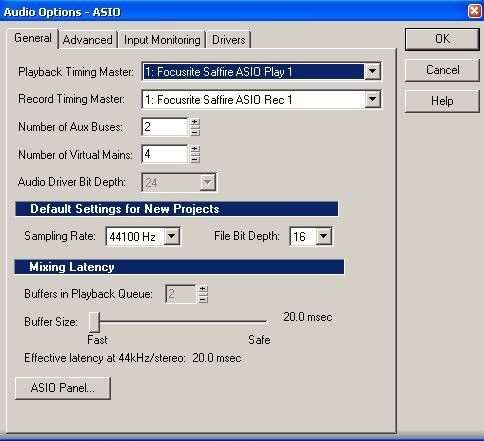 Where it says Playback and Recording Timing Master, that should be your sound card. The reported latency is where that slider control is near the bottom. This image shows mine at 20.0 ms.  The driver options should also be your sound card. 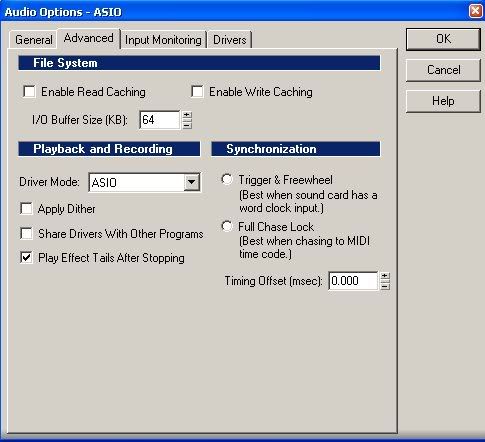 The driver mode is listed, well, you can figure that one out.  Of course, seeing all that depends on whether MC profiled your sound card correctly. MC's Wave Profiler should have run the first time you started the program, and set itself up for best performance based on your system.
|
Hakkyou1403
Max Output Level: -90 dBFS
- Total Posts : 3
- Joined: 2009/03/25 14:30:08
- Status: offline
Thank you very much, Greg. I think I know what was wrong now, I just need to record some things to make sure. Thanks again. 
|