Rob[at]Sound-Rehab
Max Output Level: -47 dBFS

- Total Posts : 2819
- Joined: 2011/02/03 04:31:35
- Location: Sound-Rehab, Austria
- Status: offline

NVIDIA driving me nuts! Help needed
Hi Guys! I need your help as I've run out of ideas on what to try. This is yet another "latency => drop out" thread, but I think I managed to isolate the problem and I'm about 99,99% sure that it's caused by the NVIDIA card (but pls tell me if I'm wrong). Here's the situation: - I build a new beefy DAW (see specs in signature)
- DAW runs nicely at low latency (ASIO buffer size 64 / 96), roundtrip 9-12 ms, using VS-700 & OctaCapture (VS EXPAND), but also occurs with single unit
- LatencyMon reports highest execution times on in USBPORT.sys (0.07 - 0.29ms) while everything works OK; nvlddmkm.sys (NVIDIA Windows Kernel Driver) is way down the list (0.05ms) ...
- About 2 1/2 to 3 mins into the playback of the song (small project!) all the sudden nvlddmkm.sys (NVIDIA) jumps to the top of the latency list and playback stops or crackles and restarts from the beginning
- I have no clue what causes the graphic card to take action 3 mins into the song. Changing screenset and this kind of things have no impact and don't trigger this problem earlier. It seems to happen at random, but at every playback sometime after about 2.5 mins ...
- I meanwhile deactivated the LAN card and all services related to network activity; all other unnecessary services are disabled as well. This is a standalone DAW with no other functionality and no network access.
I could try to post screenshots from LatencyMon if it helps. BTW, this is X1d but of course also happens in X2 in the same manner. Your help is much appreciated. Rob
GOOD TUNES LAST FOREVER +++ Visit the Rehab +++ DAW: Platinum/X3e, win10 64 bit, i7-3930K (6x3.2GHz), Asus Sabertooth X79, 32 GB DDR3 1600MHz, ATI HD 5450, 120 GB SSD OCZ Agility3, 2x 1TB WD HDD SATA 600 Audio-Interface: 2x MOTU 1248 AVB, Focusrite OctoPre, (Roland Octa-Capture) Control-Surface: VS-700C VSTi: WAVES, NI K10u, FabFilter, IK, ... (too many really)
|
brundlefly
Max Output Level: 0 dBFS

- Total Posts : 14250
- Joined: 2007/09/14 14:57:59
- Location: Manitou Spgs, Colorado
- Status: offline

Re:NVIDIA driving me nuts! Help needed
2012/11/21 16:06:51
(permalink)
FWIW... a long time ago when trying to get my DPC latency in Win7 back down to XP levels, I looked into a potential issue with NVIDIA drivers causing variable DPC latency by dynamically "throttling" the graphics processor according to the load. There was a tool that could theoretically set the chip to run at a fixed rate, but it didn't work on my system, and I eventually gave up trying to get control since it doesn't really cause any issues for me.
You might want to Google NVIDIA, Speed, Performance, Utility and related keywords to get more info, and see what's available now.
SONAR Platinum x64, 2x MOTU 2408/PCIe-424 (24-bit, 48kHz) Win10, I7-6700K @ 4.0GHz, 24GB DDR4, 2TB HDD, 32GB SSD Cache, GeForce GTX 750Ti, 2x 24" 16:10 IPS Monitors
|
emwhy
Max Output Level: -62 dBFS

- Total Posts : 1402
- Joined: 2006/01/03 15:09:02
- Status: offline
Re:NVIDIA driving me nuts! Help needed
2012/11/21 16:18:48
(permalink)
Gotta agree with Brundlefly on this. A friend has a DAW with SONAR 8.5 and an Nvidia GT 220 which does that same damn throttling thing. We would notice that when the machine was streaming video on youtube etc. everything was fine, but as soon as you stopped there would be a big spike in DPCs, into the red. The same happened when the machine was idle and you started doing something with graphics, fine then a big spike.
|
gustabo
Max Output Level: -49.5 dBFS

- Total Posts : 2591
- Joined: 2009/01/05 17:32:38
- Status: offline
Re:NVIDIA driving me nuts! Help needed
2012/11/21 16:46:54
(permalink)
My cousin had this problem with his machine and fixed it by getting an ATI card. $50 fix.
There's a reason why Studiocat and ADK both suggested, by pm, an ATI card as a good card.
Cakewalk by Bandlab - Win10 Pro x64 - StudioCat Platinum Studio DAW - 32 GB Ram - MOTU UltraLite-mk3
M-Audio Keystation 88ES - Akai MPD26 (hot-rodded) - Alesis DM10 - a few guitars, a few amps
Novation Launch Control - Korg nanoKONTROL2 - PreSonus FaderPort - DAW Remote HD on iPad
Adam A7X - Behritone C50A
PreSonus Monitor Station v2 (controlling the mons)
https://www.facebook.com/groups/sonarusergroup/
|
StarTekh
Max Output Level: -55 dBFS

- Total Posts : 2007
- Joined: 2004/03/09 12:02:20
- Location: Montreal
- Status: offline
Re:NVIDIA driving me nuts! Help needed
2012/11/21 16:52:27
(permalink)
FreeFly: what are you doing for chipset drivers and video drivers >?
|
Rob[at]Sound-Rehab
Max Output Level: -47 dBFS
- Total Posts : 2819
- Joined: 2011/02/03 04:31:35
- Location: Sound-Rehab, Austria
- Status: offline
Re:NVIDIA driving me nuts! Help needed
2012/11/21 16:57:19
(permalink)
StarTekh
FreeFly: what are you doing for chipset drivers and video drivers >?
As far as I know I'm using the latest drivers, certainly for video. motherboard drivers were updated by vendor before shipping to me 3 weeks ago, so should be the lastest, either
GOOD TUNES LAST FOREVER +++ Visit the Rehab +++ DAW: Platinum/X3e, win10 64 bit, i7-3930K (6x3.2GHz), Asus Sabertooth X79, 32 GB DDR3 1600MHz, ATI HD 5450, 120 GB SSD OCZ Agility3, 2x 1TB WD HDD SATA 600 Audio-Interface: 2x MOTU 1248 AVB, Focusrite OctoPre, (Roland Octa-Capture) Control-Surface: VS-700C VSTi: WAVES, NI K10u, FabFilter, IK, ... (too many really)
|
Rob[at]Sound-Rehab
Max Output Level: -47 dBFS
- Total Posts : 2819
- Joined: 2011/02/03 04:31:35
- Location: Sound-Rehab, Austria
- Status: offline
Re:NVIDIA driving me nuts! Help needed
2012/11/21 17:04:38
(permalink)
gustabo
My cousin had this problem with his machine and fixed it by getting an ATI card. $50 fix.
There's a reason why Studiocat and ADK both suggested, by pm, an ATI card as a good card.
I wouldn't mind swapping the cards because the one I got was cheap since I don't need GPU power for Sonar. However, I wouldn't want to have the same problem again. So I'd appreciate if you could let me know which ATI card that was and whether it was for win 7 64 bit.
GOOD TUNES LAST FOREVER +++ Visit the Rehab +++ DAW: Platinum/X3e, win10 64 bit, i7-3930K (6x3.2GHz), Asus Sabertooth X79, 32 GB DDR3 1600MHz, ATI HD 5450, 120 GB SSD OCZ Agility3, 2x 1TB WD HDD SATA 600 Audio-Interface: 2x MOTU 1248 AVB, Focusrite OctoPre, (Roland Octa-Capture) Control-Surface: VS-700C VSTi: WAVES, NI K10u, FabFilter, IK, ... (too many really)
|
StarTekh
Max Output Level: -55 dBFS
- Total Posts : 2007
- Joined: 2004/03/09 12:02:20
- Location: Montreal
- Status: offline
Re:NVIDIA driving me nuts! Help needed
2012/11/21 17:07:11
(permalink)
FreeFly sounds good, did you look in bios for speedstep and other power management options in bios and in os to see nothing is limited >? and how did you setup x-2 ..audio.. config. thread scheduling, is it set to 0 or 2 >? ..multy processor engine is enabled >?
|
Silicon Audio
Max Output Level: -84 dBFS

- Total Posts : 346
- Joined: 2012/03/06 04:33:19
- Location: Northland, New Zealand
- Status: offline
Re:NVIDIA driving me nuts! Help needed
2012/11/21 17:07:21
(permalink)
Count me in as another person who had unresolvable audio problems with an nVidia card - solved with an ATI/AMD card.
"One of the great and beautiful things about music and recordings in general is that legacies live on" - Billy Arnell - April 15 2012
|
gustabo
Max Output Level: -49.5 dBFS
- Total Posts : 2591
- Joined: 2009/01/05 17:32:38
- Status: offline
Re:NVIDIA driving me nuts! Help needed
2012/11/21 17:07:32
(permalink)
Cakewalk by Bandlab - Win10 Pro x64 - StudioCat Platinum Studio DAW - 32 GB Ram - MOTU UltraLite-mk3
M-Audio Keystation 88ES - Akai MPD26 (hot-rodded) - Alesis DM10 - a few guitars, a few amps
Novation Launch Control - Korg nanoKONTROL2 - PreSonus FaderPort - DAW Remote HD on iPad
Adam A7X - Behritone C50A
PreSonus Monitor Station v2 (controlling the mons)
https://www.facebook.com/groups/sonarusergroup/
|
Rob[at]Sound-Rehab
Max Output Level: -47 dBFS
- Total Posts : 2819
- Joined: 2011/02/03 04:31:35
- Location: Sound-Rehab, Austria
- Status: offline
Re:NVIDIA driving me nuts! Help needed
2012/11/21 17:15:50
(permalink)
StarTekh
FreeFly sounds good, did you look in bios for speedstep and other power management options in bios and in os to see nothing is limited >? and how did you setup x-2 ..audio.. config. thread scheduling, is it set to 0 or 2 >? ..multy processor engine is enabled >?
thread scheduling = 2 multi proc engne = enabled bios i can't check right now ... i'm not in the studio right now ...
GOOD TUNES LAST FOREVER +++ Visit the Rehab +++ DAW: Platinum/X3e, win10 64 bit, i7-3930K (6x3.2GHz), Asus Sabertooth X79, 32 GB DDR3 1600MHz, ATI HD 5450, 120 GB SSD OCZ Agility3, 2x 1TB WD HDD SATA 600 Audio-Interface: 2x MOTU 1248 AVB, Focusrite OctoPre, (Roland Octa-Capture) Control-Surface: VS-700C VSTi: WAVES, NI K10u, FabFilter, IK, ... (too many really)
|
wizard71
Max Output Level: -74 dBFS

- Total Posts : 836
- Joined: 2012/02/12 05:45:05
- Location: UK
- Status: offline
Re:NVIDIA driving me nuts! Help needed
2012/11/21 17:16:06
(permalink)
I read that someone had success by moving it to the PCIe 4x slot from the 16x. Worth a try if you can.
http://www.youtube.com/SpaceTimeAceshttps://soundcloud.com/space-time-acesSonar Platinum - Win 8.1 x64 - Haswell 4770k - ASrock Z87 pro3 - 32gb ram - Fractal design R4 case - 3x HDD 1 USB 2.0 external 1x cr M4 ssd for samples - Octa-capture - Sontronics Aria - Sontronics STC-1s - BX8 monitors - ARC 2 system - Kawai CA63 piano - Kawai MP6 Stage piano - Fender custom Telecaster FMT - Yamaha LL6 - Fender P bass
|
Rob[at]Sound-Rehab
Max Output Level: -47 dBFS
- Total Posts : 2819
- Joined: 2011/02/03 04:31:35
- Location: Sound-Rehab, Austria
- Status: offline
Re:NVIDIA driving me nuts! Help needed
2012/11/21 17:20:14
(permalink)
gustabo
HD5450
Thanks gustabo! That one sells for 32 EUR on amazon. Definitely worth a try!
GOOD TUNES LAST FOREVER +++ Visit the Rehab +++ DAW: Platinum/X3e, win10 64 bit, i7-3930K (6x3.2GHz), Asus Sabertooth X79, 32 GB DDR3 1600MHz, ATI HD 5450, 120 GB SSD OCZ Agility3, 2x 1TB WD HDD SATA 600 Audio-Interface: 2x MOTU 1248 AVB, Focusrite OctoPre, (Roland Octa-Capture) Control-Surface: VS-700C VSTi: WAVES, NI K10u, FabFilter, IK, ... (too many really)
|
StarTekh
Max Output Level: -55 dBFS
- Total Posts : 2007
- Joined: 2004/03/09 12:02:20
- Location: Montreal
- Status: offline
Re:NVIDIA driving me nuts! Help needed
2012/11/21 17:23:41
(permalink)
FreeFly: you did install the x-2 patch >?
|
VariousArtist
Max Output Level: -63 dBFS

- Total Posts : 1397
- Joined: 2003/11/07 15:03:09
- Location: London, UK & California, USA
- Status: offline
Re:NVIDIA driving me nuts! Help needed
2012/11/21 19:46:53
(permalink)
|
gswitz
Max Output Level: -18.5 dBFS

- Total Posts : 5694
- Joined: 2007/06/16 07:17:14
- Location: Richmond Virginia USA
- Status: offline
Re:NVIDIA driving me nuts! Help needed
2012/11/21 20:00:15
(permalink)
just disable the video adapter in device manager.the windows default controller will not throttle for power saving.
|
gswitz
Max Output Level: -18.5 dBFS
- Total Posts : 5694
- Joined: 2007/06/16 07:17:14
- Location: Richmond Virginia USA
- Status: offline
Re:NVIDIA driving me nuts! Help needed
2012/11/21 20:58:00
(permalink)
|
stratman70
Max Output Level: -45 dBFS

- Total Posts : 3044
- Joined: 2006/09/12 20:34:12
- Location: Earth
- Status: offline
Re:NVIDIA driving me nuts! Help needed
2012/11/21 21:19:43
(permalink)
Well, I must live in a magical land. I have the Nvidea GT220 and never experience any of the issues being discussed here.
My specs are below.
|
Danny Danzi
Moderator

- Total Posts : 5810
- Joined: 2006/10/05 13:42:39
- Location: DanziLand, NJ
- Status: offline
Re:NVIDIA driving me nuts! Help needed
2012/11/21 23:46:07
(permalink)
Same for me Strat. I have a few GT 300's and a GT 9400. I did see some weird anomalies but reinstalled using custom NVIDIA options. I also disable two of my NVIDIA services which don't need to be running.  Never had any problems on any of my machines. -Danny
My Site Fractal Audio Endorsed Artist & Beta Tester
|
Rob[at]Sound-Rehab
Max Output Level: -47 dBFS
- Total Posts : 2819
- Joined: 2011/02/03 04:31:35
- Location: Sound-Rehab, Austria
- Status: offline
Re:NVIDIA driving me nuts! Help needed
2012/11/22 01:19:58
(permalink)
gswitz
http://forums.laptopvideo2go.com/topic/24469-powermizer-switch-12/
There is also the powermizer switch, but it never worked all that well for me. Not nearly as well as Device Manager > Display Adapters > Nvidia (right click and choose disable)...
The monitor will still work, but not with the NVidia driver.
Hi. I tried this. This worked nicely with my old DAW where I had the same problem but much more severe. The default windows driver gave same resolution for a single screen. However, this time the onboard + default driver option is a no go. Poor resolution + I need 2 screens ...
GOOD TUNES LAST FOREVER +++ Visit the Rehab +++ DAW: Platinum/X3e, win10 64 bit, i7-3930K (6x3.2GHz), Asus Sabertooth X79, 32 GB DDR3 1600MHz, ATI HD 5450, 120 GB SSD OCZ Agility3, 2x 1TB WD HDD SATA 600 Audio-Interface: 2x MOTU 1248 AVB, Focusrite OctoPre, (Roland Octa-Capture) Control-Surface: VS-700C VSTi: WAVES, NI K10u, FabFilter, IK, ... (too many really)
|
Rob[at]Sound-Rehab
Max Output Level: -47 dBFS
- Total Posts : 2819
- Joined: 2011/02/03 04:31:35
- Location: Sound-Rehab, Austria
- Status: offline
Re:NVIDIA driving me nuts! Help needed
2012/11/22 01:22:23
(permalink)
StarTekh
FreeFly: you did install the x-2 patch >?
yes
GOOD TUNES LAST FOREVER +++ Visit the Rehab +++ DAW: Platinum/X3e, win10 64 bit, i7-3930K (6x3.2GHz), Asus Sabertooth X79, 32 GB DDR3 1600MHz, ATI HD 5450, 120 GB SSD OCZ Agility3, 2x 1TB WD HDD SATA 600 Audio-Interface: 2x MOTU 1248 AVB, Focusrite OctoPre, (Roland Octa-Capture) Control-Surface: VS-700C VSTi: WAVES, NI K10u, FabFilter, IK, ... (too many really)
|
Freddie H
Max Output Level: -39 dBFS

- Total Posts : 3617
- Joined: 2007/09/21 06:07:40
- Status: offline

Re:NVIDIA driving me nuts! Help needed
2012/11/22 01:45:22
(permalink)
I seem to have no problems with my ASUS NVIDA GT 640 card. Download the latest driver. http://www.nvidia.com/Download/index.aspx?lang=en-us In the Control panel do following settings. 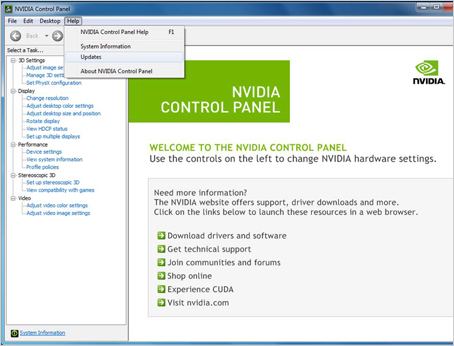 Manage 3D setting Manage 3D setting
Texture filtering - Quality = High quality Power management mode = Prefer maximum performance Ambient Occlusion = Performance Antisotropic filtering = 16x or 8x Antialiasing - FXAA = ON Antialiasing - MODE = Override any application setting Antialiasing - Setting = 16x or higher Antialiasing - Transparency = 4x (supersampling) or higher CUDA GPUs = All Threaded Optimization = ON Triple buffering = ON Vertical Sync = ON Configure Surround, PhysX It is very important that you set PhysX Processor to your Graphic card ony! In your case Geforce GT 630. Not Auto select that are the default setting. Default setting make the card use the CPU too. Adjust desktop color settings Change on every monitor that you use to---> = Use NVIDIA settings Don't forget to do "Apply" when you are done.
post edited by Freddie H - 2012/11/22 01:59:42
-Highly developed spirits often encounter resistance from mediocre minds. -It really matters!
|
GIM Productions
Max Output Level: -73 dBFS

- Total Posts : 860
- Joined: 2005/12/14 05:07:56
- Status: offline
Re:NVIDIA driving me nuts! Help needed
2012/11/22 02:18:02
(permalink)
hi you can disable the nvidia services in the control panel.this don't bring any video problems.
I always disable this services on my daw.
Intel i7 3600,Asus Z170P,16 GIG Corsair ram,Focusrite Saffire Pro 26 i\o,Nektar Impact LX 49,Focusrite Liquid Mix,Monitors ADAM-K&H,Sonar Platinum Windows 10 SP1 Producer....more stuff in SStudio, Rome ,Italy.
|
LJB
Max Output Level: -60 dBFS

- Total Posts : 1502
- Joined: 2009/07/29 10:31:31
- Location: South Africa
- Status: offline
Re:NVIDIA driving me nuts! Help needed
2012/11/22 02:30:38
(permalink)
I built an i7 2600 Intel machine last year, and my NVidia 8600 GT card started giving Blue Screens. Took it out and resorted to the onboard graphics, and the problem was gone.
Ludwig Bouwer, One Big Room Studios.
--------------------
Cakewalk with all the trimmings / Win 10Pro 64 / Intel i7-7700 / Asus Prime Z270k / 16GB DDR4 / RME HDSP9652 / RME UFX / Black Lion Audio ADA8000 / ART MPA & ART Pro Channel / Focusrite Voicemaster Pro / Aphex 107
Check out my work at www.onebigroom.co.za
|
deswind
Max Output Level: -71 dBFS

- Total Posts : 952
- Joined: 2003/11/23 14:07:13
- Status: offline
Re:NVIDIA driving me nuts! Help needed
2012/11/22 02:50:57
(permalink)
Had NVidia - now ATI.
Did not play well with Lynx drivers. And on another computer created all sorts of problems, including continually blue screens.
Put ATI in both computers - all problems gone.
I assume there are some computers and configurations where NVidia is just fine. But ATI has never been a problem for me.
Also, the posts about disabling the driver, when a NVidia card is installed - that has worked for me as well, but I like the features of the ATI cards and drivers.
|
Freddie H
Max Output Level: -39 dBFS
- Total Posts : 3617
- Joined: 2007/09/21 06:07:40
- Status: offline
Re:NVIDIA driving me nuts! Help needed
2012/11/22 12:39:21
(permalink)
deswind
Had NVidia - now ATI.
Did not play well with Lynx drivers. And on another computer created all sorts of problems, including continually blue screens.
Put ATI in both computers - all problems gone.
I assume there are some computers and configurations where NVidia is just fine. But ATI has never been a problem for me.
Also, the posts about disabling the driver, when a NVidia card is installed - that has worked for me as well, but I like the features of the ATI cards and drivers.
Some say they got problem with ATI some say NVIDIA. End of the day I think it's "50 - 50". Anyway I tried ATI too never like it, returned the card. I feel I get much clearer and more vivid colors with NVIDIA. ATI is kind of dull.. You have more settings on the NVIDIA controlpanel VS ATI's. Example "digital vibrance" don't even exist in ATI controlpanel. If anyone ask me I recommend NVIDIA card. I recommend INTEL CPU, not AMD too. If you want the best go NVIDIA! It just my two cents...
-Highly developed spirits often encounter resistance from mediocre minds. -It really matters!
|
Teds_Studio
Max Output Level: -75 dBFS

- Total Posts : 761
- Joined: 2011/12/21 01:00:42
- Location: AR
- Status: offline
Re:NVIDIA driving me nuts! Help needed
2012/11/22 12:49:09
(permalink)
Sad thing is....some programs work better with Nvidia and other work better with ATI. When I built my machine last year, I built it mainly for doing video editing with Sony Vegas Pro (11 at the time, now 12)....but did all of my audio mixing in Vegas too.
Everything I have read on any of the video forums state that Vegas Pro works so much better with Nvidia...which I adhered to since I have a GTX560Ti.
Now that I have switched over to Sonar for audio work I have found a lot of the "glitches" that have been described. Weird video stuff happening such as artifacts, etc. I've also noticed that if my machine sits for any length of time idle....then I hit play....it pauses for a few seconds before playback actually starts.
I have to have a stable video editing machine so I intend on keeping my Nvidia. If my problems don't get any worse than I have been experiencing so far....I will be fine.
ASRock X99 Extreme4 MB....Gigabyte GeForce GTX 960 4 GB DDR 5.....Intel i7 5820k 3.3 Ghz....Corsair RM850i power supply....3 Seagate 1TB SATA III drives....32 Gig G.Skill Ripjaws DDR4 3000.....Win 10 Pro.....Sonar X1 Producer Exp & X2, X3...Platinum....Superior Drummer 2 & 3 w/ N.Y. Vol 2 SDX.....Sony VEGAS Pro 11.0 32 & 64 bit Pro 12.....Sony VX2100.....Sony HVR-Z7U....Sony HDR-CX130....Alesis HD24....Behringer X32 console....Focusrite 18i20....JBL LSR2328P studio monitors with LSR2310P sub.
|
Freddie H
Max Output Level: -39 dBFS
- Total Posts : 3617
- Joined: 2007/09/21 06:07:40
- Status: offline
Re:NVIDIA driving me nuts! Help needed
2012/11/22 12:53:18
(permalink)
Teds_Studio
Sad thing is....some programs work better with Nvidia and other work better with ATI. When I built my machine last year, I built it mainly for doing video editing with Sony Vegas Pro (11 at the time, now 12)....but did all of my audio mixing in Vegas too.
Everything I have read on any of the video forums state that Vegas Pro works so much better with Nvidia...which I adhered to since I have a GTX560Ti.
Now that I have switched over to Sonar for audio work I have found a lot of the "glitches" that have been described. Weird video stuff happening such as artifacts, etc. I've also noticed that if my machine sits for any length of time idle....then I hit play....it pauses for a few seconds before playback actually starts.
I have to have a stable video editing machine so I intend on keeping my Nvidia. If my problems don't get any worse than I have been experiencing so far....I will be fine.
I have friends that use X1 and X2 and ATI and they have audio graphic glitches with Pro Channel and so on...I think your X2 is more stable with NVIDIA VS ATI card. There are so many things in the computer that can cause audio glitches not just the graphic card. Wrong system settings can also make the computer really perform bad. Some even think disable the AERO improve the audio CPU and the video performance, when it's the opposite. Set shoulder to background service is another myth. Should be set to program.
post edited by Freddie H - 2012/11/22 13:01:51
-Highly developed spirits often encounter resistance from mediocre minds. -It really matters!
|
Rob[at]Sound-Rehab
Max Output Level: -47 dBFS
- Total Posts : 2819
- Joined: 2011/02/03 04:31:35
- Location: Sound-Rehab, Austria
- Status: offline
Re:NVIDIA driving me nuts! Help needed
2012/11/22 13:17:36
(permalink)
GIM Productions
hi you can disable the nvidia services in the control panel.this don't bring any video problems.
I always disable this services on my daw.
Tried that. No improvement.
Freddie H
I seem to have no problems with my ASUS NVIDA GT 640 card.
Download the latest driver.
http://www.nvidia.com/Download/index.aspx?lang=en-us
In the Control panel do following settings.
Manage 3D setting
Texture filtering - Quality = High quality
Power management mode = Prefer maximum performance
Ambient Occlusion = Performance
Antisotropic filtering = 16x or 8x
Antialiasing - FXAA = ON
Antialiasing - MODE = Override any application setting
Antialiasing - Setting = 16x or higher
Antialiasing - Transparency = 4x (supersampling) or higher
CUDA GPUs = All
Threaded Optimization = ON
Triple buffering = ON
Vertical Sync = ON
Configure Surround, PhysX
It is very important that you set PhysX Processor to your Graphic card ony! In your case Geforce GT 630.
Not Auto select that are the default setting. Default setting make the card use the CPU too.
Adjust desktop color settings
Change on every monitor that you use to---> = Use NVIDIA settings
Don't forget to do "Apply" when you are done.
Thanks Freddie for taking the time and giving such detailed instructions. Unfortunately that didn't solve it, either.
GOOD TUNES LAST FOREVER +++ Visit the Rehab +++ DAW: Platinum/X3e, win10 64 bit, i7-3930K (6x3.2GHz), Asus Sabertooth X79, 32 GB DDR3 1600MHz, ATI HD 5450, 120 GB SSD OCZ Agility3, 2x 1TB WD HDD SATA 600 Audio-Interface: 2x MOTU 1248 AVB, Focusrite OctoPre, (Roland Octa-Capture) Control-Surface: VS-700C VSTi: WAVES, NI K10u, FabFilter, IK, ... (too many really)
|
hockeyjx
Max Output Level: -74 dBFS
- Total Posts : 839
- Joined: 2003/12/09 18:36:28
- Status: offline
Re:NVIDIA driving me nuts! Help needed
2012/11/22 13:18:45
(permalink)
Also, I've found the best thing is to download the driver package and unzip. Then browse in device manager to it.... then it just installs the files it needs, not the superfluous application.
I do this for most hardware and find it to be better.
Intel i7 950 Proc, Asus Sabertooth x58 MB, 2 Crucial 128GB SSDs and Seagate 1TBGB drive, 12GB Corsair 1600mhz 8-8-8-24 Memory, Nvidia GeForece 8400 Dual Monitor vid card
Cooler Master Silent Pro 700w Power Supply, Cooler Master Sileo 500
Win 7 64 bit, SPlat 64-bit, Komplete 10 Ultimate, AmpliTube3 and AD2 Tascam FW-1884 and AKAI MPK-49
|