• Coffee House
  • ISn't it about time for a new PC module?? (p.4)
2013/02/15 14:05:13
bapu
FastBikerBoy


Bub's referring to the screw under the meter of the PC4k buss compressor. Click on it and drag, the VU meter light will turn blue but you may need to start playback. That might even feature in a video somewhere.

Why is it that I do not have a PC4k buss compressor? Was that a single unit to be sold? I Am seriously confused.

Here is my list of PC modules:
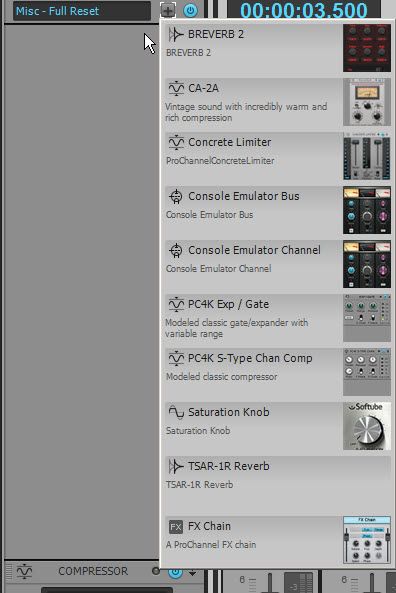

2013/02/15 15:09:39
Bub
bapu
FastBikerBoy

Bub's referring to the screw under the meter of the PC4k buss compressor. Click on it and drag, the VU meter light will turn blue but you may need to start playback. That might even feature in a video somewhere.
Why is it that I do not have a PC4k buss compressor? Was that a single unit to be sold? I Am seriously confused.

Here is my list of PC modules:


It's already in the Pro Channel. I can see the very top of it in your screen shot.

It disappears from the Module list once it's in the Pro Channel. They don't want you to add it in twice.


Click on the screw and turn it with your mouse. Make sure the Module is turned on or it won't work.

Here's what it looks like .... (It's not sticky IOW ... it won't stay on.)


2013/02/15 15:15:15
FastBikerBoy
Bub has it covered. The original PC modules can't have more than one version in the same chain. The compressor is either U-76 or PC4K but not both.
2013/02/15 15:15:31
bapu
Ok, maybe I'm lame but why does my Master Compressor say PC76 and look like this?


And moving that screw does not change the color of the VU.
2013/02/15 15:16:29
FastBikerBoy
Right click on it and select "replace" then you'll see the PC-4K as per my previous post.
2013/02/15 15:16:56
Bub
OK, here's a video of the hidden track bug.

It's kind of cool actually.

I just did some digging around with it, and it appears as though there has to be at least 2 folders in the project to get this to happen. I can recreate it every time.

When you click on the link below, click on the icon on the very bottom right to make this video full screen, otherwise you won't be able to see the whole thing.

Video Link.
2013/02/15 15:17:05
bapu
OK, got it Karl.

I'll be right back with a vid that shows I do not get a color change when I move the screw.

2013/02/15 15:19:25
FastBikerBoy
you might have to start playback.........or.......................perhaps......................................... it's a bug in your version.
2013/02/15 15:19:34
bapu
Bub


OK, here's a video of the hidden track bug.

It's kind of cool actually.

I just did some digging around with it, and it appears as though there has to be at least 2 folders in the project to get this to happen. I can recreate it every time.

When you click on the link below, click on the icon on the very bottom right to make this video full screen, otherwise you won't be able to see the whole thing.

Video Link.

Did you watch my vid? I only created one folder and did not get your results. I'll try two like you did.
2013/02/15 15:22:07
SteveStrummerUK
bapu


OK, got it Karl.

I'll be right back with a vid that shows I do not get a color change when I move the screw.


Click on the display after turning the screw.
© 2026 APG vNext Commercial Version 5.1

Use My Existing Forum Account

Use My Social Media Account