• Computers
  • HDD Expansion - Am I missing Something?
2012/04/24 18:26:23
zippsinc
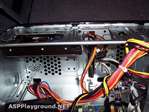
Hi there I could sure use some help here. Just bought a new Hewlett Packard PC for general duties (internet browsing, medium sized music projects etc). It's supposed to include 'expansion' capacity for an additional internal HDD (in addition to the one it come with). Thing is, I went to drop in a spare 1TB HDD I have and it appears there's nowhere to secure it. The chassis only appears to have a housing for one already in it, despite having ample space to accommodate another housing. Am I missing something? Is there somewhere else in here that HDD can be installed? Or have I been misled by the specs? See pic below.

Attached Image(s)
2012/04/24 22:32:32
John6528
Plug it in and just let it lay on the bottom of the case as long as you don't move the case around. Often when I'm cloning the HD is resting comfortably on the floor outside the open case. SSD clone was hanging by the attachment chords and didn't seem to mind.
John
2012/04/25 03:30:24
zippsinc
Thanks John Your reply is much appreciate. That's nice info to know. Is it dooable to attach another caddy to somewhere on the chassis? Is this something that's even possible? This is a real shame as it's a decent enough PC (i5, 3.Ghz and 6GB RAM) and has the capacity for another HDD with the available power cable sitting right beside the already plugged in HDD. I just can't believe that someone decided that the user wouldn't likely want a second HDD. It's bonkers. Up until the other day, my general duties PC was a crap eMachines thing and even this had two bays in its caddy for a second HDD. Stewart
2012/04/25 15:24:19
zippsinc
Managed to get an expansion kit so I'm now a happy chappy. Thanks for your reply John.

Attached Image(s)

© 2025 APG vNext Commercial Version 5.1

Use My Existing Forum Account

Use My Social Media Account