• Techniques
  • Sonar 8, Vienna Ensemble Pro and MIR Pro (p.3)
2012/05/21 17:19:58
Michael C.
Steve,

  Quick question.  Should  VEP  be setup as an FX insert in an audio channel FX bin, or should it be setup as a bus?  IN your post about sending audio to MIR you said: "Now in Sonar, set up your MIR buss and set up a 'send' on your audio track to go to that buss. In the Buss, insert the "Vienna Ensemble Pro Audio Input" plugin. Press the "Assign" button and assign it to the VEP server." 

I'm asking because I am having trouble when I try to use the "VEP Audio Input" effect with that setup.  I have things setup as follows in my example:   in Sonar my first audio track has VEP inserted as a .vst in the FX bin.  Then each of the next three tracks are midi tracks where the midi ports and channels are assigned (e.g. 1,1; 1,2; 1,3...) to the instrument channels setup in VEP.  When I try to then use the VEP Audio Input effect on a subsequent audio track I get no sound.  I think I am not setting the input and output correctly in Sonar for this.  

Here's what is confusing me.  I am still not sure whether VEP should be setup as a bus or a track insert effect.  The only way I seem to get the audio input effect to work is when VEP is setup as a bus and the VEP Audio Input effect is inserted as a track effect.  BUTm if VEP is setup as a bus, then there is no way to route the midi tracks to that bus as midi tracks cannot be "bussed!"  Is this making any sense?  :-)

I can get both to work, sort of, but not together.  

I can send screen caps if that helps!

Mike
2012/05/21 17:33:36
Michael C.
Steve,

WHat view is the screen cap you attached in Sonar?  It does not resemble either the track or console view in my Sonar. It may be just a difference between Sonar 8 and X1.

M
2012/05/21 18:20:54
SCorey
Those screenshots are showing my track view. Here's another one, zoomed out, hopefully it will make more sense:
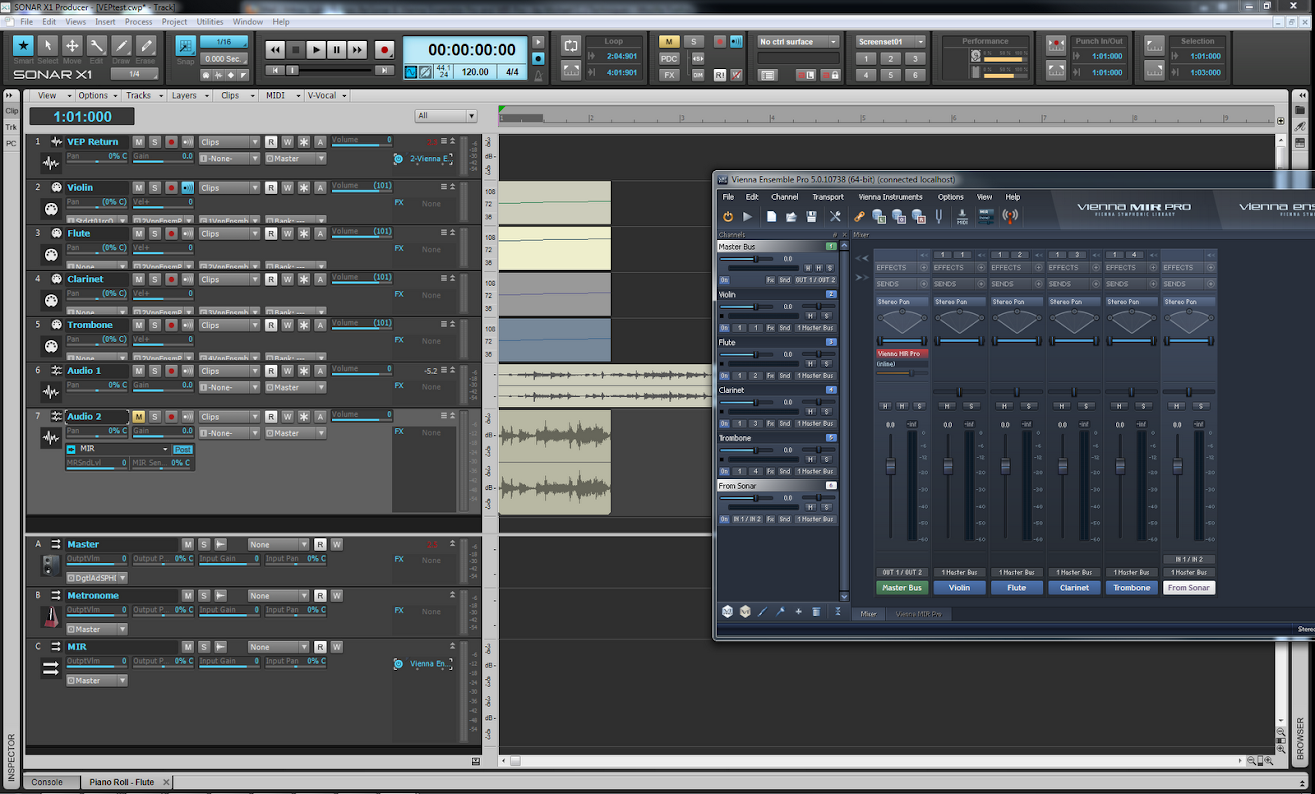


So track 1 "VEP Return" has the VEP VSTi softsynth.
 
Tracks 2-5 are MIDI that point to the instrument tracks in VEP, set to port 1, channels 1-4. You can barely see thier output and channel assignments.
 
And then tracks 6-7 are audio tracks. They have a send (visible in track 7, not 6, sorry) that goes to the buss I called "MIR".
 
Buss C "MIR" has the VE Event Input plugin, and it goes to the VEP "From Sonar" track, IN 1 / IN 2.
 
I've got MIR inserted on the VEP Master Bus, and in MIR, I've set it to 100% wet.
 
This setup is/was working for me, with all sound being routed out of VEP into Track 1.
 
Now then, while setting this up and re-reading a bit of this thread, I noticed that you had to set your MIR latency to 0. Mine was set to 128, so I set it to 0 and gave it a try. Didn't work, no MIR sound. I set it back to 128 and now I get crackles and pops. On reboot, it worked for an instant at 0 latency then stopped working. Setting to 128 didn't help.  So now I'm troubleshooting that problem, trying various combinations of soundcard and MIR latencies.
 
In any event, the routing in that screen shot seems to work for some configuration of latency setting. But I'm running out of time for today... maybe this might give you some clues to work with?
 
2012/05/21 21:10:25
Michael C.
Steve,

What I guess I don't get is how to send to that MIR bus.  I did just what you did and set MIR as a bus on the master channel, but I am not sure how it then gets that audio track data sent to it.  Obviously there is not going to be a bus called "MIR" in Sonar, so that's where I get stuck.  What should the sonar in and out be set to? It is thae lack of a "MIR" bus in Sonar that is really confusing me.

Ya know, I have written to Dietz Tinhof about this issue several times and he is mystified that I am not getting.  He keeps saying "it's intuitive" - I want to punch him in the throat right now!  :-)  (kidding, but you get my point!)

M
2012/05/21 23:15:15
SCorey
Everything's intuitive when you already know how to do it :)

You need to add an aux send and a buss to get the track to it. Right-click on the track that has the audio you want to send to MIR and choose "Insert Send->New Stereo Bus". That will add an aux send that goes to a new bus. You can double-click the busses name to change it to "MIR" if you want. Then in that busses FX bin, you insert the VE Event Input. That should get you to the point that my screenshot shows.

Now for every track that has audio that you want to send to MIR, you right-click the track and choose "Insert Send->MIR" --provided you named that bus MIR.

2012/05/22 13:01:46
Michael C.
SCorey


 "Everything's intuitive when you already know how to do it :)"  

  Exactly!  That's what I told him!   At one point when he was frustrated with one of my questions he said something to the effect of..."Duh, it's they way it's been done in MIDI for the last 30 years!"  My reply was, "yes, but you should write your manuals as if the user has been using MIDI for the last 30 minutes!"  

Thanks again - I'll give this another shot this afternoon when I have more time and get back to you.

Mike


2012/05/25 16:49:49
Michael C.
Steve worked beautifully for me.  The step I was missing was the " VE Event Input plugin " in the bus to which I send the audio track.  I had the EP Audo Input" vst inserted in to the track, but was missing the Event plugin!

It's is working fine now.

Thanks once again for your help and patience!

Mike


SCorey


Those screenshots are showing my track view. Here's another one, zoomed out, hopefully it will make more sense:


So track 1 "VEP Return" has the VEP VSTi softsynth.
 
Tracks 2-5 are MIDI that point to the instrument tracks in VEP, set to port 1, channels 1-4. You can barely see thier output and channel assignments.
 
And then tracks 6-7 are audio tracks. They have a send (visible in track 7, not 6, sorry) that goes to the buss I called "MIR".
 
Buss C "MIR" has the VE Event Input plugin, and it goes to the VEP "From Sonar" track, IN 1 / IN 2.
 
I've got MIR inserted on the VEP Master Bus, and in MIR, I've set it to 100% wet.
 
This setup is/was working for me, with all sound being routed out of VEP into Track 1.
 
Now then, while setting this up and re-reading a bit of this thread, I noticed that you had to set your MIR latency to 0. Mine was set to 128, so I set it to 0 and gave it a try. Didn't work, no MIR sound. I set it back to 128 and now I get crackles and pops. On reboot, it worked for an instant at 0 latency then stopped working. Setting to 128 didn't help.  So now I'm troubleshooting that problem, trying various combinations of soundcard and MIR latencies.
 
In any event, the routing in that screen shot seems to work for some configuration of latency setting. But I'm running out of time for today... maybe this might give you some clues to work with?


2012/05/26 16:37:44
Michael C.
Steve,

I shared your answer (anonymously) with Dietz from VSL.   Here was his repsonse (between ++++ marks):

+++++++++++++++++++++++++++++++++++++++++++++++++++++++
"Uhm - I'm a bit confused, to be honest.

I understand point 1 and 2.

ad 3: Are the audio tracks meant to be used as one ensemble, or as individual signals? When you're aiming for the latter, they should use individual VE Pro Audio Input Plugins.

ad 4: The Event Input Plugin should send controller data to VE Pro, not an audio stream. VE Pro Audio Input should be used instead. I can't see how this should work the other way 'round.

ad 5: Why do you insert MIR Pro on the master bus?!? MIR Pro should be inserted on individual channels, to allow for indivdual positions, directivity profiles and other processing. In the same vein: When you set MIR Pro to 100% wet, you will lose all of MIR's ability to do the proper positioning for the dry signal components of an instrument or audio channel.

... I suggest that you take a look at the examples I gave in the tutorial-section of MIR Pro's Manual (p.37 ff), as well as some of the Venue Presets that were released just recently (e.g. "Neuer Saal Mic 2 - Contemporary Dry (Trimmed)" might be a nice, self-explanatory example)."
+++++++++++++++++++++++++++++++++++++++++++++++++++++

Does this make sense to you?

Mike

2012/05/28 00:03:14
Michael C.
Steve, I see what Dietz was saying now. The only thing yo9u need to do to have audio go through MIR is insert the VEP Audio Input plugin in each audio track you want to send. He told me the only time the Event Input Plugin is needed is to circumvent AU/VST single MIDI port limitation on some hosts (Logic, most notably). VSL just released a bunch of good presets for VEP. Like he said, the Neuer Saal mic 2 was a god example of setting up for audio only. I hope I'm not telling you something you already know. My head has been spinning a bit for the last two weeks so I may have misinterpreted some of what you have said. I tried the basic setup he talked about and it worked very nicely - giving full independent control of all audio tracks. Mike
2012/05/29 11:48:08
SCorey
I read back what I wrote, and I did make a mistake--sorry! I said "Buss C 'MIR' has the VE Event Input plugin" and I should have said it was the Audio Input plugin. I think that lines up with what Dietz has said--barring the individual audio track situation. See next paragraph.

As for why I just had MIR on the master buss, that was only as an initial "get it working in the simplest way possible" step. The next steps would have been to get the individual tracks working and set up in MIR the way it should be. Maybe it wasn't the ideal way to explain it, but in the absence of actually working with your setup I thought it would be useful to start with baby steps and move forward slowly. I had found that the Vienna documentation assumed way too much, so I tried to keep it simple. Hopefully Dietz doesn't think I'm a complete duffer! I actually do know how it works :)

Anyway, glad you got it working and I hope I didn't send you down too many false trails in the process.
© 2025 APG vNext Commercial Version 5.1

Use My Existing Forum Account

Use My Social Media Account