Round trip latency is only noticeable when you activate input echo on a audio track.
You hear the delay because your hearing the signal after it has been in one door and out the other.
Most of folks using lower end interfaces just
don't use input echo for audio tracks.You do need it for MIDI.
The only situation where you use audio track input echo is when using real time effects like Guitar Rig.
Or if you want to hear some reverb while tracking using a plug in. The solution for those with pour RTL performance is to use an interface with DSP (built in reverb) or a mixer for monitoring. (what I do) Both those solutions can be patched as to not print the effects to "tape" unless so desired.
Most all audio interfaces have direct monitoring. This is where you can listen to the input signal
before it leaves the interface. This eliminates hearing the delay that is the result of all the A/D, USB, CPU, DAW, D/A processing that has to happen to bring the signal back for monitoring.
Read this is you have time to learn about RTL and how the different interfaces stack up.
http://forum.dawbench.com/showthread.php?1548-Audio-Interface-Low-Latency-Performance-Data-Base/page13 Your DAW will adjust the playback so it syncs with the input signal (record offset) and here is where it is important to use good drivers that Sonar can work with. Otherwise your tracks are out of sync.
I have tested my Tascam's sync and it is spot on. This is where MME drivers and on board sound cards often fail. You can test this buy loop back recording a snare drum track and comparing the transient spikes. Zoom way in.
Your set up:
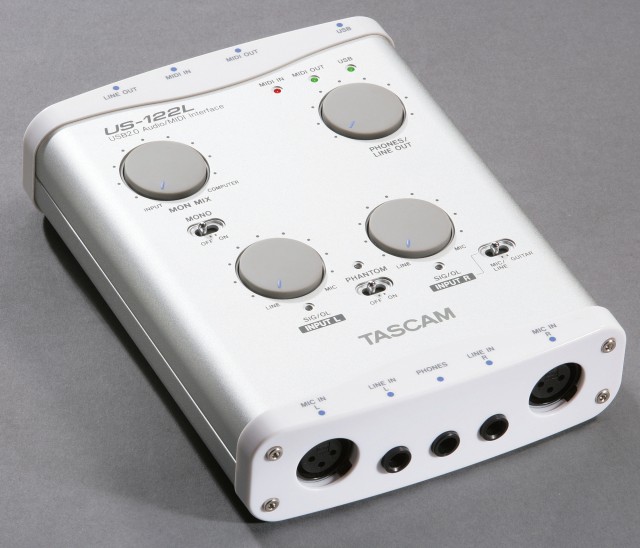
See the knob that says
Mon Mix?Set it at Computer and you'll hear only your DAWs output,
Set it at input and you hear only your mike or guitar input.
Set it in the middle and it mixes them together. By fussing with this and the Phones/Line out control you can balance a cue mix for overdubs. The bummer with your interface is it is missing a separate controls for your live monitors and the headphones. Thats a PITA. Hopefully your monitors have an easy to reach volume control or on/off switch. You certainly want them off while overdubbing with a mike.
It looks like you would use the left channel for your mike and the right for your instruments.
Not sure, but looks like there is no switch for the mike/line on the left, so might be the left line jack kills the XLR jack when used. A small mixer would be handy for you if your using more than one mike and different instruments, it saves re-patching all the time. This would also solve the monitor /headphone issue as a mixer with the correct features could control those parameters too.
Either that or look into a interface that does include those features you need. But nothing wrong with the one you have as far as making good quality recordings. Tascam Pre amps are nice sounding, quiet and certainly excellent for home studio recording.