quick guide to setting up a c01u / c03u in sonar..
(should work for any USB mic)
1. plug in the co1u / c03u (you should have a green light on the mic indicating power is going to it also)
you'll notice you get a display up
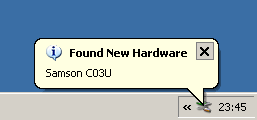
in my case for the C03U , when finished it'll say found new hardware,ready to use
2. start up sonar (which ever version your using) you might notice it profiles the mic.
If it doesn't go into audio advanced and switch to audio and change the mode from asio to MME. (The pictures below show where to go for that)
the mic does profile as 16 bit though. Although you can switch back later if you want.
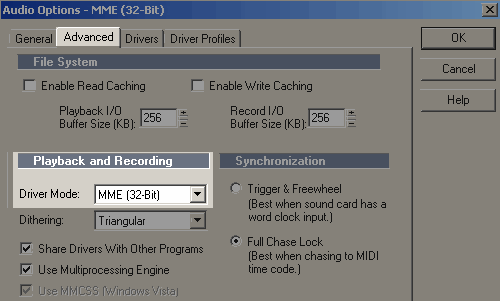
3. after profiling the MME mode, in audio > advanced > drivers you'll see a list of inputs / outputs, in my case a delta 1010LT + an SW1000 (my 2 sound cards). Although for output the samson won't be listed as it's only an input device.
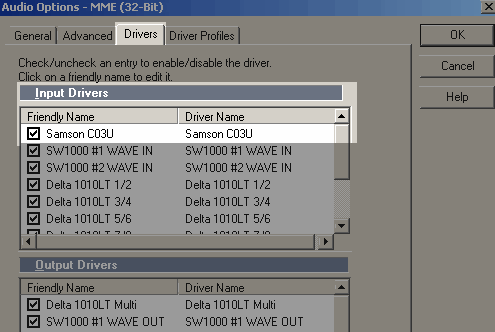
4. tick the Samson as an input, so it can be shown within sonar.. depending on your version of sonar some of these tasks may require a restart, while changing mode etc.
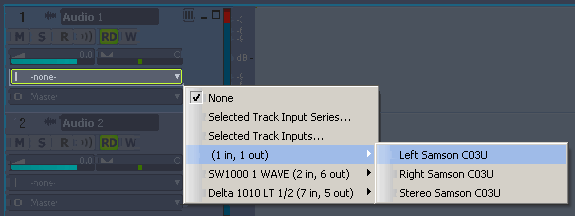
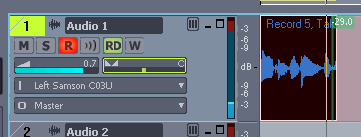
5. in the main sequencer window you'll see parts for audio / midi , go to one of the audio channels (in my case 1 - audio 1) .. you should be able to change the input to the samson, and you'll notice I've selected the Left input for the c03U
6. almost there now... you'll need to arm the track to record & monitor the level.. if you tick the arm icon (R) and speak / sing into the mic, the level just left of the input / output will go up down, accordingly. Hopefully a decent enough volume level, but not so much it distorts etc.
so if you hit record you should end up with something like this ..
not getting enough volume ?
If for some reason your not getting enough gain / volume, you need to increase the volume of the mic, in XP you can do that by going to accessories > entertainment > volume level.
You'll see a options then properties thing, which might be set for your onboard card, you need to change "Mixer device" into the samson mic, obviously playback will be greyed out as it doesn't have that.. OK that box.. it'll go back to the main window where "capture" is shown.. and you can adjust the volume to suit, mine is set low as it's a sensitive mic.
hope that helps, I would have done it specifically for LE but don't know where I put the disc (as well I use 7 and 8) , the audio side of all sonar versions is pretty much the same in respect to setting them up.
update :
After working with carbonara on sorting out why it wouldn't work on their setup. It prompted me to update this.
1)I recorded at 24 bit also and it worked fine. For some reason I was under the assumption it would work at 16 bit only.
2) anything such as webcam plugged into the usb port as well MAY mess up the timing of the samson recording / playback wise.
3) If you record a track and your happy with it, turning off the "input" on track 1 and unarming it before you move onto say track 2 is a good idea. Of course you can re-arm / record later if you want.