benjaminfrog I'm gonna go with the percussion algorithm in Melodyne (so I can see the blobs linearly) in conjunction with the volume tool. I use this all the time now for leveling vocal tracks - way more transparent than compression alone. I used to do this by splitting vocal tracks up into a bunch of clips and changing the gain of the individual clips. Now I can just adjust the volume of the blobs in Melodyne and, what's even cooler, they are resized to represent their new level, whereas the waveforms of clips stay the same size unless/until you bounce them.
Side note: Using the volume envelope tool in Melodyne or V-Vocal is very cool, and using gain control on individual clips is also handy, and has its place - all for sure.
I'm wondering, though, why you used to split vocal tracks into a bunch of clips to use the clip gain when a continuous volume envelope on the vocal track is so much easier and faster-? For the segments that don't need pitch correction, you can still do a lot of accurate volume work without compression necessarily being needed.
Even if you don't have a control surface or keyboard with sliders, it works fine to work with a fader in real time with "record automation" on. And of course envelopes can be done by hand too.
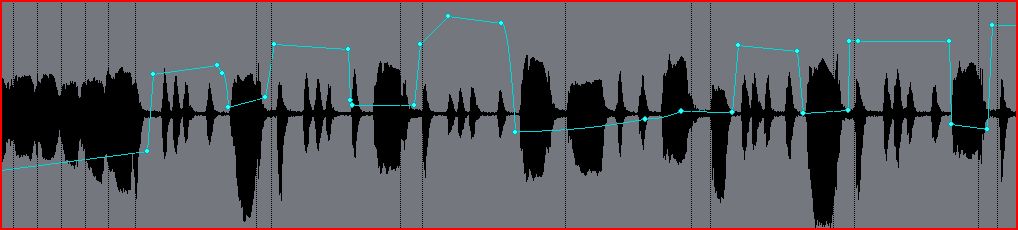
Here's a vocal track with a hand drawn envelope quite obviously bringing soft bits up and loud bits down:
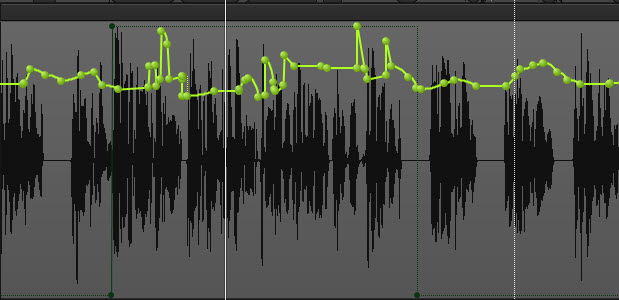
And here's a good corrective volume envelope, also on a vocal track, recorded in a single pass.
Ears are the best guide for the results of any volume work, but if you're wanting a visualization of a track's volume, the waveform preview is a great tool - I often use that on individual tracks and buses.
--Just wanted to point out that there are methods much less time consuming and clumsy than snipping into clips and using clip gain.
Randy B.