• SONAR
  • No sound, missing master outputs (p.2)
2014/06/19 19:05:05
robert_e_bone
Sorry for your frustrating situation - perhaps a reset, per scook's suggestion, may help.
 
I really don't know why the behavior would change from working one day to not working the next, without either a software change of some sort, a potential hardware problem, some plugin problem, or that sort of thing.
 
If the rename/recreation of aud.ini doesn't clear it up, perhaps a re-install of the audio interface drivers?  I have no basis for suggesting that, but think it easy enough to try, just in case.
 
I think the suggestion of seeing it 8.5.3 was still working was just to try to generate some additional information on the situation, so if it was still installed, a quick test to see if the problem also was present there - or not - might help in the attempts to figure out what was happening with X3.
 
Wish I had more for you, 
 
Bob Bone
 
2014/06/19 19:26:07
backwoods
Sometimes when i have installed an older version of Sonar or P5 after a newer opne the metronome and track templates go missing. So when you open a new project there is no master bus and no sound. Maybe check all the file paths are in order under the global preferneces in 8.5.
2014/06/20 10:02:20
jonnewyork
I now know the short answer as to why I wasn't getting any sound.
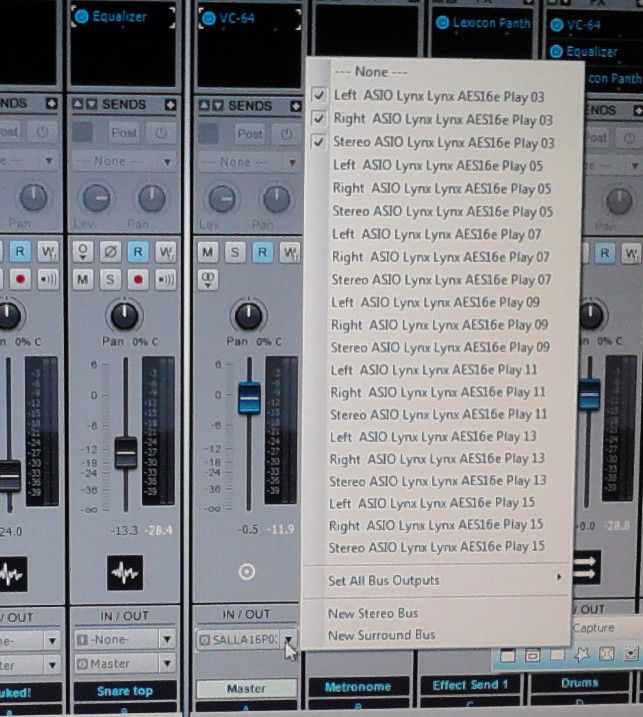
For reasons that no one seems to understand, the drop down menu on the master outputs did not contain Left ASIO Lynx Lynx AES16e Play 01, Right ASIO Lynx Lynx AES16e Play 01, or Stereo ASIO Lynx Lynx AES16e Play 01.
 
Today when I opened the same project file, the timing master is set to Play 03/ Record 03 all three appeared and are checked, and I have sound from X3. The timing master is set to Play 03/ Record 03.
 
There is no guarantee that they won't go missing tomorrow since the problem appeared out of nowhere and no one seems to have a plausible explanation as to why.
 
And, ironically, when I open up a song in 8.5.3 PE, the Sorcerer's Apprentice apparently eliminated the correct outputs, reassigned the master outputs to L/R 03.
Does anyone have a clue as to how to fix this?
2014/06/20 10:36:46
jonnewyork
Okay, the song I opened up in 8.5 I had previously opened with X3 and saved under a new name (just using "save" doesn't work, probably because that would have tried to save it as an 8.5 project file).
 
So I can just abandon that 8.5 project file and use X3.
I tried opening another 8.5 project file and it opened with the proper input and output settings. I saved it as an X3 project file. I went back to the 8.5.3 file and nothing had changed. Both project files have sound.
 
So everything works now, but there's no guarantee that it will work tomorrow, since nobody seems to know why the output assignments went missing or why they came back.
 
That's very disconcerting. What if I have session players in here and X3 decides to, in effect, stop functioning, with no available fix?
Then, on top of losing valuable time, I'd lose money as well.
2014/06/20 15:20:40
jonnewyork
I just opened the project that worked this morning and it stopped working, meaning it disappeared the correct output assignments, reassigned them to the next available WRONG outputs and I can't play the song on either 8.5 or X3.
 
Nobody has a clue?
 
No one has ever tried to assign the master bus to Right 01 and Left 01  and stereo 01 only to find that the available outputs on the drop down menu start at 03?
2014/06/20 15:29:29
scook
Is the interface used as the Windows default device?
2014/06/20 15:34:49
Cactus Music
Just a note, I just looked on my laptop which shows Timing Master as Tascam 03. Not 01 ,, but it works fine. So that's not the problem.
And my Master output bus has Tascam 01 , Tascam 03 or Tascam SPDIF  as output option.
 
The Tascam has 16 ins and only 4 outs plus SDIF. Yours seems to have 16 outs ..correct?
 
But your terms posted:
 
AES16e Play 01, Right ASIO Lynx Lynx AES16e Play 01, or Stereo ASIO Lynx Lynx AES16e Play 01.
 
Seem like your looking at inputs and not outputs or something strange. But I guess each driver dispalys differently.
 
Mine just says a very short group of words as I've made bold above. The same goes for my Scarlett which I think say's  Focusrite Mon 1. etc.
 
Anyhow just something to ponder.
 
I just find it weird that if the Sound cards 01 outputs shows in the Audio options/ Advanced output list that it would not show as an output for a Bus, that's almost imposible.
2014/06/20 16:17:58
jonnewyork
scook
Is the interface used as the Windows default device?


It is the only ADC I use.
2014/06/20 16:22:19
scook
Does this mean the first two ports are defined as the Windows default output?
2014/06/20 17:24:27
jonnewyork
 
Cactus Music
Just a note, I just looked on my laptop which shows Timing Master as Tascam 03. Not 01 ,, but it works fine. So that's not the problem.
And my Master output bus has Tascam 01 , Tascam 03 or Tascam SPDIF  as output option.
 
The Tascam has 16 ins and only 4 outs plus SDIF. Yours seems to have 16 outs ..correct?
 
But your terms posted:
 
AES16e Play 01, Right ASIO Lynx Lynx AES16e Play 01, or Stereo ASIO Lynx Lynx AES16e Play 01.
 
Seem like your looking at inputs and not outputs or something strange. But I guess each driver dispalys differently.
 
Mine just says a very short group of words as I've made bold above. The same goes for my Scarlett which I think say's  Focusrite Mon 1. etc.
 
Anyhow just something to ponder.
 
I just find it weird that if the Sound cards 01 outputs shows in the Audio options/ Advanced output list that it would not show as an output for a Bus, that's almost imposible.

Lynx Aurora has 16 ins and 16 outs.
 
I'm a music guy, not a tech guy, but it seems that the folks at Cakewalk didn't anticipate how X3 works with Lynx Aurora 16, and didn't test it.
 
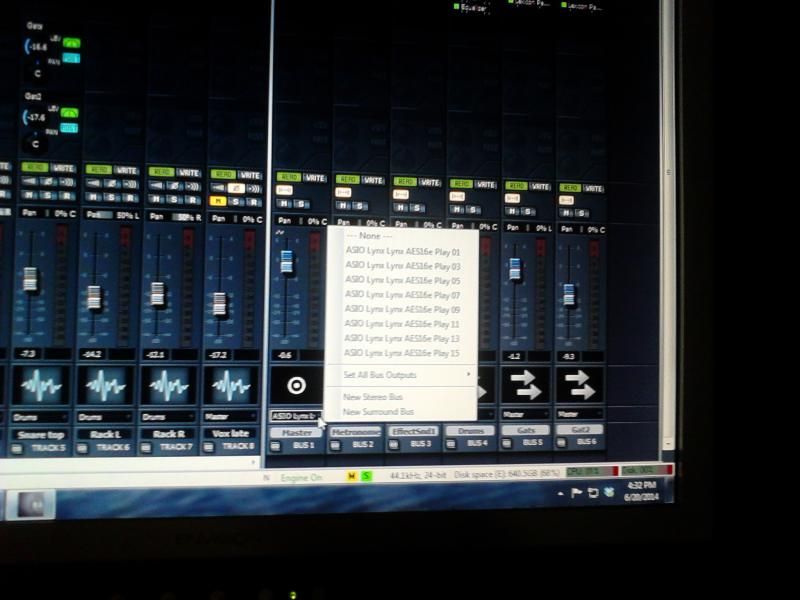
In 8.5.3, the master bus output drop down menu, when it's working, let's you select, from the exact same set up, between play 01, play 03, play 05, etc. 8 outputs in all.
 
The way X3 "sees" it, it has to display Left Play 01, Right Play 01, Stereo Play 01, and so on.
 
That's 27 items. The drop down menu only displays 21, so 6 outputs have to get lopped off. That's the 16 series and either the 03 series or the 01. It only actually creates a problem when it won't allow me to assign the outputs to the 01 series.
 
I couldn't screen capture dropdown menus, so I took a couple of pics with my cell phone and uploaded them to photobucket so you would a) understand what I'm talking about and, b) believe me. These are ouitput selections fron 8.5.3 PE and X3 PE, respectively.


© 2026 APG vNext Commercial Version 5.1

Use My Existing Forum Account

Use My Social Media Account