• SONAR
  • Experienced user, still not having it with Cakewalk Sonar products.. (p.2)
2014/06/02 05:32:53
nealios
pure awesomeness everyone thank you.
hope you guys can load the 3 images I posted, right click to view image..
 
I acquired an ran LatencyMon, seems I need to stop browsing the web with my WLAN, find my Speedstep, cpu throttling, and performance settings and fiddle around with that.  I know where to look, BIOS, Control panel. Ill tinker around.
only ran it for 6 minutes, seems it can run forever.
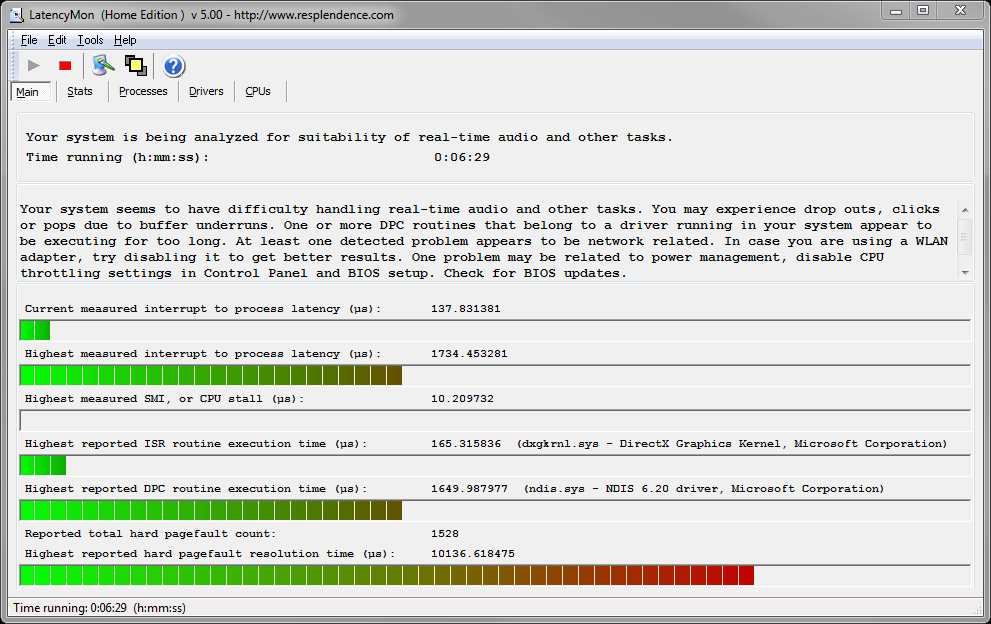
I use ASIO, I don't know much about the other driver modes, but they all are crap it seems.. right?!!
 
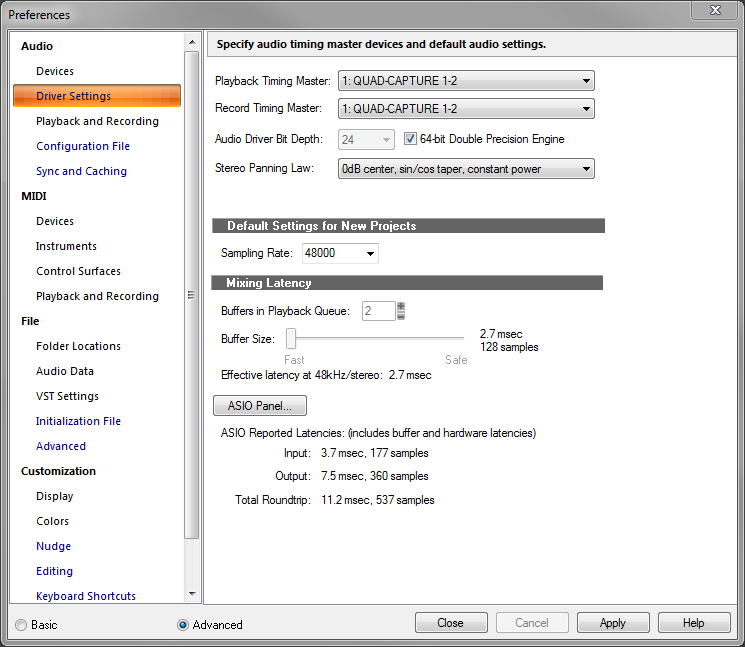
I went on and messed with sonar with these settings on my Quad Capture interface..
24/48, 128 buffer.
ASIO reported latency, Input 177 samples, Output 360 samples, Roundtrip = 11.2 msec, 537 samples
I just loaded up ADrums, z3ta 2, scrolled through presets, and recorded 4 audio tracks,
my god, it works.  No hiccups.
 
Went on to my usual settings.
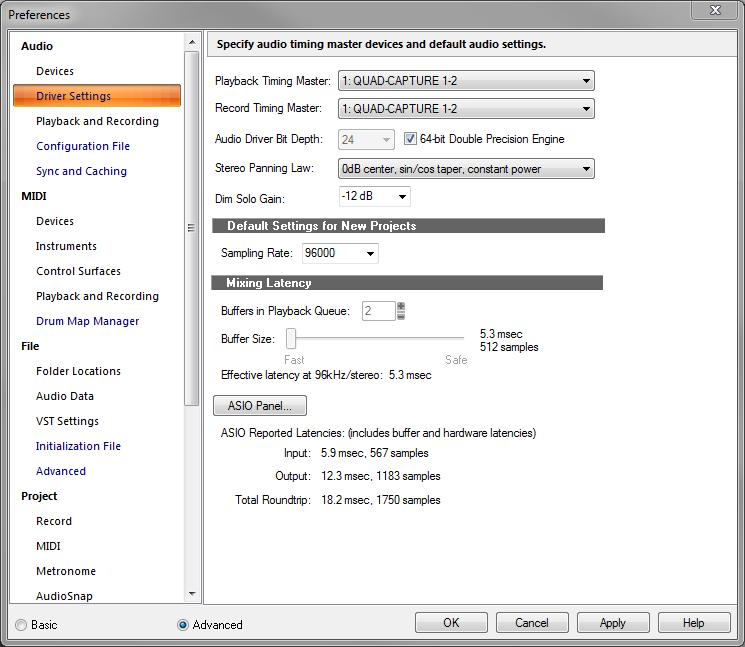
24/96, 512 buffer
ASIO reported latency, Input 567 samples, Output 1183 samples, Roundtrip 18.2 msec, 1750 samples
I did the same as before, and my god morty, its working?!..
 
Only thing I didn't do is load a Boost 11 Limiter in my master bus, which I always do,  Thanks for pointing that one out.  I thought the dropouts were coming from the VST instruments making the audio clipping, so, put a limiter on it, especially with ADrums and Z3ta, some of Z3tas presets are LOUD and some don't have the internal limiter set on them, so I load up a limiter on the master to fix this when scrolling through Z3ta's presets, and I do like doing it fast.
 
I never thought of Boost 11 or any other limiter being a possible culprit, I thought it was helping solve the problem.  Well from my brief tests 24/48, 24/96, taking out Boost 11 has rid the dropout/performance issues.
 
How do people keep your master bus from blaring out audio clipping volumes then? whats the method? cuz i thought I was doing it right to protect my monitors..
 
What other plugins do people have to worry about using? I recently bought Nomads Analog Mastering pack, came with AMT Amp Leveling, Max Warm, and Multi-Max limiter/compressors.  Im beginning to love them, I think they sound amazing and would use them on many tracks im sure of.
 
maybe I gotta plan my execution better.  I dont need to load up all the when recording, but its nice to mess with while doing so..
 
I'll tryout some other settings.  24/96 with a smaller buffer, 256, 128, and more tracks, midis, plugins for performance testing, with and without Boost 11.  Fix my computers performance also.
 
back to the lab guys..
2014/06/02 11:18:47
Splat
Can't see the images sorry.
What version of Windows are you using 64 bit Windows and 64 bit Sonar?
 
Thanks...
2014/06/02 11:42:49
nealios
64 bit windows 7 home and 64 bit sonar X3 Producer E-Build.
 Dropbox won't allow public mode anymore..:(
figured the Image problem out, went with Photobucket.. they should work now..

2014/06/04 00:38:51
gswitz
The drivers tab of latency monitor is pretty useful.
 
Concrete Limiter for the pro channel is a pretty nice low latency limiter.
 
If you raise your sample buffers as high as they go you may be able to use Boost11, but that plug doesn't get much love around here.
 
From your Lat Mon images, you can probably still do a lot to lower your deferred procedure call latency.
 
On my system, the highest measured interrupt to process latency (second bar) is 129.
On the drivers tab, sorted on highest execution ms is ClassPNP.SYS at 0.21 ms.
 
You are showing more than 10 times these numbers.
 
BTW, I recently had a latency problem caused by using a mouse for which I hadn't explicitly downloaded the driver. Going to Logitech and downloading the right driver helped me out. The mouse showed up in drivers tab as USBPORT.SYS. This same item is now 0.18 for me.
2014/06/04 06:18:43
Grumbleweed_
I've always had a Boost 11 on my Master Buss (at a neutral setting just to stop any clipping) until the Nomad stuff came with X3, and now I have the Concrete Limiter. I do not recall Boost 11 causing any problems (but I much prefer the Concrete Limiter!).
 
Grum. 
2014/06/04 07:52:07
Bristol_Jonesey
I used Boost 11 once.
 
Nothing more to say really.............
2014/06/04 08:47:05
chuckebaby
Bristol_Jonesey
I used Boost 11 once.
 
Nothing more to say really.............


 me too, by accident.
2014/06/04 09:10:28
musicroom
nealios
pure awesomeness everyone thank you.
hope you guys can load the 3 images I posted, right click to view image..
 
I acquired an ran LatencyMon, seems I need to stop browsing the web with my WLAN, find my Speedstep, cpu throttling, and performance settings and fiddle around with that.  I know where to look, BIOS, Control panel. Ill tinker around.
only ran it for 6 minutes, seems it can run forever.

I use ASIO, I don't know much about the other driver modes, but they all are crap it seems.. right?!!
 
I went on and messed with sonar with these settings on my Quad Capture interface..
24/48, 128 buffer.
ASIO reported latency, Input 177 samples, Output 360 samples, Roundtrip = 11.2 msec, 537 samples
I just loaded up ADrums, z3ta 2, scrolled through presets, and recorded 4 audio tracks,
my god, it works.  No hiccups.

 
Went on to my usual settings.
24/96, 512 buffer
ASIO reported latency, Input 567 samples, Output 1183 samples, Roundtrip 18.2 msec, 1750 samples
I did the same as before, and my god morty, its working?!..

 
Only thing I didn't do is load a Boost 11 Limiter in my master bus, which I always do,  Thanks for pointing that one out.  I thought the dropouts were coming from the VST instruments making the audio clipping, so, put a limiter on it, especially with ADrums and Z3ta, some of Z3tas presets are LOUD and some don't have the internal limiter set on them, so I load up a limiter on the master to fix this when scrolling through Z3ta's presets, and I do like doing it fast.
 
I never thought of Boost 11 or any other limiter being a possible culprit, I thought it was helping solve the problem.  Well from my brief tests 24/48, 24/96, taking out Boost 11 has rid the dropout/performance issues.
 
How do people keep your master bus from blaring out audio clipping volumes then? whats the method? cuz i thought I was doing it right to protect my monitors..
 
What other plugins do people have to worry about using? I recently bought Nomads Analog Mastering pack, came with AMT Amp Leveling, Max Warm, and Multi-Max limiter/compressors.  Im beginning to love them, I think they sound amazing and would use them on many tracks im sure of.
 
maybe I gotta plan my execution better.  I dont need to load up all the when recording, but its nice to mess with while doing so..
 
I'll tryout some other settings.  24/96 with a smaller buffer, 256, 128, and more tracks, midis, plugins for performance testing, with and without Boost 11.  Fix my computers performance also.
 
back to the lab guys..


I find for recording purposes that require low latency, I have to disable the master bus fx; especially if the project is starting to get hefty with either tracks or a combination of resource hungry plugins. To keep that step simple, I use the prochannel for the fx bin as well as the pc modules. That way it's one button to disengage on the pc master bus. Also, I sometimes need to engage the PDC botton on the toolbar to help compensate for fx latency. 
 
Latency is usually only a problem if I need to listen/monitor tracks being recorded and effected thru sonar (sims, drums, ets.). Otherwise, I can have as many plugs as I want and set the buffer high to record using the interface's zero latency monitoring. That's one reason I love having an interface with built-in dsp for adding monitoring effects. Makes a lot of difference performance wise for vocals and clean instrument recording while not worrying about buffer size and latency. Of course for vsti's heavy users, this approach wouldn't help much...
 
As far as controlling peaking - that's usually in the mix and of course you can always turn down the master bus a bit and turn up the headphone volume when recording. 
2014/06/04 09:44:48
rbowser
nealios...How do people keep your master bus from blaring out audio clipping volumes then? whats the method?...


Quite a thread!-- Congrats on getting things to work better now, Nealios. 
 
I pulled out that quote because it's interesting.  The reason you even have that question is because you're apparently accustomed to pushing everything to the max, and then relying on a plugin to stop the Master signal from peaking out -- not the best way to treat your music, no matter what the genre. 
 
The first thing to do while mixing to "keep your master bus from blaring" is to not have the track faders so danged high!  Starting with faders generally around just 1/2 way up is a good start - aiming to keep the signal from rarely peaking at the Master.  Then of course it's fine to use something on the Master to tame the peaks that are still in the mix, but your music would best be served if you'd focus on just getting a good mix, and not trying to produce a master at the same time.  Do your mix, then maximize the volume, perfect the overall EQ etc of the 2-track master - either in a dedicated audio editor like Sound Forge, or by bringing the master recording into Sonar by itself and using plugins from the big bag of tools Cakewalk provides.
 
Notice you got some snide reactions to using Boost 11.  I'm seriously surprised anyone is still using that when Sonar has much better alternatives.  Years ago, Cakewalk users tried and rejected Boost 11 because it makes for instant Destruction of your signal.  Sure it's simple to use, and its results are crude and barely acceptable.
 
The Concrete Limiter - That's the plugin you want to use for this kind of maxed out signal you're going for - It could even be used for more subtle, more musical results at lower settings.  Try it!
 
Randy B.
2014/06/04 10:02:04
robert_e_bone
I still think your Total Rountrip Latency of 18 milliseconds is too high for good recording without noticeable lag.
 
I believe the audible lag detection point is something like 14.5 milliseconds or thereabouts.  It was some German guy that figured that out, if memory serves.
 
I always recommend keeping settings to where for recording purposes, the Total Roundtrip Latency reported by Sonar is around 10 milliseconds, or just under that.
 
IF you want to run at a Sample Rate of 96 k, try using an ASIO Buffer Size of 256, though this does tax your system a bit - it should keep the latency low enough to work with, as long as the system can keep up.
 
I run with a Sample Rate of 48 k, and an ASIO Buffer Size of 128, and get a Total Roundtrip Latency of just a bit under 10 milliseconds, and can load up all kinds of synths and tracks without bogging down or getting dropouts/crackles.
 
Bob Bone
 
 
© 2026 APG vNext Commercial Version 5.1

Use My Existing Forum Account

Use My Social Media Account