mnvmusic
It's been awhile since I've bought a new VST instrument and installed it on my computer to use it in my Software DAW which is SONAR X2 Producer. I recently downloaded one onto my computer, but I can't remember how to load it into the Plug-in Manager so I can access this from the Plug-in list in my Browser. I've read information in the Help Menu, watched some of the Cakewalk videos and read articles on this topic, but for some reason, it just ain't workin' for me?!??! What am I missing? Any help would be so much appreciated!
Mike
Hi Mike, it's quite easy.....
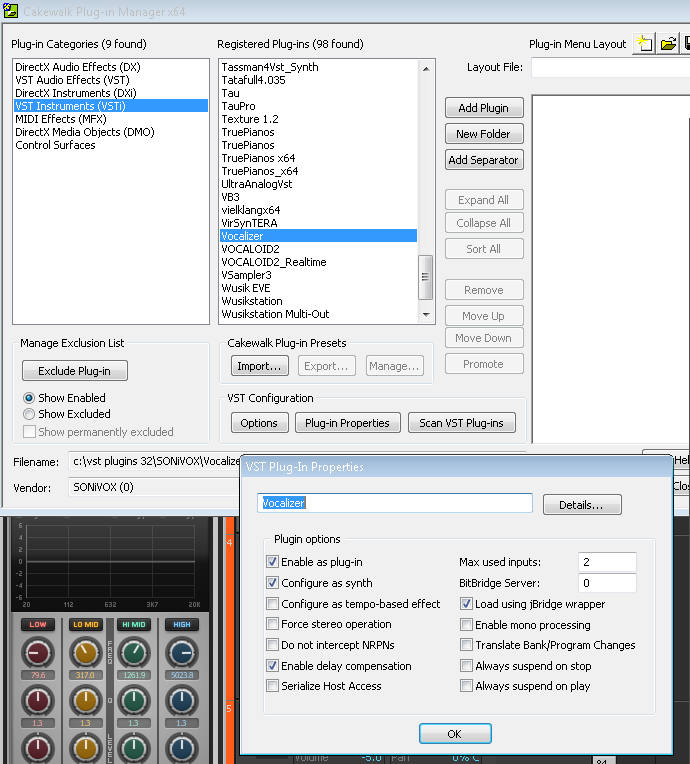
Once you install the new VST (you need to know the actual location (folder) where the VST is residing), you have to run X2 and get into the Plugin Mgr. In the Plugin Mgr. you have to let Sonar know where that VSTi is located (usually it's in the Cakewalk VST Folder in the C: Drive) and then click on Scan VST Plug-ins.
Then, click ont VST Instruments (VSTi) from the left and the registered VST instruments should populate in the middle. Select the new VSTi, click on Add Plugin, and it should show up on the far right column. Save the plugin layout (with whatever name you wish), close the Plugin Mgr., and exit Sonar. Re-open X2 and you should be able to see the new VSTi when you "Insert Synth".
Good luck!!