Modified partial extract from an old thread http://forum.cakewalk.com/FindPost/2930803 Regarding moving your plug-ins around...
A good organization scheme will
- minimize maintenance (make it easy back up/restore plug-ins)
- helps to eliminate duplicates
For example avoid having both 32 bit & 64 bit version of the same plug-in appear in your menu lists - not cause problems with your older 32 bit VSTs and some newer ones.
To what level you take that organization depends on whether you are going to have both the 32 & 64 bit versions of Sonar installed and whether you use other DAWs. For example if your only installed DAW is Sonar 64 bit then you don't need to separate 32 bit VST dupes, if you can't avoid install them - just delete them.
First - don't store your plug-ins* in any protected system folder such as C:\Program Files.
This causes problems with some plug-ins especially older 32bit VSTs and may force you to have to run Sonar as Admin.
and unless you disable the UAC (not a good idea) organizing plug-ins can be a major pain.
*Note: this doesn't apply to VST3s or DX plug-ins.
I use an organization system like this to store my plug-ins.
In this case its F:\audio plug-ins, on my other system it's C:\VSTs\...
By using non-system folders it's easy to backup, easy to restore and easy to organize.
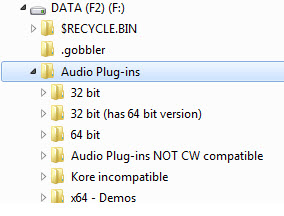
This not only makes sharing your plug-ins between different DAWs much easier it also makes it easy to avoid having duplicate plug-ins show in your Sonar menu listings.
For Sonar 64 bit my scan path includes (just listing the sub folders for brevity):
* 32 bit
* 64 bit
* x64 demos
For Sonar 32 bit my scan path includes (just listing the sub folders for brevity):
* 32 bit
* 32 bit (has 64 bit version)
* Kore incompatible
and for other DAWs I list whatever paths are appropriate.
...Steven