• SONAR
  • X3 install: FAIL - C++ again-Need computer expert help (p.3)
2014/04/10 10:02:42
robert_e_bone
You may have posted this earlier in the thread, but I am a bit pressed for time at the moment to go back and look for it.
 
Did you by chance run Dependency Walker on Sonar 8.5.3?  I would be interested in seeing if it has missing pieces too.
 
There are lots of folks maintaining 8.5.3, X1, X2, and X3, or some combination of those, as 8.5.3 was a pretty solid release, and the last one prior to the massive UI changes that began with X1.  Soooo, there must be something about the shape of things on your computer that differs, that is preventing 8.5.3 from running now.
 
Thanks, 
 
Bob Bone
 
2014/04/10 10:47:51
DeeringAmps
Randy,
I take it you did not "Image" the OS drive prior to the X3 install?
I'm pretty sure this was mentioned the first time you tried the X3 install.
Maybe you have an "old" image that would let you install 8.5?
You can not rely on the "Restore" option.
The only reason I mention it is to "help" the next user who has an issue.
I burn an image prior to any software or driver install.
 
Tom
2014/04/10 11:18:25
Cactus Music
Glad you got it sorted, I was going to chime in about the windows updates but I see you are past that. I just re-built my DAW because my C drive has a loose SATA connector and keeps going off line. I guess my W 7 disk is old and I had to do exactly what RJN did. It took about 5 re starts and 2 days before it was finished.  I pay $10 per Gig on my internet via G4 ( cell ) so the 2 days of updates cost me $20. And there is always a possibility that your internet glitches out and some downloads are corrupted. This time around is not as stable as before for me,, DPCLAT is spiking etc. I suspect my video card,  ASUS from 2005 and can't find the driver.  I can't use 2 monitors. I'm about to see if I can glue the SATA connector on my original drive! Any how computers are our worst enemy and put us off track for day's at a time when we should be recording. 
 
I got used to X3 pretty quickly and I was not going to bother installing 8.5 but I soon found out that True Piano's and Lexicon are not included with x3. What might work for you is to re install 8.5. 
2014/04/10 11:20:49
rbowser
Kylotan - Here's a screenshot I took just now:


Robert Bone - I have the DW file of its analysis of Sonar 8.5.3.  If you or anyone wants to see it, I've uploaded the DW .dwi file to my Box account:
 
DW report on Sonar 8.5.3

DeeringAmps - I do have older OS images, but I'd rather not go back to them.  I could rescue 8.5, but I do want X3 also - and now I know that when I install X3, on my machine it's killing 8.5.  What I need is a fix to this C++ error.

A friend discovered that 8.5 needs C++ 2008 version 9.0.30729.6161.  I have that, but last night went to Microsoft, downloaded a new copy of that exact file and ran it.  Since I already had that C++ file, the installer ran in Repair mode.- No change.

Randy
2014/04/10 12:47:03
robert_e_bone
rbowser
scook
The machine is missing some of the necessary MS support libraries. A call to Cakewalk tech support will get the machine sorted out.


Well, they weren't able to figure it out last time when the X3 demo was also a fail.  It was stupid to try the full program I guess.  I don't know - I've re-installed every single C++ available through Microsoft.  I have 2005, 2008, 2012, 2013.  Netframe is up to date.   - I've written Cakewalk explaining that I have to have a refund.
 
Thanks for the message, scook.
 
R


There is also a 2010 runtime C++ library available, that you do not list having:
 

x64: http://www.microsoft.com/en-us/download/details.aspx?id=14632
 
x32: http://www.microsoft.com/en-us/download/details.aspx?id=5555
 
Bob Bone
 
2014/04/10 12:49:01
John
I would try to reinstall 8.5.3. But only if you think you really need it. I have X3 only on my machine. 
2014/04/10 13:00:07
robert_e_bone
Firstly, I would suggest you get the 2010 C++ Run-Time Redistributable library installed, per my note above.
 
Then, I would test again, in case the above resolves the 8.5.3 issues. 
 
Then, I would also suggest you consider a complete removal of 8.5.3, both your x32 and x64 versions, and including deletion of their registry keys and hidden folders, and then install 8.5.3 x32 and x64 over again.
 
Prior to uninstalling either x32 or x64 8.5.3, I would suggest you back up any custom data you may have created, such as drum maps, templates, etc.
 
If you created presets for any of the plugins, you may want to avoid deleting the plugins during 8.5.3 uninstall.
 
If you need help deleting either hidden folder data or registry keys, PLEASE post back, and I will guide you through that.
 
Bob Bone
 
2014/04/10 13:16:14
rbowser
Robert - That listing of C++ files was incomplete, my error.  I do have the 2010 files.  I've recently run repair jobs on all of them, using Microsoft downloads.

Here's a screenshot of what C++ files I have right now:
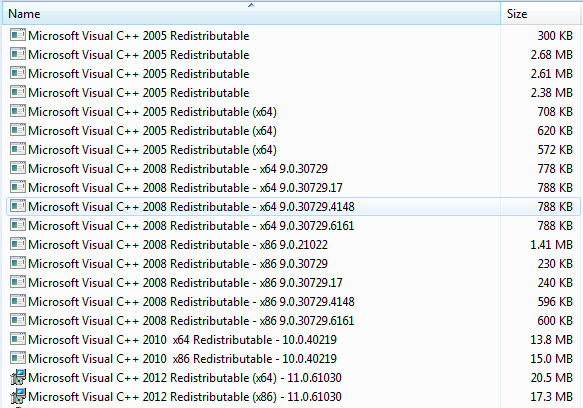


Yes - a complete re-install of 8.5 looks like it's called for, with all the backing up of custom data - argh - I would need help with that.  I'm not up for the task yet - projects keep getting delayed because of the time I've spent on trying to fix things.  But - if I still am really wanting to have 8.5 back, - I'll bite the bullet and do as you suggest.

John - This X3 installation is working fine, I'm getting work done.  Naturally I'm clumsy with it since so many things were re-arranged.  I'm working through the Groove 3 tutorials, I'm making my list of ?s as I work in it - Maybe I can just settle in and make this my only DAW software now.  I can't decide that right now while I'm still being so unsure and clumsy with it - Need to learn it better first.

Example of ?s so far:

--Where's the pop-up for Copy and Paste, so you can select only automation, events in tracks, tempo etc?  So far I'm only able to copy everything.

--How to lasso groups of notes in the PRV?  I do that all the time.  With the Smart Tool, I see how ALT turns it into Select, but it doesn't stay as Select to do the lassooing--?  I have to go select the Select tool, grab the notes, then return to the Smart Tool to move them?  I see F5 and F6 toggle between the two - but that's a bunch of extra fiddley steps to do this simple edit.
 
--The Snap To Grid is still Universal, like in the dreaded X1 release?? - And when I'm in PRV, with all the Grids on I can find, I still don't get a clean snap action - can't tell where the snap points are.

--I keep diving for the tool bar to get Erase, since I don't get how to do it with the Smart Tool.

--Yesterday I had an old plugin that was part of a project started in 8.5, and the plugin (FX3) worked - today, it doesn't work, Cakewalk reporting it as broken. -- ?

And so on.

Yeah - maybe once I've gotten X3 under my belt, I'll just only work with it. - I'm just not thrilled yet - growing pains.


Randy
2014/04/10 15:29:07
musicroom
I went through this pain myself - follow this link to another link for the fix I used. 
 
X3 and Windows 8
 
 
It's painful to think about most people being able to load X3 with no problems and then you and I (and a few others) have to load other software. Hope you get 8.53 to load. I no longer have it installed so I can't help there...


2014/04/10 16:09:23
rbowser
musicroom
I went through this pain myself - follow this link to another link for the fix I used...

Thanks much for that musicroom - Over the past few days, I've run every C++ I can find at Microsoft, but to be sure I'm covered, I ran the one posted on the thread you linked to.  No change.  X3 continues to work, but 8.5 is still dead, with the Runtime Error I posted an image of earlier.
 
It is good to see again how C++ Runtime Errors are reported all over the place.  Programs most often having the problems are from Adobe, and Open Office - even Microsoft's own suite of office programs.  I've seen iTunes reported quite a few times too - people installing a new version, only to be locked out because of C++ issue.
 
I wish I could get my little brain over how in the heck X3 could mess up 8.5 this way.  X3 makes changes so it can work - and those changes are in files shared with 8.5, but the latter can't cope--.  Something like that - but still most people don't run into the problem at all.  Such a mystery.
 
GOTTA keep trying to figure out X3 - work is so slow for me during this learning period.  Like earlier I was working on a mix, and couldn't get the Smart Tool to change the size of clips, no matter where I was placing the cursor - I could only get Move to work.  Constant juggling of tools in PRV is a nightmare for me so far - where in the heck is Erase in this supposedly "Smart" tool--?  I'll be watchin' me some more Groove 3 tutes and crackin' the manual.
 
Randy
 
© 2026 APG vNext Commercial Version 5.1

Use My Existing Forum Account

Use My Social Media Account