I have a project that I need to overdub with acoustic guitar, which requires me to be musician and engineer. But I need to record the guitar in another room and I've been investigating remote access options, so this thread comes at an opportune time for me.
First, I set up TouchDAW for my Droid Incredible. Simple start/stop/record functions work very well with fast response. Plus faders for 8 tracks. I had to install rtpMIDI on my DAW but once I got it configured it worked very well. If all you need is remote access to the transport functions TouchDAW works very nicely.
However, like the OP, I decided that it would be better if I could see my DAW screen (to adjust levels) so I tested three options to use my laptop as a remote - AirDisplay, VNC and Windows Remote Desktop (RDP).
First I installed the demo version of AirDisplay, and as I noted in my post above, lots of screen lag - in fact, really annoying screen lag. Once you have the connection, you will need to have the laptop at your DAW so you can adjust the desired application windows on the second screen (laptop). Screen drawing is poor - take a close look at the AirDisplay image below and check out the text - lots of broken text which could make smaller text difficult to read. But the deal breaker for me was the screen lag - sometimes when trying to move the mouse arrow, it would just disappear and I'd have to wait for it to appear again. Or I'd click "play" and it wouldn't start, so I would click "play" again, but then it would start from the first click then pause because of the second click. If this was the only option available you could at least get it to remotely start and stop your DAW, but with better options there is no need to use AirDisplay, even less because it costs $20. Use your $20 to buy Nectar and use VNC or RDP for remote access.
VNC means "virtual network computing" and it is a way to remotely access any other computer that supports VNC. So you could use your Mac or Linux laptop to control your Windows DAW, or vice versa. There are several free VNC programs (search the interwebs) and I used TightVNC on both my Windows 8.1 DAW and my Win7 laptop. VNC gives you full control of the remote desktop and the screen lag is much lower than with AirDisplay - in fact for me it was almost imperceptible. And the advantage over TouchDAW is that you can see meters (to adjust levels, which I'll need for overdubbing guitar). VNC is a good working, free option.
Next I tried Window Remote Desktop (RDP). RDP is very handy when working on a Windows network with multiple servers and workstations and is free in some versions of Windows - I thought it was included in all versions of Windows, but apparently that's not true. Third-party implementations of RDP servers and clients are available for Mac OS and Linux, many of them free. If you have it, you will need to allow Remote Desktop connections on your DAW to make the connection. It connects easily and has almost no screen lag. Buttons clicked work immediately, windows dragged move cleanly. It gives the user a full view of the remote desktop. Out of the three options tested, RDP works the best.
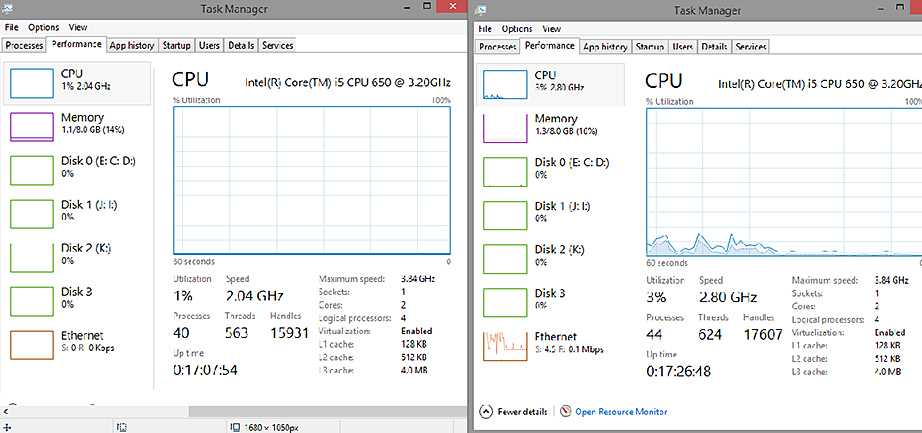
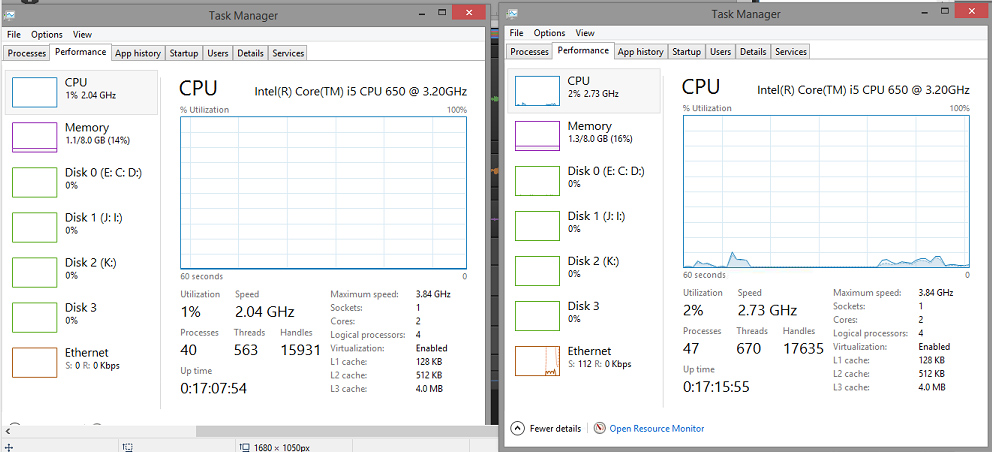
RDP is also the least resource-intensive of these three programs. In the photos below are views of the task manager using each program. In each set, the task manager image on the left is my DAW without any remote connections, with Sonar X2 open. The task manager image on the right is the view with each particular remote app connected. So in the first photo, the task manager on the left is with no remote access, and the view on the right is my DAW connected to AirDisplay. The second photo is no remote access (left) and connected with TightVNC (right). The third photo is no remote access (left) and connected with RDP (right). As you can see, AirDisplay uses the most CPU resources, with the VNC connection using just a bit lower, and lastly the RDP connection using noticeably fewer resources still.
Windows 8 DAW Task Manager without/with AirDisplay
Windows 8 DAW Task Manager without/with VNC connection
Windows 8 DAW Task Manager without/with RDP
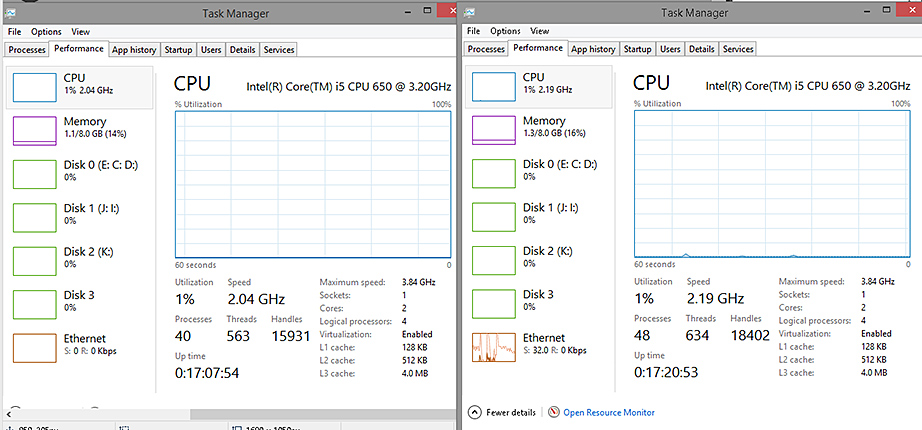
So according to these results, using RDP would result in the best quality with the lowest resource impact, followed by VNC, with AirDisplay being the lowest quality connection and using the most resources of the three.
FYI, TouchDAW used about the same CPU resources as RDP, so if I just simply and quickly need to access my DAW's transport, I'll probably use TouchDAW - nice access, small remote unit (Driod phone). But if I need to set levels or otherwise see the DAW screen I'll be using RDP for remote access. HTH.