• SONAR
  • X3 lost Session Drummer 64 (p.4)
2013/12/15 17:57:42
robert_e_bone
Is Windows maintenance up to date?
 
Was antivirus software running during either downloads or installs?
 
If uninstall of Sonar, were appropriate hidden folders removed as well as the registry keys?
 
Was a download manager used during downloads?  (like Chrome, which has one built-in).
 
Bob Bone
2013/12/15 18:46:12
StepD
robert_e_bone
Is Windows maintenance up to date?
 
Was antivirus software running during either downloads or installs?
 
If uninstall of Sonar, were appropriate hidden folders removed as well as the registry keys?
 
Was a download manager used during downloads?  (like Chrome, which has one built-in).
 
Bob Bone


Thanks, but let's just let the Cakes look into it at this point.
 
2013/12/15 19:06:10
PeteL
Hey StepD, I'm having the exact same problem, and submitted a support request to Cake over a week ago. Perhaps it will help Cake with troubleshooting that the difference between your Dependency Walker log and mine is that mine only contains the ieshims.dll as a problem, yours contains additional problem items. Maybe Cake should start by looking at the ieshims.dll since in my case that alone prevents proper operation?

Pete
2013/12/15 19:10:31
Noel Borthwick [Cakewalk]
Some errors in that log are ok however you definitely have a broken install. Based on the log you have an old version of MSVCR110.dll which is the Visual studio redistributable from Microsoft. For some reason the Microsoft installer must have failed on your machine. Do you recall an error message during install?
 
Please download and update the latest Microsoft redist from here:
http://www.microsoft.com/en-us/download/details.aspx?id=30679
 
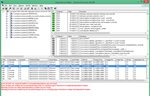
If the install is successful, dependency walker should not show anything in red in the tree on the top left that lists all the dlls.
You may have to rescan your plugins to see session drummer again.
Please report back if it solves your problem. 
 
A successful install should look like this in dependency walker. Note the version numbers for MSVCR110.dll.


Attached Image(s)
2013/12/15 19:22:20
Splat
> dependency walker.
Great tip thanks.
2013/12/15 19:54:14
PeteL
Please download and update the latest Microsoft redist from here:
 
Solved!  Thank you Noel!  For me at least, after updating the redistributable Session Drummer 3 now works properly in X3c.
 
Pete
 
Oh yeah, by the way, your MSVCR110.dll is out of date too!  ;-)
2013/12/15 20:05:35
robert_e_bone
Edited - never mind.
2013/12/15 21:07:41
StepD
Good one Noel, that worked. I definitely didn't get an error on the redistributable during SD3 install, and I actually don't think it installed the 2012 version; I think it was the 2005 or 2008 version (could be mistaken, though). It's pretty ridiculous how many different versions developers use at this point. I have 2005, 2008, 2010 and 2012 on my system now. :-)
2013/12/15 23:09:42
NMFH
I was having this issue and the latest Microsoft redist did the trick, no reinstall or registry monkey business, thank you for your help!
2013/12/17 02:06:38
wienryk

I had also problem with Session Drummer in Sonar X3 under Windows 8. After several uninstall and install finally I installed from Sonar X2. Now is OK.
There must be some problem with Sonar.
 
 
© 2026 APG vNext Commercial Version 5.1

Use My Existing Forum Account

Use My Social Media Account