• SONAR
  • [Solved] How to remove Z3TA2 bank presets ?
2014/02/01 04:35:44
tomixornot
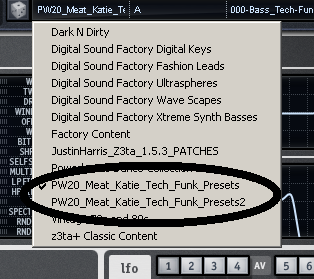
After installing presets for Z3TA2, I've realized Meat Katie, has got 2 entries, with similar presets, such as :
 
PW20_Meat_Katie_Tech_Funk_Presets
PW20_Meat_Katie_Tech_Funk_Presets2
 
The manual says to import only one of them (but I did both).
 
Anyone has any experience removing an installed Bank and how to go about it ?
 
Thanks!
 

2014/02/01 05:19:40
tomixornot
Each Z3TA2 bundle is installed into this folder
 
C:\Cakewalk Content\Z3TA+ 2\Programs
 
Just proceed to delete the extra folder. I got this info from one of the bundle's manual which asked me to manually copy the bundle folder into the same folder for manual installation.
© 2026 APG vNext Commercial Version 5.1

Use My Existing Forum Account

Use My Social Media Account