• SONAR
  • "New Drum Map" option seems to have vanished
2014/01/14 13:44:05
Alan in Cram
After 2 years of playing with Sonar X1 I am still a relative NewB . During these  years I have especially struggled with drum maps. Scott Garrigus and Trev Wilkins in their respective books “Sonar X1 Power” and “Cakewalk Sonar” give what appears to be simple instructions to assign a drum map to a MIDI track.  Finally on 17 December 2013 I cracked it and wrote a detailed account, with screen shots, so I would not forget how to do it.  These are the steps I took then:
  1. created a new midi project using TTS1.
  2. Opened up the piano roll view on the midi track and entered a few notes on C3 and D3. Then closed PRV.
  3. Clicked on the output control of the MIDI channel to be given the option of choosing  i) UA-4FX, ii) cakewalk TTS1 1 or iii) New Drum Map. I chose option iii).
  4. Opened PRV again and it appeared in Drum map format - magic! I added a few more notes for good measure.
  5. On the MIDI track I opened up the output and on the drop down menu chose Drum manager.
  6. The drum manager displayed a Map of the Kit and showed the outports as UA-4FX which I changed to TTS 1.
  7. Back to the track view and played the track. Success.
 Christmas and New Year was busy so I just got back onto Sonar in the second week of January.  I tried to repeat what I had done on the 17 December but it all went wrong. Each time I got to stage 3 of the above I was only given option i) and ii), the choice of New drum map was not available. I looked in Drum map manager but was unable to access any presets. I can’t locate the list of drum maps that were previously appearing when I was selecting a map on 17 December. Its driving me round the bend. 
I’ve searched the various forums but can’t find a solution.  Am I doing something that is obviously incorrect? Can anyone help me please? 
2014/01/14 20:41:52
icontakt
1. Go to Edit > Preferences > File > File Locations, and check the path shown to the right of "Drum Maps."
2. Navigate to the Drum Map folder and check the contents. Do you see drum maps in the folder?
2014/01/15 09:26:12
Alan in Cram
Jlien
Thanks for your reply. I followed you instructions but the Drum Maps were not in the location that they should have been. However it prompted me to search further and I found them in a now redundant folder and have transferred them over to the designated location.
This though has not solved my problem of assigning one of the drum maps to my project. My problem still remains in that the New Drum Map option that I described at 3 iii) above does not now work.
I can get into Drum map manager and create a new drum map manually but do not know to set up one from the drum maps provided by Sonar.
I thought that the presets drop down list in the DMM would show a list of all the drum maps that came with Sonar X1 but it shows nothing but a blank.
Are you able to advise how I can assign the provided drum maps please?
Alan 
2014/01/15 10:06:04
icontakt
You mean you transferred the drum maps you found to the existing folder designated in Edit > Preferences > File > File Locations - Drum Maps? If so, I think the folder got broken at some point and Sonar could no longer read the folder and list the drum maps in the drop-down list in the drum map manager. The same thing happened to me, but not in X1/X2/X3, it was a very old version (Sonar 2). I moved the Drum Map folder somewhere else, and created a new Drum Map folder and transferred the contents in the old Drum Map folder to the new Drum Map folder. It solved the issue (it was a known issue in v2, so it happened a few times). 
2014/01/15 10:16:49
scook
The default location for drum maps in your user directory\AppData\Roaming\Cakewalk\your version of SONAR\Drum Maps. To restore data missing from your user directory, hold the SHIFT key while starting SONAR. This is different from safe mode, holding the SHIFT key while opening a project. There is a master copy of the user data in C:\ProgramData\Cakewalk\your version of SONAR. Both AppData and ProgramData are hidden directories.
2014/01/15 11:20:49
Alan in Cram
Jlien
Can you confirm that I am reading you correct in that when I go to DMM and hit the Presets drop down menu the full list from the Drum maps folder should be there for me to view and choose from?  Currently it is not.
Also when I put the Drum maps folder back into “C:\Users\Main\AppData\Roaming\Cakewalk\SONAR X1 Studio” I did it by dragging and dropping the folder. Was this the correct way? I did not create a new folder then copy and paste the contents from the old folder into the new folder.
 
scook
Although I don’t fully understand what you described I did close Sonar X1 and hold down Shift as I started it again.
Also AppData was not hidden on my computer.
  
Jlien and scook
I appreciate your comments to date but I’m still in need of some hand holding.   
2014/01/15 19:33:03
icontakt
Ok, then I suggest you create your own drum map folder somewhere (in another drive if you have one) and copy only the drum maps you need from the default Drum Map folder, and choose this new folder in File Location (use the button to the right of the path). This way, the list in the DMM will be shorter (and also it will be easier to manage your own presets). I do this not only to drum maps but also to other items you see in File Locations, such as track icons, project templates.
2014/01/16 03:52:15
Bristol_Jonesey
It's odd that this was working correctly and now isn't.
 
I don't think this has anything to do with folder locations or anything like that.
Are you 100% sure you're selecting the Midi track Output to try and assign a Drum Map?
 
Try inserting Session Drummer. Don't use a simple instrument track, choose the split Midi/Audio approach, and also make sure you only have Midi Source and First Synth Audio Output checked.
 
Now go to you midi track and see what output options are available.
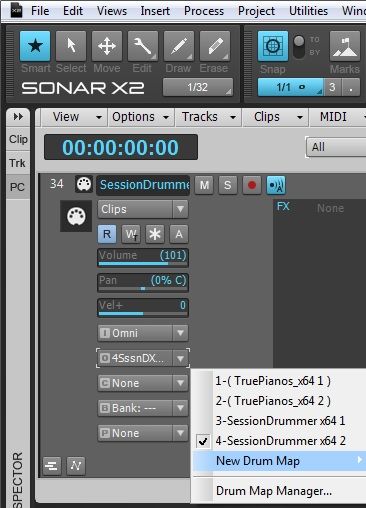
 
You should see this, or similar:
 
If you don't, and nothing else has changed on your system since it last worked, then I suggest you do a backup and reinstall Sonar from scratch
2014/01/16 11:17:37
Alan in Cram
 
Jlien
How did you move the Drum Map folder? I have copied it and placed it on my D drive but the original is still in the Default folder. I can only think of deleting the folder, inserting a new blank folder then copying in some of the files from the folder on my D drive.  I'm reluctant to do that at this stage in case I mess everything up.
 
Jonesy
Thanks for entering the fray. Yes it is odd.  I had a bad experience with Sonar in December 2012 when it would not open at all. After many weeks of corresponding with Technical support they said it could only be a Windows fault and advised me to re-install Windows 7. I did and I got Sonar working again but it was a nightmare as I lost other programs. Hence I would be wary about re-installing Sonar from scratch.
 
Yes I'm 100% sure that I'm selecting the Midi track output to when trying to assign a Drum Map. After I had cracked it I did a track in December using SD2 and the drum map option appeared. I've tried again today and there was no drum map option available. I've taken a screen print to illustrate but do not know how to insert it into this message so I'll try to put it in a PM to you.  
 
At the end of the day I can use drum map manager to create new maps but it is time consuming and I would really like to have the option to use the ready prepared maps. 
  
Alan 


2014/01/16 11:21:18
Alan in Cram
Jonesy
Sorry could not send you a PM. Apparently I need to have made a minimum of 25 posts before I can use PMs and have only made 16.
Alan  
12
© 2026 APG vNext Commercial Version 5.1

Use My Existing Forum Account

Use My Social Media Account