• SONAR
  • Couple of problems / issues
2013/12/30 09:31:05
Bristol_Jonesey
Firstly, I'd like someone to try this and see what happens.
  • Insert BFD as a multi audio output synth
  • Insert a drum map - any old map will do
Now try and open the BFD GUI by double clicking the midi icon on the midi track. For me, the only way BFD will open is by switching the output from the Drum Map to BFD and then double clicking the icon
 
This leads me onto my 2nd problem, with the synth rack
 
The icon I've highlighted in the screenshot does NOT appear on all of my projects. (this is the other way of opening up a synths GUI) I'm not aware of any setting that could cause this, so does anyone have any idea why this should be missing?
 
 
Thanks, and Happy New Year!!
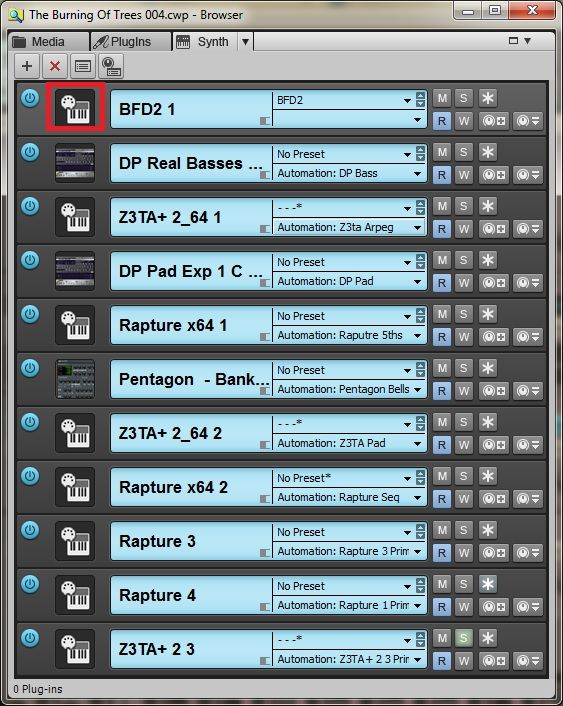


Edit to add:
 
I knew there was something else 
 
Try inserting any Pad from Dimension Pro and record a long, sustained note or 3
 
Now insert a series of tempo changes to encompass the note and playback.
 
On my system, I get a rhythmic series of ticks where the tempo changes occur and the ticking sound stops when the final tempo change is reached. Bouncing the track down does nothing to cure this.
The only workaround I can find is to use a different synth - the old Pentagon works perfectly so again, any ideas?
 
2013/12/30 10:50:33
brundlefly
Drum maps break the link between the MIDI track icon and the synth GUI because the map could be pointing to many different ports/synths, and SONAR would hav eno way of knowing which one you want to open. You can get at the synth GUI from the track icon in the audio track hosting the synths output or via the synth tab in the Browser.
 
The icon you're referring to is  for Simple Instruments where the MIDI and Audio tracks for a synth are combined. If you have separate MIDI tracks and Synth tracks (audio tracks with a synth assigned as input), you won't have that icon with the DIN plug on top of the synth keyboard. You would have to split a Simple Instrument track to be able to assign the output of the MIDI to a drum map so that would explain why you don't have one.
 
Not sure about the click with tempo changes, but it might be that the particular patch has a tempo-synced element. It's technically difficult to get a sounding waveform with rhythmic elements to follow a tempo change without creating a discontinuity in the waveform that manifests as noise.
2013/12/30 11:07:56
bvideo
The ticks at tempo changes are coming from a tempo-based effect, probably embedded in the dimension patch.
2013/12/30 11:25:39
Bristol_Jonesey
brundlefly
Drum maps break the link between the MIDI track icon and the synth GUI because the map could be pointing to many different ports/synths, and SONAR would hav eno way of knowing which one you want to open. You can get at the synth GUI from the track icon in the audio track hosting the synths output or via the synth tab in the Browser.

Yep, I'm aware of this and have been moaning about it for several versions, but in previous versions I could always double click the Midi icon to open up the synth attached to that particular track (how else could I have ever edited BFD considering I ALWAYS use a drum map?)
 

The icon you're referring to is  for Simple Instruments where the MIDI and Audio tracks for a synth are combined. If you have separate MIDI tracks and Synth tracks (audio tracks with a synth assigned as input), you won't have that icon with the DIN plug on top of the synth keyboard. You would have to split a Simple Instrument track to be able to assign the output of the MIDI to a drum map so that would explain why you don't have one.

I never use SIT's, split Midi + Audio have always worked perfectly well for me. The icons shown on the screenshot above are all from split Midi/Audio synths
 

Not sure about the click with tempo changes, but it might be that the particular patch has a tempo-synced element. It's technically difficult to get a sounding waveform with rhythmic elements to follow a tempo change without creating a discontinuity in the waveform that manifests as noise.

Now that's given me something to check out, thanks!
 
 
2013/12/30 11:37:26
brundlefly
Bristol_Jonesey
I never use SIT's, split Midi + Audio have always worked perfectly well for me. The icons shown on the screenshot above are all from split Midi/Audio synths

 
Oops. Got my icons mixed up. The one with only the keyboard is the Simple Instrument. So what icon do you have on audio tracks with synth inputs?
 
In any case, I think you're mistaken about ever having been able to open synths by the icon on MIDI tracks pointing to drum maps. This has never worked for the reason I stated.
 
2013/12/30 14:10:34
Bristol_Jonesey
Dave, the problem is I have NO icon in the synth rack, as shown here:


Consequently, the only way I can open up the GUI is to first assign the midi track output to BFD rather than the drum map, open it up, do what I need to do and then re-assign the output. It's a bit of a pain.
 
Both screen shots I've posted are from X3D, but on different machines and different projects.
So I need to determine if it's machine specific or project specific
2013/12/30 14:59:48
Bristol_Jonesey
It's machine specific.
 
It displays correctly on my secondary DAW but not on my main machine.
 
So what's different? Other than the fact that my main machine was a purpose built one with a higher spec than the non-DAW, which I built myself in 2009?
2013/12/30 15:07:17
scook
Can you right click and load or reset the icons? Are the track icons where the folder preference is set?
2013/12/30 15:16:51
brundlefly
For a workaround to get the GUI, you can right-click and choose Synth Properties. You might also try re-personalizing SONAR with Shift+click to launch.
2013/12/30 15:21:10
Bristol_Jonesey
As ever Steve, you're a genius.
 
Right clicking worked. Resetting initially did nothing, but as soon as I chose LOAD icon, and just picked any old bitmap in Sonar's Track Icons folder, the rest of them appeared normally.
 
Thanks indeedy sir!!!
12
© 2026 APG vNext Commercial Version 5.1

Use My Existing Forum Account

Use My Social Media Account