I have some questions regarding Sonar X3 vs. X2. I have compiled some questions and annoyances from X2, and I would like your input from the X3 users out there. Overall, without a demo for X3, there is no way to know of the bug fixes or improvements in the latest version (X3c). So the only way to find out is to ask! Some questions may need a little X3-experimentation to confirm. Thanks in advance! Here are my questions (and to ease is responses/replies, they are numbered):
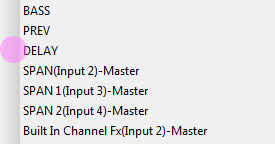
#1. Are Sends "check-marked" in the drop-down list to show that it's active? Also, are the abbreviations shown on the top-side of the drop-down menu (before it's clicked; see picture below) any clearer, i.e. a little less cryptic? Overall, my biggest beef with sends in X2 is that despite a gray, shaded area on the left side of the drop-down menu, a check-mark or highlight is
not utilized to show the active Send-Destination for any given Send number. See picture below where a nice check mark or dot
should be located to designate the "active" send in the drop-down menu. It's like Cakewalk
wanted to do this, but forgot, and it was never implemented. After all, the shaded area is obviously available for a check mark! So has this feature been added or improved in X3?
...and by cryptic, I mean this:
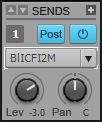
At first glance, I think it's "Bus Input Compressor FX...two...'M'...uh? Oh wait, I'll just pop open the drop-down to see which one is selected! Oh wait. Can't do that!
 [Problem report and feature request submitted on 12/9/13 - CWBRN-22318]. #2.
 If Sonar is running on a dual-monitor setup, where the Track View and Multi-Dock/Console View are displayed separately, and Sonar is minimized, then upon reclick to foreground (i.e. re-maximize), the second monitor's display (in this example, the Multi-Dock) reappears
not in fullscreen; it merely reopens in a small window, specifically a window 280x1279 pixels. So did Cakewalk fix this issue? NOTE: this
may be a Windows vs. floating-window issue, inherent to a program running in the Windows environment, and therefore no fix or workaround is possible.
[Problem report submitted on 6/18/13; submitted to development -- CWBRN-17792]. #3. For some reason, Sonar seems to forget VST and VSTi layouts in the Browser upon opening projects or starting new templates. Sometimes I need to select "Default All Plug-ins," then reselect my own Layout from time to time. It seems rather inconsistent and intermittent, but I don't think it's just me. So is this still an issue?
#4. Perhaps I am missing something easy, but I always thought if I right-clicked an audio clip, I could select an effect to apply to it. For example, if I wanted to normalize a clip, I could right-click on it and select "Normalize" from a "Process" menu. However, the only way to do it, as far as I know, is to go to the top of the screen's
Process Menu and select
Apply Effect. I think it's been this way since the beginning of Sonar, but that doesn't mean it couldn't be improved. So has this optimized trick/feature been added?
#5. Sometimes it would be nice to have a peak-hold needle on the ProChannel bus/channel compressors (similar to Cytomic's the Glue), or a numeric peak-hold indicator. This is asking a lot, but has this feature been added? After all, this would be more useful than the ability or Easter egg to turn on the PC4K comps' VU-meter backlight! Has anything been improved upon for any of the ProChannel modules besides the EQ?
#6. Oh, BTW, can the EQ be removed from the ProChannel strip? In X2, it could never be removed.
#7. Also, can values for knob parameters be manually entered in any ProChannel module other than the EQ?
#8. There still seem to be some issues with envelopes and the "crashing" of envelopes (i.e. not working/non-responsive, either in automation lane or within a clip) once deleted and then recreated. For example, if a volume envelope is delete but created again, the track then does not read the envelope, therefore not causing any parameters to automatically change as it's supposed to. Is this issue fixed, or is
stable, in X3?
#9. Also, there is a delay when reading an automation envelope if a metronome count-in is utilized. Is this issue fixed in X3?
[Problem report submitted on 8/13/13; submitted to development -- CWBRN-18893]. #10. There is a problem/bug with the Browser "forgetting" or "ignoring" the preview bus-routing if changed from the default, or if the original Preview stereo bus is deleted but added again later, after which the Browser audio-preview-bus is set
back to a newly created Preview bus, or other bus for that matter. At this point, Sonar X2 completely ignores
any bus and continues to preview/play audio clips at full volume which is very annoying. So...has this been fixed or improved?
[Problem report submitted for good measure on 12/9/13; submitted to development on 1/2/14 -- CWBRN-22300]. EDIT (1/2/14): Item #10 has been "submitted to development" as of Jan. 2, 2014.