Wow, great to see some more additions to the thread! The good news is I've solved the drift issue. Surround Bridge is simply not an option for instancing any sort of plugins (and noticing that there was no real support for 5.1 surround plugins - more than stereo audio I/O via surround bridge). Thus, I had to create several steps.
- Initial sound project:
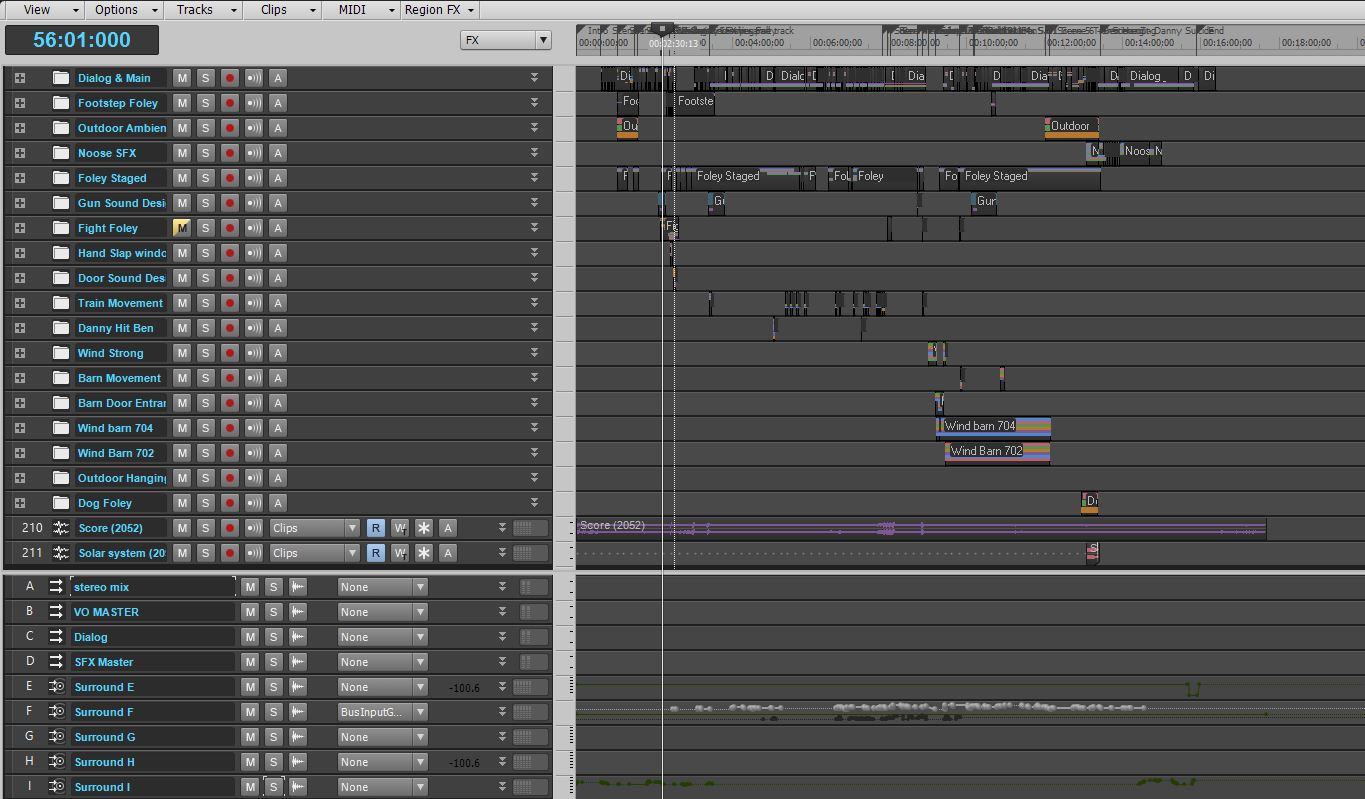
Srnd E: Master Surround bus to surround mains
Srnd F: Dialog/Production Sound global
Srnd G: Ambience global
Srnd H: SFX global
Srnd I: Music (already mixed, just placed for reference in this project).


All clip-based FX are bounced and logged, with notes, using the clip lanes as archival and steps/iterations.
All the dialog based tracks with track FX are "frozen" in place, and then trimed manually for the large silence gaps as I opt for this method or trim silence tools to make sure there are no issues with transient or sudden jump from zero amplitude. - Created a new "mix" project, importing each of the stem bounces in 6 channel multitrack wave @ 96k/24 (same as my initial project).
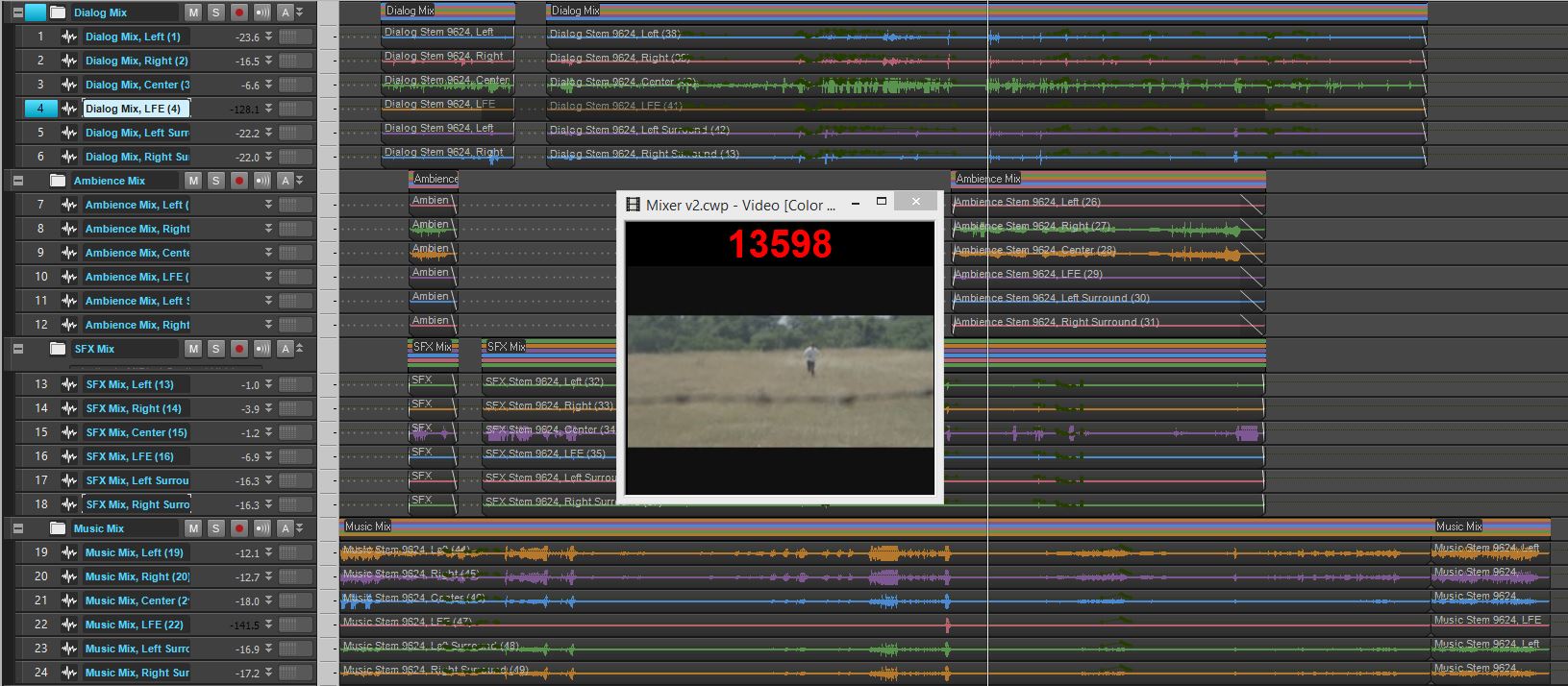
Each channel is hard panned to the correct surround placement / speaker designation using the surround panner. I then worked from the center channel on outward experimenting with sound mixing: dynamics and EQ etc trying to find a good program level that wasn't squashed but also could be uniformly applied to each of the 6 channels (yes, affecting the sub too). I would recommend (after experiencing this workflow) processing the center discretely, apply an instance of your chain to the front left and right, and whatever changes are made to the FL/FR keep them uniform with each other, do the same with the rears, and then treat the sub last, adjusting to keep impact and keep in mind the LFE's purpose in the listening experience.

Much smaller project management. The project above with all the stems I went through and removed silence manually again. This stage is where I spent a fair amount of time doing volume automation for secondary mix. While processing with plugins worked to get me a "character" or window with which to hear the sonic landscape in, much of the dynamics and overall presentation I managed to achieve with automation. - My client was wanting rushed edits and constant temp render updates of the entire film project (printed to HD1080p mp4's) which meant every time I had to render the full film to give him a new copy of the film with the changes made (often there were changes made to VFX shots, or issues with timing in the end spacing between cut to black and the credit roll) meant I would have a solid 24-28 hours of down-time while the computer rendered the film. I tried to urge him to minimize the time we spent doing iterative renders like this but he was insistant on the last two passes I made in the last couple months as he really wanted the film as complete as possible for each of his festival submissions.
Due to this, I ended up rushing a "master" phase and overdid it trying to get the levels and everything to feel and sound more "commercially competitive". it ended up destroying the mix, sounding amateurish, and in the stereo-downmixes phasing became ultra-apparent due to the center/LR/rears being muxed together with such smeared details in my processing being pushed up by the mastering chain.
Thankfully I was able to spend some time undoing the damage and rendered the client a new temp render for submissions that while less "commercial competitive" retains the impact, sounds much more dynamic and was able to deliver on all the elements and work he wanted to stand out.
I have since purchased the X3 Producer upgrade, and LOVE the new features especially with the vst3 etc. However, as this project was rushed I couldn't afford any issues so I did a side-by-side install of X3 next to X2, and just kept working on the project in X2. One thing I will point out is that the plugin Manager utility will be affected by the X3 install, and in X2 will show you options for VST3 but I didn't have any problems so long as I kept my static plugin menu layouts saved in X2 separate from X3. I have yet to try and mess with X3's surround plugin capabilities and see if the surround bridge issues have been fixed. But I can say with 99.99% certainty that the SOURCE of my problems started with using surround bridge for surround processing on 5.1 busses, and have completely disappeared in this workaround. I have 0 timing/drift issues.