• SONAR
  • Heads up/ Reminder re Run-As-Admin plugs
2013/11/12 13:15:26
Jay Tee 4303
If you open a plug which warns you that you aren't allowed to save settings unless you close it and run it as Admin, and you don't do that, then lay down several sterling audio tracks, and hit save, with the plug still open, it can hose the Sonar instance, and lose your hard work.
 
Mmmhmm, yep, I did.
 
:-)
2013/11/12 13:23:19
Splat
Good tip ;) I always run Sonar as Admin.
2013/11/12 15:24:26
Jay Tee 4303
I log in as admin, I know, but years of  IT conditioned me, and there's a lot more to sweat as root on a Unix box supporting $5 bill in financed commercial aircraft than just a PC, and I've never broken anything yet, but I do tend to forget that the Gates Dynasty knows ever so much more than me and saves me from myself everytime I think logging in as Admin means I actually have administrative authority over one of Bill's computers.
 
Ima set ip 'Run as Admin across the LAN, forthwith, thx for the reminder!
2013/11/12 15:27:58
John T
You can set whatever icon or menu item you use to start Sonar to always run as an admin you know. Right click on it, select "properties" go to the Compatibility tab and check the Run As Administrator box in there.
 
Doesn't work on icons that are pinned to the taskbar, as they are merely objects that inherit the properties of whatever icon or menu item you used to pin it in the first place.
2013/11/12 15:34:14
Guitarmech111
I have always wondered, do you have to run as administrator if your user ID has admin privileges? I thought that if your userid had admin privileges, you were good to go.  I only have my userid, apart from the default administrator, as the default login ID and it has admin privileges.
2013/11/12 15:48:24
Bristol_Jonesey
No.
 
I run many programs logged in with full admin rights, and many of these ask me for permission to carry on doing whatever it is, so clearly, this action "lifts" your status to full admin rights. Just running a program logged in as an administrator doesn't enable the same level of authority.
2013/11/12 16:31:58
TheSteven
This thread is a good argument on why you should NOT store your plug-ins in system folders such as C:\Program Files. 
 
I never run Sonar as Admin (except to activate it), haven't turned off the UAC on my PC and I very rarely run into these issues because I don't store my plug-ins in system folders such as C:\Program Files. 
 
I instead I store them in a folder created in another location (in my case F:\audio plug-ins).
Easy to backup, easy to restore and easy to organize.
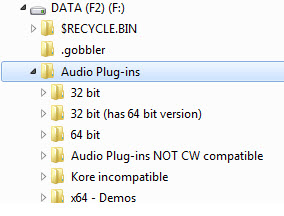
This not only makes sharing your plug-ins between different DAWs much easier it also makes it easy to avoid having duplicate plug-ins show in your Sonar menu listings. 
 
For Sonar 64 bit my scan path includes (just listing the sub folders for brevity):
* 32 bit
* 64 bit
* x64 demos 
 
For Sonar 32 bit my scan path includes (just listing the sub folders for brevity):
* 32 bit
* 32 bit (has 64 bit version)
* Kore incompatible 
 
and for other DAWs I list whatever paths are appropriate.
 
...Steven
 
2013/11/12 16:50:34
TheSteven
Guitarmech111
I have always wondered, do you have to run as administrator if your user ID has admin privileges? I thought that if your userid had admin privileges, you were good to go.  I only have my userid, apart from the default administrator, as the default login ID and it has admin privileges.


Quick overview...
As of Vista - programs do not run at admin level (regardless of user level) unless
  • the application as been elevated to run at admin level.
    Such as when you right click on app icon & select "Run as Administrator" from pop-up menu.
  • the  "User Account Control (UAC)"  had been disabled.
The "User Account Control (UAC)" in Vista & later prevents malicious programs from installing or modifying your system as well as it also prevents basic users to accidentally change system critical settings which can be harmful to the system.
 
I know a lot of people here don't like the UAC or recommend turning it off but (especially with Windows 7 & 8) if you set your stuff up correctly it's really not an issue.   
 
...Steven
 
 
2013/11/12 16:58:21
Splat
This thread is a good argument on why you should NOT store your plug-ins in in system folders such as C:\Program Files. 
 
OK one of these days I'm going to do a plugin reorg as you've suggested...
I will probably still run sonar as admin but this is a very good tip thanks Steven... 
 
UPDATE - In fact I'm reorganising my plugins right now as suggested - cheers...
 
2013/11/13 23:27:35
slartabartfast
Jay Tee 4303
I log in as admin, I know, but years of  IT conditioned me, and there's a lot more to sweat as root on a Unix box supporting $5 bill in financed commercial aircraft than just a PC, and I've never broken anything yet, but I do tend to forget that the Gates Dynasty knows ever so much more than me and saves me from myself everytime I think logging in as Admin means I actually have administrative authority over one of Bill's computers.
 
Ima set ip 'Run as Admin across the LAN, forthwith, thx for the reminder!


Well if you want to live dangerously, there is still a way to actually get full administrator privileges:
http://www.techrepublic.com/blog/windows-and-office/access-the-real-administrator-account-in-windows-7/
http://www.ghacks.net/2012/06/11/windows-8-enable-the-hidden-administrator-account/ 
12
© 2026 APG vNext Commercial Version 5.1

Use My Existing Forum Account

Use My Social Media Account