• SONAR
  • I'm REALLY liking SONAR X3, BUT... (p.2)
2013/10/29 21:13:07
e.Blue
gustabo
My workaround has been to drag fx from the browser where I can use the layout I select, including my custom layout.


Yeah, I've been doing that sometimes too. However, for me I've found that using the Default All Plugins menu is slightly quicker, based on the way that I work.  I have a LOT of plugins, so I sometimes have to do quite a bit of scrolling. I also have to remember stuff like Universal Audio decided to put their plugins in a folder named 'Powered Plugins' instead of using the company name like everyone else. 
 
-e.B
2013/10/29 21:21:08
TheSteven
Zo
done a video on it ......go to prefreence , open asio panel close apply and re do .....
 
by the way e blue  is topped usint X3 after 2 dayz ....can't believe some stuff i have expereience have passed the beta , the only explainatio i have is tha Cakewalk rushed it to be on point fo X3 to be still distributed by Roland .....before the Gibson move or some like that ....if not , bugs are so obvious that the beta testers should be punished !!lol 


Are you even posting in the correct thread?
If you 'done a video' where's the link? Or did you rush your post out so quickly that it bypassed what should have been your mental quality control?
 
If you have a solution post it.
If you have a problem and are looking for a solution open a thread or contribute a post to a thread.
 
If you just want to be a troll - go away...
2013/10/29 21:34:04
TheSteven
Hey e.B,
 
In lack of other remedies I would try the following:
  1. Move out all of the old custom menus so that the only item on the FX Bin list is the 'Default - All Plug-ins' menu
  2. Then, try creating a small custom menu to see if it's possible to select it.
If the new custom menu can be selected - then possibly one of your old menus has problems and is corrupting the ability to select a custom menu.
A corrupt menu shouldn't prevent other menus from being selected or loading - but since nothing else seems to be working this might be a test worth doing.
 
...Steven
2013/10/29 21:50:12
Zo
http://s638.photobucket.c...nagementissue.mp4.html
 
by the steven calm down i made 2 or 3 threads then i stopped  ..waiting for the new update !!!
 
you're calling me troll while in GS i'm a cakewalk Fan boy !!! lol  i guess you guyz know me better than i do .....woah !! 
 
http://forum.cakewalk.com/Boston-we-have-a-problem-m2910349.aspx
 
http://forum.cakewalk.com/My-afternoon-with-X3-heaven-and-hell-m2909769.aspx
 
By the way i also remember that you gave me a great advice on checking your tools (that i found great by the way) ......so if you don't mind allow people to say waht they want and to ask this Brand to deliver what they can deliver "high quality software" as they used to do ....
 
even if i do my best since years to promote sonar in France in many ways (i aint gonna go details) , it is my duty as a user to say when some wrong .....specilay since i know and can isolate issues ....
 
issues noticed and confimr after 10 min of use :
 
1) plugin layout issue
2) solo track issue
3) slow mutitimbrale plugin inserting
4) bad graphic engine behavior
5) Asio panel issue (asio buffer not displaying)
6) track size scrolling inconsistant
7) not confirmed : VS 700 Act data weirdness
 
i stoped after that , also we lost some goodies (don't know why) like some colors customistation
 
2013/10/29 22:18:20
TheSteven
Zo,
 
Still don't see what you're reference to the Asio Panel referred to, but maybe I missed something in one of the post in this thread that relates to it.
 
You have a number of issues, I am assuming that you submitted a bug report to Cakewalk.
In regards to your issues - I don't see any specs in footer so there's little that I can suggest on your setup.
 
I regards to the refresh problem you show in your videos. 
  • If you are using Vista or Windows 7 did you 'optimize your performance' settings?
    Check out this article on Improving DAW Performance
    If your are running Windows 7 or Vista and have turned off Aero Glass (or altered Windows Performance Options) to improve your DAW's performance you may have done just the opposite.
    Image from article: 
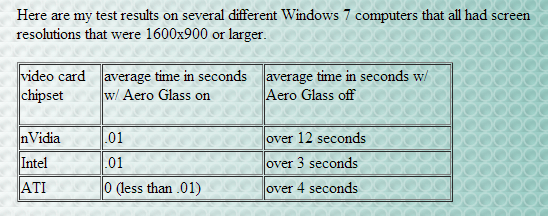

In regards to your comment:
Venting
the only explainatio i have is tha Cakewalk rushed it to be on point fo X3 to be still distributed by Roland .....before the Gibson move or some like that ....if not , bugs are so obvious that the beta testers should be punished !!lol 

 
Please show me how this is constructive? 
 
BTW - I am sorry that you are having these problems and hope that you get them quickly resolved.
My experience with this board is that fellow users will try to help, but comments like the above don't encourage useful answers.
 
...Steven
2013/10/29 22:26:31
Zo
I'm gonna simply reply that : a system working with X1 should work with X3 , if X3 isn't playing well and my system didn't change (fully oprtimized and rock solid for years as i teach Computer optimisation my own)
 
Nothing is system related , those are bugs !!
 
and yes my last comment was a joke .... but get it how you want .....i ain't tripping , really not that important ....
 
We will see with X3C and the bug list .....and then maybe you will consider that i'm not talking wind ....
 
I beta test for a lot of brands , and i know when somthing is serioulsy solid or not .....
 
i do a lot of videos in youtube in X1 and stress the thing like crazy with ONE glitch !!
http://www.youtube.com/user/ZozillaThaGreat
 
i ain't even trying on X3 seeing what i experince just recording simple bug videos !!!
2013/10/29 23:28:26
TheSteven
Zo,
 
Out of curiosity - as mentioned in the link, do you have Aero Glass turned off on your system?
2013/10/29 23:56:13
Splat
Sorry Zo but just because an older version of sonar works on your system, it doesn't mean that if a later version doesn't work it must be sonar code at fault. How you configure and optimise each version of sonar is a factor (eg clean AUD.INI, plugin config etc). Also the software may access your driver/s in a different way. e.g. hook into the driver via more optimal methods, which turns out to be a buggy area of the driver... Then again your virus scanner might be slowing down some specific X3 functionality such as plugin scans.

You could easily be right but I disagree with your written assumptions.... Just saying....
2013/10/30 00:58:52
swamptooth
Zo
i teach Computer optimisation my own)
 
Nothing is system related , those are bugs !!
i ain't even trying on X3 seeing what i experince just recording simple bug videos !!!


um... can you debug the link to the photobucket video?
2013/10/30 09:03:56
Zo
TheSteven
Zo,
 
Out of curiosity - as mentioned in the link, do you have Aero Glass turned off on your system?


nope !!
© 2026 APG vNext Commercial Version 5.1

Use My Existing Forum Account

Use My Social Media Account