• SONAR
  • [Answered] M-Audio Fast Track Ultra Users: Drivers 6.1.9 do not work with Sonar X1 64
2013/09/10 20:35:39
jazzwombat
On my Win7-64 machine running Sonar X1, the latest drivers for the M-Audio Fast Track Ultra (driver version 6.1.9) found on the Avid site:
 
 
do not seem to work: they are not recognized nor do they show up in the Preferences Drivers window on Sonar X1. Reverting to version 6.0.8 corrected the problem. (Nice interface, however on the newer drivers.) Of course, YMMV.
 
Good luck.
 
Bob aka jazzwombat
2013/09/10 20:44:04
scook
I believe this has been discussed before http://forum.cakewalk.com/FindPost/2879368
2013/09/10 20:45:36
jazzwombat
Thanks, and with great apologies for duplicating a previous post. The OP was written with good intentions.
2013/09/10 20:46:46
scook
I believe you are the first to mention it in this forum. Some may have missed the other thread. And the other thread does offer a suggestion to correct the problem with regedit.
2013/09/11 04:20:11
pagec
Hi there,
 
I have this problem also that the new driver does not show up in Sonar. I see there is work around here, but i'm not to technical. Could someone possibly tell me what I need to do step by step. That would really be appreciated.
 
Thank You
2013/09/11 08:40:04
fireberd
As I noted on the other thread (I have X2a not X1).
 
I just installed the latest version, 6.1.9.  Win 7 64 bit and Sonar X2a 64 bit.  On playback everything is working OK, without doing the registry modification as noted. 
 
I haven't tried any recording, but Sonar automatically recognized my Fastrack Ultra 8R and set it as the audio device (ASIO).
 
UPDATE:  I installed the new version on Windows 8 64 bit/Sonar X2a 64 bit and it is working OK there too.  It is the same PC, dual boot Win 7/Win 8.
2013/10/02 14:06:28
swamptooth
pagec
Hi there,
 
I have this problem also that the new driver does not show up in Sonar. I see there is work around here, but i'm not to technical. Could someone possibly tell me what I need to do step by step. That would really be appreciated.
 
Thank You


hi page, 
sorry for the late reply.  to start the registry editor, hold the windows key+r at the same time.  when the run dialog box pops up type "regedit" and hit enter.  you should see something like this:

click the arrow next to hkey_local_machine to expand it and then software and then asio until you get to here:

double-click the "description" key shown on the right of the screen and you'll get an edit string dialog like this:
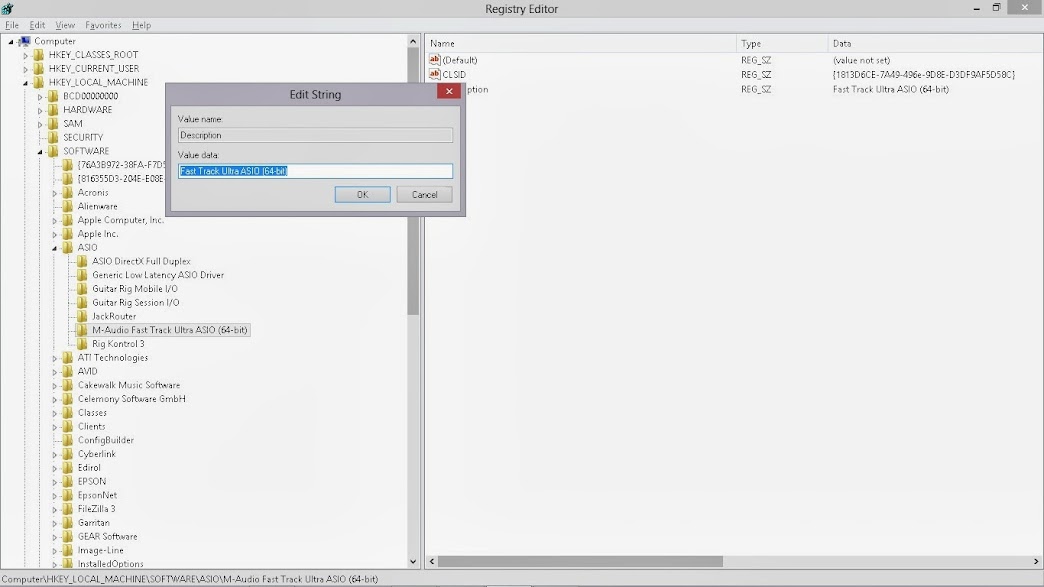
 
then, in the value data field, type something less than 64 characters, like "Fast Track Ultra x64", click on ok, then close the registry editor.  
start sonar, and it should see the FTU. 
 
hope that helps!
2013/10/03 13:48:43
PTravel
The new Avid driver has problems with other DAWs besides Sonar, and these problems go beyond merely not showing up.  I would suggest reverting to the last m-Audio driver and avoiding the Avid driver entirely.  The last m-Audio driver is, I believe, 6_0_8_77158.  It works just fine Sonar X2 and X3 64-bit as well as other DAWs.  Note, too, that the Avid driver doesn't really offer anything beyond a new GUI -- functionality remains the same.  There's no reason to switch.
2013/10/04 20:03:23
gswitz
X2b is out with a fix.
Resolved a compatibility issue between the latest Avid Fast Track Ultra ASIO drivers and SONAR
http://www.cakewalk.com/support/kb/reader.aspx/2007013324
 
Edit: X3b... duh
2013/10/04 20:10:53
swamptooth
PTravel
The new Avid driver has problems with other DAWs besides Sonar, and these problems go beyond merely not showing up.  I would suggest reverting to the last m-Audio driver and avoiding the Avid driver entirely.  The last m-Audio driver is, I believe, 6_0_8_77158.  It works just fine Sonar X2 and X3 64-bit as well as other DAWs.  Note, too, that the Avid driver doesn't really offer anything beyond a new GUI -- functionality remains the same.  There's no reason to switch.


That's not necessarily accurate... the new driver is built on a revised multi-client asio architecture and they fixed several of the problems associated with a buffer size of 64.  i'm not having any problems with them on win8 x64.  you have to uninstall the old driver, then open device manager and show all hidded devices and delete any hidden ftu's (which will happen if you've plugged it into different usb ports), then reboot, then install the new driver, running the setup program as an administrator.
12
© 2026 APG vNext Commercial Version 5.1

Use My Existing Forum Account

Use My Social Media Account