Let me start out by saying that I finally "get" the difference between record modes now. My difficulty in understanding comes purely from my history of workflow with 8.5, X1, etc, I think.)
Here's what I did this afternoon:
- Enable COMPING record mode.
- Arm "Vocal Takes" track.
- Set Loop around the first verse.
- Press [R]
- Record 7 or 8 takes through the verse, each time getting better as I got familiar with my performance.
- Press [SPACE] to stop.
- Adjusted the loop points to the next verse.
- Repeat process above for all 8 or so "verses".
Finally, I stopped the session and expanded the take lanes to see where we were.
I have 71 take lanes.
This is because, even though I advanced the loop points in the timeline for each verse, SONAR started to record takes into a fresh take lane. So every time through the loop, and every stop-start, increments the take lane count.
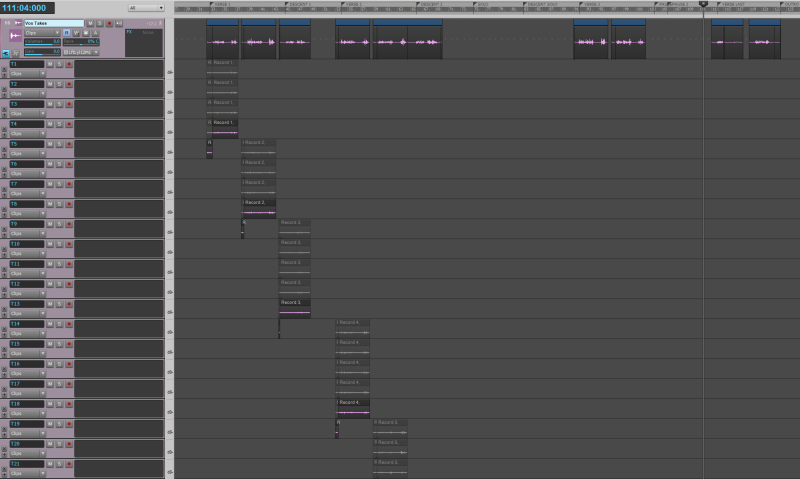
I would seriously like a "rebuild take lane" option to redistribute the takes into just the top 7 or so lanes.
Unless I'm missing something, I have to do this manually by repositioning the takes with the mouse.
Tedious!
I know it is purely cosmetic... but if I want to keep all the raw takes (which I might) then I definitely want to make this easier to navigate.