Current issues I've found with Sonar X3, carried over from X2. The only change made from X2 to X3 that I was really looking forward to is the QuadCurve zoom. I don't really care about the other changes, as wonderful as they may be, but I do care about the following and would really like to see them implemented/fixed.
1/
Behaviour of smart tool for drawing notes does not make sense with how the Event Draw Duration works.
One cannot:
a) Simply walk into Mordor
b) Simply click to place a note
So one has to drag at least a little to draw a note but this does not draw a note to the length specified by Event Draw Duration, rather it changes Event Draw Duration to the length of note drawn. What then is the purpose of Event Draw Duration when drawing notes with the smart tool? Why can't the smart tool draw notes just by clicking as the draw tool can?
If you click and drag just a tiny bit, to less than whatever the snap grid is set to, then a note of Event Draw Duration will be created, but this is too hypersensitive; it's far too easy to override this duration, create a note of the wrong duration and change Event Draw Duration.
Clicking and dragging to the left is also odd; first of all a note of Event Draw Duration is created then extended to the left. However, the resultant note's duration is always shown afterwards in Event Draw Duration as a number of ticks, never as a note value. I do not know off the top of my head what the '5280' ticks is. It should at least make an effort to work out what the note value is if possible.
Also, when in the piano roll, dragging across velocity tails for notes using the smart tool (as the draw tool) does not only affect selected notes, it affects all notes! I think this behaviour changes to how the draw tool works if you hold down shift while this is done, but the behaviour is erratic.
In summary, make the smart tool behave as the draw tool if the draw tool icon is showing.
2/
Vertical zoom limitation in piano roll view is still way too limited. I rarely want to see five octaves at a time and that's the most zoomed in it can go! Please remove this limitation, allow me to zoom in like I can in the track PRV. All the notes look really squashed together. I don't want to use the magnifying glass, I just want to be able to zoom in further. Please allow this, it can't be anything harder than changing a single limit variable in the code as the software is already capable of zooming in and out smoothly.
The code already allows one to zoom out to a ridiculous level, see:
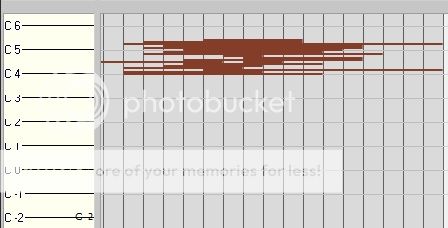
How is that useful? That only occupies like a 3rd of the vertical height of the screen. I'm not saying get rid of this, just that there should be a similar lack of restriction on the vertical zoom *in* limit.
3/
As above, vertical zoom limitation in track view Automation Lanes is also still way too restrictive. Why? It makes it really fiddly if not impossible to make fine automation adjustments. Please remove this limitation. The software can already smoothly scale the height of the automation pane, so why the restriction? Just change the limit variable already.
4/
Still unable to apply a custom name to an Automation Lane. Please implement this as for Take Lanes. If you have a large number of esoterically named automation lanes, it can be next to impossible to find the one you're looking for.
Something like this:
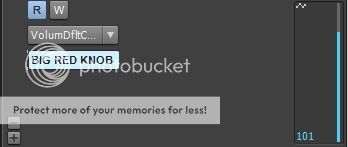
Pretty trivial but very useful workflow change.
5/
Grid lines in track view still make no sense and are useless as guides. If the zoom level permits, make the track view grid lines follow the snap grid settings. Also, grid lines in the piano roll should also follow the snap grid settings. This *sometimes* happens, but the way that the main snap setting and the piano roll's 'independent' snap setting work together is broken. Try playing around a bit with them to see what I mean.
For instance, in piano roll, turn off the independent snap setting. Change the main one and you'll see the grid follow it. All well and good thus far. Now chose a triplet setting. Now the grid does not follow the main setting. Why the difference in behaviour? Now re-enable the independent snap setting. Set it to the same triplet value (e.g. 8th triplets). The grid still does not update. Now change the main snap setting to some other triplet setting, e.g. 1/4 note triplets. Only now does the grid update and show the 8th note triplets.
Basically, you need to need be updating the grid state machine whenever there's a change of state in either the main or local snap settings, and that includes enable/disable.
More to follow...probably...