• SONAR
  • Help with the X3 plugin browser please
2013/09/28 19:23:19
ston
"The plugin browser has been updated to make sorting and finding plugins easier.
Plugins can be grouped into folders by type – VST3, VST2, DX" 
 
How is this done?  How do I make the plugin browser list all my plugins, not just those defined in the 'X3 Producer Effects' selection? 
 
The X3 help page says this: "Default All Plug-ins. The default layout, which lists all plug-ins by format (Built In, VST3, VST2, and DirectX)." 
 
This does not work.  'Default All Plug-ins' does not show all plugins, its display doesn't change from what was shown before; if the MIDI effects were shown before, and you switch back to Audio Effects, the MIDI effects are still shown and the only things that are added are the 'FX Chain' folder and the External Insert icon (?!)  Why are MIDI effects still being shown?
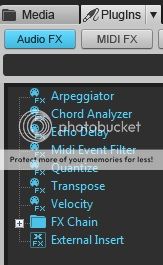


If Audio Effects:X3 Producer Effects was selected and you switch to Default All Plug-ins, then the display doesn't change other than a couple of 'FX Chain' and 'External Insert' icons being added to the end of the list.  This can go on indefinitely, like this:
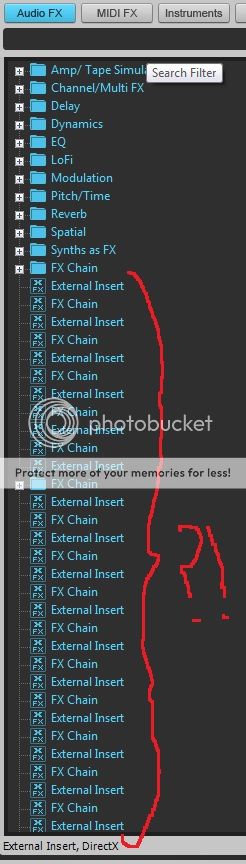


X2 behaves correctly when you select 'Default All Plug-ins'.  Well, it used to; now that its plugin manager and browser has been replaced with X3's, X2 no longer shows all plugins on my system. 
 
Note: X3 is perfectly aware of all my plugins, I can right-click in an FX bin and navigate my VST hierarchy to select the effect I want. 
 
If anybody can help with this, I'd really appreciate it.    
2013/09/28 19:41:33
ston
Ah, this article seems to have sorted most of the above out:
 
http://www.cakewalk.com/Support/kb/reader.aspx/2007013315
 
Hopefully this will help somebody else.  (The behaviour is still rather odd if you haven't both reset and rescanned the plugins though, even though I'd rescanned a few times before that).
2013/09/28 20:00:29
robert_e_bone
That looks a bit fishy on my system, as well.
 
I normally just have the browser pointed to Synth, and right-click in FX Bins when inserting effects.
 
I too do not see the Built In category, and it certainly does not display all plugins.
 
What happens if you create such a category in the Plugin Manager?  Will that get you what you want?
 
Bob Bone
 
2013/09/29 03:39:35
ston
Bob, did you do the VST reset and then re-scan?
2013/09/29 09:28:33
gswitz
This helped me. Thanks!!
2013/09/29 12:13:00
robert_e_bone
All better.
 
Bob Bone
2013/09/29 17:03:15
jbraner
Sorry to appear dim - but is that KB article saying to do a full vst scan after you upgrade to X3 or before?
2013/09/29 18:34:17
JonD
"Reset and rescan plugins after X3 upgrade" should be a sticky -- or in bold letters at the top of the front page. 
 
It's turning out to be THE FIX on a number of issues with the upgrade.
2013/09/29 18:49:44
Noel Borthwick [Cakewalk]
Hmm I dont believe Ive seen this one. Please let us know if aby of these problems persists after the reset and rescan.
2013/10/01 07:44:35
ston
On a related note, why do I see quite the different tree of effects hierarchy when right-clicking in an FX Chain area as opposed to an FX bin in a track or channel, or even in the browser?
 
Have they always been different perhaps?  I'm a bit of an FX Chain n00b.  I actually quite like the way the FX Chain effects tree looks tbh.
12
© 2026 APG vNext Commercial Version 5.1

Use My Existing Forum Account

Use My Social Media Account