• SONAR
  • How do I add MIDI Plugins? (p.2)
2011/07/07 23:35:42
Chappel
The videos on its page show it being used by Ableton. There is an e-mail address for support there. Might be a good idea to send him a message and ask him how it works, if it does, with Cakewalk software.
2011/07/08 00:19:05
RobertB
Copy that. I downloaded it as well, following Chappel's cue.
It is a VSTi, but it goes between the MIDI source, and the actual synth.
It is not capable of producing sound itself.
Here's what I did:
Extract Kirnu to Shared VST's.
Run scan.
Insert synth of choice in SHS6XL. You will need MIDI Source Track, First Synth Output, and Synth Properties Page.
Insert Kirnu from synth/ VST list.
Very Important! Make sure MIDI Output is selected when you insert Kirnu.
You will also want MIDI Source Track,  First Synth Audio Output, and Synth Properties Page. 
Routing should be as follows:
 Kirnu MIDI Source track:
Input: Appropriate source and channel
Output: Kirnu (channel does not seen to be relevant)
Kirnu Synth track:
Input: Kirnu
Output: Not relevant. You can select "None" here.  I'm not sure how the synth track fits in, but it doesn't seem to work without it.
Set the Input of your MIDI track associated with your actual synth to Kirnu. Here, the channel is relevant, so make sure the channel matches the Output channel in the Kirnu GUI.
In SHS6, it should look something like this:
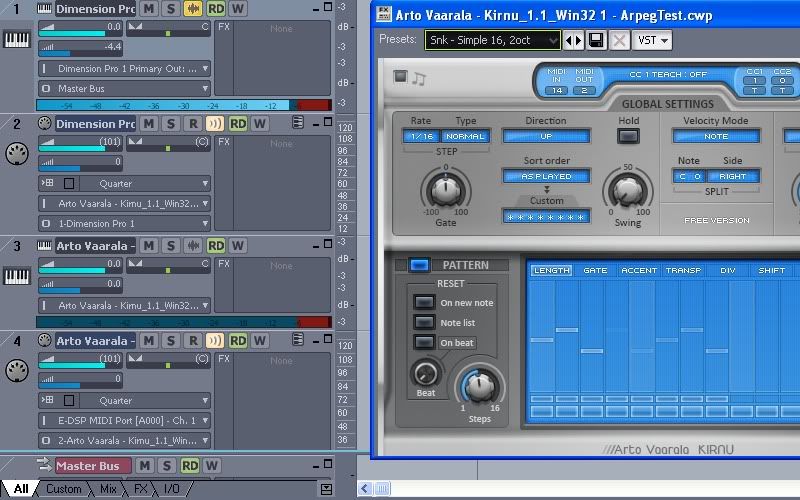
Note: I am triggering this with a controller, and Input Echo must be turned on for both Kirnu and the actual synth (in this case DimPro) to hear sound. You''ll need to experiment with the various controls in the Kirnu GUI. It seems most effective with patches that have short attack and duration.

Sorry about the inaccuracy of my initial post. That's what I get for trying it late at night after a 15 hour day

Hope that helps. It's kind of cool, once you figure it out.


2011/07/08 00:48:58
Chappel
I tried something almost exactly like that. But you know the old saying, "almost only counts in horseshoes and hand grenades".
2011/07/11 00:12:47
tradivoro
Hey Robert B, thanks very much for that detailed description, it helped to install another plugin that was also a midi pulugin but would not install in the midi plugin directory.   I got it to work following  your instructions and yes, midi echo is important and selecting midi output in the plugin is important.  The plugin I used was midilegato from xoxos.
2011/07/11 08:44:38
Jonbouy
Robert is on it here.

To run a Sonar MFX type plug-in it has to be registered on the system the plug-ins installer will take care of that, it will then show up in the midi tracks fx bin. (For example Franks' Midi Plugins are bona fide MFX plugins).

A VST type plug in is different animal it has to be in your normal VST scan path and it has to be routed as Robert describes.
2017/12/11 21:39:35
oeai
well, the problem still persists and i'd wanted to solve it, so i found that franks plugins adding well
and checked registry for few strings and found, changed for BlueARP and at least now it appears in list of mfx and can be added in custom midi plugin list, so i can add it in midi fx channel, but got error loading plugin itself
 
Error :"missing plug-in stand-in"


to add it you need to generate guid by yourself and write these into registry
 
[HKEY_LOCAL_MACHINE\SOFTWARE\Classes\CLSID\{6204A987-7301-4B9C-8EBE-39FAFC0A4B20}]
@="BlueARP32"
[HKEY_LOCAL_MACHINE\SOFTWARE\Classes\CLSID\{6204A987-7301-4B9C-8EBE-39FAFC0A4B20}\InprocServer32]
@="C:\\VstPlugins\\BlueARP.dll"
[HKEY_CLASSES_ROOT\CLSID\{6204A987-7301-4B9C-8EBE-39FAFC0A4B20}\InprocServer32]
@="C:\\VstPlugins\\BlueARP.dll"
[HKEY_LOCAL_MACHINE\SOFTWARE\Cakewalk Music Software\MIDI Filters\{6204A987-7301-4B9C-8EBE-39FAFC0A4B20}]
[HKEY_CURRENT_USER\Software\Cakewalk Music Software\MIDI Filters\Presets\{6204A987-7301-4B9C-8EBE-39FAFC0A4B20}]
 
so now i'm not sure what to do,
seems like i need some values in last @presets string, that i don't know or maybe something else
for example it show it like directx in the bottom of fx-plugin browser, but it should be vst
2017/12/11 22:10:10
azslow3
Unfortunately old Russian joke which describe your operation will violate this forum rules
 
As correctly mentioned before, MFX should be registered in the system before it can be used by Sonar.
But not EVERYTHING you register as a MFX will magically become MFX....
BlueARP.dll is NOT a MFX. It is a VST. In Sonar you can try to use it as VSTi, with described by RobertB routing.
2017/12/11 22:12:43
mudgel
MFX plugins come as an executable file, ie an installer which registers the files and places them in the appropriate locations.
MFX plugins are not found by doing a VST scan and you just can’t grab the files and move them where you like.

Franks MIDI plugins come in a 32 bit or 64 bit exe file.
2017/12/11 22:23:32
oeai
well maybe it's a problem of windows 10, but i also can't register it with regsvr32
maybe franks plugins also directx? but i thought it's vst too
in the end all franks plugins are .dll
 
and you know "violate rules" // they've stopped support at all and didn't fix this bug for years.
 
so what i found is that mfx is not an abbreviature of midi fx,
but a different kind of dll and vst midi fx can't work same way in Sonar  
some mfx midiplugins can be found so far, but too much outdated
2017/12/11 22:46:18
scook
Your problem has nothing to do with this 6 year old thread. BlueArp is a VST, not an MFX. It should be installed in the VST scan path. After scanning, here is how to use the plug-in:
  1. Insert Blue Arp as a Simple Instrument Track, this is one of the few cases where instrument tracks make sense to me.
  2. Insert the synth of your choice into the project , make sure this synth makes sound
  3. Set the input on the (instrument or MIDI) synth track to "Blue Arp Omni." if you do not see Blue Arp as in input option, enable MIDI output on the Blue Arp plug-in using one of the following:
    • The insert synth options dialog
    • The VST2/3 drop down in the standard header (see the "To enable VST MIDI input and output ports" section near the bottom of the page
    • Or in the synth rack where the option is available from the synth settings menu and the context menu for each synth found by right-clicking the synth in the rack.
  4. Add MIDI notes the Blue Arp track
  5. Play project
12
© 2025 APG vNext Commercial Version 5.1

Use My Existing Forum Account

Use My Social Media Account