For some reason this vanished... here it is again:
A few months back I did an enhancement for Sonar's MackieControl and passed it on to Cakewalk, but they've not done anything with it, so I thought I'd make it available to everyone here.
As it stands:
- By default, moving the faders will change the volume of the associated tracks and the select button does nothing.
- When "Select highlights track" is checked on the Mackie Control dialog, the select button works, but any change to a fader will also select the track of the fader that was moved.
What I wanted was to be able to move faders without changing the selected track, and to use the select button to change track.
Unfortunately, there's no way of stopping a Mackie controller from sending out the "select track" signal when moving a fader, but what I have done is change the way it's handled.
The enhancement now has a new "Double-click to select" option, which becomes available when "Select highlights track" is checked:
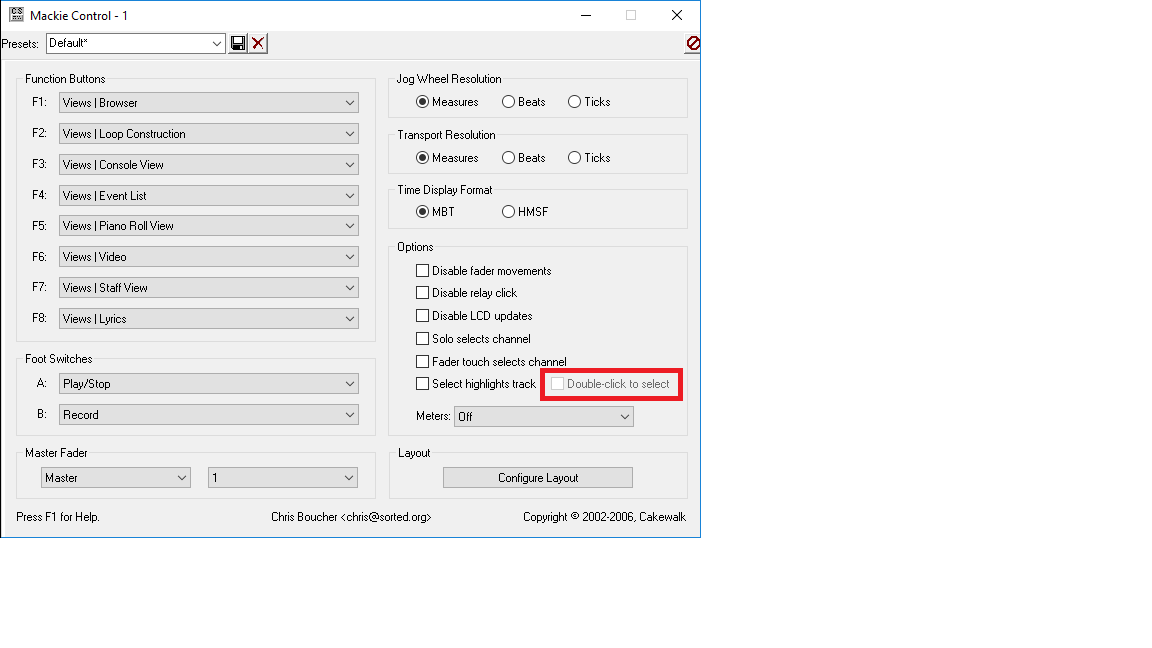
This allows you to "double-click" the select button to change selected track, whilst moving the faders leaves the selected track alone and continues to just change the volume of the tracks as normal.
If the "Double-click to select" option is left unchecked, then the behaviour returns to that of Cakewalk's shipped version.
I've tested this with both a Mackie Control Universal, and a Korg Nano Studio and both work perfectly.
You can download them from here:
32 Bit Sonar Mackie Control64 Bit Sonar Mackie Control To install:
Go to
C:\Program Files\Cakewalk\Shared Surfaces and rename
MackieControl.dll to
MackieControl.dll.oldUnzip the downloaded zip file, and copy the extracted DLL to
C:\Program Files\Cakewalk\Shared Surfaces Note that if you re-install Sonar, or do an update or rollback, then this file will revert to Cakewalk's shipped version.
Regards,
Mark.