Good idea, but SHS6 didn't have simple instrument tracks.
We can still roll with a new project, though.
Adam, for SD2 ( or any softsynth) to work in SHS6, you must have two important tracks.
The Synth Audio Output
and the MIDI Source Track.
The Synth Audio Output brings the sound from the softsynth into Sonar. It is just like an audio track that you would use to record guitar, vocals, etc.
DO NOT drag your patterns from SD2 into this track. It is an output, and the synth cannot read the MIDI data from here.
Be sure to drag the patterns to the MIDI track. It has the round icon that looks like a 5-pin DIN MIDI plug.
If you have SD2 inserted properly, it should look like this:
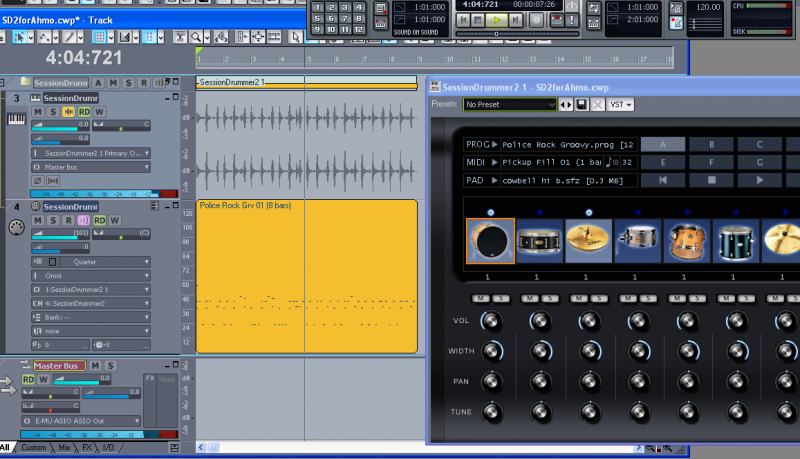
Be sure to hit the All tab(bottom left corner) so you can see all of your track options.
The most critical option is the MIDI track output. Be sure it is set to Session Drummer 2.
Channel 10 is the GM convention for drums, but it can be any channel. Here, I am using Channel 4.
Bank and Patch are not relevant with SD2.
If you have everything set up correctly, the synth will play when you hit the play button in the transport , or the spacebar.