• SONAR
  • yOU GUYS GOTTA HELP ME WITH MIDI DRUM TRACK (p.3)
2013/07/04 19:39:13
ahmo
How do I get the midi and the audio tracks into the project and connected like it looks in your screan shot?
2013/07/04 20:19:23
RobertB
Hang in there, bud. This is the key to unlocking the power of all of your soft synths.
From the tool bar, click Insert>Soft Synths>Vstplugins>Session Drummer 2.
You should be presented with this dialogue box:
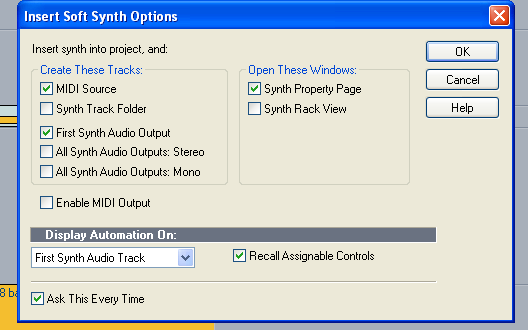
By default, you will see this.
If you have unchecked the Ask This Every Time box, you won't see the dialogue, and we will have to do something slightly different.
If you do see it, make sure you have check marks in all of the boxes shown.
I am standing by. Let me know what you see.
edit: If you are able to include a screen shot, that will really help me see what you see.
2013/07/05 00:35:52
ahmo
OK, I was at the fireworks show.  I'm going to try it now.  Are you still there?
2013/07/05 00:40:46
ahmo
OK, I've Session Drummer loaded in.  Now what?
2013/07/05 09:37:57
57Gregy
If you used the default options as in RobertB's image, you should have seen a MIDI track and the soft synth track appear in the project.
The MIDI track should already have it's output set to the synth.
Open either the Piano Roll view or Staff view and enter notes. You should hear the synth play as the notes are clicked in.
Or set the input to the MIDI track to your MIDI device and play your keyboard/controller (if you have one). You should hear the synth play.
To record what you're playing with the keyboard, click Arm in the MIDI track, then the Record button; play.
2013/07/07 18:11:20
ahmo
I DID IT!!
Thank you guys!
If you want to hear it let me know.
2013/07/07 22:45:24
RobertB
Sweet.
I love seeing that message. 
For sure, post us a link.
© 2026 APG vNext Commercial Version 5.1

Use My Existing Forum Account

Use My Social Media Account