Bansaw, you already have the SD2 drum map in place, as Greg suggested. Your screen shot shows that.
The snap to grid setting just draws your notes to the nearest increment. As you have it set in post #7, your notes will be drawn to the nearest eighth note. It does not give you "placeholders".
The sequencer you have shown just happens to have 16 slots showing.
You really have a lot of flexibility with the PRV in SHS6. You don't need placeholders, and you are not limited to the available slots in the sequencer.
The grid in the PRV gives you your reference points. You can set the grid resolution to any note value you would like to use. In post #7, you have it set to quarter notes, so your project is probably set to 4/4 time.
You can do a sequencer-like procedure in the PRV. I actually prefer doing it this way, because I have absolute control, instead of relying on the step sequencer to interpret what I mean to do.
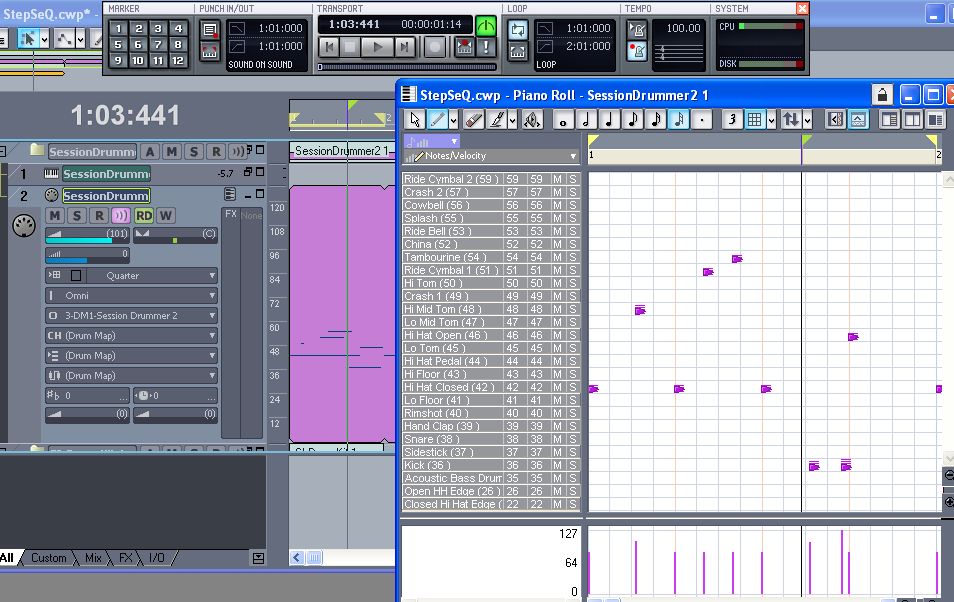
In this view, I have the Session Drummer 2 map selected as the output of my MIDI track, so the PRV shows the correct drum names.
In the track view, I have set loop points so that measure 1 loops continuously.
In the PRV, I can add, delete, or move notes as measure 1 loops. Snap to grid is set to Real Time-0.00 so that notes can be placed precisely where I want them. Snap to grid tends to even them out too much, and make it sound mechanical. I have essentially turned it off.
Once I have the pattern the way I want it, I can go to the track view, select the measure(s), and convert them to a groove clip. Instant loops.
You can put the loop points anywhere you want, so you can dial in any specific part of your MIDI track.
Play with this a bit. Once you get a feel for it, I think you'll like it.