• SONAR
  • Sonar 8 Tracks dragging and dropping out
2013/04/19 22:58:22
KreeJohnson
Cakewalk Forum
 
I'm recording a project using Sonar Producer 8.5
 
My project tracks drag,  pop and crackles on playback and eventually the CPU meter in the lower right hand corner goes into the red, the tracks freeze and I get a message "DROPOUT".
 
Does anyone have suggestions for resolving this? I've listed my PC and sound card specs below. I graciously appreciate any help.
 
My PC specs are:
Processor: Intel Core 2 Duo CPU E8400 @ 3.00GHz 3.00GHz
RAM: 4.00 GB (3.50 usable)
System Type: Windows 7 32-bit Operating System
 
My Sound Card specs:
M-Audio Fast Track Ultra
Panel: 1.0.0.7
Driver: 5.10.0.5100
Firmware 1.51
2013/04/20 06:52:19
Kalle Rantaaho
Welcome to the forum!

Your PC is very similar to mine. I can run a project of 20-35 tracks 50/50 MIDI and audio quite fluently
with many plugins, 3-5 soft synths. Processor usage hovering somewhere between 30-60%.

Are you using ASIO driver? What's your latency setting? What sample rate?

In addition to driver type, buffer/latency settings and sample rate, a key question would be what kind of plugins are you running. During tracking CPU-heavy VSTs like Ozone, Perfect Space, Linear Phase EQ can be too much for your PC.

Some details would help figuring out what the main obstacle.
2013/04/20 09:38:05
KreeJohnson
Hello Kalle

Thank you for the reply and your asistance.

I'm using ASIO driver : ASIO4ALL v2
ASIO buffer size : 512
ASIO reported latency : 544
Sample rate is set at 44.1 khz
I'm using a variety of SONAR audio effect plug-ins
V-Vocal, VX64_VocalStrip, LP64_EQ, z3ta+_fx, Cakewalk Tuner, Sonitus:fx Equalizer and Boost11

What are your recommedations for sample rate and buffer size?
I really appreciate your help.
2013/04/20 11:02:59
57Gregy
Welcome to the forum.
First, delete ASIO4All from your computer completely.
Then go to M-Audio's web site and download and install their latest true ASIO driver for the Fast Track and your operating system.
Then try again.
ASIO4All is just a band-aid for those audio interfaces which don't have real ASIO drivers available. Since M-Audio does have actual ASIO drivers for their devices, I' m pretty sure you will get better performance by using their driver.
Deleteing ASIO4All is necessary in order to run another ASIO driver.
2013/04/20 12:56:26
KreeJohnson
Thanks Greg
I deleted the ASIO4All drivers and installed the latest M-Audio Fast Track Ultra drivers.
I'm still getting the same same results on playback, the tracks drag, pop and crackle on playback.
Do you have other suggestions?
Thanks
Kree
2013/04/21 09:34:26
57Gregy
What are your settings after installing the M-Audio ASIO driver?
Do you have any other programs running while using SONAR?
Can you post a screen shot of an audio track pane and a MIDI track pane showing us your in/out selections?
 
http://forum.cakewalk.com/tm.aspx?m=2299538
 
Have you tried Freezing the tracks with soft synths in them?
Take a few minutes to read through the Help file sections on Troubleshooting and Improving Audio Performance.
 
 
2013/04/21 09:48:21
Kalle Rantaaho
You are using several cpu heavy plugins. Don't use Vocal strip or LP-64 during tracking. Add the heavy VSTs when you start mixing and you can raise latency. Always bounce the V-Vocal clips to audio when you've done the edits. My latency is set to 7-9 ms in the ASIO panel.
2013/04/21 10:35:06
KreeJohnson
Hello Kalle

I've been adding the VSTs during the mix.
I'm kinda confused about what buffer and latency are.
I thought they were the same thing with the exception that buffering applied to Audio tracks and latency applied to Midi tracks.

Thanks

Kree
2013/04/22 14:53:22
Kalle Rantaaho
I'm not at all an expert on these technicalities.
 AFAIK you can say latency and buffers are the same thing in practice. A buffer of xx size causes xx ms latency.
When you use ASIO drivers you usually are offered the ASIO panel to set the latency in milliseconds, and that affects both MIDI and audio. At least in 8.5 and earlier all the latency and buffer settings settings are in the Audio-dropdown of Options (Preferences in X-series).

As I've never needed to struggle with those I may have misunderstood/overlooked something, though.


A buffer of 512 samples is about 11 milliseconds. My ASIO panel setting is usually below 10 ms so I don't know whats so different in your system or project.

You did not answer Gregs question: What is your latency setting after installing real ASIO drivers?
The same as with ASIO4ALL?
2013/04/23 01:01:49
RobertB

Latency applies to everything you hear.
This includes your recorded audio tracks as well as the synth audio output tracks.
Don't confuse the MIDI track with the synth audio output. Both are essential, but not the same thing. If you are using simple instrument tracks, the concept is difficult to grasp, becuase you cannot see the two separately.

As for your immediate problem, you are basically asking the computer to do too much too fast.
I'm going to recap some things already mentioned by Greg and Kalle, but here goes.

The buffer size and latency are just two ways of looking at the same thing, the buffer being the front end controlling factor, and latency being the back end result.
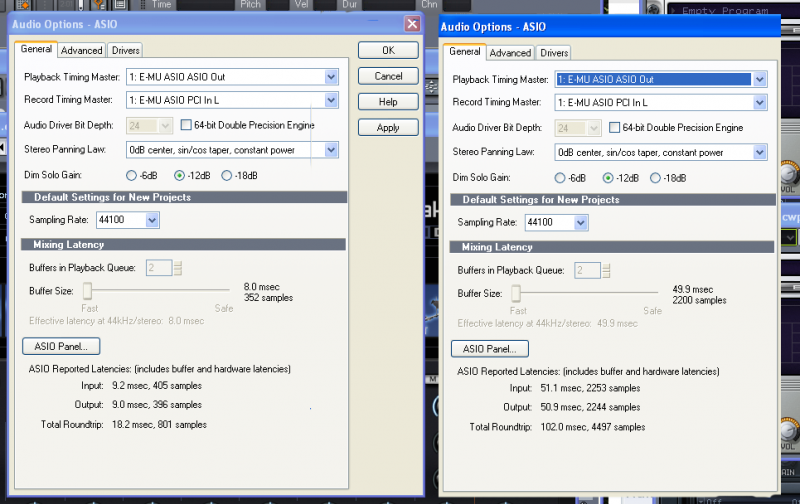
The E-MU sound cards that Kalle and I use reference latency when making adjustments in the ASIO panel. M-Audio references the buffer size. The end result is the same.

An increase in buffer size/latency reduces the CPU load.

Basically, it gives the CPU more time to process the sound data before it hands it over to the sound card to actually produce sound.
Pops and crackles are the first signs that your CPU is getting stressed.
If the CPU goes into the red, a dropout is virtually guaranteed.

I use a rule of thumb I learned early on. Track low, mix high.
Especially when recording soft synths live, low latency is crucial.
Minimize effects, and don't use heavy hitter plug-ins at all. Save those for the mixing stage.

When you are ready to start mixing, increase your latency/buffer size.
In your current project, if you significantly increase your latency, you should see a marked decrease in CPU usage, your crackles should go away, and dropouts should be eliminated.
You may also notice that the sound processing is more complete, and you have a fuller, smoother sound.

The view below shows my setting for recording on the left, and mixing on the right.
Note that there is a direct relationship between the buffer size and latency.


© 2026 APG vNext Commercial Version 5.1

Use My Existing Forum Account

Use My Social Media Account