ahmo
When I do this:
"To repeat a pattern, hover your cursor over the right edge of the pattern. It will change into a little handle. Hold and drag the pattern out for as many repetitions as you want. You can tell where the loop ends by the notches in the clip."
when I play the track back, I don't have any drum sound or just one of the 8 bar patterns
I know there's a simple way to solve this with one click of the mouse, but I just don't know how to do it.
I see the little dashes on the track but I don't get any sound.
Adam
Maybe this will help:
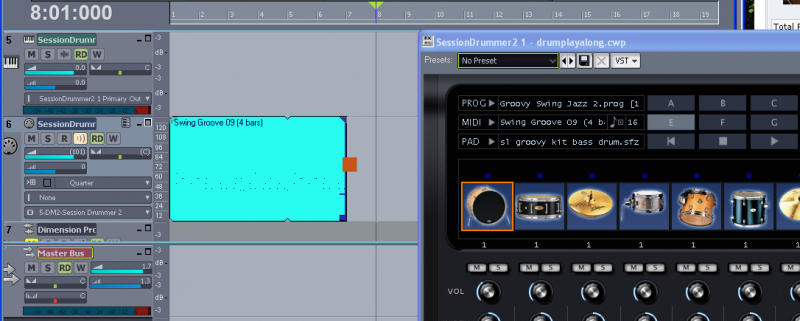
Hover your cursor where you see the red square. It will change to a rectangle. Hold the left mouse button, and drag to the right. The pattern will repeat as far as you drag it out.
Also, note that my MIDI track output is set to the SD2 Drum Map (This will make working in the Piano Roll much easier when you get there).
The MIDI source track, synth audio track, and GIU(synth properties page) were selected when I inserted SD2 from the tool bar.
I changed the MIDI track output to the drum map from the drop down options after the track was inserted.
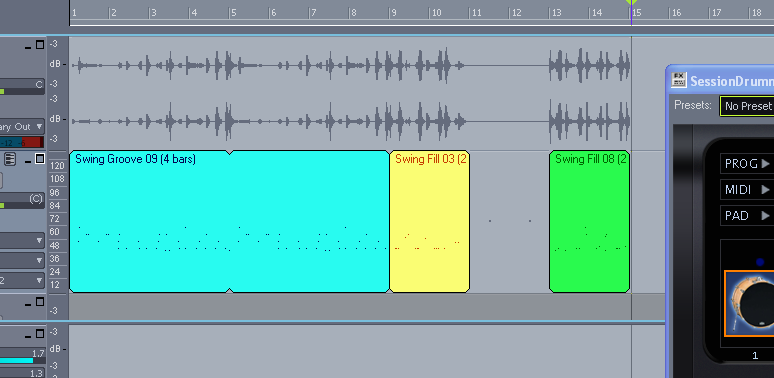
In this second view, I have dragged the initial groove out for 8 bars(two full repetitions), and dragged two different fills from the SD2 GUI.
I skipped measures 11/12 on purpose. Look at the waveform preview in the synth audio track. Since there is no MIDI data in these measures, there is no sound. In other words, there is nothing to tell the drums to play.
Hopefully, that helps answer some of your questions.